AVCHD encoder research

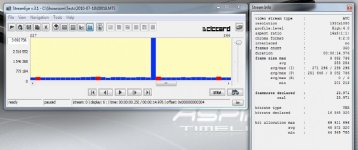
According to the attached results (I frames of about 442kB and P frames of about 60kB) it shouldn't be much higher than 17Mb/s. It's surprising. :huh:

On the other side, black test is similar to Chris's results, except that there are no rogue frames.

17mbits would be very bad if that is true. When filming the star chart or the codec chart I've posted- you usually push the codec to record at it's highest bi-rate. My start charts whether Mjpeg or AVCHD always pushed the top end mbits. So if it only recorded 17mbs with all that detail in the chart, that's bad- it should have excited the codecs VBR to rise to it's ceiling.. Now I'm assuming that your interpretation is correct though.


Pappas
 
Last edited:
Indeed, something strange is going on here... as these settings have given me bitrates of 46mbps (as described earlier in this thread). I'm backtracking my steps.
 
According to the attached results (I frames of about 442kB and P frames of about 60kB) it shouldn't be much higher than 17Mb/s. It's surprising. :huh:
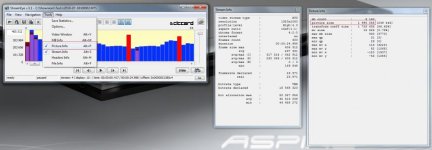
Numbers on Y axis in StreamEye are bytes, so to calculate bitrate in bits multiply that by 8. Also, size in bits is shown when additional picture tab is checked (see screenshot).
On the other side, black test is similar to Chris's results, except that there are no rogue frames.
FWIW, I have not been able to produce rogue frames in high-detail static shots anymore. I have only seen them with "real-life" footage.
 

Attachments

  • streameye frame size explained.jpg
    streameye frame size explained.jpg
    46 KB · Views: 0
Last edited:
Pappas,

In the black tests the Preset Bitrates didn't appear to have any effect on 24p. With the other tests I did using the high detailed scene the Preset Settings didn't seem to make the streams look any different, but stability was significantly affected - it was worse with the settings set to 500. If i started the capture out of focus, it didn't fail often, if I started in focus there was usually a failure very quickly (less than 1 second, usually within 1/3 of a second). As far as instant failures were concerned the Native 24p setting didn't seem to make much difference; it seemed more of an issue later in streams.

Rambooc1,

I have no idea why H and L settings affect FHD and SH modes - I just know that they do. I tried al sorts of tests to try and determine if those settings had any effect on image stream data when capturing in FHD or SH modes - and they do not. I thought that maybe there was a layered approach to the encoding where H an L settings would come into play under certain circumstances but I could find no evidence of that. The only thing I can think of is that somehow buffer allocation is being affected or some other mechanical aspect of the CODEC not affecting the final output (except that it causes failures).

Modulr,

Those are very interesting results! I'll have to try out some of your ideas in my tests. I've never quite understood what Video bitrate does because the AVCHD CODEC seems to go as low as it can (which is much lower than the Video Bitrate setting), and then as high as it can (up to the Limiting Bitrate). I haven't seen any evidence that the average is particularly close to the Video or Overall bitrates.

Chris
 
Last edited:
Svecher,

According to the EyeStream manual the bars' Y value is frame size in bytes, and that agrees with the info panels. I think the other settings show the size of certain parts of the frame data like coeffecients and vectors, etc... Frames do contain data other than picture data so I would expect picture data to always be somewhat smaller than frame data.

Chris
 
According to the EyeStream manual the bars' Y value is frame size in bytes, and that agrees with the info panels. I think the other settings show the size of certain parts of the frame data like coeffecients and vectors, etc...
Chris, you are right; those numbers are bytes. From example I listed frame size is 249,444 bytes x 8 = 1,995,552 bits. I visually picked the most average looking frame, so 1,995,552 x 24 = 47,893,248 bps (which is in the ballpark with that StreamEye is reporting in Stream Info session.

I'll amend my note, so an not to contribute to confusion.
 
While I still don't understand why my posted settings are yielding entirely different bitrate results than when originally tested... I went back thru the real life footage shot this past week, and it's in line with Svecher's observations. Static testing type shots, no rogues.. but real life, yes.
 
I should amend what I said before. I have seen that Video Bitrates approach settings when high detailed scenes are captured. I have also seen that setting Limiting Bitrate too high causes failures. Looking at data from modulr it seems that the difference between Limiting and Video Bitrates is what is creating the opportunity for rogue frames to appear.

Does this mean that the effect of having a higher Limiting Bitrate than a Video Bitrate does nothing except offer the opportunity to have big ending P frames containing garbage? I know that sounds strange, but what other inference can we draw?

There is audio data and metadata, so there is an argument for having Overall Bitrate a little higher than Video Bitrate. Maybe a good theory to test would be to try settings where Video Bitrate is X, Overall Bitrate is X+2000000, and Limiting Bitrate is equal to Overall Bitrate. Or maybe try leaving Limiting Bitrate unchecked.

I'm going to test this out with the black test and see if I can make the SH mode rogue frames go away. Obviously, if this works it won't fix H and L modes unless they are set to the same value as SH mode - which is useless. Besides, I already know that there is an interaction problem anyway. There is obviously still a rogue frame problem with progressive modes, we'll just be masking it. Eventually, hopefully, that bug is found and eliminated.

I wonder if the Limiting Bitrate is used by the card writing routine to determine how frequently to empty buffers based on flash memory burst capabilities. If so, that might degrade IQ somewhat because the CODEC can't spend as much time processing if buffers need to be emptied sooner. Or, maybe IQ will be the same but compression will be less effecient - that would be OK. Or maybe it just won't matter - which would be cool.

What happens if Limiting Bitrate is lower than Video Bitrate? Does it fail? If not that would imply that Video Bitrate controls the maximum average bitrate for detailed scenes and that Limiting Bitrate controls how much data can be buffered before a memory card write. That would mean that Limiting Bitrate controls how often flash memory is written - not a maximum stream bitrate. Does anybody have any data that tested this out (modulr - hint... hint... nudge... nudge...)?

Chris
 
Last edited:
What happens if Limiting Bitrate is lower than Video Bitrate? Does it fail? If not that would imply that Video Bitrate controls the maximum average bitrate for detailed scenes and that Limiting Bitrate controls how much data can be buffered before a memory card write. That would mean that Limiting Bitrate controls how often flash memory is written - not a maximum stream bitrate. Does anybody have any data that tested this out (modulr - hint... hint... nudge... nudge...)?

Hehe.. Video bitrates > Limiting bitrate lock up the camera. It won't even begin to record... (tho I was testing more extreme numbers at that point in time). Might be worth a revist.
 
Nah, I tested Limiting < Video and it always crashes. I guess that theory was crap.

One interesting thing though - leaving Overall Bitrate unchecked even with Video Bitrate set to 50000000 didn't. So what does Overall Bitrate do? Either it doesn't do what we think or the Panasonic firmware is so devoid of error checking that it just lets the buffer overrun.

Oh well... Back to the drawing board. Sorry to have wasted your time.

Chris
 
One would think that using a parameter driven codec would have buffers allocated according to those parameters. Do you suppose Panasonic may have allocated buffers statically and they don't change when parameters are changed? That would explain some of the random stuff we are seeing. Come to think of it, how would they do that without re-compiling unless buffers are allocated at runtime?

Chris
 
It's quite common to use dynamic memory allocation. In C you usually use malloc (); and free ();
Yes but dynamic memory allocation is much much slower than static memory allocation. With such limited computational resources as are available on the GH1, I would be very surprised if the programmers used malloc() unless they absolutely had to. They might use calloc() for dynamic memory allocation on the stack but again I would be surprised since calloc() is slower than static memory and its hard to see that they wouldn't know the size of all their buffers in advance. So I agree with cbrandin, with high probability all the buffers are allocated at compile time.
 
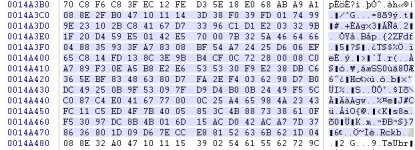
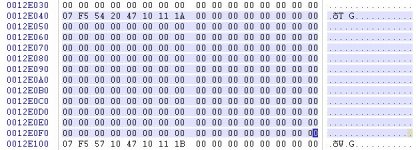
A little more information about rogue frames... I tore apart streams with rogue frames (both 24p FHD and SH files) to see if I could identify what is in the rogue frames. They appear to contain some valid image data - about the same amount as normal P frames - plus hundreds of packets of null data.

Stream data basically consists of fairly small packets of data (most are 192 bytes long). These packets start with headers that contain sequence counters, packet type, etc.... This non-image metadata is 8 bytes long - the rest of the packet is actual image data (or audio, but not in this case). The first image I have attached is what a normal packet of image data should look like (the highlighted part is one packet). The second image is what one of these "rogue" packets looks like. As you can see, aside from the header data they are empty. Rogue frames contain hundreds of these null packets and they don't appear anywhere else.

Not sure if this is useful to anybody, but I thought it was interesting.

Chris
 

Attachments

  • Normal P Block.jpg
    Normal P Block.jpg
    70.8 KB · Views: 0
  • Roguel P Block.jpg
    Roguel P Block.jpg
    70 KB · Views: 0
After endless firmware reflashes, it seemed to me that AVCHD clearly begins choking at roughly 53mpbs or so. I began to think about the logic of using overall and limiting bitrates that could exceed 53mbps.. and of what use could higher values really be? So I opted to set FHD/SH, overall, and limiting to the same value. I could be mistaken in this approach, but liken the idea of it being a brick wall of sorts where no value exceeds the AVCHD processing limits of the camera.

So far, I have not noticed rogue p frames.

Would be interesting if anyone else could confirm, as I've had zero issues shooting 24PN over the past week.
Unfortunately, I cannot confirm. Shooting the Death Chart with the following settings:
Code:
[Information]
Comment=modulr's ALL 50Mbit and graduated H/L settings
SD_Card=Sandisk Extreme Class 10
Camera=GH1 v1.32
[Settings]
Prevent version compare=Checked
Native 24p/25p=Checked
Video Bitrate FHD/SH=50000000
Video Bitrate H=40000000
Video Bitrate L=32000000
Overall Bitrate=50000000
Limiting Bitrate=50000000
Preset bitrate=500
Preset bitrate 2=500
I produced a rogue frame on the first try (see screenshot). It was quite a large one too - 3MB is 24 Mbit -- full second bitrate allotment under standard spec consumed in only 1/24th!

Rogue frames or not, Preset Bitrate patches seem to have increased the stability of 24p/25p patch remarkably. We used to think that rogue frames were the cause of freezing, but I'm not so sure anymore.
 

Attachments

  • 00018 modulr setting 3MB rogue.jpg
    00018 modulr setting 3MB rogue.jpg
    58.4 KB · Views: 0
What is the difference between both quotes?!?
There is none. Video bitrate setting higher than Limiting bitrate will cause instability.

Was it shot hand-held or by using a tripod?
I always shoot Star chart on a tripod unless otherwise noted. I'm not sure this test can be classified as completely static, as scanning lines appear to add some "motion" to the frame.
 
I always shoot Star chart on a tripod unless otherwise noted. I'm not sure this test can be classified as completely static, as scanning lines appear to add some "motion" to the frame.

And it survived with Native 24p/25p settings? Very good, indeed! I'll have to try with SanDisk Extreme 30MB version. However, it would be much more helpful if we would clearly understand what bitrate numbers in PTools really mean and what are inner camera speed restrictions.
 
However, it would be much more helpful if we would clearly understand what bitrate numbers in PTools really mean and what are inner camera speed restrictions.
"You just ask the impossible." (c)

Clear understanding will come from either internal Panasonic specifications/documentation/software (still waiting for volunteers to try that route) or by attempting to establish and analyse patterns produced by repeated shots in the dark (no pun intended) with what really amounts to as a tweak here and there.
 
Back
Top