AVCHD encoder research

Hi Vitaliy,
I posted two days ago a question:

To TEster13:

Is it possible to have two different settings for FHD and SH?

Because as I understand we have SH: 17Mbps, H: 13Mbps, L: 9Mbps all 720 60p

It seems that settings for AVCHD in Ptool do not affecting H and L.

I did quick a test with H and I got 12Mbps with hidetail scene. I used C settings...
My Idea was that we can use C settings for FHD and SH( in low detailed scenes) and for H we could use other settings to get 30Mbps stable ( for hidetail)....
THx
 
Hi, I've been testing the AVCHD setting on the GF1 and in great detail scene I can get more than 40mbit/s. that is good.
However the compression is of the codec in detail shadows is really bad (really muddy and low bitrate). I do not now if it is happening too with the GH1 or if it is the algorithm of the GF1, would be nice to have both to compare but I don't.

here is an example of what I am talking about: http://dl.dropbox.com/u/199525/00019.MTS
The problem I see is that at certain point of exposure the bitrate drops massively.
Is it possible to put a limiter so that the bitrate doesn't go under 12mbit/s or something.

PS: I don't know if I can post here, you can move it or erase it.
 
As for limiter - of course it is not possible.
AVCHD I frame compression works like JPEG. So, it is kind of dumb. It have similar to jpeg Q tables things and they describe how DCT results will be processed.
If you have simple or dark scene it'll result in dropped bitrate as DCT coefficients are much simpler and after same processing can be compressed much better.
Best thing I can think of is to have something like I/P ration setting to set ration between I frame and P frame sizes in whole GOP.
We'lls see if it is possible.
 
Testing 3.37d:

It works as expected...

Video bitrate adjustment FHD/SH 50000000
Video bitrate adjustment H 38000000
Video bitrate adjustment L 30000000
Overall bitrate adjustment 52000000
Limiting bitrate adjustment 60000000

FHD- 37 Mbps--- No Mud, No problems with heavy pans, No problem with zooming with Kit lens, No problem on tripod

SH-- 38 Mbps - stops recording after 10 sec on heavy pans

H -- 32 Mbps - No MUD, No problem with pans ( 1 min 15 sec), Stops recoding after 12 sec with zooms

L -- 28 Mbps- I can see a MUD ( but no as before) , No problems with pans and zooms

At LOW LEVEL seme as before....

I've tried also:

Video bitrate adjustment L 34000000--- No MUD, No problems with pans (1min 20 sec), Stops recoding on Zooms after 20 sec
 
Here is a summary of some tests I did last night with PTool 3.37d.
Lens 7 mm, at F4.
Shutter Speed 1/50 s
ISO: 800
Card: Sandisk Extreme 30MB/s

1) Check Off:
* Version Compare patch
* Video Bitrate Adjustment FHD/SH Simplified -> 60000000
* Overall Bitrate Adjustment -> 62000000
* Limiting Bitrate Adjustment -> 70000000
Producing nice clean footage in a wrapper. Looks good at low level too (see attachment).

2) Add the following to 1):
* Native 24p/25p patch
As soon as I hit record button camera becomes unresponsive, but live view is still operating.

3) Add the following to 1)
1080p25 GOP Size -> 15
Same result.

When bitrates are lowered to P-Tool "C" settings camera records with native patch successfully.
 

Attachments

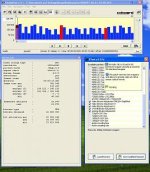
  • 60,62,70 60i streameye.jpg
    60,62,70 60i streameye.jpg
    20.4 KB · Views: 0
Last edited:
1) Check Off:
* Version Compare patch
* Video Bitrate Adjustment FHD/SH Simplified -> 60000000
* Overall Bitrate Adjustment -> 62000000
* Limiting Bitrate Adjustment -> 70000000

Producing nice clean footage in a wrapper. Looks good at low level too (see attachment).

2) Add the following to 1):
* Native 24p/25p patch
As soon as I hit record button camera becomes unresponsive, but live view is still
operating.

Hi there!
Sorry if this report sould go to other thread, so if this is the case don´t doubt in delete if!

This exact thing happened to me also (24/25p patch ticket on...), when trying to shoot in FHD mode two days ago (had to remove battery too.....), but with the same settings was able to record in SH mode without any problems...

I was using a Sandisk Ultra 16GB Class 4 with 15MB/s of writting speed.
Hope this helps....
Cheers!
Asier.
 
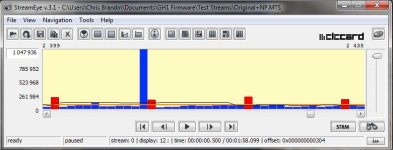
I can get the GH1 to pulse when Native 24p is selected no matter how other patches are set - it's just a matter of shooting a sufficient mixture of detailed and flat subjects.

Attached is what happens if the only patch selected is Native 24p and everything else is left alone (factory AVCHD/FHD settings except for Native 24p).

I've tried A, B, C, and a plethora of other settings with GOP lengths of 8, 12, and 15. I can always get pulses.

My conclusion is that pulsing is a product of Native 24p and that alone, although the frequency of pulses may vary.

Chris
 

Attachments

  • Native24pOnly.jpg
    Native24pOnly.jpg
    45.2 KB · Views: 0
Thanks.
This seems reasonable.
As 24p and 25p modes are completely untested by developers of actual video encoder.
So, we see spikes in last P-frame in GOP.
 
Yes, I've checked and it is always the last frame.

chris

This is long known quirk of GH1 video encoder.
Seems to be some bug or wrong parameters set used.
All GH1 encoder style breaks basic rules, as it depends on special settings for predefined modes instead of making general and scalable solution.
Plus error processing is non-existent.
 
Is much known about the CODEC code? This looks like the product of a bad conditional statement that is causing a subroutine to be called before it should be. Perhaps a combination of P and I frame subroutines being called when only one should be called. This should be patchable if the error is something like a more-than-or-equal instead of a more-than conditional. The instructions for both should be the same length.

Chris
 
No, it is just seems like proper P frame with some garbage in it.
We need better analazying tools to understand it.
And if you think that codec disassembly is similar to C code with comments you are badly wrong :)
 
I know. I do patent forensics work for a living, so I'm well aware how cryptic disassembled code is. Still... if the code location that is executed at the transition between frame types is known it might not be so hard to find the problem. If it's unknown, however, that's another thing altogether.

Chris
 
Somebody - I think it was Barry - determined that the color sampling was better in native 24p mode. Was this test done with pulldown processed wrapped video? If not, I can run some tests with wrapped video that has had the pulldown removed with NeoScene compared to native 24p video also processed with NeoScene.

Chris
 
I did test and verify that the native 24p mode uses the proper progressive color encoding system, whereas using the 60i wrapper causes it to use the interlaced 4:2:0 color system, yes.
 
I ran some tests with the "C" settings (50, 52, 60) with Native 24p not checked on a Transcend 16 GB class 10 card (this is totally reliable for me producing no pulses and no failures) and here are some results:

As I suspected higher shutter speed and lower Noise reduction both have an effect because they create more fine detail. Here are some numbers:

All clips were the same subject (bushes and flowers in a breeze - lots of detail)and ran 30 seconds producing a file size of 168-171 Megabytes.

At 1/500 and NR -2 the peak frame size was 649536
At 1/125 and NR 0 the peak frame size was 566400
At 1/50 and NR -2 the peak frame size was 515328
At 1/50 and NR 0 the peak frame size was 488832

I assume, because the average data rate was always virtually identical, that these numbers mean that the increased peak frame sizes is at the expense of detail in other frames. Obviously it would be foolish to sharpen in camera (I assume that would raise the peak frame size too) because that's better done in post anyway. There is a case for letting the camera do noise reduction - which is somewhat contrary to current thinking.

Chris
 
Vitaliy,

You may want to have a look at this thread (starting half way down the page): http://www.dvxuser.com/V6/showthread.php?t=213908&page=19


Someone has managed to get two I frames in a row in AVCHD mode:

RogueIframe.jpg


Chris
 
Note that it really is two I frames in a row, and not a bad display of the stream, there are 11 P frames on either side of the two I frames. The GOP is apparently set to 12.

Chris
 
Back
Top