AVCHD encoder research

Are you saying that if I check Native 24p I might get results that are in some cases the opposite of what I am seeing? That's very interesting - I'll have to try that out. Actually, I may have misunderstood, or put the answer to the question badly. My tests were with Native 24p NOT checked.

Chris
 
Are you saying that if I check Native 24p I might get results that are in some cases the opposite of what I am seeing? That's very interesting - I'll have to try that out. Actually, I may have misunderstood, or put the answer to the question badly. My tests were with Native 24p NOT checked.
Yes, exactly. I just tested your B set settings + 24p/25p patch and got two card speed errors with one of them resulting in empty file (but no crash) out of 10 test shots of full frame Death chart. I then added H/L bitrate settings (50M/40M) and haven't gotten any errors in FHD mode.

720P modes are a different matter. I get card speed errors after 5-10 seconds of shooting footage in SH mode (50M). Switching to H mode (40M) resolved the problem.
 
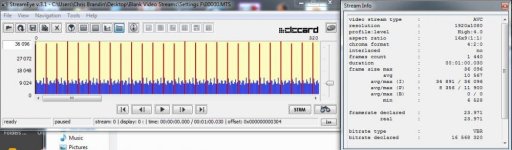
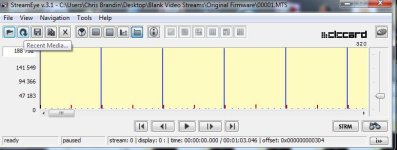
Actually the 720p mode is not 2 I frames followed by 28 P frames, it's 1 I frame followed by 29 P frames - at least according to StreamEye.

Chris

Oops! I got the wrapped 1080 mode mixed up with the 720p mode - sorry.
 
No Detail AVCHD Tests

No Detail AVCHD Tests

I ran some tests using the same configurations as before (they are shown again below). This time I wanted to see what happens when there is no scene detail - so I ran the tests with the body cap on. The results are interesting, to say the least.

Here are the settings:

[Information]
Comment=Settings A
SD_Card=Transcend Class 10
Camera=GH1 v1.32
[Settings]
Prevent version compare=Checked
Video Bitrate FHD/SH=50000000
Overall Bitrate=52000000
Limiting Bitrate=60000000

[Information]
Comment=Settings B
SD_Card=Transcend Class 10
Camera=GH1 v1.32
[Settings]
Prevent version compare=Checked
Video Bitrate FHD/SH=50000000
Overall Bitrate=52000000
Limiting Bitrate=60000000
Preset bitrate=500
Preset bitrate 2=500

[Information]
Comment=Settings C
SD_Card=Transcend Class 10
Camera=GH1 v1.32
[Settings]
Prevent version compare=Checked
Video Bitrate FHD/SH=50000000
Video Bitrate H=32000000
Video Bitrate L=22000000
Overall Bitrate=52000000
Limiting Bitrate=60000000

[Information]
Comment=Settings D
SD_Card=Transcend Class 10
Camera=GH1 v1.32
[Settings]
Prevent version compare=Checked
Video Bitrate FHD/SH=50000000
Video Bitrate H=32000000
Video Bitrate L=22000000
Overall Bitrate=52000000
Limiting Bitrate=60000000
Preset bitrate=500
Preset bitrate 2=500

Basically, these are all the suggested "C" settings. The differences are that A only has the basic settings set, B has the preset bitrates set to 500 added, C has H and L set to 32 and 22 respectively, and D has those set as well as the preset bitrates set to 500. Each configuration was tested in all modes for 1 minute each. The numbers in the table below indicate the resulting file sizes. If a failure occurred the number of seconds captured are indicated as well.

Here are the results:

...........A............B............C............ D
FHD...21..........16..........17...........16
SH.....15..........15..........15...........15
H.......15..........15..........15...........15
L........15..........15..........15...........15

Things to note:

Native 24p NOT checked.

There were no failures.

SH, H, and L settings produced identical results in each mode, except for one detail which I will show below.

H & L settings made no difference, so A results were the same as C and B results were the same as D.

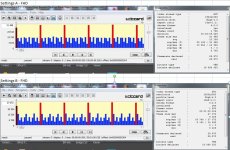
I have attached two images. "FHD Compare" shows FHD mode comparing Preset Bitrates unchecked (Settings A) with both Preset Bitrates set to 500 (Settings B). There appears to be no significant difference except the pattern on the P frames.

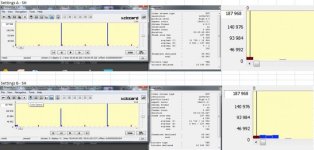
"SH Compare" is similar to "FHD Compare" except it shows SH mode and a detail showing the first few frames. There are two interesting things about these captures:

When Preset bitrates are set to 500 the first few I frames contain more data than when Preset Bitrates are unchecked. This pattern was utterly consistent in all tests and across SH, H, and L modes.

Every second GOP has a big spike in the last I frame. This was also utterly consistent.

Chris
 

Attachments

  • FHD Compare.jpg
    FHD Compare.jpg
    94.3 KB · Views: 0
  • SH Compare.jpg
    SH Compare.jpg
    62.3 KB · Views: 0
Three more "dark" no data tests. The first test uses Settings F, which only have Native 24p checked and the Limiting Bitrate set to 60M. The second test (Settings H) is similar except the Video and Overall bitrates are set as well.

The following settings were used:

[Information]
Comment=Settings F
SD_Card=Transcend Class 10
Camera=GH1 v1.32
[Settings]
Prevent version compare=Checked
Native 24p/25p=Checked
Limiting Bitrate=60000000

[Information]
Comment=Settings H
SD_Card=Transcend Class 10
Camera=GH1 v1.32
[Settings]
Prevent version compare=Checked
Native 24p/25p=Checked
Video Bitrate FHD/SH=50000000
Overall Bitrate=52000000
Limiting Bitrate=60000000

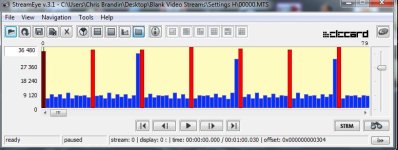
The results for FHD mode are attached below. Note that the rogue frames only appear if Video and Overall Bitrates are set in addition to the Limiting Bitrate. Limiting Bitrate alone does not cause rogue frames. Also, the rogue frames are smaller than they are in detailed scene tests - but they are there nevertheless.

The last test uses the Panasonic factory firmware. The third capture below shows that the spikes for SH mode occur even with factory firmware.

Conclusions? Well, I'm not sure what to make of all this yet but I think I know this much: Rogue frames are a bug in the factory firmware and they appear with progressive footage - whether it's the factory 720p or the "hacked" 1080p. The strange thing is that 720p always shows it, but hacked 1080p requires that the Video Bitrates are set to higher values.

Chris
 

Attachments

  • F-FHD.jpg
    F-FHD.jpg
    54.6 KB · Views: 0
  • H-FHD.jpg
    H-FHD.jpg
    49 KB · Views: 0
  • Factory SH.jpg
    Factory SH.jpg
    41.9 KB · Views: 0
Last edited:
Where the rogue frames come from.

Where the rogue frames come from.

I think I know what is causing the rogue frames! The Panasocic firmware has two routines that do the final stream processing prior to writing to flash. One processes true progressive modes (i.e. SH, H, and L modes) and it has a bug that can produce a rogue frame at every second GOP. The second processes the "wrapped" 1080 mode (i.e. FHD mode) and does not have this bug. Fix the 720p mode output routine and I'll bet the rogue frame problem with Native 24p/25p goes away.

Still, one mystery remains: Why does the Native 24p/25p mode only manifest this problem when Video Bitrates are increased while 720p modes show it all the time?

Chris
 
"Dark" tests conclusions.

"Dark" tests conclusions.

Having given all this "dark" test data some thought I think I can come to the following conclusions:

1) The reason that AVCHD FHD "wrapped" mode is more stable than all others (Native 24p/25p, SH, H, and L) is that all these other modes are failing for the same reason - a bug in the final progressive mode output routine in the Panasonic firmware that produces rogue frames.

2) The Preset Bitrate settings affect how the CODEC starts up and have little effect once a clip progresses past the first few frames. It's probably better to leave these values low to increase stability. This might also explain why things go better when you start out of focus. If these are set to high values the camera fails immediately if you start the capture in focus, but no failure occurs if you start out of focus.

3) SH, H, and L modes all produce rogue frames with Panasonic factory firmware.

4) Wrapped FHD mode never produces rogue frames.

5) The Panasonic AVCHD CODEC does the "variable" processing quite well. When there was no image to process all SH, H, and L modes produced almost exactly the same file sizes no matter how bitrates were set and which mode was selected.

Chris
 
Fantastic work Chris and confirms my gut feeling was right moving back to Wrapped settings for 1080.

Funny i never noticed the rogue frames in original FW, but then i wasn't particularly looking for them.
 
Congratulations on your research, Chris. I asked myself why nobody approached to the problem systematically.

Still, one mystery remains: Why does the Native 24p/25p mode only manifest this problem when Video Bitrates are increased while 720p modes show it all the time?

As far as I understood from your posts, 24p/25p mode does not produce rogue frames when bitrates are low? What did you mean by low? Low-complex picture and/or lower bitrate settings? Have you found a limit when rogue frames appear?
 
Thanks!

These tests were made with no lens - just the body cap on, so there was no image detail whatsoever. My theory was to isolate CODEC artifacts unobscured by image data.

By "low" bitrates I mean the Video Bitrates and the Overall Bitrate unchecked (factory defaults). It didn't matter how the Limiting Bitrate was set.

Good question about when the rogue frames appear, I'll have to test that. I wonder if they appear suddenly or gradually. Hmmmm....

Chris
 
Good question about when the rogue frames appear, I'll have to test that. I wonder if they appear suddenly or gradually.

Yes, it would be interesting to see. I suppose that you'll probably do it in "controlled environment". If my "failing chart" can help you, it's attached. The positive property of the chart is that it has repeatable pattern. So, at first you can apply higher zooms in order to reduce the acquired data. Later on wider shots can be applied.
 

Attachments

Thanks for the chart.

What I want to test now is when rogue frames appear with no image data. In other words, when they start to appear just based on bitrate settings. I've noticed that rogue frame size can vary according to image data, but whether they appear at all seems to depend on the CODEC irrespective of image data.

Actually, this testing is something anybody can do - just take off the lens and put on the body cap (make sure to set the "without lens" option). This is an easily controlled environment - all black.

Chris
 
I've noticed that rogue frame size can vary according to image data, but whether they appear at all seems to depend on the CODEC irrespective of image data.

You are absolutely right.

Actually, this testing is something anybody can do - just take off the lens and put on the body cap (make sure to set the "without lens" option). This is an easily controlled environment - all black.

The only problem I see is that it is limited-time research per person (I mean 30-days limiting evaluation period). If everybody starts using the software at the same time, we might be in a trouble in one-month time. :embarasse
 
2) The Preset Bitrate settings affect how the CODEC starts up and have little effect once a clip progresses past the first few frames. It's probably better to leave these values low to increase stability. This might also explain why things go better when you start out of focus. If these are set to high values the camera fails immediately if you start the capture in focus, but no failure occurs if you start out of focus.


Chris

Great testing Chris- Do the patches help 24PN at all- Either 1 & 2 0r both ticked?

Pappas
 
Here are the StreamEye captures. There are several interesting conclusions to be drawn - especially since the results were repeatable. Note, for example, that FHD mode always failed after 1.5 seconds in the C and D tests. The only difference between C and D tests versus A and B tests is that the H and L values were set in the C and D tests.

Chris

Chris sorry to back up a bit to this post, but how do you think H and L is affecting FHD? It is the only one with the wrapper when Native is unticked.

If it is affecting stability and we don't really have a need for H and L then maybe should leave them stock and just change FHD/SH settings.

Ditto on Pappas question above as well.
 
Last edited:
Interesting finds.

I have been exploring the AVCHD 24PN a bit, and I question the need for exceedingly higher overall and limiting bitrate settings. For the past week, I've been using the following settings (w/ Sandisk 8GB Extreme Class 10).

NATIVE 24P = CHECKED
FHD/SH = 50000000
H = 36000000
L = 26000000
OVERALL = 50000000
LIMITING = 50000000
PRESET BITRATE1 = 500
PRESET BITRATE2 = 500

After endless firmware reflashes, it seemed to me that AVCHD clearly begins choking at roughly 53mpbs or so. I began to think about the logic of using overall and limiting bitrates that could exceed 53mbps.. and of what use could higher values really be? So I opted to set FHD/SH, overall, and limiting to the same value. I could be mistaken in this approach, but liken the idea of it being a brick wall of sorts where no value exceeds the AVCHD processing limits of the camera.

So far, I have not noticed rogue p frames.

Black test (FHD/24PN)...
modulr_24PN_black.png


Star chart (FHD/24PN)...
modulr_24PN_star.png


Would be interesting if anyone else could confirm, as I've had zero issues shooting 24PN over the past week.
 
Last edited:
Very interesting guys

Very interesting guys

Yesterday I went for really high bits and was actually missing frames, this was 60,62,70. Going to give these a try today, nice and clean at low level.
 
Interesting finds.

I have been exploring the AVCHD 24PN a bit, and I question the need for exceedingly higher overall and limiting bitrate settings. For the past week, I've been using the following settings (w/ Sandisk 8GB Extreme Class 10).

NATIVE 24P = CHECKED
FHD/SH = 50000000
H = 36000000
L = 26000000
OVERALL = 50000000
LIMITING = 50000000
PRESET BITRATE1 = 500
PRESET BITRATE2 = 500

After endless firmware reflashes, it seemed to me that AVCHD clearly begins choking at roughly 53mpbs or so. I began to think about the logic of using overall and limiting bitrates that could exceed 53mbps.. and of what use could higher values really be? So I opted to set FHD/SH, overall, and limiting to the same value. I could be mistaken in this approach, but liken the idea of it being a brick wall of sorts where no value exceeds the AVCHD processing limits of the camera.

So far, I have not noticed rogue p frames.


Would be interesting if anyone else could confirm, as I've had zero issues shooting 24PN over the past week.

modulr,

Very interesting find- I wonder if you even need the H and L settings- So the star chart didn't give you a write error? What was the data rate on the star chart test shot?

Pappas
 
What was the data rate on the star chart test shot?

According to the attached results (I frames of about 442kB and P frames of about 60kB) it shouldn't be much higher than 17Mb/s. It's surprising. :huh:

On the other side, black test is similar to Chris's results, except that there are no rogue frames.
 
Last edited:
Back
Top