
Navigation
Install the app
How to install the app on iOS
Follow along with the video below to see how to install our site as a web app on your home screen.
Note: This feature may not be available in some browsers.
More options
You are using an out of date browser. It may not display this or other websites correctly.
You should upgrade or use an alternative browser.
You should upgrade or use an alternative browser.
AVCHD encoder research
- Thread starter Vitaliy Kiselev
- Start date
I checked - all my tests were 24p, not 25p. The one with the 13 GOP size appears to only have done that on the first GOP. I've noticed that when Native is checked, one of the issues produced is the occassional wrong GOP size (I've seen them one too long and one too short, and sometimes both).
Chris
Chris
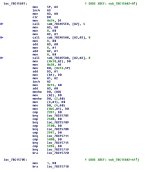
I have found a rather odd thing in the firmware. I think these screenshots are from the AVCHD decoder routine (I'm not sure, though). It appears that the decoder supports framerates and resolutions that the encoder does not (i.e. true 24 fps, 480, and 576 resolutions) . For what it's worth....
Chris
Chris
Attachments

Looking at my "dark" test files I discovered a difference between the codec when it encodes 720 vs 1080. With 720 clips it seems to enforce a threshold where if the amount of image data doesn't reach a certain level it simply doesn't encode it and produces emply frames (the big P frames are full of nulls - presumably to keep the minimum data rate up). I've attached an image from Stream Parser showing all empty P frames (except for the big ones they are all 192 bytes and only contain time stamp and header data - no video). Also attached is a magnified Vector Scope display showing simply a black point dot. If I step through the clip nothing ever changes.
The 1080 clip is different - it shows data in each frame. I've also attached screen captures for that. I've also looked at histograms - the 720 clips contain absolutely no image data and the 1080 clips do. I've tried this several times with different settings and it appears to always work this way. I also looked at Native clips, and they also contain data. The data follows a pattern, so it might be some sort of dithering.
If 720 mode is enforcing a threshold, and 1080 mode isn't, it could make a difference in how images appear.
Chris
The 1080 clip is different - it shows data in each frame. I've also attached screen captures for that. I've also looked at histograms - the 720 clips contain absolutely no image data and the 1080 clips do. I've tried this several times with different settings and it appears to always work this way. I also looked at Native clips, and they also contain data. The data follows a pattern, so it might be some sort of dithering.
If 720 mode is enforcing a threshold, and 1080 mode isn't, it could make a difference in how images appear.
Chris
Attachments




Last edited:

Vitaliy Kiselev
Carbonite Member
Seems to be large P frame again. Last in GOP.
Looks like highly bogus implementation.
Looks like highly bogus implementation.
Seems to be large P frame again. Last in GOP.
Looks like highly bogus implementation.
Boy, you got that right! Plowing through this code is a nightmare. In 1080 mode, the data actually appears in every frame.
Chris
Vitaliy Kiselev
Carbonite Member
Boy, you got that right! Plowing through this code is a nightmare. In 1080 mode, the data actually appears in every frame.
Chris
Generally code is quite clear (compared to ARM or even x86).
Look at grouping of functions.
It has various plugins (search by this word).
And tables of offsets that reference to related functions.
So, decoder functions are near each other, same for ts muxer, same for video encoder.
Last edited:
Vitaliy Kiselev
Carbonite Member
Yup, I found all that. The hard thing is that it looks to be mostly table driven and back-tracing pointers to pointers, to addresses in the plug-ins and back to pointers to tables and offsets is rather time consuming.
Chris
Yep. They also like to copy memory parts in other routines (or even tasks).
So, you are looking at references to certain structures but can't find any.
Because they copy large part (including structure) to other place (or instead something to this place).
All firmware is based on tables.
But as soon as we'll start to realise how this works it is to our adventage.
In reality they frequenly use special codes (they are easy to find, as they are quite unique most of the time) to select some function from the table.
Last edited:


Stream Parser is only set up to do GH! clips. Obviously different frame type flagss are being used here so frame types are not being correctly identified. It looks like these streams also contain B frames - is that correct?
This gives me an idea. I could add a feature to stream parser where you can manually enter PID's and frame type flags.
Chris
This gives me an idea. I could add a feature to stream parser where you can manually enter PID's and frame type flags.
Chris
Last edited:
If do a new rev of Stream Parser, could you calculate two more stats in the info window: peak and average bitrate of the entire stream. I've had to estimate these by eye balling the charts.
OK, will do.
Chris
I've been researching low-light recording failures in SH 720p30 mode with my Fast Action 3-Frame GOP Patch. From what I've seen, if the illumination is low enough, the bitrate will drop below 5Mbps and the recording will terminate after about 7 seconds, leaving a zero-length file. The camera then displays a write-speed limitation error, with both slow Class 4 and fast Class 10 SD cards alike. Here's a Stream Parser screen grab of a video I saved before the 7-second limit:

My guess is that the camera builds up unused bit allocation that it can't find a use for over each one-second interval. It then writes out the surplus as a single huge P-frame which overwhelms the SD card's write-speed limits. Anyone know of a patch that may fix this problem?
My guess is that the camera builds up unused bit allocation that it can't find a use for over each one-second interval. It then writes out the surplus as a single huge P-frame which overwhelms the SD card's write-speed limits. Anyone know of a patch that may fix this problem?
Vitaliy Kiselev
Carbonite Member
No.
But this behaviour is common to GH1 encoder.
It has problem with last P frame in GOP sometimes.
Like on your picture.
But P frame size on your picture seems pretty small to cause any write problems.
But this behaviour is common to GH1 encoder.
It has problem with last P frame in GOP sometimes.
Like on your picture.
But P frame size on your picture seems pretty small to cause any write problems.
I've seen this pattern with dark tests in all modes. When you raise bitrates the big P frames get bigger. I assumed that it was just maintaining a minimum bitrate as the big P frames contain mostly nulls in my tests (you might want to check that). The bitrate looks pretty small, so I doubt the write function is being overrun. You might try upping the Overall Bitrate anyway, that speeds up the camera's ability to write. One thing I noticed about 720p mode is that there seems to be some sort of threshold condition that has to be met before it will put anything in a P frame. Oddly, 1080 mode doesn't seem to have that. I posted something about that earlier in this thread: http://www.dvxuser.com/V6/showpost.php?p=2103518&postcount=206.
Chris
Chris
Last edited:
Maybe there's another parameter in the firmware that lower bounds the encoder output bit rate. If the encoder can't satisfy that lower bound, it aborts with a "write speed error"? Not unlike the upper bound that Chris investigated.
Why would Panasonic implement such a parameter? Like Chris's upper bound, programming convenience. It's probably easier to track how much data the encoder is outputting in a window than it is to measure the instantaneous card writing speed or to track card write errors. If the encoder outputs too much data, then the firmware assumes without proof that the card can't keep up and it raises a write speed error. If the encoder outputs too little data in the window, then the firmware assumes without proof that the card writing subroutine must be getting hung up and it raises a write speed error.
Just a thought.
Why would Panasonic implement such a parameter? Like Chris's upper bound, programming convenience. It's probably easier to track how much data the encoder is outputting in a window than it is to measure the instantaneous card writing speed or to track card write errors. If the encoder outputs too much data, then the firmware assumes without proof that the card can't keep up and it raises a write speed error. If the encoder outputs too little data in the window, then the firmware assumes without proof that the card writing subroutine must be getting hung up and it raises a write speed error.
Just a thought.