Adventures in the PSE

  • Thread starter Thread starter Guest
  • Start date Start date
The EVIL codec!

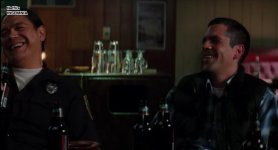
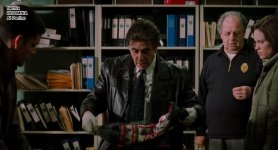
The most damaging element is the H.264 compression. Have you ever watched Insomnia on Netflix? Al Pacino has Orange skin...

...Shot on film by... masters
watched on netflix... orange skin. wtf?

The conversion to the netflix compression was probably run through a stock compression setting. That is how the H.264 compression is working on the dslr. It is the honey badger*... it doesn't care how carefully you have crafted your colors. It will apply its own interpretation of the image data and convert it to an .MOV file.

Carefully design your picture style to counteract whatever you don't like in your video footage, not just the RAW image.

There are some issues with Canon imaging too. Canon definitely has a Red emphasis in their color rendering. In every picture style Blue and Green are odd, Red clips early. Landscape is the most different, but cartoony skin tones and over saturated blue and green. Faithful makes everything look tea dyed.

Insomnia03.jpgInsomnia02.jpgInsomnia04.jpg

*honey badger reference explained:
http://www.youtube.com/watch?v=4r7wHMg5Yjg


Mobius 1080P screen shot by onesielaff, on Flickr


Mobius 720P screen shot by onesielaff, on Flickr

Look at how much color change has happened in these two compression versions of the same footage. Taken from a high end HD camera.
 
Last edited:
Human Eye

Human Eye

The Human Eye

It is said, that the human eye never takes a bad picture. Too bad such a true and profound saying doesn't go on to explain why. Maybe I will give it a go.

When we are born, we can't speak, but neither can we see. Yes, we can makes sounds and cry, as we still have a voice, and just the same we can still sense light with our eyes, but none of it has meaning. It is through experience that we learn to associate light with physical reality. As we mature we learn how to focus our eyes, and begin to make sense of shapes and patterns.


Our eyes are still the basis for almost all camera designs today: A lens focuses light onto the retina, and then the brain gives meaning to those signals. Here are some similarities and differences with the camera obscura.


1. Adaptive reasoning
Unlike an image from a camera, the image from the eye is tapped directly into our brain. In fact, parts of the eye are a literal extension of our brain! This means that the images we see are deeply intertwined with our cognitive perception at the moment. Our brains have an amazingly adaptive ability to create associations and sense of information given to it by our body. So, if you see a person standing near a window facing into the house, and a 60 watt incandescent light bulb is lighting her face. A camera would make a literal assessment of the colors and create a very Orange color on the face. However, to your eye, you wouldn't think anything strange. You would think it normal.

This is different than auto white balance, because it is not just finding a middle ground or color temperature, it is rewriting the rules based on what you subconsciously think is normal.


2. 3D vs 2D
Next time you see a nice scene, try closing one eye and see if you still think it is so great. 2D imagery requires the use of frames-within-frames, leading-lines, and light-and-shading to create a sense of depth. Without having these elements in the photo you take, it will be a flat image.

3. Perception of Scale
When you stand on a mountain and look out, you are perhaps inspired by the scene, and so snap a shot, however when you look at the picture, it doesn't feel so grand. One reason is that it is obviously now a small photograph, but the major reason, is loss of scale. Whether something is big or small, we lose that sense of scale in photographs without a familiar object for reference.


4. Green Bias vs Red Bias
The eye is more sensitive to Green, and digital cameras are sensitive to Red.

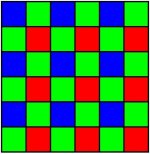
Many of you know that every DSLR uses a black and white sensor. The sensor has an RGB filter with a different color covering a different pixel on the sensor in a systematic order: Green-Red-Green on one row, and then Green-Blue-Green on the next....and so on. The imagining engine in the camera then deciphers the data and creates a color image. That is why a 21Megapixel sensor is not giving you true 21megapixel resolution.

http://en.wikipedia.org/wiki/Bayer_filter
bayer_cfa.JPG

Because a digital capture medium is more sensitive to Red light, the bayer pattern is designed to counteract the Red bias, and create a Green bias synthetically. But even then, digital cameras stiiiiiiill have a sensitivity to Red.


5. Shallow Depth of Field
Our eyes have a small focus point. Look at something. It is in focus, and everything else isn't. Although, Our eyes are constantly roaming, so having a small focus point is hardly noticed to most people. 35mm mimics this small focus point with shallow depth of field. Maybe this was a happy accident.


6. Translation of Dynamic Range and Contrast
We can see the details of a white flower at high noon, and find our way around a campsite on a moonless night. That's awesome. A camera can do the same, and even better with super slow and fast shutter speeds. What the camera struggles with is seeing both light and dark sources at the same time.

Even our eyes are limited to the range of light we can see at the same time. Ever struggle to see the road with the Sun in your eyes? Not only is the Sun so bright, it prevents us from seeing details in the road, but it is also causing lens flare in your eye. The Sun visor works like a matte box and french flag for your eye.

When you squint your eyes, you can increase contrast, and simulate what a digital slr sees.

(still working on this segment, just wanted to get some basic concepts down.)
 
Last edited:
Perceiving Color

Perceiving Color

Perceiving Color

There are different types of color mixing according to different theories: Look up "subtractive" and/or "additive". For more detail.


Subtractive Color mixing is the mixing theory we learn in 1st grade. Blue, Yellow, and Red are the primary colors, and mixing Blue and Yellow makes Green, etc.


When working with photography, both color theories are important to understand, but sometimes they do not explain the mix of colored light and colored objects:


The color of light shown on an object will change that color and its relation to other colors.

For example, if you have a Christmas outfit on, and the sweater is Red and the pants are Green, and you shine Red light on the outfit, the sweater will become Pink or White, and the pants will become Brown or Black.

Furthermore, a vibrant Orange shirt will look rather plain under candle light, but will look electric at twilight outdoors.

You can test this yourself. Grab a colorful painting and take a picture of it with daylight white balance (or appropriate K white balance) during the day, maybe by a window, then after the sun has gone down take another picture of it under incandescent light with the camera set to incandescent white balance (or appropriate K white balance). Then compare the two photos on your computer monitor. ...Are the color relationships the same? How have they changed?
 
Last edited:
Pressure tested your picture style today on a shoot (without the boss knowing) and man, I'm impressed. While I prefer flat for my features, the tv show I work for has a fast turn around, so your style seemed like a good choice to get a semi graded look without grading. I love the way it makes the blues pop, almost like A-Team. With the right art design, this could really shine. Great work and thank you!
 
Pressure tested your picture style today on a shoot (without the boss knowing) and man, I'm impressed. While I prefer flat for my features, the tv show I work for has a fast turn around, so your style seemed like a good choice to get a semi graded look without grading. I love the way it makes the blues pop, almost like A-Team. With the right art design, this could really shine. Great work and thank you!

That is awesome! Glad it worked out for you. Thank you for your kind words!

Congrats on your show.
 
Before going into the PSE to design, it is important to have a firm grasp of:
-Color Theory
-Eye vs Digital capture vs Display of captured images
-H.264 codec characteristics at low bit rates
-use of Curves
-Canon DSLR image characteristics
 
Canon Characteristics

Canon Characteristics

CANON IMAGE CHARACTERISTICS


Since the video mode is giving us straight H.264, we can ignore the RAW image, and concentrate on the default picture styles.

The default picture styles are pre designed interpretations of the RAW image. They are recipes cooked up by the Canon experts over years of experience and polling.

Anything you design in the PSE must first start with one of these picture styles. You can change the base picture style for your custom picture style at the upper left drop box in the PSE, as well as in camera.
 
Canon Characteristics Dynamic Range

Canon Characteristics Dynamic Range

Dynamic Range

Despite common perception, Neutral is not getting the most dynamic range. Landscape reaches further into the highlights, and Neutral reaches further into the shadows, but clips earlier than Landscape in the highlights. The differences are very small though.
 
Last edited:
Canon Characteristics - Color

Canon Characteristics - Color

COLOR

Standard
Overall pleasing colors. There is an imbalance compared to what the eye sees. Blues are not vivid enough, and greens are often too yellow. Reds get hot real quick. Some of this can be fixed by setting the white balance correctly and potentially adjusting the tone slider in camera.

Neutral
Works well in a variety of lighting conditions, because everything is duller than normal. Mixed lighting situations are better tackled with Neutral. The trade off is magenta skin tones for caucasians. Red still clips early.

Landscape
Everything gets an infusion of saturation. In particular Blue and Green. Skin tone gets pushed into the orange/yellow region compared to other profiles. Looks awful under incandescent light.

Portrait
wuh? You either love it or hate it, because if you get used to the idea that it is producing good skin tone, nothing else will feel as vibrant or alive. Your brain can adapt to anything. I have done numerous polls and found that when compared to other styles, Portrait is not picked out as having pleasing skin renderings.

Faithful
Confusing name, as the profile doesn't seem to reflect that.


Each of these profiles will display differently on different displays. Important to compare them on different screens.
 
Last edited:
Canon Characteristics - Skin Tone

Canon Characteristics - Skin Tone

Skin Tone


The human form is what we are most discerning about. Subtle differences in skin color, facial features, body, and so on, are vastly more important and obvious to us than any other visual subtleties. Naturally we are going to be most critical of the way Canon handles skin tone. Good skin reproduction is the Holy Grail of image reproduction. But it is very difficult for something as linear and literal as a camera to mimic what we see in an ever adapting visual consciousness.


In addition, the image captured by a camera will always be further degraded by the compression method and viewing medium, wether displayed on a monitor, or printed.


The general consensus about Canon's interpretation of caucasian skin tone is that it is too red, or too magenta. While on Asian skin, it can be considered flattering, adding warmth to the complexion. Conversely, Nikon looks a bit pale and 'cardboardy' when rendering Asian skin, and looks aesthetically nice on white skin by reducing the appearance of blotchy redness. Other skin colors often get ignored in the argument as they often lie in the middle, hue-wise. It is very difficult to render multiple skin tones in one scene, because of our perceptions of what is aesthetically pleasing, and the difference between the broad adaptive range of the eye and the narrow literal capture of the camera.


Adjusting color in PSE for skin is difficult, but possible.
 
Last edited:
Making Fine Color Adjustments in PSE

Making Fine Color Adjustments in PSE

Making Fine Color Adjustments in PSE


Making fine adjustments in PSE is rather... well it is like painting the crevice where the wall meets the ceiling with a paint roller.


Layering:
When adjusting colors in the color wheel with the control sliders, you may notice that the color nearest the dot gets the biggest adjustment in color, but also that all of the colors in the range get adjusted too. You can also layer these on top of each other. That way, even though you cannot select a small specific range, you can still layer them so that that 2 layers overlap the main layer and then the 2 smaller layers push the unnecessary areas back to a "normal" color.

Light and dark:
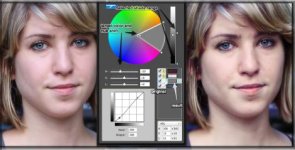
When you select a color with the picker, the shadow bar on the side also gets a dot. You can limit whether the shadows, mids, or highlights are to be effected in the color you've chosen to alter. This can be helpful at times, when you want to effect a very specific range of color. You could push skin tone shadows towards magenta, and the highlights a tad toward yellow and get a pseudo cross processed effect in the skin tonal range.

Example of a cross processed look achieved using PSE:
selective_range.jpg
Left image: Before, Right image: After
Original image captured using Canon Standard profile.
(sorry the image is so small. Any tips on how to make these pics bigger? Thanks)

Limits:
The ideal, would be if the curves layer allowed separate RGB channel adjustments. Then we could get some cross processing effect. But that is not possible. The main thing is that colors can only be pushed left or right.


Knowing:
Knowing what your end destination is, is the best recipe. If you want an overall warm tone, but don't want orange or red skin, then destaturate or change the hue of certain areas to get the look that will counteract a warm white balance. Pushing the skin colors into the reds, and then use the camera tonal slider and go into the green tint.

Word of advice: be thorough, don't just tweak
Whatever the case, if you are trying to get a very particular effect, be sure your RAW pictures you deal with when creating the custom picture style are either perfectly white balanced, or have the exact conditions you will be using the profile in. If you want to 'allow' an accident to create your final look, that is fine. You can do whatever you like. I did that for weeks too. =)
 
Last edited:
Recap

Recap

Just an overview of things covered up till now:

Influential players in adoption of popular picture styles


PSE interface and controls


Changing Colors


Curves Control


How a picture style is applied in-camera


Video example of using flat


H.264 impact on final image and picture style


Film vs digital


Battling H.264


Flat Curve (does it improve dynamic range?)


What is Flat Curve doing?


Subtractive Curve


Aplastic Anemia Awareness


What are in camera style settings doing to the the picture style?


H.264 has the final say before your video leaves the camera


Illusive skintones


Human Eye Characteristics


Color perception


Characteristics of Canon Default Picture Styles
-Dynamic Range
-Color
-Skintone


Making Fine Color Adjustments in PSE
 
Last edited:
I am working crazy hours, so I will not update this post till October 20th, or there about.  At that point, I will be working on a strange documentary which will be utilizing the Canon DSLR's.  During that time, I will try to post as much as I can with screen shots from the doc, and me trying out different pic styles.  In the meantime, I will try to make a collection of my favorite beta pic styles for you guys to download and play around with.  You may hate my workflow, but at least it will be a slightly different picture style dogma than is currently popular.
 
I am working crazy hours, so I will not update this post till October 20th, or there about.  At that point, I will be working on a strange documentary which will be utilizing the Canon DSLR's.  During that time, I will try to post as much as I can with screen shots from the doc, and me trying out different pic styles.  In the meantime, I will try to make a collection of my favorite beta pic styles for you guys to download and play around with.  You may hate my workflow, but at least it will be a slightly different picture style dogma than is currently popular.


nice!
 
Video Comparisons

Video Comparisons

1.
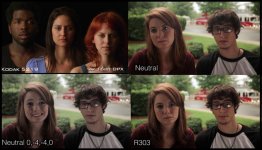
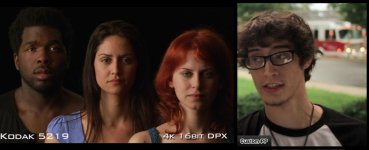
Film_Neutral_R303.jpg
2.
Film_SN206.jpg
3.
R303_Neu_Sta_LanSca.jpg

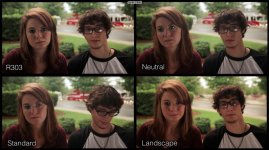
Just some casual tests I did with two actors I have worked with. We were at dinner, and I had the gear in the car, and asked if I could do a quick test. They obliged my geeky-ness.

Most of us are very used to the 7D/60D/T2i colors in Neutral picture style, so I threw in a screen shot from the Zacuto shootout 2011 to mix things up. Even though it is not at all related to my quick comparison videos, it may help us to not naturally assume neutral is the best setting. Neutral is just the most muted setting, so it can handle dynamic colors more gracefully, by not being aggressive, however, the image ends up looking drab and even dead sometimes.

R303 was my earliest color profile, and I was surprised at how well it looked in these comparisons. It has encouraged me to go back to it and fine tune some issues I have had with it. It is not the most accurate, but it has a pleasing natural look all its own. Far better caucasian skin tonality than Neutral too.
 
Last edited:
Picture 3 shows R303 in comparison to the most commonly used profiles. All the settings are defaulted to the same: 1,0,0,0

Because it was overcast and back lit (albeit with a bead board bounce) the overall look should be very subdued. Landscape kind of ends up looking useable here. It is usually too saturated for most things, but help invigorate this setup. However, it never really escapes the synthetic look. The green is over juiced and a bit yellow. The Standard style is very anemic in the greens.

Standard is not a bad profile, I shot this almost all in standard (some neutral): http://vimeo.com/17450671
Even though I had already created a beta R303 at that time, I hadn't tested it enough to feel comfortable using it. Mostly, standard for daylight and neutral for incandescent light.
 
R303 Custom Picture Style Explained

When I created R303, I wanted to make something that worked with the Canon look, not fight it. It will never be film or a RED. But within it's own confinements, I wanted to bring out the good and subdue the bad. As you can see from the pictures above, the skin tones on white people has less inherent magenta. But below is a list of the things I wanted to accomplish:


VS.
--------------------------------------------------------------------------------------------------------------------------
VS Standard: The thing I liked about standard was how it was a bit more alive than neutral. However, the blues and greens never showed up like they do to the eye, though blue hue in standard seems more accurate than it is in landscape. The skin tone range was always a bit red/magenta for my tastes.

VS Landscape: Lanscape is the remedy for bringing blue and green up in saturation, but it goes too far for everything. Turns white people into walking carrots.

VS Neutral: Works well in tough lighting situations, but never gets skin tones right in white light. I like it in warm lighting situations, where the warmth of light is rendered nicely on the skin. Landscape is awful on white skin under warm light, because it is orange on orange.

VS Bloom: I really like the idea of reducing contrast, but felt -4 was a bit much, in addition it wasn't using a smart curve, but a general inverted S curve. Midtones end up suffering in low contrast situations. The Crop Sensor Canons go too far with -4 contrast, as can be seen in the zacuto shootout 2011 pt 3. Also, there is no way I would be able to release any footage without color grading. Doesn't fix skin tone issues. But, the Bloom style allows for great versatility and flexibility.

--------------------------------------------------------------------------------------------------------------------------


Overall, after playing around with all of the Canon default styles, I found that they could be pushed to look like one or the other using the PSE, as they are all fundamentally related.


At the end of the day, I knew I couldn't fix all of the issues in one picture style, because the H.264 limits the versatility of any picture style recipe. But R303 has done quite a bit for me:

- Smart curve: 1.) keeps mid tone contrast 2.) retains highlight detail without ugly blowout clipping 3.) Lifts shadows subtly

- Colors: 1.) Bring blue and green to a saturation level that reflects what my eye sees in real life 2.)reduce reds and prevent early red channel clipping 3.) Make caucasion skin tone more pleasing

And I think it accomplished that.

I found over time, though that there wouldn't be one 'fix all' picture style. I do not care for R303 under very warm lighting situations, as it tends to already be warm on skin when the camera is properly white balanced. So adding warmth to warmth goes over a bit. This is an issue with H.264 codec and digital technology in the camera. The two combined don't like to be pushed too much, they want be used within confined parameters.
 
Last edited:
Back
Top