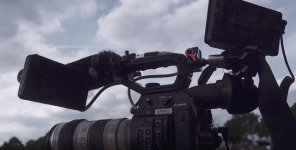
C200: The new Canon C200 with 4K

Had some hands-on time with the C200 last night (along with numerous other DVXUsers) at Canon Burbank. Actually learned some not good things about the C200. I am still on pre-order but was not very happy to find that:

1. When shooting Cinema RAW Light, the 2k proxies are not proxies, they are referred to as "sub-recordings". Canon really made this feature almost useless from a workflow viewpoint because of naming conventions. All of the sub-recording files will end with an .MP4 file name, will have a simple name like, "MOO01.MP4", while all of the RAW recordings end with a completely unrelated, totally different file structure/naming string, ending with .CRM. The file naming structure of the RAW has no relationship to the file naming protocol for the sub-recording. Meaning that the typical workflow of editing proxies, then conforming back to the RAW files seems as if it won't work. This oversight seems unfathomable to me, why even have the sub recording other than for clients to pop it into their laptop to just see dailies? Perhaps one or all of the NLEs can be written to provide some sort of header and footer translation but what a PITA for all involved. The more I thought about this last night, the more frustrating it becomes. The dream of shooting Cinema RAW Light, grabbing the SD card with the 2K file and editing it on your laptop, then conforming it to the RAW later appears to not be possible. So why even have it? Can't figure out the design logic here.

2. Loren Simon with Canon verified that the outputs for the C200 are 1080 4:2:2 via SDI while UHD via HDMI is verified as 8 bit 4:2:0. This is in the same camera that has the newest, latest Digic 6 dual processors, more powerful then the Digic 5 processors found in the C300 MKII and C700. I don't buy that the UHD output is not able be at least 8-bit 4:2:2 because of any processing or horsepower limitation. It is hobbled on purpose.

3. It is not possible to output signal through SDI and HDMI at the same time. Only one output at a time, thank you. Not huge, but frustrating.

4. There appears to be no reason processing reason (Hello, dual Digic 6 processors?) that Canon couldn't have outfitted the C200 with a 12G SDI output so we could have obtained UHD via SDI. The costs, even if a few dollars more, would have gladly been borne by C200 buyers. I would have easily/gladly paid an extra $200.00 to $300.00 to never have to use HDMI again.

5. While not verified or conclusive, I heard several statements that lead me to believe that the XF-AVC codec, when it arrives in February, will probably be indentical in spec to the C200s .MP4, 8-bit 4:2:0 UHD. It will merely be a wrapper addition. I can live with the 8-bit, but when you can buy an XC15 for $2,399.00 that has a nice, robust 8-bit 4:2:2 codec at 305Mbps, IF the C200 really only gets dealt an 8-bit 4:2:0 codec at 150 Mbps, that seems punitive punishment to C200 owners. Hope I am wrong. Nobody from Canon said anything conclusive and they really may not know , this is just something that a few statements I heard made my Spidey-sense tingle. I really hope I am wrong.

6. We semi-verified that the C200 handgrip connection seems to be the same as the older C cameras. Which means that the Shape handgrip relocater cable that Eric Coughlin mentioned a few months ago will work. We didn't have the Shape cable to try but Loren did plug a C300 handgrip into the C200 and it worked so the protocol and pin outs are the same. So if you want to operate your C200 on your shoulder with an Arri rosette extension arm, better order that Shape cable before they sell out. Loren seems to feel that the Shape cable has some sort of electronics built into it in that plastic block so I don't think a Radio Shack cable is going to do the trick. You need the $80.00 Shape cable.

7. No surprise, we already knew this but Cinema RAW Light ONLY shooting DCI 4K at 17:9 is going to be a huge PITA. I neglected to find out if the monitor and EVF on the C200 have 16:9 framing lines for when you crop and zoom that image to 16:9 UHD. Just thinking about workflow and two things come to mind. We are going to hand off Cinema RAW Light files to some clients and they are going to freak out when their editor shows them it is 17:9 either squeezed or letterboxed on their 16:9 monitors so be prepared to get calls asking, "Why did you screw up and shoot DCI?" or "Why does the footage you shot look off?". As far as our own workflow, everything is going to end up UHD for most of us. So having to zoom and crop the 17:9 to 16:9 aspect is going to be just one more step and we will always have to remember to protect compositions and headroom for 16:9. Why didn't Canon build in a switchable DCI versus UHD setting into the camera?

I get it that we are not getting TC i/o, genlock, dual CFast slots, 410 Mbps XF AVC and that if we want those, we should buy the C300 MKII. But a lot of these other details just seems like either oversights or pure hobbling by Canon marketing, which if that is the case, is annoying as a buyer. These revelations are making me reconsider buying the C300 MKII over the C200. If the prices were the same today, for a new one, I would go for the C300 MKII. But at $2,500.00 more, I am still on the fence. It really is frustrating that the more professional camera, the C300 MKII, doesn't have the 4K 60p. I could live without the touchscreen, even though I prefer it, but the C300 MKII way of using the joystick totally works, it's just not as intuitive as the touch screen. I could live with the awful clamshell monitor/audio inputs/and the big, dorky dual cables, even though the C200 setup is much better designed and slicker.

Per usual, the best camera would be a combination of the C300 MKII and the C200 in one body. Talk about a dual set of compromises.


To answer the questions I posed a week or two ago in a different C200 thread...

1. Does using the touchscreen require as light touch as Canon's DSLRs? Many are concerned about shooting with the C200 with a long lens, like say the Canon 100-400 4.5-5.6 IS II, will it result in camera shake?
Yes, to both. It seemed to be about the same as the touchscreen responsiveness in my 80D. That said, in normal shooting, I don't think you'll see any camera bobble. With really long focal lengths, you may see some bobble.

2. How do we relocate and use the C200 grip when mounted to an Arri rosette off camera?
Answered above. The Shape grip extension is the answer.

3. How does the new audio section sound? Lot of grumbling that Canon stuck with 16 bit/48Khz. How are the AES/EBU inputs to use with a digital mixer?
Didn't have a chance to test this last night since we didn't have a a nice mix/mixer, playback or an AES/EBU output mixer or wireless. I have no reason to believe this camera will sound any better or worse than the C300 MKII/C700.

4. Is the battery life the same when shooting CFast versus SD?
The Canon reps didn't know, all they have is the Japanese/English spec sheet.

5. What are all of the color profiles available? We know C-Log 3 and that C-Log 2 is only available when shooting Cinema RAW Light? What about the baked-in looks, are they the same as the C300 MKII? What does WDR look like for clients who go straight from camera to web or air? Does it even have WDR?
Besides C-Log, C-Log 2 and C-Log 3, WDR is available as well as several other user definable, baked-in PP presets.

6. Does the C200 exhibit the same issues with NR and blues that they C300 MKII does/did?
No comment was made.

7. Is the EVF identical to the C300 or something newer/different?
I couldn't tell in going back and forth between the C200 and C300 MKII. They looked the same to me, pretty usable.

8. Is there anything new with the audio routing, channels, etc.?
Loren suggested that the Tentacle Sync TC system could easily be fed into audio channels 3 and 4 via the 3.5mm mic input jack on the C200. My follow up question was, are the channel isolation and crosstalk specs good enough on the C200 to make sure that there is ZERO audio crosstalk between channels 3 and 4 and 1 and 2? We'll have to test that one once the camera delivers.

9. I'm still trying to figure out a mounting location for the touchscreen when using the camera on shoulder with a third party EVF. Or if we don't use the touchscreen for focus, does the DPAF have the same functions as the C300 MKII where you can use the joystick to locate the focus box?
You can pretty much locate the touchscreen anywhere you want, even on a gimbal with the Canon long accessory 20-pin cable. You can use the joystick to locate the focus box ala 300 MKII.

10. Actual battery life with the Canon batteries? Any more or less than expected with shooting Cinema RAW Light? Does shooting RAW suck down more battery than .MP4s?
Loren said in his presentation, roughly two hours with the BP-30

11. Do the damn buttons light up? Everyone has been asking, nobody will answer
No, they definitively do NOT. Bummer.

12. Is the slow and fast motion mappable to the usual buttons? I know it maxes out at 1080p 120 but can you map a ramp down to lower frame rates through external buttons or can that only be dialed-in on the menus?
It is a one touch button to jump from your regular time base frame rate to 120fps in 59.94Hz mode/100fps in 50.00hz mode.

13. Why can't somebody who is a decent DP shoot some green screen 4K 24p .MP4 and key it? How about A/Bing the Cinema RAW Light with the same scene's proxy 2K file?
No facility for shooting/testing green screen last night at Canon.

14. Why doesn't someone shoot some nicely lit interior scenes? So far, if I am not mistaken, all we have seen from any C200 test are daylight/available light exteriors? Can't be bothered? Too much work?
The new Canon facility in Burbank has a nice DMX dimmer board and a trade-show like lighting/shooting set up, they had a model seated. From what I saw in their Resolve room on the monitor, the camera has a very nice image with beautiful skin tones.

15. Many would be interested to see the HDMI 4K recorded out to an Atomos 10-bit 4k recorder? A lot of these tests are being sponsored by retailers like CVP, so have at it guys? I know you have a Ninja Assasin or Shogun Inferno laying around, hook it up, A/B with the .MP4 and Cinema RAW Light.
I have no reason to think it won't look good but it will be UHD 4:2:0 8-bit recorded to 4:2:2 10-bit Prores so it is what it is. If well lit, green screen will key fine with this workflow but it will not be as robust as a real 4:2:2 10-bit signal obviously.
 
Last edited:
Had some hands-on time with the C200 last night (along with numerous other DVXUsers) at Canon Burbank. Actually learned some not good things about the C200.

Only two things stick out for me on this:

I am really surprised that the 4K hdmi out is not 8bit 4:2:2. That is what the XC10 has. The XC10 was originally reported to have 10bit HDMI so maybe the rep just got that wrong. Again.

Regarding NR and blue issues with the C300 II vs the C200- I really hope the C200 is almost an exact match for the C300 II. This would make it an absolutely fantastic b camera for the C300 II as it fills in the gaps that the C300 II seems to be missing. I shoot almost everything with two cameras and the fact that Canon's cameras do not match are a pain as it means you are stuck using the same model if you need a good match. The XC15 is a pretty close match to the C300 II in the production camera setting, but I would prefer having the C200 as a b cam and the XC15 as a c cam. That would be a nice set of cameras.
 
Sounds like they are definetly protecting a forthcoming model, too...

You'll get your internal RAW and synced proxies on a future model(C400 That people are mentioning?).

Another poster said that SDI and HDMI are both disabled when shooting internal RAWLight. If true, that right there makes the camera unusable.
 
On the C300 Mark II the file names for the proxies and the Cfast files are different. I use Adobe Bridge to batch rename the files (I've done it based off of the time-stamps, but you could probably do it other ways as well), which is an extra step but not that much trouble. Could you not do the same with the C200 proxies?
 
Sounds like they are definetly protecting a forthcoming model, too...

You'll get your internal RAW and synced proxies on a future model(C400 That people are mentioning?).

Another poster said that SDI and HDMI are both disabled when shooting internal RAWLight. If true, that right there makes the camera unusable.

I edited my post about that. One of the reps said that the outputs are disabled because the Raw signal has not yet been debayered and therefore couldn't be outputted. But he also had a C200 sitting on a tripod with a monitor feed hooked up to it and was rolling footage. So I'm not sure what he meant by that comment. Perhaps he just meant the SDI and HDMI could not be outputted simultaneously (which is something he also said)?? But I'm not sure why he added the Raw Debayer comment. Maybe he just meant you can't see a true Raw signal coming from the camera, meaning you can't send Raw out of the HDMI and SDI?
 
The only disturbing thing that was unforseen here is the proxy workflow is essentially broken. This does seem like something that can easily be fixed with a firmware update; the question is will they?
 
You'll get your internal RAW and synced proxies on a future model(C400 That people are mentioning?).

Another poster said that SDI and HDMI are both disabled when shooting internal RAWLight. If true, that right there makes the camera unusable.

As an FCPX user, the external proxy workflow doesn't work anyway. That is not a dismissal of the naming convention problem, that is me giving a heads up on a design issue within FCPX. The C300II names it's "proxy" files the same as the Cfast files and FCPX gets really confused if you try to import both files.

The fact that the SDI and HDMI stop working when recording RAWLight does not surprise me, but it is a huge problem. The 1DC disabled the HDMI port while shooting and I think the XC-10 also disabled the HDMI while shooting in 4K although that might have been a settings issue for me. The C300 II has some weird routing choices in which only certain outputs will work at one time. I think it has to do with processing or heat management.
 
Sounds like they are definetly protecting a forthcoming model, too...

You'll get your internal RAW and synced proxies on a future model(C400 That people are mentioning?).

Another poster said that SDI and HDMI are both disabled when shooting internal RAWLight. If true, that right there makes the camera unusable.

Totally. Insane if true because then you'd have to buy the monitor and some people like myself, if were to buy it, would go only for the C200B version.

I could definitely picture the image going black once you hit record.

But he also had a C200 sitting on a tripod with a monitor feed hooked up to it and was rolling footage. So I'm not sure what he meant by that comment.

Are you sure the camera was set in RAW and recording? (I'm sure you are, just wondering.)
 
Sounds like they are definetly protecting a forthcoming model, too...
C500 MKII was mentioned by the Canon Rumors. One then wonders if they'll drop C300 line for a while, once the MKII inventory clears.

FWIW, I think a lot of workarounds will be created to overcome the crippled features.
 
This would be a good time for Panasonic to swoop in and announce more EVA1 information. Possibly take back some of their share.
 
Thanks for all the info, Puredrifting. That's a serious bummer about the proxy naming SNAFU, and disabling HDMI and SDI output while recording raw is almost a dealbreaker for me. I need to be able to shoot in raw with the touchscreen for focusing while a separate monitor is attached for the rest of the crew to look at. If you can't have a large external monitor showing what you're recording internally on the C200, then that means the camera op is the only one that can see what's being shot, and that's unacceptable.

When you tested the DPAF touchscreen, was it as easy to use as in the 80D and 1DX II? Or were there additional complications with selecting tracking points, etc.?
 
C200 is a really interesting camera. I have never seen a product with so many cool features and innovations, yet riddled with so many vexing operational compromises as well for professionals trying to get work done. It's the ultimate push-me-pull-you camera. There are workarounds for most of the issues, not sure Eric, if your solution would work, it sounds like it could, but once again, you already have to deal with Debayering the signal in the Canon utility, Resolve or your editing program. You also have to deal with protecting for UHD and cropping and zooming to output UHD from the RAW. Then adding another procedure on top of that just make the files conformable? Ughh. As far as outputting SDI/HDMI while shooting Cinema RAW Light, I did not hear or see that. I did see lots of people shooting RAW and the camera was still outputting a signal to the external monitor (the C200 that was on the tripod) but I wouldn't swear to that. Maybe the handheld one they were passing around was shooting RAW and the one on the tripod was shooting .MP4? I don't know, I was exhausted, got up at 3:00 AM for a shoot in San Diego yesterday, shot all day down there, fought traffic all of the way back up to Burbank to go to this presentation at 7:00 to 9:00 pm at Canon Burbank so I was a bit out of it.

I agree, we need to hear some excitement about the EVA 1, it's gone cold since CineGear week. We need some more teasers Mitch!
 
Pop quiz!

The opening and closing scenes (and many other shots throughout the film) from the Golf Channels new feature, Summer of 76, were shot with two cameras, an Amira and a C100 mk1.

http://www.golfchannel.com/video/summer-76-sneak-peek/

Footage from both cameras are in this preview, can anyone tell me which shots were which?

From what I'm reading here, it should be pretty easy right?

10bit ProRes 4444, 14 stops of DR vs 8bit AVCHD 4:2:0, 12 stops of DR

Good luck.

Not quite so easy if they dumbed down the look of the ARRI to match the weaker CODEC of the particular Canon mentioned.
 
Totally. Insane if true because then you'd have to buy the monitor and some people like myself, if were to buy it, would go only for the C200B version.

I could definitely picture the image going black once you hit record.


Are you sure the camera was set in RAW and recording? (I'm sure you are, just wondering.)
I am not sure. Lots of people were swarming around the two cameras they had. One camera was handheld without a monitor feed and the other was on a tripod with a monitor feed. The camera with the monitor feed was definitely recording Raw at one point because they took that footage back to an editing suite to color correct it. Whether or not the monitor went black when they shot the Raw footage, I do not know.

AbleCine is having their C200 Meet and Greet in NYC on July 27th. Perhaps someone could confirm this??
 
Maybe one of the DVXuser sponsors here who have a camera can confirm if an external monitor goes black either via HDMI or SDI while recording RAW. Might lead to some canceled preorders though so no pressure, ha.

Also...PB has a monitor hooked up in his review. I feel like he would definitely have noticed and said something if the SDI or HDMI were disabled while recording RAW. Or even anyone else in the world up to this point almost 2 months after the camera was announced.

C200.jpg
 
Was the sdi port as well as the hdmi port connected?
That would explain why you didn't get a signal.


From the manual:


NOTES
• Signals cannot be output from the SDI terminal and HDMI
OUT terminal simultaneously
. To output signals from
the SDI terminal, make sure the HDMI OUT terminal does not have an HDMI
cable connected to it.
• Depending on the external recorder, you may not be
able to record at the desired video configuration.
• After you connect the camera to the external recorder
, make a test recording first to check that audio and
video are recorded correctly on the external recorder.
• You can set
>
[
Æ
$
Recording/Media Setup]
>
[Rec Command] to [On] to use the camera’s
REC button to control also the recording operation of
an external recorder connected to the SDI terminal.

manual is available for download at canon :thumbsup:

I hate repeating myself
here a link to the manual (seems to be only available in the netherlands, however its in english
https://1drv.ms/f/s!ArOxk5VJ_WyMgX5CSM1zaoXg7fT5
 
Back
Top