Odyssey Firmware 2015.5

I have tested s-log2 on my Sony A7s and it definitely clips below 100 IRE ( about 98 IRE ) irrespective of the level of overexposure. It also clips blacks at about 10 IRE irrespective of the level of underexposure.
I don't have an A7 here to test, but if that is the case it is not following Sony's S-Log2 spec. That sounds as if the signal is being scaled to fit in the 0-100 IRE range. Have you double-checked you do not have "Legalize HDMI" switched on in your Odyssey, which will perform this scaling.

Why would you create an extended range LUT for this camera ?
Extended range does NOT mean it handles values outside the 0-100 IRE range. The exact opposite in fact. It means it uses the whole range from 0-1023 to represent 0-100 IRE, so CANNOT represent anything outside that range.

I think I need to write a document on the subject of legal and extended range and LUTs, so I can point people to that when they misunderstand. I have explained a number of times in this thread, but I realise I can't expect everybody to read every post I make.
 
I think I need to write a document on the subject of legal and extended range and LUTs, so I can point people to that when they misunderstand. I have explained a number of times in this thread, but I realise I can't expect everybody to read every post I make.

that'd be helpful, but still, it really is a kind of complicated topic - still trying to completely get my head around it...
 
I have tested s-log2 on my Sony A7s and it definitely clips below 100 IRE ( about 98 IRE ) irrespective of the level of overexposure. It also clips blacks at about 10 IRE irrespective of the level of underexposure. Why would you create an extended range LUT for this camera ?

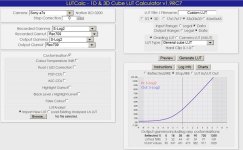
What have you set your ISO to? If you're not at the native ISO of 3200 for the A7s, I think it will affect where it clips. Also, are you looking at raw slog2 data, or has a LUT been applied? Attached is a screengrab from Ben Turley's excellent LUTCalc program. For the A7s, 100% IRE occurs at 5.5 stops over middle gray, and black limits at about 4 IRE.
 

Attachments

  • A7s.jpg
    A7s.jpg
    83.9 KB · Views: 0
Last edited:
What have you set your ISO to? If you're not at the native ISO of 3200 for the A7s, I think it will affect where it clips. Also, are you looking at raw slog2 data, or has a LUT been applied? Attached is a screengrab from Ben Turley's excellent LUTCalc program. For the A7s, 100% IRE occurs at 5.5 stops over middle gray, and black limits at about 4 IRE.

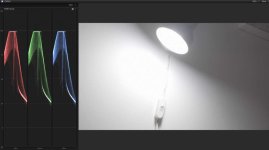
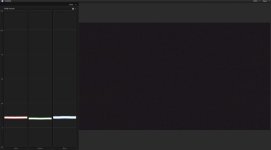
I have repeated the tests making a 100% sure that ISO is set at 3200. Profile 7 ( slog2 with default settings ); shutter 1/50; frame-rate 25fps; aperture f8.0. No post-proccesing applied. The screenshot is from FCPX but Catalyst Browse is the same. Here are the results.

!. Camera pointed at spotlight. It clearly clips at around 98 IRE.

White.jpg

2. Shot taken with lens-cap on. It clearly clips at around 10 IRE.

Black.jpg


Slog2 on the Sony A7s therefore always stays between 10 IRE and 98 IRE irrespective of the degree of under or over exposure. Profiles like Cine 4 and others goes all the way to 109 IRE.
 
There is a brief version here, but it really needs a much longer article with diagrams.


A lot of the stuff can get lost in translation. Sometimes examples works better. Let us take the following scenario:


I shoot 2 clips. Clip A has values outside the legal range, something like -2 IRE to 106 IRE. Clip B has values inside the legal range, something like 8 IRE to 92 IRE.

1. I load clip A into Da Vinci Resolve. I set the project attributes as video levels. I do grading and export the LUT. Is this LUT legal or extended ?

2. I load clip A into Da Vinci Resolve. I set the project attributes as data levels. I do grading and export the LUT. Is this LUT legal or extended ?

3. I load clip B into Da Vinci Resolve. I set the project attributes as video levels. I do grading and export the LUT. Is this LUT legal or extended ?

4. I load clip B into Da Vinci Resolve. I set the project attributes as data levels. I do grading and export the LUT. Is this LUT legal or extended ?


I think answering and discussing (optional) these scenarios can go a long way in demystifying this subject.
 
WJ, i think the pics you posted only proof that FCPX is working in legal range - that doesn't mean everything above 98 is gone, the values are just not mapped correctly.

Nick, i think what you wrote clarifies the whole thing a bit - in short, would you say this is correct:

- if i took my 7Q Prores slog2 File into resolve, did some random grade to it, without changing the clips attributes = leaving auto range = video range / legal range - and then export that grade as a LUT and load it into the 7Q, then i should have to select "legal range" to display the LUT correctly, and with correct, i mean allowing the LUT to display superwhites while viewing the 7Q's screen.

- exporting a LUT based on a "legal range" video file should result in a "legal range LUT", hence the need to activate legal range in the 7Q.

- Resolve is able to display superwhites no matter if video or data range is selected - because, as you wrote, resolve allows values greater and smaller than 1.0 and 0.0
 
WJ, i think the pics you posted only proof that FCPX is working in legal range - that doesn't mean everything above 98 is gone, the values are just not mapped correctly.

Nick, i think what you wrote clarifies the whole thing a bit - in short, would you say this is correct:

- if i took my 7Q Prores slog2 File into resolve, did some random grade to it, without changing the clips attributes = leaving auto range = video range / legal range - and then export that grade as a LUT and load it into the 7Q, then i should have to select "legal range" to display the LUT correctly, and with correct, i mean allowing the LUT to display superwhites while viewing the 7Q's screen.

- exporting a LUT based on a "legal range" video file should result in a "legal range LUT", hence the need to activate legal range in the 7Q.

- Resolve is able to display superwhites no matter if video or data range is selected - because, as you wrote, resolve allows values greater and smaller than 1.0 and 0.0


FCPX shows the exact captured range applicable to a clip. If you use something like Cine 4 which captures an extended range FCPX shows clipping at 109 IRE.
 
- if i took my 7Q Prores slog2 File into resolve, did some random grade to it, without changing the clips attributes = leaving auto range = video range / legal range - and then export that grade as a LUT and load it into the 7Q, then i should have to select "legal range" to display the LUT correctly, and with correct, i mean allowing the LUT to display superwhites while viewing the 7Q's screen.

- exporting a LUT based on a "legal range" video file should result in a "legal range LUT", hence the need to activate legal range in the 7Q.

- Resolve is able to display superwhites no matter if video or data range is selected - because, as you wrote, resolve allows values greater and smaller than 1.0 and 0.0
No, I'm afraid not. Resolve does not "display super-whites". It can preserve them to be used in its un-clamped float pipe, but it only displays 0-1.0.

If you do as you describe, you will create an EE LUT, and should select Extended in the Odyssey to see the same result there. You will not see super-whites. Making an LL LUT is more complex, and requires you to manually take control of the input AND output scaling of your media. I would really suggest you ignore super-whites when making a preview LUT for the Odyssey. The output of a LUT should not (in my opinion) include super-white values. It is a preview of your final deliverable, and that should never include super-whites.

I really wish Sony had not used the super-white range in their S-Log standard. It really does confuse things. ARRI LogC is so much simpler.

I need to start working on that document! In fact it may become a video, if that explains things better.

**Advanced extra information**
In fact to be strictly accurate, if you want the LUT in the 7Q to mirror Resolve precisely, you need to clamp your image to 0-1.0 as the first operator of your grade. If you use grading operators to "pull" super-whites into the visible range, a LUT in Extended mode in the 7Q cannot replicate this. Putting the 7Q in Legal mode with a LUT which is EE may appear to do what you want, but it is actually doing something different again.
 
Last edited:
I don't have an A7 here to test, but if that is the case it is not following Sony's S-Log2 spec. That sounds as if the signal is being scaled to fit in the 0-100 IRE range. Have you double-checked you do not have "Legalize HDMI" switched on in your Odyssey, which will perform this scaling.


Extended range does NOT mean it handles values outside the 0-100 IRE range. The exact opposite in fact. It means it uses the whole range from 0-1023 to represent 0-100 IRE, so CANNOT represent anything outside that range.

I think I need to write a document on the subject of legal and extended range and LUTs, so I can point people to that when they misunderstand. I have explained a number of times in this thread, but I realise I can't expect everybody to read every post I make.
I have only used internal recording for these tests.

When you use the Odyssey you can record values above 100 IRE in slog2 but when you compare this with the internal recording there is a significant difference in contrast. When you activate "legalize HDMI" the Odyssey recording and the internal recording is identical. I assume the internal recording is the "correct" interpretation of Sony's A7s slog implementation.
 
Last edited:
No, I'm afraid not. Resolve does not "display super-whites". It can preserve them to be used in its un-clamped float pipe, but it only displays 0-1.0.

If you do as you describe, you will create an EE LUT, and should select Extended in the Odyssey to see the same result there. You will not see super-whites. Making an LL LUT is more complex, and requires you to manually take control of the input AND output scaling of your media. I would really suggest you ignore super-whites when making a preview LUT for the Odyssey. The output of a LUT should not (in my opinion) include super-white values. It is a preview of your final deliverable, and that should never include super-whites.

I really wish Sony had not used the super-white range in their S-Log standard. It really does confuse things. ARRI LogC is so much simpler.

I need to start working on that document! In fact it may become a video, if that explains things better.

**Advanced extra information**
In fact to be strictly accurate, if you want the LUT in the 7Q to mirror Resolve precisely, you need to clamp your image to 0-1.0 as the first operator of your grade. If you use grading operators to "pull" super-whites into the visible range, a LUT in Extended mode in the 7Q cannot replicate this. Putting the 7Q in Legal mode with a LUT which is EE may appear to do what you want, but it is actually doing something different again.


Thank you and yes please!!!! I would love a video to help better understand what's going on with this. Thank you for your time and contribution
 
Hi,
i can't use converted LUT in the Odyssey 7Q+, all are "psychedelic" look.
sorry for my english.

Which version of the CD LUT utility are you using? I had the same problem with the CD 3D-LUT Utility (Mac Version 10.9/10.10 Java 8). I downloaded the CD 3D-LUT Utility (Mac Version 10.6-10.8 Java 6) and it worked as intended.

As a side note if the Mac version refers to OS used that is weird since I'm on 10.9.5.
 
Last edited:
I need to start working on that document! In fact it may become a video, if that explains things better.

Yes, please and thank you! An extensive tutorial in to the LUT system with examples would clear a lot of things up. :)
 
I have only used internal recording for these tests.

When you use the Odyssey you can record values above 100 IRE in slog2 but when you compare this with the internal recording there is a significant difference in contrast. When you activate "legalize HDMI" the Odyssey recording and the internal recording is identical. I assume the internal recording is the "correct" interpretation of Sony's A7s slog implementation.
I would suggest it may be the other way around. It may be FCP-X's interpretation of the internal recording which is incorrect. By the way, I don't trust the waveform in Catalyst browse. It's scale is not IRE. 100% on the Catalyst Browse waveform scale appears to be 109 IRE, and 0% is -7 IRE. Sony do like to be inconsistent and confusing sometimes! It would make things easier if their post software and cameras behaved the same way, but that's not always the case.

I am looking now at an F65 RAW clip in Catalyst Browse, and the clipped highlights read at 97%. When I render this clip out of Catalyst Browse as ProRes, those same highlights are at 106%. Try rendering your S-Log2 clip as ProRes from Catalyst Browse, and look at that in FCP-X. I think you will find that it contains super-whites, and matches the Odyssey ProRes recording.
 
Last edited:
I did the update and the focus assist function doesnt work. Each of the three styles arent working for me. Do i have to play with the settings? my favorite style was the enhanced and it doesnt do anything. Is this happening to anyone else?

Thanks,
Chris
 
I would suggest it may be the other way around. It may be FCP-X's interpretation of the internal recording which is incorrect. By the way, I don't trust the waveform in Catalyst browse. It's scale is not IRE. 100% on the Catalyst Browse waveform scale appears to be 109 IRE, and 0% is -7 IRE. Sony do like to be inconsistent and confusing sometimes! It would make things easier if their post software and cameras behaved the same way, but that's not always the case.

I am looking now at an F65 RAW clip in Catalyst Browse, and the clipped highlights read at 97%. When I render this clip out of Catalyst Browse as ProRes, those same highlights are at 106%. Try rendering your S-Log2 clip as ProRes from Catalyst Browse, and look at that in FCP-X. I think you will find that it contains super-whites, and matches the Odyssey ProRes recording.

The rendered file from Catalyst Browse when imported to FCPX is identical to the original (in FCPX), with superwhites clipping at about 98 IRE. I have also noticed when you import the original file into DaVinci Resolve superwhites clip at about level 1000.
 
The rendered file from Catalyst Browse when imported to FCPX is identical to the original (in FCPX), with superwhites clipping at about 98 IRE. I have also noticed when you import the original file into DaVinci Resolve superwhites clip at about level 1000.
In that case, Sony's internal recording in the A7s is not conforming to their own standards. That is not very helpful, but it wouldn't be the first time this sort of thing has happened!
 
Last edited:
Catalyst Browse appears to be applying some range scaling behind the scenes, based on some assumptions about what it "thinks you want". My F65 test clip is clipping at 97% on the Catalyst Browse waveform in S-Gamut/S-Log2, and when I transcode that to ProRes choosing "input settings only" the resulting movie clips at 106% in e.g. FCP-X. When I apply the LC_709TypeA look profile, it clips at 98% in the Catalyst Browse waveform, but when I transcode to ProRes, this time choosing "all color settings" the resulting movie clips at 98% in FCP-X.

Maybe it's just me, but I would expect that when I see clipping at about the same level (97/98%) on the waveform in Catalyst Browse, I would expect transcoded movies to have clipping at about the same level.

I do find software which makes these kind of hidden adjustments for you incredibly frustrating. I have no problem with software which sets defaults for you based on assumptions, but I do think that software intended to be used by professionals ought to give you the option to override those defaults.
 
Back
Top