Odyssey Firmware 2015.5

What happened to the false colors? I tapped it on today just checking stuff after the firmware upgrade and now everything is red with occasional green is certain areas. (non of the other colors are there any more.) was that by default now? I know I can change all the settings to show all the different ranges but was it setup that way (the 2 colors) by default?
Hit the reset button in the False Color menu.
 
Agreed, Mitch! My apologies for sounding professorial. While this describes my own practice, I am no one to tell someone else how to work. Again, my apologies for sounding as if i was.

I beg your indulgence for a small rant. It seems to me this whole LUT thing is running a wee bit amuck. This thread, alone, shows the complexities of their use. Not the least of which is having to understand different exposure threshholds for each and every different LUT. It's just so much simpler to learn the exposure threshhold for a camera's Log, one time. For whatever reason, even high end cameras, like my Sony F5, change the zebra, wfm/histogram with an MLUT. Rather counterproductive, I think.<End of Rant>
When you add capabilities and controls to a device it will make it more complicated. That's all there is to it.

You can always use the device in a different way so as to uncomplicated it, or you can deal with the complications to get greater control.
 
I would agree that my personal preference would be to shoot using an exposure tool that had no LUT applied and an image that did have the LUT applied. It's nice to see an image that looks somewhat normal, and I can generally light to that image knowing that it is my intended destination. The exposure tool does not have to be the waveform, although I wouldn't suggest changing from it if that's what you're used to. But you could just as easily set a zebra or a false color to kick in at something like 90% on the unLUTted signal and have that overlay onto the LUTted picture. Our new Zebras are kinda like False Color Lite. With no zebra kicking in you have a normal image as opposed to the monochrome image in False Color. Then you can have two colors of Zebra pop up at selected ranges, and those ranges can be set to be with or without LUT applied separate from the image having the LUT applied. In run & gun work it saves you having to glance down to the corner of the frame to check exposure. Quite nifty.
 
Hi Mitch, any news on the new HFR firmware ? I got a job in midle of JUly and they are asking me for 100fps prores continuous. Any chance ?
 
Shot a commercial today and have to say the LUT is a godsend. Now I can see every tiny color temperature variation in the image straight away with my own eyes. No more guessing if I need 1/2 ctb or full ctb on my tungsten to match the light coming from the window. WOW! Massive, massive improvement to my workflow on set!!!
 
i was able to get focus assist working well. I tinkered with the settings and got them to where i like it. Alot of custom settings now. very impressive.
 
Hi Mitch, any news on the new HFR firmware ? I got a job in midle of JUly and they are asking me for 100fps prores continuous. Any chance ?
There's always a chance, but I wouldn't want to promise that one.

We can do it and we know it works, but we need to stabilize various aspects of it. Some tricky computing to make sure that it will always work consistently and never fail or corrupt. No sense releasing something that usually ​works. It has to always perform.
 
Nick/Mitch,

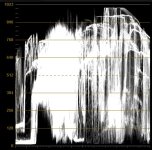
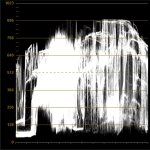
Can you please explain why the SONY_EE_SL2_L709A-2 LUT clamps the luminance from what seems to be around CV30-CV900 and the SONY_EE_Slog2_LC709A LUT is from CV10-CV1000 ish? I've been scratching my head as to why the -2 stop LUT is clamping the range and the normal LUT is not.

Here's what I'm seeing in Resolve:

LUT.jpg
SONY_EE_Slog2_LC709A (with 2 stops exposure pulled down in a node prior to the LUT)

LUT-2.jpg
SONY_EE_SL2_L709A-2

This is confusing the hell out of me as I assumed the only difference between these LUTs was that the -2 LUT had lower exposure.
 
To Mitch Gross :
hi Mitch,
i can't use the Lut converted with the two version of Lut Converter for Mac. All the Lut in the 7q+ are psychedelic look. Can you help me ?
 
To Mitch Gross :
hi Mitch,
i can't use the Lut converted with the two version of Lut Converter for Mac. All the Lut in the 7q+ are psychedelic look. Can you help me ?

I had the same thing with Java 8 version. Used Java 6 version, and then the picture was heavily bluish. I converted ImpulZ FS700 SLog2 film convert LUTs. They work in Resolve, but they don't work in 7Q. Maybe there is a problem with the conversion software? Preset LUTs work as intended.
 
sorry if it's a bit sheepish question.. how can I rename the LUT folders on the 7Q instead of having 3 xNEW FOLDER

--
edit: thanks to a hint of my friend stefanhuberfilms I manage to find it. It's a tab "manage folder" on top of the LUT window. Thanks!
 
Last edited:
To Mitch Gross :
hi Mitch,
i can't use the Lut converted with the two version of Lut Converter for Mac. All the Lut in the 7q+ are psychedelic look. Can you help me ?
We found the issue and are currently testing the fix. Of all things it turns out to be because in the US we note the date as month-day while in much of the rest of the world it is day-month. Inside your computers this fouled things up with the software and caused the messed up LUTs. New version should be posted shortly, as soon as testing is complete.
 
We found the issue and are currently testing the fix. Of all things it turns out to be because in the US we note the date as month-day while in much of the rest of the world it is day-month. Inside your computers this fouled things up with the software and caused the messed up LUTs. New version should be posted shortly, as soon as testing is complete.

This sounds like NASA+ESA a few years ago. They lost their joint satellite mission to Mars, 'coz one group counted in yards, while the other did it in meters :)
 
Can you please explain why the SONY_EE_SL2_L709A-2 LUT clamps the luminance from what seems to be around CV30-CV900 and the SONY_EE_Slog2_LC709A LUT is from CV10-CV1000 ish? I've been scratching my head as to why the -2 stop LUT is clamping the range and the normal LUT is not.
That is because Resolve only feeds the 0.0-1.0 range (0-1023 on the waveform) into a LUT. S-Log media has a little bit of highlight information in the super-whites (>1.0) which gets clipped off before the image is fed into the -2 LUT. When you manually reduce exposure before the standard LUT you are pulling some super-white image information down into the visible range, so now the LUT can "see" it.

Think of the -2 LUT as a preview in the Odyssey of what your image will look like when "printed down", but with the bonus that there is a little bit extra in the highlights that you can "dig into" in the grade.

I could make LUTs which could access the super-white image data. But I would have to make them as pairs, one to be applied in the Odyssey in Legal mode and a different LUT to use in Resolve (but which wouldn't work in the Odyssey or some other software which supports .cube LUTs). This was discussed, but it was decided that is was less confusing (at least initially) to produce one LUT which could be used everywhere and would be consistent.
 
That is because Resolve only feeds the 0.0-1.0 range (0-1023 on the waveform) into a LUT. S-Log media has a little bit of highlight information in the super-whites (>1.0) which gets clipped off before the image is fed into the -2 LUT. When you manually reduce exposure before the standard LUT you are pulling some super-white image information down into the visible range, so now the LUT can "see" it.

I've "rescued" super-whites in Resolve by selecting "Data Levels"; and, manually pulling down the hilites(the data looks clamped, but is still there if the gain is lowered. Same thing happens in the shadows w/ some files, again saveable by going to data levels, with special note to selecting Data Levels when exporting from the Deliver page.That's why I start worrying when there are other factors that start clamping my levels. Figuring out where it's happening sometimes is a witch hunt.
 
Last edited:
I could make LUTs which could access the super-white image data. But I would have to make them as pairs, one to be applied in the Odyssey in Legal mode and a different LUT to use in Resolve (but which wouldn't work in the Odyssey or some other software which supports .cube LUTs). This was discussed, but it was decided that is was less confusing (at least initially) to produce one LUT which could be used everywhere and would be consistent.

Nick, that would be awesome, because now in Resolve the -2 LUT clamps at around CV900 in the Waveform and you have to bring the super whites back in with a node prior to the LUT. And then in a subsequent node you have to raise your highlights back to 1023 if there are highlights that have to be true white. The workflow would be much more convenient and safe if "super whites" were immediately displayed after the LUT was applied.
 
Nick, that would be awesome, because now in Resolve the -2 LUT clamps at around CV900 in the Waveform and you have to bring the super whites back in with a node prior to the LUT. And then in a subsequent node you have to raise your highlights back to 1023 if there are highlights that have to be true white. The workflow would be much more convenient and safe if "super whites" were immediately displayed after the LUT was applied.
As I said before, the current LUTs were designed the way they are to try and keep things simple for people. Because of this there are limitations. The amount of confusion in this thread makes me feel I should wait until I have made the video explaining LUT ranges and how the different types of LUT should be used, before I put a load more LUTs out there to potentially add to the confusion, and cause problems if they are used incorrectly.
 
There have been a bunch of mentions of 4K/120fps->ProRes, and also 2K/240fps->ProRes (??) in this thread so far, but it appears the official answer was "use at own risk, it was left activated by accident" ...is this correct Mitch?

I've got a causal (non-pay) shoot later today, and am curious if anyone has had good luck with the results? Tested at all? Graded ok? (I'll test, but only have minimal time) I can live with 3fps monitoring, if it means not having to shoot TB's of RAW.

UPDATE: 4K120p shows up, and does record the camera's buffer! But once ProRes files are in Premiere, it looks like every 27/28th frame jumps ahead and misses ~10 that weren't recorded... So not usable! Just to save anyone the time or false excitement (that I had
:cry:)

***thanks for all the info and reading about LUTs implementation and Data levels, really does help my understanding of properly following a planned path through post (or suffer lost highlights)

***also, was there an email release sent out for this firmware? I never got one, and am curious if I dropped off the email list, or it was never actually sent out
 
Last edited:
There have been a bunch of mentions of 4K/120fps->ProRes, and also 2K/240fps->ProRes (??) in this thread so far, but it appears the official answer was "use at own risk, it was left activated by accident" ...is this correct Mitch?

I've got a causal (non-pay) shoot later today, and am curious if anyone has had good luck with the results? Tested at all? Graded ok? (I'll test, but only have minimal time) I can live with 3fps monitoring, if it means not having to shoot TB's of RAW.

UPDATE: 4K120p shows up, and does record the camera's buffer! But once ProRes files are in Premiere, it looks like every 27/28th frame jumps ahead and misses ~10 that weren't recorded... So not usable! Just to save anyone the time or false excitement (that I had
:cry:)

What?

4K2HD 120fps worked perfect in the previous firmware. Is it now destroyed? Im planning to use it on a shoot in 1 week.
 
Back
Top