C500: C500 II Streaking

I bought it from Texas Media Systems, they are working with Canon to get it fixed somehow. I asked to return it and they wouldn't let me so i've now asked for a replacement unit.

Barry - It's odd because there are some shots at 800 iso that I cannot produce noise in no matter how far I push it, it will be completely underexposed and I can make it look like daylight with zero noise or artifacting what so ever, and some other shots that the noise is always there and it looks like I shot it in 4k digibeta.
 
Sadly I have had exactly the same problem. My dealer in the UK is dealing with it fortunately and have invited me in to test out their demo unit in their studio. Test 1 bright.jpg
The brightness on this still has been heavily ramped up (way more than it ever would be). I cannot get a clean image out of the camera over iso800. I have owned or used heavily every camera in the C line and this particular unit is definitely at fault. I have seen some incredible low light footage from other users so hopefully Airwolf and I are in the minority. There are also some hot pixels.
 
I bought it from Texas Media Systems, they are working with Canon to get it fixed somehow. I asked to return it and they wouldn't let me so i've now asked for a replacement unit.

Barry - It's odd because there are some shots at 800 iso that I cannot produce noise in no matter how far I push it, it will be completely underexposed and I can make it look like daylight with zero noise or artifacting what so ever, and some other shots that the noise is always there and it looks like I shot it in 4k digibeta.

Yeah, looking at the stills you posted(here and off-site), it looks a lot noisier than I would expect a Canon to look like at 800 ISO.
 
Man, is this the first time Canon's rolled something out that isn't quite ready yet? I feel like in the past they've always been super reliable and the QC on point. This combined with shipping the camera with a SanDisk 512GB card that can't be read by its own SanDisk reader.......definitely giving me pause on pulling the trigger on a purchase right away. Maybe I'll wait it out until things are more straightened out.
 
I bought it from Texas Media Systems, they are working with Canon to get it fixed somehow. I asked to return it and they wouldn't let me so i've now asked for a replacement unit.

Barry - It's odd because there are some shots at 800 iso that I cannot produce noise in no matter how far I push it, it will be completely underexposed and I can make it look like daylight with zero noise or artifacting what so ever, and some other shots that the noise is always there and it looks like I shot it in 4k digibeta.

To me it that would sound like the sensor is overheating. IDK. I do have to say, that your shots looked a little underexposed to me, as does the photo that Twickers just posted. Some of that is because of the noise, but also the skin tones look heavy in the log example you posted. Don't know....just spitballing. Do you have a chart you can add to a scene and expose for 90% white (should be between 56-60ire in clog3).

I've shot a fair bit with the camera and haven't had any anomalies like yours, other than I keep setting the new power switch to lock and then spending 2 minutes checking all the cables wondering why the buttons don't work :)

B
 
Man, is this the first time Canon's rolled something out that isn't quite ready yet? I feel like in the past they've always been super reliable and the QC on point. This combined with shipping the camera with a SanDisk 512GB card that can't be read by its own SanDisk reader.......definitely giving me pause on pulling the trigger on a purchase right away. Maybe I'll wait it out until things are more straightened out.

The issue with the reader is a mechanical catch that isn't catching. Mine did it once, and has been fine ever since. Others, the catch doesn't catch and the card pops out. (the reader reads fine when the card is engaged avec un élastique. Not really canon's fault. But you should wait it out. :)
 
To me it that would sound like the sensor is overheating. IDK. I do have to say, that your shots looked a little underexposed to me, as does the photo that Twickers just posted. Some of that is because of the noise, but also the skin tones look heavy in the log example you posted. Don't know....just spitballing. Do you have a chart you can add to a scene and expose for 90% white (should be between 56-60ire in clog3).

I've shot a fair bit with the camera and haven't had any anomalies like yours, other than I keep setting the new power switch to lock and then spending 2 minutes checking all the cables wondering why the buttons don't work :)

B

Its possible it's not perfectly exposed. But regardless of that, I've been shooting not perfect for years on my fs5 and a7s's, c100, and 5diii. And never had this kind of an issue. To me, I'm paying for the ability to not shoot perfect and still get good results.
 
The issue with the reader is a mechanical catch that isn't catching. Mine did it once, and has been fine ever since. Others, the catch doesn't catch and the card pops out. (the reader reads fine when the card is engaged avec un élastique. Not really canon's fault. But you should wait it out. :)

Not to cross this thread with the other thread, but I just got a reader that doesn't work at all regardless of machine, holding the card in, using rubber bands, etc. Won't even mount to the computer - I think there is more going on....Lensrentals said in their testing it tends to not mount on SanDisk cards over 128GB and that their testing with Sony CFEXPRESS cards of any size the SanDisk reader works just fine.

I bought the Prograde reader overnight and works fine, but just strange that Canon didn't test these out before shipping.
 
Its possible it's not perfectly exposed. But regardless of that, I've been shooting not perfect for years on my fs5 and a7s's, c100, and 5diii. And never had this kind of an issue. To me, I'm paying for the ability to not shoot perfect and still get good results.

Ok...well that's an interesting point of view...maybe not the best way to evaluate a camera, but fine. I dropped your "raw" still into a timeline and certainly on a waveform you are flirting with danger territory as to where that black t-shirt is sitting. You may think it shouldn't matter, but as someone who's been dealing with cineon style log curves for a long time, I can tell you that the "rule of thumb" is that you never underexpose them. Especially if you want to grab detail out of the bottom end. Log curves favor the highlights and so if you feel you don't need to be perfect, then generally you want to be imperfect in the opposite direction by over exposing the image. Log curves look best when pulled down and they almost always look horrible when they are pulled up. (don't believe me? how bout Matt Porwoll. --

"What is amazing about this test is how far I can correct an over-exposed image. At 5 stops over, I am able to normalize it with little to no impact in the image. I am starting to lose information in the highlights, but the rest of the shot looks great. It’s not until correcting the shot 6 stops over that things start to fall apart. The opposite is true for correcting under-exposed shots. Correcting something a stop under-exposed is no problem, but with 2 stops under you start introducing noise. By 3 stops under, the image becomes incredibly noisy...........My overall thoughts with how the C500 MKII handles over and under-exposure is that across the board, it is much much safer to over-expose your images than under-expose. This is no different than with the C300 MKII. Based on these tests, I would recommend even pulling “the stock,” by shooting a stop over-exposed and adjusting the exposure in post."

Now, If you simply don't have enough light, With Canon cameras, a better approach is to increase the ISO as canon has it's own way of applying analog gain, similar to others dual ISO that helps minimize noise compared to pushing in post.

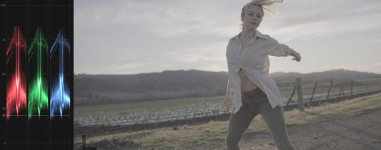
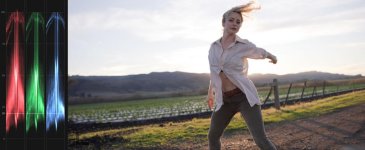
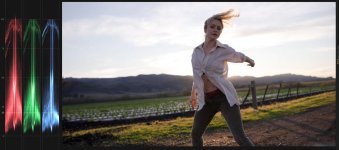
When I compare my images posted today, in Log, shot into the sun, with the sun just clipping, the deepest shadows are a good 10-15 IRE brighter than yours (about 2 stops) and the shadow side of her face, meant to "print" a pretty dark tone, is also about 2 stops brighter than the shadow side of your face. My image has none of the noise of your camera, but I bet if I dropped the exposure 2 stops it would start looking a lot like yours.

As for the streaking. Not sure what will happen when canon support looks at it. They may say it's in spec. They may say it's not. The fact that the streaks don't happen all the time would indicate it's an exposure issue or cmos smear, or some combination of both.

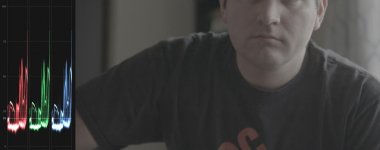
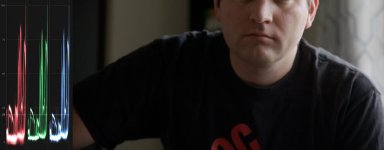
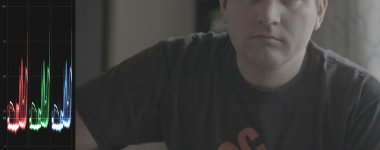
Note below when I apply the LUT to your image, it pretty much makes the t-shirt go jet black. No detail. That's telling you something about your exposure. When you look at my exposures, again, shot directly into the sun... note what happens to that dirt on the lower left of the image when I apply the same LUT. That dirt is in reality the color of dark roast espresso...blacker than your t-shirt...but you can still see detail, and all the other shadows are open. If I pull the exposure down (last image), you can see how everything comes together nicely. no noise, no streaks.

I'm going to drop it here. I'm just saying it might be worth a look at this, before sending back to Canon.

Screen Shot 2020-01-20 at 6.37.59 PM copy.jpgScreen Shot 2020-01-20 at 6.39.40 PM copy.jpgScreen Shot 2020-01-20 at 6.37.45 PM copy.jpgScreen Shot 2020-01-20 at 6.40.40 PM copy.jpgScreen Shot 2020-01-20 at 6.52.35 PM copy.jpg
 
Last edited:
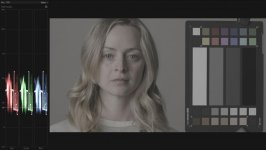
One more...I forgot I had some charts (duh) that might help illustrate the issue. Attached below is my 800 ISO chart that I posted last week. this chart is exposed to "spec" meaning the white patch is at about 60 IRE. If you look at the waveform at the lowest patch, that's a "gloss black" on the chart...in theory...that's "pure black"...ie...much darker than a mid-life black t-shirt lit by a window. YET, when we compare the waveform, you see that your T-shirt is exposed darker than that "pure" black (a tone that shouldn't have ANY detail in it.) In fact the shirt does have detail in it, but that's essentially a gimme..it's in the area that should render as pure black. Thus, the shirt is underexposed by a fair amount, and thats why you're seeing problems when you try to lighten and see that detail. Increase your exposure by 1 stop, and it will improve, Increase it by two and it will all go away. You may lose detail out the window, but at least then you'll know the range of your camera.

Chart 800 Log 3.jpgScreen Shot 2020-01-20 at 6.37.59 PM copy.jpg
 
If this is normal sensor behavior for the C500.2, it seems anyone with a C500.2 should be able to easily replicate the issue (e.g. underexpose by x, then push in post to reveal).
 
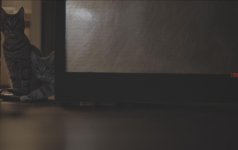
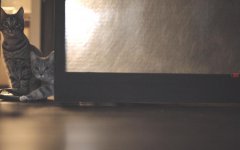
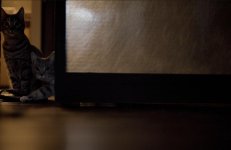
This is what I have, shot the morning after I received the camera. Chasing my cats into some dim light. Not sure the ISO. Was shot Xf-AVC. I caution anyone about suggesting that this is somehow proof that this camera is defective. What you're looking at is the absolute noise floor of the camera, and if you think there should be clean detail there, then you simply haven't been paying attention (feel free to read Canon's white papers about log gammas, mat porwolls comments etc). But someone will, and if you do, I'll call you an idiot now, to save myself a post. (whew...glad I got that out).

Here are two images...one is the native exposure...the other has been gained. The area I'd look at is the horizontal painted wood at the middle of the Frame to the right of Moki and Lila. (the area below is wood slats and so any horizontal pattern is that). Is there some patterning in the area I mentioned?....well...yeah...maybe. Is that normal for a canon, and many other cameras?...Absolutely. Actually, I'd say it's damn good for a Canon Camera. Edit: For perspective I added a version with the LUT applied. that's how dark the image 'should' look.

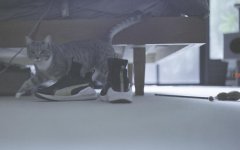
While I'm at it, let me show you another shot, already adjusted. This one, originally nearly as dark as the first shot, I'd suggest tells us how much work canon has done on CMOS smear...the C300 mark II would have a nice fat streak across the leg of the bed...

If I had to guess, I'll bet Airwolf's camera is exactly the same as mine. But that would be guessing. I'm not sitting there dealing with his camera, so I really don't know. But to me I think he's just underexposing, and thats that. Both he and the other poster both started out by taking about how they pushed the images "beyond what you'd reasonably do", showed us verifiably underexposed images, and then all of a sudden it's a defective camera.

This will be the 3rd camera I've owned in the $16k Cinema EOS range. It's by far the cleanest.

Noise floor.jpgNoise floor raised.jpgScreen Shot 2020-01-21 at 11.10.55 AM copy.jpgsmear test.jpg
 
Last edited:
Barry if you can closely replicate the other 2 cams, that would make a case that it's normal for the sensor. The examples you've posted so far look pretty good (and unlike the other 2 cams in terms of obvious streaks).
I occasionally observed sensor smear on the C300.2, however is was very minor. Worse was the double image from NR (which Canon later (mostly fixed) with IIRC a -1 option for NR lol). Apparently I'm the only one who noticed aliasing on the C300.2 (shot a lot of talking heads with the 24-70 F2.8 II (fairly sharp lens)): that was super annoying (plus the soft 4K). The C500.2 appears to have aliasing controlled (oversampling) and real 4K now (oversampling), so indeed good progress has been made. That doesn't rule out manufacturing and QC issues (like the memory reader (not really Canon's fault directly)).
 
I only pushed the image that far because after applying the stock canon LUT (which is supposed to be the fool proof way of grading Clog), I'm looking at the image and i'm going "what the hell is that streak?" Because I can see it in the shadows. I show it to my colleagues and they also see it. So I push it up and there is that ghost of a streak I was seeing, now in living color.

After further testing, it's possible this is appearing most prominently when there is an over exposed object next to an under exposed object. That window for example, or a street light. But I can't reproduce that 100% of the time either.

If that's the case and this camera just produces banding, what does that say about the camera, I can't shoot any over exposed objects and something dark at the same time? That's part of the reason I got a camera with "15+ stops of dynamic range". So it could outdo my Sony FS5, which by the way has never under even the worst underexposed circumstances ever produced a horizontal streak across the image. Noise yes, and lots of it, but never a defined shape like that. I've also shot quite a bit with the Blackmagic URSA Mini, and while that has a ton of fixed pattern noise when you raise the exposure up, it does not have this kind of banding, and I've pushed that camera to the extreme in a lot of uncontrolled situations, just shooting regular prores.

Does this also mean that I always have to crush the blacks down? What if I want to see whats in the shadows? Sure one can argue that a more contrasty image looks better, cleaner, etc, but what if I don't want that for a particular shot?

If this was a $1,400 EOS R, sure, i'll take banding in the shadows and say I underexposed it. For $16k I expect better. For that reason I sincerely hope this is just a defective batch of cameras.
 
  • Like
Reactions: mmo
I always thought that C500 MKII would be perfect for making cat videos.

(I kid, I kid)
 
Airwolf- in the hopefully unlikely event this behavior is considered normal by the manufacturer, especially if others can't replicate, you can first file a dispute with your CC (if you used a CC), otherwise this can be effective: https://www.dca.ca.gov/acp/songbev.shtml (there are similar laws in most states).

Did you try black balancing?
 
Airwolf- in the hopefully unlikely event this behavior is considered normal by the manufacturer, especially if others can't replicate, you can first file a dispute with your CC (if you used a CC), otherwise this can be effective: https://www.dca.ca.gov/acp/songbev.shtml (there are similar laws in most states).

Did you try black balancing?

Yeah, i'm using regular channels and giving them the opportunity to fix it before I go that far.
I did ABB, in fact I did a test before and after ABB, and there was no noticeable difference.
 
I only pushed the image that far because after applying the stock canon LUT (which is supposed to be the fool proof way of grading Clog), I'm looking at the image and i'm going "what the hell is that streak?" Because I can see it in the shadows. I show it to my colleagues and they also see it. So I push it up and there is that ghost of a streak I was seeing, now in living color.

After further testing, it's possible this is appearing most prominently when there is an over exposed object next to an under exposed object. That window for example, or a street light. But I can't reproduce that 100% of the time either.

If that's the case and this camera just produces banding, what does that say about the camera, I can't shoot any over exposed objects and something dark at the same time? That's part of the reason I got a camera with "15+ stops of dynamic range". So it could outdo my Sony FS5, which by the way has never under even the worst underexposed circumstances ever produced a horizontal streak across the image. Noise yes, and lots of it, but never a defined shape like that. I've also shot quite a bit with the Blackmagic URSA Mini, and while that has a ton of fixed pattern noise when you raise the exposure up, it does not have this kind of banding, and I've pushed that camera to the extreme in a lot of uncontrolled situations, just shooting regular prores.

Does this also mean that I always have to crush the blacks down? What if I want to see whats in the shadows? Sure one can argue that a more contrasty image looks better, cleaner, etc, but what if I don't want that for a particular shot?

If this was a $1,400 EOS R, sure, i'll take banding in the shadows and say I underexposed it. For $16k I expect better. For that reason I sincerely hope this is just a defective batch of cameras.

If I were you, I would be expecting to be told that this is normal behavior for the C500 II. Some of the reviews have said they haven't noticed CMOS smear, but that was probably just in comparison to the C300 II. On the C300 II, the streaking would be so much worse and you wouldn't need to raise the blacks to see it. It would just look like you were wearing striped shirt even with a LUT applied.
 
Hi Airwolf, I eliminated the classic quote so I could respond to each part...(my answers in italic)

I only pushed the image that far because after applying the stock canon LUT (which is supposed to be the fool proof way of grading Clog), I'm looking at the image and i'm going "what the hell is that streak?" Because I can see it in the shadows. I show it to my colleagues and they also see it. So I push it up and there is that ghost of a streak I was seeing, now in living color.

-------I applied the stock canon LUT to your image, and there is no streak visible, because the area in question is rendered completely black.

After further testing, it's possible this is appearing most prominently when there is an over exposed object next to an under exposed object. That window for example, or a street light. But I can't reproduce that 100% of the time either.

---------This could be cmos smear as mentioned previously, and also minor veiling flare - not normally visible with normal processing, but when raising shadows, it can appear in a variety of ways depending on the source of the flare.

If that's the case and this camera just produces banding, what does that say about the camera, I can't shoot any over exposed objects and something dark at the same time? That's part of the reason I got a camera with "15+ stops of dynamic range".

---------I've recommended that you consult Canon's white papers about their log gammas, HDR, etc. They are very blunt about the challenges achieving this kind of DR from their sensors. And the issues specifically with shadow noise. They are illuminating reads.

So it could outdo my Sony FS5, which by the way has never under even the worst underexposed circumstances ever produced a horizontal streak across the image. Noise yes, and lots of it, but never a defined shape like that. I've also shot quite a bit with the Blackmagic URSA Mini, and while that has a ton of fixed pattern noise when you raise the exposure up, it does not have this kind of banding, and I've pushed that camera to the extreme in a lot of uncontrolled situations, just shooting regular prores.

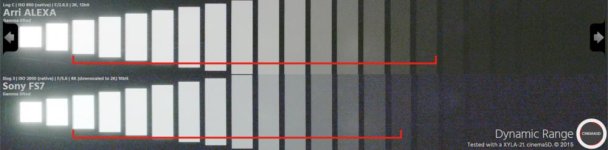
-----Fix pattern noise is generally not something that can be cleaned up in post. Take a look at the Fs7 xyla chart below and you'll see some streaking and plenty of fixed noise, and mountains of color noise around where the red line ends. Sony rated that camera at 14.7 stops, the reviewer about 12. (I'd have said more like 10 or 11 given the color noise.) There is a point in all of these cameras where the DR continues, but you can't really consider it usable, thus the term "usable Dynamic Range". Yes the C500 mark II has 15+ stops of DR. Is it all usable? No! Most cameras, including the ones you've mention are rated for around 15 stops. Most reviewers will tell you that they fall well short of that in terms of Usable stops. the only camera I know of that has typically rated it's DR accurately is that damn Alexa. 14 stops. 14 usable stops (well, maybe 13).

Does this also mean that I always have to crush the blacks down? What if I want to see whats in the shadows? Sure one can argue that a more contrasty image looks better, cleaner, etc, but what if I don't want that for a particular shot?

---------No you don't. (not any more than you do with all those camera's you've used with their tons of fixed pattern noise.) You just have to expose properly. I've demonstrated that for you already. I expose properly, and wallah...no noise, no crushed shadows, no problems. Smarter people than me will tell you to never underexpose Log gammas. If you refuse to believe it, I don't know what to tell you.

_______________________________

Unfortunately this discussion we're having isn't a new one. People buy a camera with these specs, and log gamma and they think they are a get out of jail free card. That they don't need to pay attention to their exposure, that they can just "fix it in post". If anything these cameras take more discipline because they have that ability to get you into trouble. There is so much range visible in the viewfinder, it's hard to tell what's what. Now, If you took your beloved FS5 out of LOG mode and displayed strait Rec 709, and underexposed the image, you'd know it...the important stuff would be black..and so, you'd probably increase exposure. But then your highlights would be blown out. So then you'd have to go to work... you might have to get out a light, or a fill card, or a flag. Perish the thought!

Log gammas are, for the most part, the same goddamn information as that rec.709 image, just spread out so you can push it around in post a little more. Thinking about it any other way is at your own peril.

sony alexa xyla.jpg
 
Last edited:
Back
Top