C300: C300MKIII vs. C70 - An Unsolved Mystery

chris f

Veteran
I'm working through all of my side by side tests I ran the other week, and right out of the gate I was surprised at how different the color & curve/lift seems to be between the two cameras. I shot BTS of the whole test so I can confirm that both cameras had the exact same settings across the board, but they look so different to me that I'm wondering if there could be some other user error on my part? Both cameras had been on for about 30 minutes before I black balanced both cameras. Both cameras had the same picture settings, recording settings, and the exact same lens.

Picture Profile settings for both cams are below, only difference is the line "Look File - Off" is an option only on the C70, but as best I can tell from the manual this only for turning custom loaded LUT files on or off, and doesn't apply to the built in CP files (can someone with a C70 confirm this?)
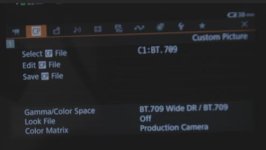
Screen Shot 2021-02-05 at 2.12.51 PM.jpg

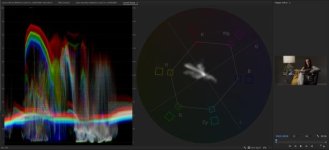
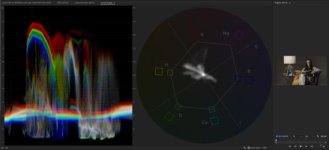
The differences between the images and scopes won't be as noticeable on here because DVXUSER compresses the heck out of photos, but you can download the two 4K .png exports from my Premiere timeline & the Scopes here:
https://drive.google.com/drive/folders/1Eww-I6r12yk9MdCTl9PLV4jiRSDlloKu?usp=sharing

C70

C70.jpg
C70_Scopes.jpg

C300MKIII
C300MKIII.jpg
C300MKIII_Scopes.jpg

There's an obvious color shift between the cameras, but I also find it strange that there's such a difference in the scopes. It's almost as if the Wide DR in the C70 is a different "Wide DR" that's punchier....
 
Hi Chris,

What kind of color shift are you seeing, by eye and on the scopes? Can you describe it? I don't see it.

What I definitely do see is brighter overall exposure on the C300mk3. Since every part of the waveform looks uniformly higher on the C300 shot than on the C70, I'm not sure that the C70 is punchier, if by punchier you mean more contrasty.

Not sure what would account for different exposure though.
 
Last edited:
Hi Chris,

What kind of color shift are you seeing, by eye and on the scopes? Can you describe it? I don't see it.

What I definitely do see is brighter overall exposer on the C300mk3. Since every part of the waveform looks uniformly higher on the C300 shot than on the C70, I'm not sure that the C70 is punchier, if by punchier you mean more contrasty.

Not sure what would account for different exposure though.


If you download the originals from the Google Drive link you can see (especially in the scopes and waveform) that the C300 is leaning more yellow & green and the shadows aren't as crushed (coming in at about 4 IRE, whereas the C70 is touching 0 IRE)
 
If you download the originals from the Google Drive link you can see (especially in the scopes and waveform) that the C300 is leaning more yellow & green and the shadows aren't as crushed (coming in at about 4 IRE, whereas the C70 is touching 0 IRE)

Ok, I just looked on a different monitor and I definitely see a more magenta lean on the C70. However, regarding exposure, it's not just the shadows that are crushed. The entire C70 waveform is lower by those 4 IRE that you are mentioning. The peak of the highlights on the forehead for example, or the highlights from the lamp. If you take any of those as a reference point, that difference of 4-ish IRE is present between the two, so I'm not sure that it is a different tonality spread. It seems to be uniformly lower exposure on the C70. The color difference is definitely more concerning and notable. It could probably be easily corrected, but that defeats the point of buying two cameras that are supposedly using the same sensor for multicam shoots so I definitely understand the concern.
 
I have a friend that owns two C70s. I might see if I can borrow both and do another test with a color chart and gray card as well to get a better idea of what's going on and to make sure it wasn't a fluke or just the specific C70 that I used last time.

I expected to see some sharpness/noise differences in some of the different modes of the two cameras, but I didn't expect to see such a big color difference. Definitely disappointing...
 
Fascinating. I wonder if you'd get the same color shift if you shot in C-Log 2 on both cameras, or some other picture profile.
 
I just run a three camera setup last week with 2 x C300MKIII's and a C70 and can confirm the C70 colours do not perfectly match the C300MKIII's. I was slightly shocked as its the same sensor. Not a huge difference between them but still they should just match out of the can. Not sure if this is something Canon should really address in a firmware update. In my opinion all of the modern Canon cameras should match perfectly in terms of colour.
 
It’s almost like the C70 has a color cast across the whole image. The image doesn't look as neutral as the C300. I actually ran some tests last week with some IR cut filters because I was wondering if the C70 suffered some sort of minor IR pollution (it doesn’t look like it.)

I haven’t done a test to see if the NDs themselves are creating a non IR related color cast or color shift. Might be worth testing? If it is truly an identical sensor, the only variable would either be the NDs used for the RF mount or the color profiles themselves.

A lot of the footage from the C70 I see online has these similar color qualities. The skin has kind of a reddish/brown look, rather than a pink or golden look you’d see from the C300ii or the C100. If you dial out the red, you end up with a really cool toned image.

I’ve been digging into the Gamma Shift settings in the color matrix settings. I think I was able to improve it but I definitely don’t like the image straight out of the camera as much as I did with the C300ii.
 
Last edited:
I’m following this because I find it interesting. It must be extremely frustrating because these cameras are marketed in such a way that would lead you to believe you could use the C70 as a B-Cam to C300 MkIII or even the C500 MkII with their speed booster. So much so that I had considered picking up the C70 as third camera angle for multi-person interviews but I would also want the ability to do live feeds that just match (with the same settings of course) and/or I also wouldn’t want to spend a bunch of time in post matching LOG footage.
 
It’s almost like the C70 has a color cast across the whole image.

I haven’t done a test to see if the NDs themselves are creating a non IR related color cast or color shift. Might be worth testing? If it is truly an identical sensor, the only variable would either be the NDs used for the RF mount or the color profiles themselves.

That is a good thought, but unfortunately in my testing I did lots of tests with and without the ND filters and it is the exact same difference in all of the clips.

If I can get the C70s again I’ll test all of the cams in Log 2 as well and try a different copy of the lenses, but I will say that I did a two camera shoot earlier that week with those cams with different lenses and was noticing the same types of differences...
 
Fascinating. I wonder if you'd get the same color shift if you shot in C-Log 2 on both cameras, or some other picture profile.

Will try this out if I can borrow the C70 again. Something interesting to note is that during my tests I also shot the C300mkiii in raw and then placed the appropriate Wide DR LUT that Canon provides in post and as you might imagine… none of the three images match! Interestingly though the C300mkiii raw with the LUT applied matches the C70 more closely than the C300 internal Wide Dr.
 
To sort out the confusion with mentioning of multiple copies of lenses, did you test the cameras with the exact same lens?

You know, firstly attached to one camera and then to other?
 
To sort out the confusion with mentioning of multiple copies of lenses, did you test the cameras with the exact same lens?

You know, firstly attached to one camera and then to other?

"Both cameras had the same picture settings, recording settings, and the exact same lens."
 
"Both cameras had the same picture settings, recording settings, and the exact same lens."

*Correction: same lens, multiple copies. These tests were done with the cameras side by side at the same time using two Canon EF 50mm 1.4 lenses.

I was able to get my friend’s two C70s today and in my retests I’m going to test all 3 cameras one at a time with the same copy of the Canon EF L 50mm 1.2 lens so I can rule the lens variable out of the equation.

That said,that would be a pretty wild variation between the two copies of the original lens to see that much difference in exposure and color rendition, no?
 
In my new tests I’ll shoot each camera in Wide DR, Log 3, and Log 2 and will also shoot the C300MKIII in raw as well to see if those produce any different results. Like my first test I will also shoot with and without the built-in NDs to see if those are causing any shifts as well.

Anything else I should consider in testing?
 
In my new tests I’ll shoot each camera in Wide DR, Log 3, and Log 2 and will also shoot the C300MKIII in raw as well to see if those produce any different results. Like my first test I will also shoot with and without the built-in NDs to see if those are causing any shifts as well.

Anything else I should consider in testing?

Maybe try Wide DR in a few different color matrix settings? Production, Video, and Neutral?

Have you checked to see if the “color matrix tuning” settings were the same on the C70 and the C300? In theory, if you pointed both at a color chart, you should be able to manually compensate for the shift with the C70.

You could also try saving a CP file from the C300 and installing it on the C70. This can be done in the CP menu.

I still think it’s weird that Canon hasn’t updated their LUTs for the new cameras.
 
Maybe try Wide DR in a few different color matrix settings? Production, Video, and Neutral?

Now that Ben says that, I do recall in the past week or so hearing someone say that if you put the different Canon camera models into their “Neutral” color profile that it should match them all up but it specifically needed to be “Neutral” to work. I can’t remember who / where I heard that or I’d give them credit. Plus, I don’t want to take the blame if that doesn’t work :)

You may have already done that but it may be worth a try. If this worked, it should solve the color issue but I wouldn’t think it would affect the luminance difference. That may boil down to the how they’re processing the information off the sensor. I know they’ve advertised the C70 as the same sensor as the C300 MkIII but I also wouldn’t put it past them to pull their punches just a little to give the more expensive camera body the edge.

Like you though, I do feel like there should be some simple menu options to match all of the colors from this various new crop of Canon cameras; obviously the luminance will differ based on the sensor / processing in each camera body.

You could also try saving a CP file from the C300 and installing it on the C70. This can be done in the CP menu.

I’ve really taken to doing this with my pair of C500 MkII’s. When prepping for a shoot I just setup one camera and then transfer all of the settings over to the second camera body. It’s so simple and there’s no worrying if you didn’t match up some of the more minute settings like Color Matrix for example.

Can you do this between different camera bodies / models? I wasn’t sure since there are bunch of unique settings / functions to a certain camera body. If so though, that would be amazing. I only have the C500 MkII’s so I can’t test it.
 
Not that this is very relevant to Chris' quandry but our C200 and C300 MKII also look surprisingly different. They dropped some of the fine tuning Matrix settings from the C200 that are on the C300 MKII
but even at as close as you can get to matching all settings, the C200 is lower contrast and less punchy than the C300 MKII generally. Wish I was a better colorist. Even with my kindergarten level
CC skills, I have gotten them to match close enough for clients although all of us would see the subtle differences.
 
Maybe try Wide DR in a few different color matrix settings? Production, Video, and Neutral?.

Good idea, will do. I did a quick test yesterday with my C300MKIII on all three of those modes to get a general idea of what they’re doing. Pulling the clips into premiere and looking at the scopes and RGB waveform Production and Video were dang near the exact same look, whereas the Neutral was warmer, shifted towards magenta, and the image and especially the skin tones were more saturated aka more Canon-y.

Jumping in the studio today with all three cams to run them through all modes. Should have a pile of data to sift through this week...
 
Now that Ben says that, I do recall in the past week or so hearing someone say that if you put the different Canon camera models into their “Neutral” color profile that it should match them all up but it specifically needed to be “Neutral” to work. I can’t remember who / where I heard that or I’d give them credit. Plus, I don’t want to take the blame if that doesn’t work :)

Will test this out today, based on my preliminary tests my gut tells me that C70 @ Production w/ C300 @ Neutral will get the images the closest in camera.
 
Back
Top