You would be surprised...That said,that would be a pretty wild variation between the two copies of the original lens to see that much difference in exposure and color rendition, no?

Navigation
Install the app
How to install the app on iOS
Follow along with the video below to see how to install our site as a web app on your home screen.
Note: This feature may not be available in some browsers.
More options
You are using an out of date browser. It may not display this or other websites correctly.
You should upgrade or use an alternative browser.
You should upgrade or use an alternative browser.
C300: C300MKIII vs. C70 - An Unsolved Mystery
- Thread starter chris f
- Start date

chris f
Veteran
You would be surprised...
Consider me surprised! Turns out the other copy of the lens was likely (if not totally) responsible for the exposure shift and I think some of the color shift between the two cameras (more testing to be done on that....)
However, there is definitely a difference between the two cams.
For reference this was my methodology for Round 2 of my testing: (If I did any step of this incorrectly, please let me know)
I tested 3 different cameras:
A CAM: Canon C300MKIII
B CAM: Canon C70 w/ standard Canon RF to EF adapter
C CAM: Canon C70 w/ .71x Canon RF to EF adapter (Canon's speedbooster)
1. All cameras ran for 30+ minutes before black balancing. After black balancing the tests began and no camera changed its ISO throughout the testing
2. All cameras used the same copy of the Canon EF 50mm f/1.2 L USM lens for all of the tests
3. All cameras used the exact same settings for manual white balance, aperture, shutter, ISO, frame rate, frame size, and data rate.
4. White balance reference for each camera was obtained by shooting an X-Rite Video ColorChecker on the full White Balance Target side and exposed as close as possible to 18% grey using Canon's false color by changing the shutter angle and aperture as needed, but leaving ISO at 800 and not using any ND filters.
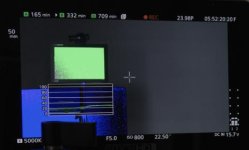
5. All cameras had their Custom Picture Profile settings reset to factory default. I tested every single combination for all 3 cameras (Wide DR, LOG 2, LOG 3) in every possible Color Matrix (Neutral, Production Camera, Video). For this specific example below I was using the BT.709 Wide DR / BT.709 Gamma/Color Space and the Neutral Color Matrix.
6. I had a BTS camera pointed at the active camera's screen to confirm all setting changes were correctly documented and no setting was accidentally changed or forgotten.
Here is a link to the full res references for downloading: https://drive.google.com/drive/folders/17YZ8W0C6l_I7NF5Z8P2k9AKBDqDodkJa?usp=sharing
(in all likelihood you'll need to download these to see the subtleties)
If you download this file from the google drive link you'll be able to see what adjustments were needed in the Color Temperature and Tint sliders in order to achieve a proper white balance for each camera inside of Adobe Premiere.
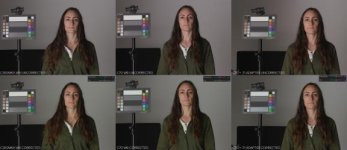
Here is a blow up of the RGB Waveform of all three cameras's WB reference (Step #4) with no WB corrections applied. I also boosted the saturation by 200% to visually exaggerate the color biases so you can more easily see what's going on in the color balances of each camera (this goes the same with the Scopes that I uploaded to the Google Drive as well).
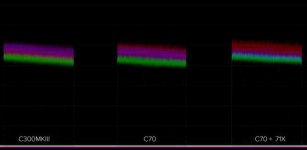
Overall when it came to white balance here are the results:
All three cameras were on the magenta side of things (no shocker there #CANON), however the C70 was a little warmer and a little more magenta than the C300MKIII and surprisingly(?) the C70 with the .71 adapter ran considerably warmer than even the other C70, but it was the least magenta out of the three.
I'm sure there's some margin of error there as to my eye the corrected C70 + .71 image still looks a hair warmer and more magenta than the other two, but if you reference the linked Waveform monitor & Vectorscope you can see what's going on.
Last edited:
rob norton
Veteran
Consider me surprised! Turns out the other copy of the lens was likely (if not totally) responsible for the exposure shift and I think some of the color shift between the two cameras (more testing to be done on that....)
However, there is definitely a difference between the two cams.
For reference this was my methodology for Round 2 of my testing: (If I did any step of this incorrectly, please let me know)
I tested 3 different cameras:
A CAM: Canon C300MKIII
B CAM: Canon C70 w/ standard Canon RF to EF adapter
C CAM: Canon C70 w/ .71x Canon RF to EF adapter (Canon's speedbooster)
1. All cameras ran for 30+ minutes before black balancing. After black balancing the tests began and no camera changed its ISO throughout the testing
2. All cameras used the same copy of the Canon EF 50mm f/1.2 L USM lens for all of the tests
3. All cameras used the exact same settings for manual white balance, aperture, shutter, ISO, frame rate, frame size, and data rate.
4. White balance reference for each camera was obtained by shooting an X-Rite Video ColorChecker on the full White Balance Target side and exposed as close as possible to 18% grey using Canon's false color by changing the shutter angle and aperture as needed, but leaving ISO at 800 and not using any ND filters.
View attachment 142328
5. All cameras had their Custom Picture Profile settings reset to factory default. I tested every single combination for all 3 cameras (Wide DR, LOG 2, LOG 3) in every possible Color Matrix (Neutral, Production Camera, Video). For this specific example below I was using the BT.709 Wide DR / BT.709 Gamma/Color Space and the Neutral Color Matrix.
6. I had a BTS camera pointed at the active camera's screen to confirm all setting changes were correctly documented and no setting was accidentally changed or forgotten.
Here is a link to the full res references for downloading: https://drive.google.com/drive/folders/17YZ8W0C6l_I7NF5Z8P2k9AKBDqDodkJa?usp=sharing
(in all likelihood you'll need to download these to see the subtleties)
If you download this file from the google drive link you'll be able to see what adjustments were needed in the Color Temperature and Tint sliders in order to achieve a proper white balance for each camera inside of Adobe Premiere.
View attachment 142329
Here is a blow up of the RGB Waveform of all three cameras's WB reference (Step #4) with no WB corrections applied. I also boosted the saturation by 200% to visually exaggerate the color biases so you can more easily see what's going on in the color balances of each camera (this goes the same with the Scopes that I uploaded to the Google Drive as well).
View attachment 142330
Overall when it came to white balance here are the results:
All three cameras were on the magenta side of things (no shocker there #CANON), however the C70 was a little warmer and a little more magenta than the C300MKIII and surprisingly(?) the C70 with the .71 adapter ran considerably warmer than even the other C70, but it was the least magenta out of the three.
I'm sure there's some margin of error there as to my eye the corrected C70 + .71 image still looks a hair warmer and more magenta than the other two, but if you reference the linked Waveform monitor & Vectorscope you can see what's going on.
Thanks for sharing the tests Chris. How big an issue are these differences to you?
chris f
Veteran
In the grand scheme of things not that big, but it is a little disappointing that you can't just grab a C300MKIII and a C70 and get matching images with all of the same settings (especially since it's supposed to be the same sensor).
But perhaps my biggest takeaway is that I didn't realize that a different copy of a lens could effect the image so much. I guess I expected maybe some slight variation in sharpness, or chromatic aberration or something, but not color and brightness.
After doing this second round of testing I think it may take some time, but if/when I buy a C70 as a B-CAM I'll make a custom picture profile with these adjustments so they match better out of the camera. Since you can load custom presets/LUTs to the C70 that will be nice to fix the color matching that early in the pipeline.
But perhaps my biggest takeaway is that I didn't realize that a different copy of a lens could effect the image so much. I guess I expected maybe some slight variation in sharpness, or chromatic aberration or something, but not color and brightness.
After doing this second round of testing I think it may take some time, but if/when I buy a C70 as a B-CAM I'll make a custom picture profile with these adjustments so they match better out of the camera. Since you can load custom presets/LUTs to the C70 that will be nice to fix the color matching that early in the pipeline.

puredrifting
Major Contributor
In the grand scheme of things not that big, but it is a little disappointing that you can't just grab a C300MKIII and a C70 and get matching images with all of the same settings (especially since it's supposed to be the same sensor).
But perhaps my biggest takeaway is that I didn't realize that a different copy of a lens could effect the image so much. I guess I expected maybe some slight variation in sharpness, or chromatic aberration or something, but not color and brightness.
After doing this second round of testing I think it may take some time, but if/when I buy a C70 as a B-CAM I'll make a custom picture profile with these adjustments so they match better out of the camera. Since you can load custom presets/LUTs to the C70 that will be nice to fix the color matching that early in the pipeline.
Not the same thing, but I rented three or four C100s five years ago, used the same lenses on three of the cams, with the same setup files and the footage couldn't looked more different. I couldn't figure out why when we used the same setup file and lenses,
some were more saturated and cooler versus less contrasty and warmer.
But last year, rented four C200s and used my own on a big corporate shoot for Trader Joes and they all matched perfectly, even using pretty different lenses (all were Canon, a mix of stills lenses and 18-80s) on all five. But this is live streaming
color matching, which in a way, is easier than trying to get things to match in post.
chris f
Veteran
But last year, rented four C200s and used my own on a big corporate shoot for Trader Joes and they all matched perfectly, even using pretty different lenses (all were Canon, a mix of stills lenses and 18-80s) on all five.
I too have done several live stream multicam shoots with 4 C200s and to my eye they all matched perfectly across the board. In my experience being a Canon shooter for about 13 years now, Canon's cameras match great if they're different copies of the same model, but if it's a different model 7D vs. 5DMKII, C100 vs. C100MKII, C300MKII vs. Canon C500, C300MKIII vs. C200, etc. even though they might have the same picture profiles (and some the same sensor), I've never had them match straight out of the camera.
Luckily the new Canon cameras let you load custom profiles from an SD card, so as long as the C300MKIII to C70 difference is consistent across the board once I make the right tweaks I can store it on a memory card and quickly load it onto any additionally rented cams (I hope

chris f
Veteran
Vectorscope question:
Below is the vectorscope readings of the C70 w/ regular RF to EF adapter (no glass) and the C70 w/ .71x RF to EF adapter (speedbooster). With the regular adapter the Yellow and Magenta aren't as tight of a line as the rest of the colors, but when you add in the .71x adapter the Yellow and Magenta lines get even further spread out.
I'm not a scope genius, so what does that mean when the "line" pointing to the hue marker spreads out?
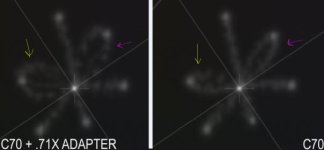
Below is the vectorscope readings of the C70 w/ regular RF to EF adapter (no glass) and the C70 w/ .71x RF to EF adapter (speedbooster). With the regular adapter the Yellow and Magenta aren't as tight of a line as the rest of the colors, but when you add in the .71x adapter the Yellow and Magenta lines get even further spread out.
I'm not a scope genius, so what does that mean when the "line" pointing to the hue marker spreads out?
Ben_Ericson
Well-known member
Really interesting stuff. Thanks for the very detailed documentation.
I would be curious what your initial thoughts are with the noise levels on the new DGO sensor? I did a quick side by side with my C70 and a C300ii. I am not seeing a night and day comparison. Both look pretty clean to me.
The noticeable difference is that the C300 Mk2 definitely has WAY more yellow in the skin tones and it looks better out of the gate to my eyes.
I would be curious what your initial thoughts are with the noise levels on the new DGO sensor? I did a quick side by side with my C70 and a C300ii. I am not seeing a night and day comparison. Both look pretty clean to me.
The noticeable difference is that the C300 Mk2 definitely has WAY more yellow in the skin tones and it looks better out of the gate to my eyes.
chris f
Veteran
Really interesting stuff. Thanks for the very detailed documentation.
I would be curious what your initial thoughts are with the noise levels on the new DGO sensor? I did a quick side by side with my C70 and a C300ii. I am not seeing a night and day comparison. Both look pretty clean to me.
The noticeable difference is that the C300 Mk2 definitely has WAY more yellow in the skin tones and it looks better out of the gate to my eyes.
I haven't dove into DGO testing yet, but the more yellow skin tones on the C300MK2 doesn't surprise me. Canon's color science is great, but isn't constant when you jump to different models.
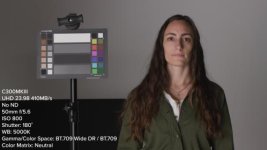
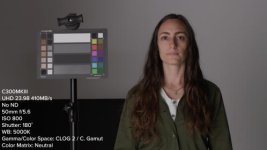
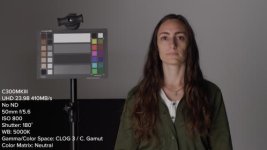
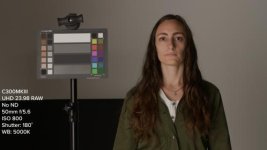
Also, if anyone needs a good laugh toggle through these comparisons via the Google Drive link below of Canon's Wide DR LUT that's built into the C300MKIII and what happens when you shoot in CLOG 2, CLOG 3, and RAW and then apply their corresponding LUTs (CLOG2 & RAW used the CinemaGamut_CanonLog2-to-BT709_WideDR_65_FF_Ver.2.0.cube LUT and CLOG3 used the CinemaGamut_CanonLog3-to-BT709_WideDR_65_FF_Ver.2.0.cube LUT)
Link to full res: https://drive.google.com/drive/folders/14CAxRFn_FE4VPi2vsV7jdtWkdq1JE3_3?usp=sharing

Jaime Valles
Veteran
Thanks for the testing, Chris! I just got my C70 in the mail, and can confirm... that it turns on! WOOT!!!
I have a big video shoot this Monday, so will spend the weekend in testing mode myself. Hopefully, this will be a big upgrade in every respect from my aging C100 cameras!
I have a big video shoot this Monday, so will spend the weekend in testing mode myself. Hopefully, this will be a big upgrade in every respect from my aging C100 cameras!
Ben_Ericson
Well-known member
[SUB][/SUB]
Nice work. Extremely detailed and thorough.
Agreed, Canon really need to update their LUTs and sort out the post work flow. The downloadable LUT pack for the C70 or C300iii even includes conversions for gamma profiles that no longer exist with the new sensor! (CLOG2/BT709.)
I am also curious why there is no CLOG2 to REC709 LUT?
Will probably make another video or two out of all the tests I ran, but here's my findings so far on the Canon C70 vs. my C300MKIII:
Nice work. Extremely detailed and thorough.
Agreed, Canon really need to update their LUTs and sort out the post work flow. The downloadable LUT pack for the C70 or C300iii even includes conversions for gamma profiles that no longer exist with the new sensor! (CLOG2/BT709.)
I am also curious why there is no CLOG2 to REC709 LUT?
puredrifting
Major Contributor
Thanks Ben! Yea I don't understand Canon's thinking on their LUTs, it seems like they could just pay a proper colorist like a couple of day rates to get their LUTs dialed in for the new cameras, save the LUTs and upload a new bundle.
Chris, applying logic and practicality to what Canon does?
It's funny as I've been testing and comparing the R5 and my C300 MKiii for sharpness (Oddly I thought the R5 wasn't looking particularly sharp, must have been a wrong setting being used) and half way through my tests I watched your video Chris and went and got the latest Canon LUTs I could find and and applied the "CinemaGamut_CanonLog2-to-BT709_WideDR_33_FF_Ver.2.0.cube" LUT to all three clips (screen shots below) and to my surprise they looked very very close. This obviously might not be relevant to the C70 conversation but I found it super interesting non the less and wanted to share as I've always had difficulty with matching even when using a Colour Checker and didn't expect the R5 to be so close.
In term of colour correction (I'm in FCPX) all I did was raise the overall brightness on the 8K clip +0.05 as it was a fraction under vs the other clips, apply the Canon LUT and applied the exact same curve to each clip for some contrast. No saturation or other colour manipulation. I did punch in on the R5 to match the Super 35 crop and the XFAVC image had Digital IS on (doh) with is why it's got a slight crop.
Ps. Ignore the quality of the shots, it was a very quick and dirty sharpness test. Also they seem to have been compressed quite a bit when uploading.
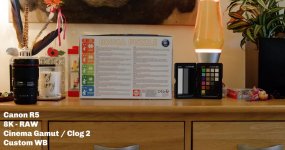
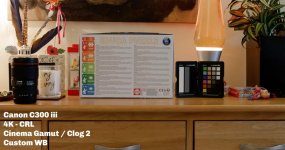
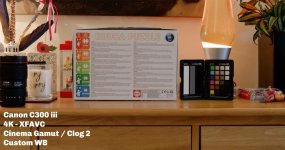
In term of colour correction (I'm in FCPX) all I did was raise the overall brightness on the 8K clip +0.05 as it was a fraction under vs the other clips, apply the Canon LUT and applied the exact same curve to each clip for some contrast. No saturation or other colour manipulation. I did punch in on the R5 to match the Super 35 crop and the XFAVC image had Digital IS on (doh) with is why it's got a slight crop.
Ps. Ignore the quality of the shots, it was a very quick and dirty sharpness test. Also they seem to have been compressed quite a bit when uploading.
Hi Chris, I finally got around to viewing this. Great work, good to watch.
I use long GOP for corporate work and as per your testing, don't really see any difference between it and All-I compression.
What I do see a big difference in (and could in your test also) is RAW vs XFAVC. That's what puts me off the C70, the lack of RAW. For my personal projects and things I care about I much prefer Canon CRL.
To me in all the reviews of the C70 I've had a cursory look at all the talk is of C300mkIII image quality (and how "the image is that good, you don't need Raw")... well for me CRL is a big deal. XFAVC looks mushy by comparison, even in that short YouTube comparison you did. I'd take C200 CRL footage with a touch of Neatvideo over the XFAVC from the newer cams (workflow aside).
I'm hoping Canon releases a camera in a very similar form factor to the C70 that includes CRL (an EVF would be nice too).
Thanks for your work - like your review style. Clear, facts based, not full of boorish self promotion - you come across really well.
I use long GOP for corporate work and as per your testing, don't really see any difference between it and All-I compression.
What I do see a big difference in (and could in your test also) is RAW vs XFAVC. That's what puts me off the C70, the lack of RAW. For my personal projects and things I care about I much prefer Canon CRL.
To me in all the reviews of the C70 I've had a cursory look at all the talk is of C300mkIII image quality (and how "the image is that good, you don't need Raw")... well for me CRL is a big deal. XFAVC looks mushy by comparison, even in that short YouTube comparison you did. I'd take C200 CRL footage with a touch of Neatvideo over the XFAVC from the newer cams (workflow aside).
I'm hoping Canon releases a camera in a very similar form factor to the C70 that includes CRL (an EVF would be nice too).
Thanks for your work - like your review style. Clear, facts based, not full of boorish self promotion - you come across really well.
chris f
Veteran
Hi Chris, I finally got around to viewing this. Great work, good to watch.
I use long GOP for corporate work and as per your testing, don't really see any difference between it and All-I compression.
How has the long GOP been in editing? I haven't done much with Long GOP outside of my tests yet, but have had several people mention that it can be harder on your system to edit (I haven't noticed any performance issues on my end)
How has the long GOP been in editing? I haven't done much with Long GOP outside of my tests yet, but have had several people mention that it can be harder on your system to edit (I haven't noticed any performance issues on my end)
Hi Chris, editing everything on a 16” mbp in FCPX just fine with basic corrections. No missed frames.
I haven’t even tried an ALL I project as I can’t see a visual difference and mostly what I shoot is long form interviews.
I do see quite a jump stepping up to CRL.