
Navigation
Install the app
How to install the app on iOS
Follow along with the video below to see how to install our site as a web app on your home screen.
Note: This feature may not be available in some browsers.
More options
You are using an out of date browser. It may not display this or other websites correctly.
You should upgrade or use an alternative browser.
You should upgrade or use an alternative browser.
AVCHD encoder research
- Thread starter Vitaliy Kiselev
- Start date
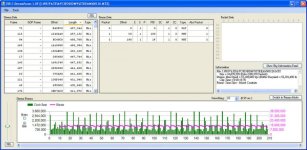
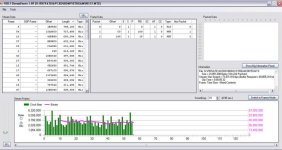
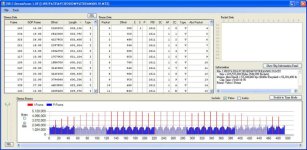
few tests had been done, post all of them because dont want to waste.
all test carried by GH1 PAL 20/F1.7@F2.8 iso400 shuttle:1/100
the setting can refer to the file name
[FHD bitrate]_[OB/ "u" means unclick]_[OB2]_[PB]_[PB2]_[shooting mode:FHD/SH]_[interlace/progressive]
thanks for vitaliy's ptools, cbrandin's streamparser and pappas's chart for testing.
here you go
all test carried by GH1 PAL 20/F1.7@F2.8 iso400 shuttle:1/100
the setting can refer to the file name
[FHD bitrate]_[OB/ "u" means unclick]_[OB2]_[PB]_[PB2]_[shooting mode:FHD/SH]_[interlace/progressive]
thanks for vitaliy's ptools, cbrandin's streamparser and pappas's chart for testing.
here you go
Attachments
-
 u-u-u-u-u FHD F2.8 100 iso400.jpg94.6 KB · Views: 0
 -
 u-u-u-u-u FHD time F2.8 100 iso400.jpg88.5 KB · Views: 0
 -
 u-u-u-u-u FHD-p time v1.jpg78.6 KB · Views: 0
 -
 u-u-u-u-u FHD-p time.jpg76.4 KB · Views: 0
 -
 u-u-u-u-u FHD-p v1.jpg90.6 KB · Views: 0
 -
 u-u-u-u-u FHD-p.jpg89.8 KB · Views: 0
 -
 u-u-u-u-u SH time.jpg88.1 KB · Views: 0
 -
 24-u-u-u-u FHD-p.jpg91.1 KB · Views: 0
 -
 24-u-u-u-u FHD-p time.jpg77 KB · Views: 0
 -
 24-u-u-u-u FHD.jpg94.8 KB · Views: 0
 -
 24-u-u-u-u FHD time.jpg88.8 KB · Views: 0
 -
 u-u-u-u-u SH.jpg92.7 KB · Views: 0
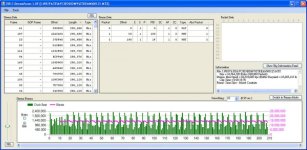
20 seconds as a standard time, but native facing freeze of camera so reduced to 5 seconds
Attachments
-
 u-24-u-u-u FHD time.jpg88.3 KB · Views: 0
 -
 u-24-u-u-u FHD.jpg96 KB · Views: 0
 -
 u-50-u-u-u FHD time.jpg87.3 KB · Views: 0
 -
 u-50-u-u-u FHD.jpg95.1 KB · Views: 0
 -
 u-u-27-u-u SH time.jpg88 KB · Views: 0
 -
 50-63-u-u-u FHD-p.jpg73.5 KB · Views: 0
 -
 50-63-u-u-u FHD-p time.jpg75.7 KB · Views: 0
 -
 50-u-u-u-u FHD.jpg95.4 KB · Views: 0
 -
 50-u-u-u-u FHD time.jpg89.2 KB · Views: 0
 -
 u-u-27-u-u SH.jpg92.8 KB · Views: 0
 -
 50-80-u-u-u FHD1.jpg95.4 KB · Views: 0
 -
 50-80-u-u-u FHD time1.jpg87.9 KB · Views: 0
if adjust the OB2 alone seems not affect of output. and tests stop here. hope that helpful, over !!
Attachments




Hey zhaoyun,
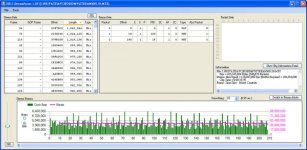
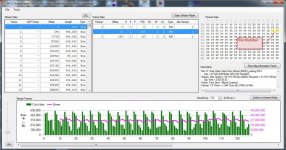
Can you do me a favor? For the different modes: FHD (no Native 25p), SH, H, L, and FHD pN (with the Native 25p set); could you tell me what the number shown in the attached capture is? It should be in Frame 0, Packet 1 (with a PID of 100) in timing mode (I highlighted it in the capture for you) in the Packet Data window. For example the attached picture is for FHD 25pN (native mode checked) and has the value of 433F. I only need PAL information.
Chris
Can you do me a favor? For the different modes: FHD (no Native 25p), SH, H, L, and FHD pN (with the Native 25p set); could you tell me what the number shown in the attached capture is? It should be in Frame 0, Packet 1 (with a PID of 100) in timing mode (I highlighted it in the capture for you) in the Packet Data window. For example the attached picture is for FHD 25pN (native mode checked) and has the value of 433F. I only need PAL information.
Chris
Attachments

Vitaliy Kiselev
Carbonite Member
All of this patches must be the same.
As of limiting bitrate - I described my understanding in few threads already.
As of limiting bitrate - I described my understanding in few threads already.
fraustosound
Member
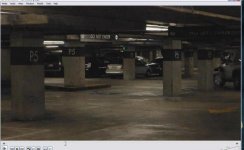
Shot some footage in a dimly lit parking structure. Lots of mud and macroblocking but what really caught my eye is the pulsing. Looks like one frame is clean and consequent frames deteriorate. It happens at a steady rhythm of about 1.3 BPM. Take a look at the video to see for yourself. Encoder does not like low light levels.
http://www.youtube.com/watch?v=UPy-2N02s6s
edit - well, you can't see it in the youtube vid so I will upload some stills....
edit 2 - Now this is interesting.....I just opened the video in Windows media player and there is far less mud and the pulsing is not noticeable. I only notice the problem when I open it with VLC player. The screengrab below is from VLC. I cannot seem to do a screengrab from Windows media player....I just get a black screen.
edit 3 - I just downloaded the latest version of VLC and the macroblocking/mud is almost non existent. Goes to show how having the latest version of a program can save many a headache! Look at the the two screenshots below to see the difference.
GF1
PAL 25fps
ISO800
1/50 shutter
Using zhaoyun's AVCHD PTool settings:
Video Bitrate FHD/SH=50000000
Video Bitrate H=36000000
Video Bitrate L=27000000
Overall Bitrate=54000000
Preset bitrate 2=540
Overall Bitrate 2=45000000
http://www.youtube.com/watch?v=UPy-2N02s6s
edit - well, you can't see it in the youtube vid so I will upload some stills....
edit 2 - Now this is interesting.....I just opened the video in Windows media player and there is far less mud and the pulsing is not noticeable. I only notice the problem when I open it with VLC player. The screengrab below is from VLC. I cannot seem to do a screengrab from Windows media player....I just get a black screen.
edit 3 - I just downloaded the latest version of VLC and the macroblocking/mud is almost non existent. Goes to show how having the latest version of a program can save many a headache! Look at the the two screenshots below to see the difference.
GF1
PAL 25fps
ISO800
1/50 shutter
Using zhaoyun's AVCHD PTool settings:
Video Bitrate FHD/SH=50000000
Video Bitrate H=36000000
Video Bitrate L=27000000
Overall Bitrate=54000000
Preset bitrate 2=540
Overall Bitrate 2=45000000
Attachments

Last edited:
Yes, old VLC versions were ugly. BTW, you can take screenshots on Windows using the new playback feature of GH13Parser.
edit 3 - I just downloaded the latest version of VLC and the macroblocking/mud is almost non existent. Goes to show how having the latest version of a program can save many a headache!
Is there a risk of bricking the GF1 when checking Preset bitrate 2 (540) and Overall Bitrate 2 (45,000,000) ?
I ask because these are settings publicly shared by zhaoyun (he has a GH1) but they are in the "Patches for testers" section of Ptool, which tells me it could be risky.
Are both (PB2 and OB2) safe ? Can't find the info with the search tool.
With zhaoyun OB2 and PB2 settings, one does get higher birates than say just tweaking "End users" settings ?
I ask because these are settings publicly shared by zhaoyun (he has a GH1) but they are in the "Patches for testers" section of Ptool, which tells me it could be risky.
Are both (PB2 and OB2) safe ? Can't find the info with the search tool.
With zhaoyun OB2 and PB2 settings, one does get higher birates than say just tweaking "End users" settings ?
Last edited:
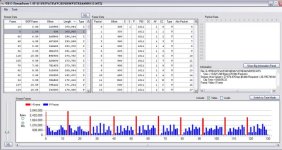
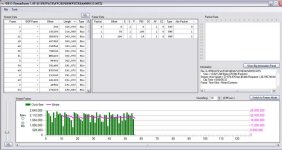
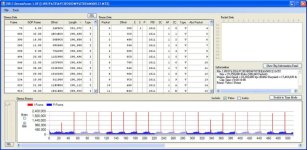
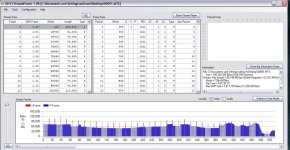
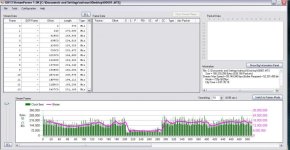
I've noticed that there appears to be a fundamental difference between 24p encoding and 60p encoding. I have attached three captures from Stream Parser. They are all "dark" tests; that is, they were shot with the body cap on - so there should be no video data (except for a little I frame data). With the SH clip there is indeed no P frame video data except for the big P frame, which is just full of nulls (presumably to keep the minimum bitrate up). With both the 24p clips (one is Native, the other not) there is actually a fair amount of video data (i.e. not nulls) in each frame. Where is it coming from? Why does it only appear in 24p clips? Interesting, huh?
By the way, the big P frames in the Native 24p clip are also just filled with mostly nulls.
Chris
By the way, the big P frames in the Native 24p clip are also just filled with mostly nulls.
Chris
Attachments

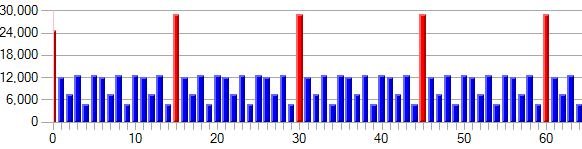

Last edited:
You are using an old version - get the newest one here: http://www.dvxuser.com/V6/showpost.php?p=2076390&postcount=75
Remember to uninstall the old one first.
Chris
Remember to uninstall the old one first.
Chris
Vitaliy,
I’ve been perusing the IDA database. You’re right – it looks like a bunch of table driven stuff, it’s very hard to analyze. I’ve noticed that the AVCHD codec is capable of more than is being used; I suspect it is derived from a library they use for several products. For example, I noticed that they have provisions for actual 24fps encoding (not just the 23.xxx).
I’ve developed a theory about how the native vs. wrapped progressive encoding is handled. I’ve attached two clips that were shot under exactly the same circumstances. One is 25p and the other is 25pN. You’ll notice that the ratio of I frame sizes to P frame sizes is completely different. In fact, the wrapped clip has P frames that are relatively almost twice as big as in the native clip. Which is the better ratio? The native clip looks more like what you get with 60p. However, I think this is not correct. At 24 or 25 fps, versus 50 or 60 fps, P frames basically have to do twice as much “work” because they have to account for changes over at least twice as much time. Therefore, at 24-25 fps one would expect the ratio between I frames and P frames to be lower than with 50-60 fps. Indeed, this is true when examining 50-60p clips compared to the same thing shot at 24-25p when it is wrapped in 50-60i. It is, however, not true when looking at native24/25p mode clips – but I believe it should be.
My theory is that there is a parameter that controls this ratio between P frames and I frames. Moreover, I believe it is applied when the final stream is produced rather than on the initial encoding pass. That would explain why the two 25p clips look so different, when they should look identical. The wrapped clips do encapsulate two interlaced frames in one frame, but I know for certain that AVCHD decoders actually interpret these combined frames as two separate frames (I had to deal with that when I wrote Stream Parser). There is a variable set to 3/8ths the frame size (I’ve attached a screenshot). I think this variable somehow governs the ratio between I and P frame sizes. It appears to be correct for streams that are being delivered at 50-60 fps (which is still true for 24-25p wrapped footage). However, it is incorrect for footage being delivered at a slower rate. I think the 3/8ths number should be changed to 6/8ths of the frame size to yield the same results for native 24/25p as you get with wrapped 24/25p (assuming that it works the way I think rather than the other way around). We’ll know if that is true if clips at native 25p start looking the same as the same subject shot with wrapped 25p. 24p is a little more complicated to analyze because of the pull-down. If my theory holds up, we would want to apply the same logic to all other modes of operation where the frame rate is lowered as well. This would go a long ways toward explaining why native mode seems to make the codec run out of steam with empty frames, pulsing frames, etc... - because the I frames are being allowed to be too big taking too many resources away from P frames.
Anyway, that’s my two cents worth for the day – let me know what you think.
Chris
I’ve been perusing the IDA database. You’re right – it looks like a bunch of table driven stuff, it’s very hard to analyze. I’ve noticed that the AVCHD codec is capable of more than is being used; I suspect it is derived from a library they use for several products. For example, I noticed that they have provisions for actual 24fps encoding (not just the 23.xxx).
I’ve developed a theory about how the native vs. wrapped progressive encoding is handled. I’ve attached two clips that were shot under exactly the same circumstances. One is 25p and the other is 25pN. You’ll notice that the ratio of I frame sizes to P frame sizes is completely different. In fact, the wrapped clip has P frames that are relatively almost twice as big as in the native clip. Which is the better ratio? The native clip looks more like what you get with 60p. However, I think this is not correct. At 24 or 25 fps, versus 50 or 60 fps, P frames basically have to do twice as much “work” because they have to account for changes over at least twice as much time. Therefore, at 24-25 fps one would expect the ratio between I frames and P frames to be lower than with 50-60 fps. Indeed, this is true when examining 50-60p clips compared to the same thing shot at 24-25p when it is wrapped in 50-60i. It is, however, not true when looking at native24/25p mode clips – but I believe it should be.
My theory is that there is a parameter that controls this ratio between P frames and I frames. Moreover, I believe it is applied when the final stream is produced rather than on the initial encoding pass. That would explain why the two 25p clips look so different, when they should look identical. The wrapped clips do encapsulate two interlaced frames in one frame, but I know for certain that AVCHD decoders actually interpret these combined frames as two separate frames (I had to deal with that when I wrote Stream Parser). There is a variable set to 3/8ths the frame size (I’ve attached a screenshot). I think this variable somehow governs the ratio between I and P frame sizes. It appears to be correct for streams that are being delivered at 50-60 fps (which is still true for 24-25p wrapped footage). However, it is incorrect for footage being delivered at a slower rate. I think the 3/8ths number should be changed to 6/8ths of the frame size to yield the same results for native 24/25p as you get with wrapped 24/25p (assuming that it works the way I think rather than the other way around). We’ll know if that is true if clips at native 25p start looking the same as the same subject shot with wrapped 25p. 24p is a little more complicated to analyze because of the pull-down. If my theory holds up, we would want to apply the same logic to all other modes of operation where the frame rate is lowered as well. This would go a long ways toward explaining why native mode seems to make the codec run out of steam with empty frames, pulsing frames, etc... - because the I frames are being allowed to be too big taking too many resources away from P frames.
Anyway, that’s my two cents worth for the day – let me know what you think.
Chris
Attachments


Last edited by a moderator:
Thinking about it some more it occured to me that I might have it backwards - the ratio may need to be set to 3/16ths rather than 6/8ths. Shouldn't be too hard to test it out. Hopefully, the codec is arranged so that it can be configured in these general setup routines instead of having to set something else buried in some other routine.
By the way, the average bitrate between native and wrapped clips is nearly identical - it's just the ratio of data devoted to I frames versus P frames that changes.
Chris
By the way, the average bitrate between native and wrapped clips is nearly identical - it's just the ratio of data devoted to I frames versus P frames that changes.
Chris
Last edited:
Vitaliy Kiselev
Carbonite Member
Ok. I'll make patch to change both values.
I think that theory is wrong. But you could experiment yourself.
Please, post IDA screens without addresses and HEX (cut all left side).
I think that theory is wrong. But you could experiment yourself.
Please, post IDA screens without addresses and HEX (cut all left side).