AVCHD encoder research

Thanks. I'll keep the addresses out from now on.

Are you saying that changing these parameters won't help (which I can - unfortunately - believe), or that there is a good reason for wrapped 25p to look completely different than the same subject captured in native mode?

Chris
 
crunchy,

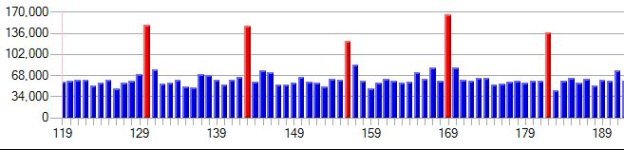
Here's the 25pN screenshot, but with the scale in this time. These were shot under controlled conditions with identical subjects (my electronic slate). It's the ratio between average I frame size and average P frame size that interests me. If wrapped 25p is just the native footage wrapped in a 50i container it should look the same - no?

Chris
 

Attachments

  • Wrapped 25p.jpg
    Wrapped 25p.jpg
    25.8 KB · Views: 0
  • 25pN.jpg
    25pN.jpg
    26.7 KB · Views: 0
Last edited:
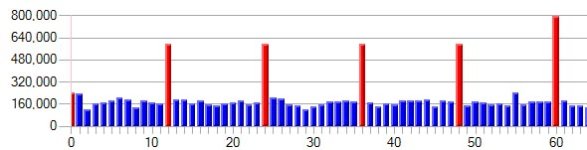
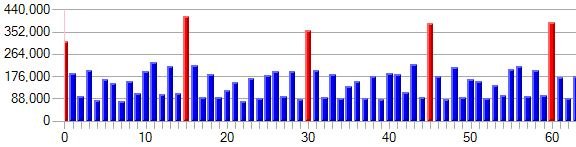
One is 25p and the other is 25pN. You’ll notice that the ratio of I frame sizes to P frame sizes is completely different. In fact, the wrapped clip has P frames that are relatively almost twice as big as in the native clip. Which is the better ratio? The native clip looks more like what you get with 60p. However, I think this is not correct. At 24 or 25 fps, versus 50 or 60 fps, P frames basically have to do twice as much “work” because they have to account for changes over at least twice as much time. Therefore, at 24-25 fps one would expect the ratio between I frames and P frames to be lower than with 50-60 fps. Indeed, this is true when examining 50-60p clips compared to the same thing shot at 24-25p when it is wrapped in 50-60i. It is, however, not true when looking at native24/25p mode clips – but I believe it should be.
Chris, what was the scene like in those screenshots?
Also, the apparent I/P frame ratio differences in native and interlaced footage are to be expected I think -- these are two different streams (at frame level) after all. I would be curious to find out if there are differences between native progressive and "processed" progressive (interlace-wrapper removed).

One of these days I need to ask Vitaliy for the key to look at this stuff too :)
 
Here's a couple of screenshots comparing 24p clips. The difference is somewhat less apparent because of the pull-down, but it's still there.

Chris
 

Attachments

  • Native 24p.jpg
    Native 24p.jpg
    25.3 KB · Views: 0
  • Wrapped 24p.jpg
    Wrapped 24p.jpg
    25.2 KB · Views: 0
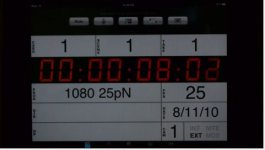
The subject was an electronic slate (I was testing timing, skipped frames, etc... for Stream Parser). Not very high detail and somewhat underexposed because I was using a very high shutter speed. I've attached a picture.

Chris
 

Attachments

  • Subject.jpg
    Subject.jpg
    14.7 KB · Views: 0
Actually, the difference between interlaced and native streams with 25p data shouldn't be much. Theoretically, the main difference is how data is arranged within frames - the amount of data should be the same. For 24p it's a little more complicated because of the 24 to 30 fps pull-up. With 25p the frame sizes should be essentially identical. My contention is that there is more of a difference than simply containing progressive frames in an interlaced wrapper that we are seeing.

Chris
 
Last edited:
I added requested patches to latest PTool.

Is this the "Constant for 1080p patch"? It's certainly doing something, in early testing the 777,600 number is not high enough though; at that number and below it freezes the camera almost instantly with C settings. Higher numbers (above 1,000,000) and it starts to get interesting, the higher you crank it the less likely you are to see mud, but you can also start locking up the camera even while panning a little (like around 6,000,000), a situation where it would not freeze before. Generally it takes around 6-8 seconds before it starts to think about locking up.

I'll fool around with it some more because this is encouraging, since unlike everything else tried so far it is definitely having an effect on the mud/blank P frames/freezing
 
With 25p the frame sizes should be essentially identical.

Exactly! Encoding just half of the picture two times per frame or encoding entire frame should not result in noticeable differences. I would say that 25pN coding should result in a slightly lower bitrate, but hardly noticeable.

Funny, but electronic slate (if only red numbers are changing) should not result in large P frames. I would expect that P frames are noticeably smaller than I frames.
 
OK, I did some testing with the new patches Vitaliy put in for me. When I doubled the size of the "Constant for 1080p" nothing much changed. When I halved it, however, it made a huge difference in the ratio between I frame and P frame sizes. I've attached two captures (same subject, etc...). Obviously, I made too big a change - so I'm going to experiment with smaller changes. I'm just posting this now so anybody who might be interested can play too.

Chris
 

Attachments

  • LP25pN_Normal.jpg
    LP25pN_Normal.jpg
    36.8 KB · Views: 0
  • LP24pN_Buff3-16.jpg
    LP24pN_Buff3-16.jpg
    24.3 KB · Views: 0
Two more tests. By the way, these are all witl the Lpowell settings and a very highly detailed scene. The first is with the "Constant for 1080p" reduced by 20% (i.e. set to 622080). The second is the same subject shot with no changes to the Lpowell settings (i.e. not Native and Constant for 1080p unchanged). Notice that ratio is now somewhat lower - but not quite enough. The peaks are lower than the previous posted picture (which had native checked, but Constant unchanged), and higher that the one with Constant halved), but still somewhat higher than the pure LPowell settings. Stability also seems pretty good. My guess is that somewhere between a 25-40% reduction in the Constant for 1080p is going to look about right. The overall bitrates are pretty close to each other.

Chris
 

Attachments

  • 20_lower.jpg
    20_lower.jpg
    25.2 KB · Views: 0
  • Wrapped.jpg
    Wrapped.jpg
    21.8 KB · Views: 0
I was shooting the slate hand-held because I wanted things to change a little more. I was also shooting at 1/500. The issue for me is that the 25p ratio changes so much depending on whether you have native checked - and it's consistent, it does it every time I test.

I've been testing with more Constant for 1080p settings. It's pretty complicated. When I reduced it by 33% the results looked almost as bad as the 50% reduction settings. At 20% it looked fairly good but there were still strange things in the stream like GOPs of 13, followed by 11, and some empty frames. Stability was much better, though. When I try the Lpowell settings with only Native 24p checked the streams end up being corrupted within seconds (i.e. they flunk the file check test routine containing outright garbage). Same thing when I set it to a higher, rather than lower, value.

I think these new settings are interesting, but I'm not sure they will solve the stability issue by themselves - there's more going on.

Chris
 
Very interesting task is to track parameters passing from settings routines (look at two main ones) to bitrate related procedures.
If you could track it we can make patch to change native on the fly, as 0x7... address stuff is located in RAM and can be safely patched.
 
There is a difference between the Lpowell settings and the "C" settings that I think is significant. The "C" settings offer a slightly higher bitrate, but the peak transfer rate to flash jumps up by 11Mb, which is much more than the difference in overall bitrate (which is about 4Mb). I suspect that when the camera fails writing to flash it is for two different reasons; either the video data being produced exceeds the fixed theoretical maximum transfer rate calculated by the camera, or the flash memory can't unload the write buffer fast enough. It's sort of a balancing act.

Chris
 
Vitaliy,

That's exactly what I was planning to do next. Obviously there is something interesting going on there because of how the wrapped vs. uwrapped 25p clips come out.

Can you point me to the tables you were talking about earlier (i.e. the ones with 33 entries)? What labels did you use?

Chris
 
Vitaliy,

Can you point me to the tables you were talking about earlier (i.e. the ones with 33 entries)? What labels did you use?

Look at names window, sort it by name, and look at
AVCHD_bitrate things.
Look at different tables and looking at references try to get logic how they are used.
 
I think the AVCHD codec does have some features to choke the output when there is too much data being produced. The camera doesn't lock up but there are strange things about the streams like wrong GOP lengths and empty frames (where nothing changes). The clips do play, though, and they pass the file check function in Stream Parser. The other kind of failure I see is when there appears to be a buffer overrun; which results in lockups and streams that contain complete garbage (they fail the file check).

Chris
 
OK, I did some testing with the new patches Vitaliy put in for me. When I doubled the size of the "Constant for 1080p" nothing much changed. When I halved it, however, it made a huge difference in the ratio between I frame and P frame sizes.
I've gotten promising results using both "Constant for 1080p" and "Constant for 720p" at high bitrates in a new patch I've been testing on an NTSC GH1. However, I've run into two roadblocks with similar symptoms in other modes:

1. The "Constant for 720p" patch isn't available when I load the GF1_122 firmware. Without that patch, my SH-mode settings cause the GF1 to fail to start recording in AVCHD mode. There's no error message or file created, it simply does nothing when the movie button is pressed.

2. When I switch the NTSC GH1 into PAL mode, it fails to record in any of the four AVCHD modes, in a manner very similar to the above GF1 symptom. I'm puzzled by this since Chris has apparently been testing the "Constant for 1080p" patch in PAL 25p mode without problems. I can confirm that the GH1 is patched correctly to record on a PAL SD card, since it writes MJPEG files properly in HD mode.

I'm getting impressive results with this patch on the NTSC GH1, and I'm close completing my reliability tests. I'm keen to get it working and tested on GF1 and PAL so I can provide full support for those cameras as well.
 
Back
Top