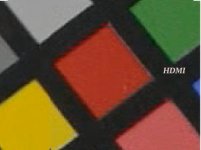
Any GH2 news on the HDMI output front?

It just doesn't make any sense for HDMI output on this camera to be 4:2:0. There would have to be some sort of seperate compression processing going on in real time and the image would look exactly like the AVCHDs. But it doesn't. From all of the examples I've seen so far (in and outside of this thread) and as good as the AVCHD is the AVCHD always looks washed out in comparison (with some artifacts). The only issue that stands out is the interlacing (as mentioned).
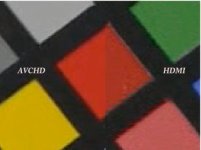
 
Henry's sample shows interlaced chroma for the nanoflash recorded HDMI output as well (despite IVTCing)

Using an adaptive field matcher and decimation (TIVTC in avisynth) , it's quite easy to recover 24000/1001 fps progressive despite irregular recorded field cadence (because it's adaptive). This would be similar approach to decomb() as suggested earlier

I'm not sure why the color differences exist (both avchd and nano used rec.709 for decoding to RGB)

I checked on several frames, so this isn't some spurious result, or a poor field match. Every frame shows the artifacts

http://www.mediafire.com/?6woaq1dm1kvmpbr#1
The 1st 2 are 1:1 screenshots of the same frame, the next are point resized comparisons of parts of the frame (i.e. zoomed in)


As an aside, people often think they get cleaner images when recording higher bitrates or uncompressed. This isn't necessarily the case. Higher bitrates preserve more sensor detail , but also more of the noise. Low bitrate compression (like youtube, vimeo) often hides the noise, but cause a different types of compression artifacts.
 
I don't mind noise - if it's all part of what was originally captured. Noise/details - they give me choices. But this artifacting on allegedly 4:2:2 signals, isn't cool. And it's not limited to aemonk and henry. Every piece of footage i've seen where hdmi can be compared to AVCHD shows that they share very similar patterns - to where the presence of noise is the only real easy method of identifying which file came from HDMI. I'll take a deeper gander at what PDR is saying - and I appreciate that my examples may exaggerate the differences between 4:2:0 and 4:2:2, but even if that were something that could be reduced by half - it still shows more variance than what I see coming out of the GH2 AVCHD and HDMI pipelines. I'll post more examples when I get back . . . gotta go.
 
I've taken the colour chart provided by Sandbox and printed it out for some tests. (Apologies again for the poor lighting, it is 3200 ISO)
I did a recording using the Intensity Pro YUV 8-bit codec (Uncompressed 4:2:2) and compared it to a frame from the AVCHD recording.

HDMI in Preview Mode (before recording begins) http://marty.id.au/video/yuvpreview.png
HDMI in Recording Mode http://marty.id.au/video/yuv.png
AVCHD http://marty.id.au/video/avchd.png

There does appear to be some chroma interlacing going on, not sure if it is 4:2:0, perhaps worse as the reds bleed up to 4 pixels every second field on the diagonals.
 
More pictures. Borrowed from AVCHD and HDMI samples made available by y. kimura. Files can be downloaded from azurite.jp/​data/​blog/​GH2_HDMIvsSDdirect.zip

AVCHDvsHDMI.jpgHDMI.jpgInterlacingTest.jpg

Greater resolution available at
http://www.sandboxproduction.com/AVCHDvsHDMI.png
http://www.sandboxproduction.com/HDMI.png
http://www.sandboxproduction.com/InterlacingTest.png

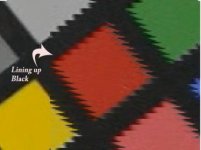
I broke the HDMI picture into 4 sets of 1/4 res (vertical) and moved them horizontally to create a smooth black edge on the red square, to see if it would help explain what's going on with the HDMI image. If it were simply a matter of interlace mismatch (phase) it could be fixed. But this shows something else (I believe).

I'm less inclined to use this camera for anything involving off-board recording. Especially if it was an additional cost of several thousand dollars, heh heh.

Fortunately, the AF100 doesn't seem to have the same problem.
http://crews.tv/blog/2010/10/22/af100-images-pushed-to-the-limit/


The red collar detail shot at least shows the AVC Intra to have the advantage over AVCHD.
Check out
http://crews.tv/files/2010/10/AF100-Blowup-Intra-rev.jpg
http://crews.tv/files/2010/10/AF100-Blowup-AVCHD-rev.jpg

We see some of the same artifacting in this AVCHD sample as in the GH2 HDMI footage I've posted above.
 
Just got this email from Atomos about the Ninja:

Thanks Jean Phillip,

No we have not tested with the GH2 as yet, however I plan to test before release and there should be no reaosn why it doesn;t work.

We can record any HDMI signal, question is wether camera outputs full 1920x1080. This is the limiting factor.

The GH2 seems popular so I think we have to support.

Watch the website for compatibility updates. I will also put you on our newsletter mailing list but only if you haven't pre ordered yet.

please let me know if you have pre ordered or not and I can add you to that mailing list.

Cheers
Jeromy
CEO
ATOMOS

------------------

At least they know they can sell a lot if this works:)
 
I am a little bit confused. What is the real output from the HDMI? Is it uncompressed 4:2:2 or not? Its a shame, that Panasonic doesn´t tell their clients, what they get for their money, if they buy their products. Its like the cat in the bag.

What is the real output of the HDMI and how to handle for getting the best?
 
Only just started reading this thread... Sorry if the following questions I ask are answered somewhere in it, but.

Q1
whats the benifit of recording the camera in 24p (cinema) mode over the other one (cant remember its name) when your taking the signal from the HDMI... Surely they are both output as uncompressed... so the signal bit rate is simular (obviously /24 instead of /24), and the compression happens only when encoding to AVCHD

Q2
It was my understanding that GH2 doesnt ever really use interlacing, it just pretends. IE each feild is the same. SO! You dont ever wana drop a feild!!! you simply just wana output a Progressive version of the file...

and finally

Q3
I remember reading somewhere that the actual Preview on the LCD at the back of the camera is created by line-skipping, whilst the final .mts file is scaled. (nice) could it be possible that the HDMI output is LineSkipped?

Cheers

JC
 
I am a little bit confused. What is the real output from the HDMI? Is it uncompressed 4:2:2 or not?
It is uncompressed, it is 8-bit, it is 60.000i (not 59.94i) and its chroma is not 4:2:2, it's a screwed-up 4:2:0.

What is the real output of the HDMI and how to handle for getting the best?
The HDMI is for monitoring, not recording.

The thread that Ralph pointed to will tell about the latest efforts to turn the HDMI output into something recordable.
 
@Barry and Ralph: Many thanks for your clear answers.


One question more:

Is it true, that the sensors of the AF100 and Gh1 are the same?


Thanks:happy:
 
Is there a chance to get 4:2:2 out from the HDMI by a hack? Is Color sampling a feature of the hardware or of the software?

Thanks
 
You're right :( 24p looks subtantially sharper. 1/50 and 1/40 in 50i look identical but with lower resolution. Doesn't make much sense to me, it can't be field doubling as that would not work for 50i. Perhaps the internal processing works differently.

http://marty.id.au/video/24p-1-50.jpg

http://marty.id.au/video/50i-1-50.jpg

http://marty.id.au/video/50i-1-40.jpg


These pictures you've posted... Did you deinterlace the 50i-1-50 at all, or is it both the fields?

Also, is 50i-1-40 with both adjacent frame half fields joined together?
 
sorry if it was asked. did anyone tested hdmi output in crop mode? maybe it will take us better hdmi picture?
 
The GH2 does not output anything over HDMI in crop mode. (ETC)

Right, but backwards -- in fact, it's quite the opposite -- if you plug in the HDMI, it will disable crop mode. So it's not that the GH2 doesn't output anything when you're in crop mode, it's that when you have a monitor plugged in there's no such thing as crop mode.
 
Right, but backwards -- in fact, it's quite the opposite -- if you plug in the HDMI, it will disable crop mode. So it's not that the GH2 doesn't output anything when you're in crop mode, it's that when you have a monitor plugged in there's no such thing as crop mode.
This is my experience. I set crop mode, plug in the monitor and it is disabled, and also the Fn button which I assigned for ETC does nothing. Very confusing the first time.
 
@Barry and Ralph: Many thanks for your clear answers.


One question more:

Is it true, that the sensors of the AF100 and Gh1 are the same?


Thanks:happy:

I know that a lot of people say that the sensors aren't the same but from the standpoint of knowing the industry of fabricating CMOS devices that take millions of $$$ in design, prototyping, testing and packaging of both the product AND the machines that make these parts, I would have to say YES the possibility is very good that these sensors are the same. A company such as panasonic will not spend huge amounts of money to develop a part that will only be used in a single device(GH2) that they themselves claim is just a niche market. Same for the AF100, the expected sales of these products can't possibly cover the costs of all of that work. I'd expect that the sensors ARE the same and that designs for the next couple years will utilize the same sensors, just assembled on their carrier PCBs differently to change their characteristics.
 
Back
Top