Any GH2 news on the HDMI output front?

Thanks Ralph, that looks pretty perfect. There are a few red flashes that means that the entire lower field was removed for that particular frame.
Would be cool if you could post your AVISynth script!
 
Here is the AVIsynth script I used to remove the pulldown from aemonk's PAL test clip.

DirectShowSource("Your_Movie.avi")
Converttoyuy2()
LoadPlugin("C:\Program Files\AviSynth 2.5\plugins\Decomb.dll")
AssumeTFF()
Telecide(guide=0,post=0,vthresh=30)
Decimate(cycle=25, mode=0)

However, I have since discovered something that might be a little better. It is:

DirectShowSource("Your_Movie.avi")
Converttoyv12()
LoadPlugin("C:\Program Files\AviSynth 2.5\plugins\Decomb.dll")
AssumeTFF()
Telecide(guide=0,post=0,vthresh=30)
Decimate(cycle=25, mode=0)

The second script does the same thing, the only difference being it converts the picture to YV12 color space instead of YUY2, which the first script uses.

This illiminates the occasional color flash that appeared when using the first script.
Try them both, and see what works best for you.

Keep in mind that aemonk's clip with alternating red and green horizontal lines 1 pixel thick, is for diagnostic purposes only. No real world footage would ever look like that. So try these scripts on REAL scenes!
 
I've been testing my utility on aemonk's footage but haven't had much success due to the compression. (two identical frames will look different when using GOP compression)

I've been able to pulldown i-frame encoded footage fine except that it appears the signal misses a single field at random intervals (could be related to the 23.976 rate)
These fields are completely missing and cannot be recovered, i'm guessing the decomb filter is just upsampling the remaining field in those cases.

The missing fields, however rare, is a deal breaker as it makes the recording process unreliable, they might occur right in the middle of some critical footage (a visible jolt will appear if it occurs in the middle of a pan)
I will be looking at some NTSC footage next to see if all the fields are available all of the time, but since the HDMI output was not designed with syncing in mind, it's probably the same deal with 60i
footage.
 
I don't know what I did, but I switched from 24p to 50i and the HDMI output was 25p for a while. I haven't been able to re-create it since. I've tried switching modes, changing shutter speeds etc to no avail, but it was definitely 25p!
 
I don't know what I did, but I switched from 24p to 50i and the HDMI output was 25p for a while. I haven't been able to re-create it since. I've tried switching modes, changing shutter speeds etc to no avail, but it was definitely 25p!

How do you know it was "definitely 25P"? And how long is "a while"?
 
By "a while" I mean as long as the camera was switched on. As soon as I switched it off I couldn't get it working again.

I was doing some 50i recording tests but when I started analysing the video I noticed two things:

1. The preview footage (before hitting record) had no interlacing at all when panning, it was like the bursts of progressive frames under 24p mode except it was progressive all the time.
2. When recording the camera appeared to flip the fields, so AB BA AB BA AB BA etc, when I joined the last field of the previous frame to the first field of the next, the result was a progressive frame.

If I can only work out how to get it back into that buggy mode, I will record some proper footage for you guys to have a look at.

It really does seem like beta firmware to me that Panasonic rushed out the door to get the camera out quickly. I'm hopeful a lot of these things will be resolved and missing features such as 25p will be added.
 
I was doing some 50i recording tests but when I started analysing the video I noticed two things:

1. The preview footage (before hitting record) had no interlacing at all when panning, it was like the bursts of progressive frames under 24p mode except it was progressive all the time.
2. When recording the camera appeared to flip the fields, so AB BA AB BA AB BA etc, when I joined the last field of the previous frame to the first field of the next, the result was a progressive frame.

If I can only work out how to get it back into that buggy mode, I will record some proper footage for you guys to have a look at.

This is potentially remarkable! For people in PAL-land, I hope you're right.
 
Sorry, i'm an idiot, turns out the camera was using a 1/40 shutter speed. I didn't expect 1/40 to result in 25p progressive output, but there you have it.
 
Do you think there's a relationship between shutter speed and cadence? If so, that may explain some of the "randomness" we're seeing? Or, to the other point, by experimenting with shutter speeds, we might find patterns that are actually predictable? Any idea why 1/40 would be significant? 1/50 seems more likely . . . unless there's lag after shutter fire before it's sent out over hdmi? Are you getting consistent 25p results without duplicated frames this way? Very cool. Wish I had a camera :(
 
Sorry, i'm an idiot, turns out the camera was using a 1/40 shutter speed. I didn't expect 1/40 to result in 25p progressive output, but there you have it.
Any shutter speed lower than the frame rate, will cause frame duplication. Shooting 50i, the slowest shutter speed you can use is 1/50th. If you go any slower, it will cause the camera to drop the frame rate to accomodate buffering the frame for the full exposure. So yes, 1/40 will cause the frame rate to drop from 50i to 25p; but the question is whether it's a real 25p, or just field-doubled (effectively de-interlaced 50i).
 
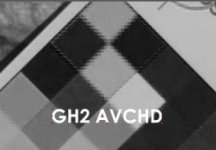
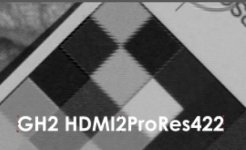
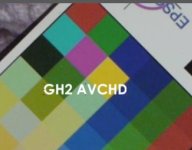
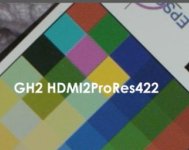
here are some chroma samples of GH2 HDMI out vs AVCHD. HDMI was recorded to ProRes422 HQ:

AVCHD red channel:
GH2_AVCHD_red.jpg

HDMI red channel:
GH2_HDMI_red.jpg

AVCHD RGB:
GH2_AVCHD.jpg

HDMI RGB:
GH2_HDMI.jpg
 
@aemonk -

What method are you using to look at the red channel ? It doesn't look like the same method was used to take the RGB screenshot ? Specifically , how are you decoding the Y'CbCr video to RGB for the screenshot?

Do the colors seem off between the AVCHD and HDMI samples ? Maybe a different colormatrix used ? rec709 vs. rec601 ?
 
this was done inside After Effects. I used the .mts without trans coding. AVCHD is 4:2:0. The file capture from HDMI looks slightly smoother. Not sure if this is true 4:2:2 color sampling. I need to redo this test with a codec other then ProRes (something 4:4:4).
 
this was done inside After Effects.

I should have guessed :) AEmonk...

I used the .mts without trans coding. AVCHD is 4:2:0. The file capture from HDMI looks slightly smoother. Not sure if this is true 4:2:2 color sampling. I need to redo this test with a codec other then ProRes (something 4:4:4).

Something else seems weird, almost as if the chroma is interlaced. For example if you open up either of the RGB jpg screenshots, and look at the Red channel), you don't see the notching as shown in your "red channel" screenshots (I know it's a highly compressed jpg, but if it was derived from the same RGB conversion, you should see something similar)
 
Thanks, it's definitely interlaced chroma on the HDMI. Even the AVCHD seems off to me. What version of AE and are you on a Mac ?

How did you record the HDMI? This was BM Intensity Pro ? What mode did you record in ?

Would it be possible to upload a small video sample of the AVCHD ?
 
- I'm on Mac AE CS4 (my CS5 can't load ProRes. Guess its a 64/32bit issue).
- HDMI is recorded using AJA io HD into a ProRes422 HQ clip.
- Yes, I'm uploading but it takes a while ...


EDIT:
I captured using ProRes 4444 and also "AJA 2yuv" codec. Looks all the same ...
 
Last edited:
Back
Top