so:
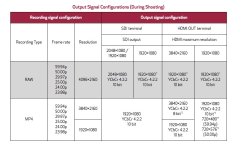
sdi is hd 422 10 bit
hdmi is hd 422 10 bit, 4k 60 420 8 bit. ---how about 4k 24p ? still 4:2:0?

Follow along with the video below to see how to install our site as a web app on your home screen.
Note: This feature may not be available in some browsers.
so:
sdi is hd 422 10 bit
hdmi is hd 422 10 bit, 4k 60 420 8 bit. ---how about 4k 24p ? still 4:2:0?

According to the full version of that Output Signal chart, the 8-bit 4K HDMI output is 422 when frame rate is below 50p, so that's something right? That's basically a 4K equivalent of the original C300 codec.
Here's the full chart with footnotes: https://www.usa.canon.com/internet/portal/us/home/explore/cinema-eos-c200-cameras/versatility

According to the full version of that Output Signal chart, the 8-bit 4K HDMI output is 422 when frame rate is below 50p, so that's something right? That's basically a 4K equivalent of the original C300 codec.
Here's the full chart with footnotes: https://www.usa.canon.com/internet/portal/us/home/explore/cinema-eos-c200-cameras/versatility


Just a heads up for everyone that I've requested the addition of the C200 prefix to be added to Canon Cinema EOS Cameras.


RAW footage is not video, it is linear output from the sensor that still needs to be debayered and put into a colorspace.There’s one thing that I haven’t understood : When do you shot RAW you must select a LOG profile? The CRM files (RAW Light files) without C-LOG are fully colorized or they have a flat look?
I know the RAW files are untouched by the camera, but what is the advantage to use a C-LOG profile in RAW, considering that the CRM files are already flat? I plan to use Da Vinci not Canon's Cinema RAW Development software.RAW footage is not video, it is linear output from the sensor that still needs to be debayered and put into a colorspace.
All footage from all cameras start with RAW, the camera can then either process this internally or save this to a RAW file format (some RAW file formats uses a log curve for compression purposes)
The advantage of RAW is that you have maximum flexibility in post, not that it is necessarily of a better quality.
What about adding the C700 prefix?
