Michael Thames
Carbonite Member
Yea, that was for Mitch sorry I should have quoted him.

Follow along with the video below to see how to install our site as a web app on your home screen.
Note: This feature may not be available in some browsers.
Here are some ungraded frame grabs from a short film I DPed last week with a non-Sony camera. Brought the footage into Premiere, it automatically applied a LUT (so no color work from me), and voila.
Images were sharper before compressing photos and uploading. Need to figure out a better method.
Full-size: http://i.imgur.com/Twh3tLZ.jpg

Canon 35 T/1.5 CN-E
Full-size: http://i.imgur.com/yes8vpo.jpg

Canon 18-80 T/4.4 CN-E
Full-size: http://i.imgur.com/MCk8NR8.jpg

Canon 15.5-47 T/2.8 CN-E

Is the image above straight from camera or heavily graded/CCd?
Then perhaps you should explain the sprit of your post in more detail. I'm kind a slow sometimes.

Trick? No. Oh, I forgot to mention about Premiere automatically applying a LUT to this camera's footage; the LUT didn't need to be rendered either. I've always needed to render LUTs in the past, but not in this case. Super simple. Footage with the automatically applied LUT plays nice and smooth on my laptop in Premiere.Ha ha! Is this a trick?
Eric,Footage with the automatically applied LUT plays nice and smooth on my laptop in Premiere.
Your earlier post indicated that the differences between types of signals, color space and bit depth was only noticeable to a select few, and therefore didn't really matter all that much. I was attempting to draw a parallel to the guitar world, with which you are more familiar than I. I'm quite sure that you can well appreciate the qualitative difference in a higher end guitar compared to a more basic inexpensive model. While both serve a purpose they do not particularly compare, and I'm sure you could educate me on the differences quickly and I would be able to appreciate many of them once identified. My point is that it is the same with the video formats.
Trick? No. Oh, I forgot to mention about Premiere automatically applying a LUT to this camera's footage; the LUT didn't need to be rendered either. I've always needed to render LUTs in the past, but not in this case. Super simple. Footage with the automatically applied LUT plays nice and smooth on my laptop in Premiere.

Probably a C300 mkIIBut, you haven't identified the "non-Sony camera"is there a reason you don't tells us what the camera is? ha ha! I think your gonna say it's an HV40 or something.
But the A7 variants, 6300/6500, FS5/FS7, to me, do not have an acceptable look straight out of camera.


Files were recorded with Log-C with a 709 LUT applied to the viewfinder and SDI out (not to the recorded image, though). Once I brought the ProRes files into Premiere, it automatically applied a LUT in Luminetri, as I said, with no need to render the LUT, so the files play smoothly with the LUT applied.Tell us more about Premiere automatically applying a LUT. I've never seen that happen before. I've heard of FCPX doing it though.

It's an Arri Amira. I might be in love.

You were in love and your shoulder was likely in pain!
Congrats on getting to shoot on the Amira. I love the camera, but I make certain to demand a Camera Grip when using it! That thing is a tank.
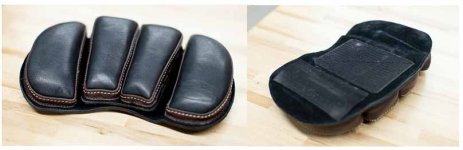
In find that a shoulder pad that velcro adheres onto the camera works better than the strap-on-body type you were using. The strap-pad thing always seems to have slipped around and is never where you want it to be.
Yeah, it takes a toll on the shoulder and back. I agree that strap-on pad doesn't like to be where you want it, so I'd regularly have whoever was next to me readjust it which is a pain. I'll have to consider that Letus pad you mentioned. I gather you buy some separate Velcro strips and stick them on the bottom of the camera so it can meld with the Velcro on the Letus pad. I feel like I'd be a bit concerned about the Velcro sticky part tearing the Amira's shoulder pad if you stuck it there, but maybe the Amira's pad would hold up fine.You were in love and your shoulder was likely in pain!
Congrats on getting to shoot on the Amira. I love the camera, but I make certain to demand a Camera Grip when using it! That thing is a tank.
In find that a shoulder pad that velcro adheres onto the camera works better than the strap-on-body type you were using. The strap-pad thing always seems to have slipped around and is never where you want it to be.
The Amira we rented just came with one lame camera handle which didn't have any extension, so I used the Canon 18-80 grip attached to the Shape arm extension I'd just gotten for the 18-80, and then the Zacuto relocator setup with a C300 grip for the left side. Some dangling cables that weren't being used, but it worked pretty well given that I don't own just regular handles (which actually aren't cheap; probably another $800 or so just to get a good handle setup for the Amira if I stay with Shape).I like the Canon handgrip


Karl, if you go through DVXUser A7S/II threads, you can find more info on LUT's, looks and profiles. Way back when, someone was selling an "ARRI" LUT for like $15. Then EOSHD created another LUT (also $15, IIRC.). Those are a matter of taste, obviously, but they looked pretty good to me.This is the Cinema EOS section so I probably shouldn't mention this here, but I'll disagree about the A7 series. I spent at least two days going through all the options to generate my own custom profile- non LOG of course. Then tweaked it as I gained more experience. Thought it was very pleasing unless there was a green spike in the ambient lighting..

This is the Cinema EOS section so I probably shouldn't mention this here, but I'll disagree about the A7 series. I spent at least two days going through all the options to generate my own custom profile- non LOG of course. Then tweaked it as I gained more experience. Thought it was very pleasing unless there was a green spike in the ambient lighting. a number of producers wanted to know what camera I was using when they saw the footage- combination of A7S- full frame, custom profile, on a tripod, 350watt LEd fresnel based booklight, etc. Older Tokina ATX Pro zooms or old, pre-AI cinevized Nikkors. Not the latest and greatest and sharpest glass. Personally never liked the Slog out of A7S. Everyone who told me how bad that camera was, outside of low light- I'd tell them to stop shooting slog and do their own custom profile. With inexpensive gear I want the fastest workflow possible.
I'm not there with the C300 Mk2 yet- probably because almost everyone wants CLog, so I haven't tweaked the color profile enough for straight out of the camera delivery. I will say I"m not using any presets when not shooting LOG- didn't really like anything direct from Canon.