GH5 Panny: Orange is the new Red?

wwjd

Well-known member
k, this is more about my GH4, but curious if GH5 and S1H have the issue.

REDs lean over towards the ORANGE coloring

Noticed this immediately when I got my GH4, but worked around it okay. ALSO noticed it in a recent S1H vs P6K... the P6K had a RED caboose, while the S1H had a red-orange caboose.
I've noticed these colors on 3 different calibrated monitors, from 3 manufactures as well as TV and phone playback testing.

Kinda wonder, does the EVA1 also have orangey red?
I don't see this topic brought up very often. I may have brought it up before... but now with the S1H in full swing, kinda shocked I still see it.

Experiences?

 
Yes, this is where the lower price point and still lineage of hybrid cameras rears its head. I have a GH5 and look to LOG shooting and a good LUT to correct the color accuracy of these cameras. They are not bad with the factory choices (we have come a LONG way), they are just not as good as a more expensive camera. Now with RAW on the table this should all go away as a problem. I have custom color profiles for my RAW still work and hope to be able to create this for video with the next camera I purchase.

The best one can do if using factory presets is adjust the overall color shift thing towards magenta a little bit.
 
Thanks, Bassman. I feel like Black Magic is hitting good colors with their reds, but I havent deep dived the rest of their color.

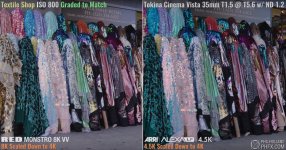
JUST NOW ran across another instance, granted, it is a high end cinema camera, but pretty sure even my cheapo Canon was hitting the reds better.
orange red.jpg
 
I too have shifted to using V log as the straight correction in either EDIUS or Resolve results in close to the correct red for me. No separate LUT used. A little correction is all that is needed most of the time. Any other picture profile has the orange issue.True for both my GH5 and GH5S though the GH5S is a little better. I found it is very dependent on the light source and material. For instance an actor walking across the stage can go from the correct red to orange and back to red. Shooting at the same time with a Sony AX100 and red does not change.
 
Yes, this is where the lower price point and still lineage of hybrid cameras rears its head.

I wouldn't argue with that (it certainly seems to be true), but does anyone know why still cameras wouldn't need the same kind of color accuracy as cinema cameras? I would think photographers would be concerned with color as well.
 
It's because that's how this particular big pot of soup was cooked by the final chefs.

Sometimes they'll re-cook it if too many people don't like the taste (firmware).

Here's a sample of the world's two most popular cinema cameras and some colors...even with the best money can buy there may be differences:

https://www.youtube.com/watch?v=XZPa3yp7lsQ

Sample Grab.jpg
 
I wouldn't argue with that (it certainly seems to be true), but does anyone know why still cameras wouldn't need the same kind of color accuracy as cinema cameras? I would think photographers would be concerned with color as well.

Still cameras do have VERY accurate colors. But, they are for a different medium and color space. RAW stills are in 14bit sRGB or Adobe RGB. Still and video images have never looked the same for me. They are converging but the still companies are better at their still output. I would guess a pro video camera team puts more manpower/resources than a still team making a video preset. But I am only guessing.
 
still shocked this is even a problem on cheaper gear... other cheaper gear I had wasn't this off. It's all digital: numbers pushed into a file to reproduce color. How did they not get this closer?? WE fix it with other numbers on our end, they could fix it in their end... like VLOG kinda does.

and to have it in the not cheap $4000 S1H? wow
 
still shocked this is even a problem on cheaper gear... other cheaper gear I had wasn't this off. It's all digital: numbers pushed into a file to reproduce color. How did they not get this closer?? WE fix it with other numbers on our end, they could fix it in their end... like VLOG kinda does.

and to have it in the not cheap $4000 S1H? wow

I do not think your statement is a fair assessment as the GH footage was shot in LOG. If you had shot the GH in "Natural" or some other factory preset, then you could blame Panasonic. LUTs can help or ruin depending upon how well they are made.

VLOG or RAW actually takes the original cameras makers out of the mix compared to baked in profiles. If one shoots RAW stills or video, the color handling shifts to the RAW conversion quality. And it goes on down the line with user influences...
 
FWIW, years ago I shot a video of my neighbor's Corvette using my GH3. Although his Corvette was definitely red, much of the video made it look orange. I still have that video on YouTube, and you can see it here: https://youtu.be/4qBdvqcLuBE

Starting at around 30 seconds into the video, it looks like a very saturated red-orange to me. I tried to tweak the colors slightly with the editing software I had at the time (2013), but couldn't do much with the orange cast. If anyone is interested, the car is now sold. :laugh:
 
Still cameras do have VERY accurate colors. But, they are for a different medium and color space. RAW stills are in 14bit sRGB or Adobe RGB. Still and video images have never looked the same for me. They are converging but the still companies are better at their still output. I would guess a pro video camera team puts more manpower/resources than a still team making a video preset. But I am only guessing.

Which is exactly the point. Most professional video cameras have been developed to comply with the standards laid down in the USA and Europe. The US standards being those laid down by SMPTE and in Europe those laid down by the EBU. Neither of those standards has anything to do with sRGB or Adobe RGB. That's why on high end 10-bit true grading monitors we will have selections like sRGB, RGB for stills and selections like Rec 601, Rec 709 and Rec 2020, DCI-P3, D50 and D65 for video and film production. Depends on what you are grading for, stills or a variety of video/film levels. That defines what color space setting you will select. One only has to look at the difference in colorimetry between NTSC and PAL to realize there are differences in color saturation and luminance between the those two standards. The stills world and the TV/film world standards are not related to one another so often you will see striking differences in color, gamma and luminance between the two worlds. That is why broadcast cameras all have a full SMPTE color matrix so that cameras of different brands can be matched together pretty closely on an OB or studio setup to a common standard. That's the SMPTE standard for the US/NTSC world and EBU for Europe/PAL world. Even then there are differences in the PAL world between PAL B/G and I. Don't we all love wading through this color matching process mess. It keeps us guessing and busy I suppose!

If you have a Hue adjustment in the GH try pushing it to +2, that's if it goes clockwise, as that should take your oranges more towards red. Adjust counter-clockwise if it is getting further to orange/yellow. Bear in mind, if your hue adjustment goes clockwise it will take skin tone more towards, pink/magenta as your are rotating the entire color palette of the camera. Most still cameras do not have the ability to alter the chroma phase of one individual color independent of other colors. This you can do within a SMPTE Matrix plus you often have a sub-matrix that gives you even finer hue shift capabilities for even finer tuning of color matches between cameras.

Chris Young
 
The problems isn't simple on the GH5 as any fixed change to hue or WB will not solve the problem. As I mentioned just tracking an actor walking across the stage can change colour from correct red to orange and back to red. The lights on stage and the material of the red of course are critical to see this issue. My Sony's do not show this when recording the same scene at the same time. Using V log does almost solve this though. Not totally but close. So it is something to do with the gamma and gamut used. The normal conversions in EDIUS and Resolve ( for input file type to project settings NOT a grading LUT ) bring the red for Vlog close including the tracking ( though it is still there a little if I am really picky ).
 
As I mentioned just tracking an actor walking across the stage can change colour from correct red to orange and back to red. The lights on stage and the material of the red of course are critical to see this issue. My Sony's do not show this when recording the same scene at the same time. Using V log does almost solve this though. Not totally but close. So it is something to do with the gamma and gamut used.

Sounds a little like Allard referred to in his initial assessment of the S1H. Something not quite right there by the sounds of it in mixed light. Maybe a related issue?

"My first impressions of the image quality of the S1H are mixed. Like most cameras in this price range, the camera looks nice in controlled lighting scenarios and in conditions that are favorable. Where I did notice that it seemed to struggle was in mixed lighting conditions. For me, this is what separates the lower end cameras from high-end digital cinema cameras."

https://www.newsshooter.com/2019/09/09/panasonic-s1h-footage-first-impressions/

Chris Young
 
while I agree cheap will always have something to do with it, that doesn't explain why my $600 old Canon T3i, never had this problem and 5 year newer $1600 GH4 does. yes, it's camera color science, as BlackMagic cheapo doesnt have this issue. Maybe no one has mentioned it to Panasonic in 10 years? :D
 
Can you do a comparison between the two cameras with baked in profiles? I don't know if the BM has any installed profiles and non-RAW shooting modes or not but at least you would be taking outside variables away. The first LUT I applied to some GH5 LOG footage I shot was with the official Panasonic 709 LUT in Edius. It looked horrible! Not saying yours is horrible, just saying to test the camera with the color preset you think looks the best, that is the "factory" color. Then you can explore how to improve things shooting LOG and adding external LUTs.
 
I can not as my T3i no longer functions without batteries, and I don't own black magic or other. I've just seen comparos on you tube similar as the first one I posted.

these are all different peoples' videos

vs2.jpg

vs3.jpg
 
Last edited:
coming back to your initial question. 1st the VLOG of the GH5 is different to S1, Varicam, EVA1. Applying a LUT for those cameras will never give you accurate results on the GH5 and they won't match to those other cameras. 2nd I don't find the standard Panasonic V-Log to REC709 LUT accurate nor pleasing. I am pretty happy with butterly LUTs for GH5 and S1 as well.
 
So just to clarify, you only own a GH4 but you are making judgements on other Panasonic cameras only based upon watching YouTube videos? Does not seem very fair to Panasonic.
 
First do not rely on other peoples video to evaluate a camera. Even with my limited skill I can make things look good or bad to taste. Colour shifts, bad focus I am sure I can demonstrate. For the videos you posted from other people the Panasonic clips are over exposed. Is that deliberate to make the BM look good ? In Resolve I do not think I would have much problem making them look identical.
 
Back
Top