GH4 Panasonic GH5 coming in 2017

.assuming it was properly focused. [naughty]One thing i did not mention i have watched all the unedited clips on my tv and nothing went wrong with processed GH5 clip in the NLE
Cameras vary so i could have purchased a supercharged RX10, it resolves more than my GH5 with any lens but beyond 300mm its mostly noticable, in every other respect the GH5 is a lot better,i dont know if lens and camera are are defective .
https://www.youtube.com/watch?v=R60uYfqopjk A few days ago,today i took the RX10 as well and taking similar clips to the ones in the film the RX10 clips had more detail.Anyway thank you everyone for the help,i have to decide what to do.
 
Flinty, either have the camera & lens checked (I'm convinced you have a defective lens based on every other video with this combination appearing very sharp) or just use the RX10iii if you don't want to have the lens and camera checked. Nobody here seems to be able to convince you that the GH5 is simply more resolved than the GH4 and more resolved than my RX10iii. They removed a filter that was used in the GH4 that inhibits resolving power to some degree. So you seeing better results with the same lens on a GH4 is inexplicable.

In terms of your latest linked video, look at 0:20. To my eyes I'm seeing the plants in the water, behind and to the left of the ducks, in better focus than the ducks themselves. Something is just wrong.

Best of luck in whatever you do. We're just trying to give you some friendly advice. You know the old saying, "You can lead a horse to water...." :)
 
The LensTip.com review website does not rate the Panasonic 100-400mm zoom very high, especially when it comes to resolution.

Take a look at their resolution chart : LensTip.com : Panasonic Leica DG Vario-Elmar 100-400 mm f/4.0-6.3 Image Resolution

Well that's fine, but the emphasis here is video, not stills, and as the videos I linked prove, the 100-400 lens is very sharp for 4K video, even at 400mm. A simple search of YouTube brings up one video after another where a properly constructed 100-400mm lens produces very sharp results. I only posted the first 4 that showed up, there are many more.

Now if we're talking about the much higher resolution demands of stills, sure, the limitations of the lens will be seen. But for the much lower resolution demands of 4K video? Not so much.
 
So then why not upload one clip to Google Drive?

Because every clip looks the just same played before being edited or rendered,if the clips and and every clip i have taken are out of focus at full zoom a big coincidence,while 300mm and below are in focus,yesterday i spent a long while on one shot going in and out of focus manualy until i knew the subject would not focus better,the result an identical RX10 clip with more detail,also the the GH5 has good AF and could have done what i spent a good while doing in a flash.The results in
http://www.lenstip.com/476.4-Lens_r...-6.3_ASPH._POWER_O.I.S._Image_resolution.html bear out what i find its beyond 300mm that the problems start.After i get the lens checked i will inform everyone,if its not the lens its the Camera.
 
Not to beat this to death, but even with the resolution of the lens lessening past 300mm, we know from other videos a properly manufactured 100-400 lens still looks very sharp at 400mm. Again, this lessening of resolution is more important when taking 20 megapixel or higher stills, where compromises in lens' resolution is more obvious, as opposed to 8 megapixel videos.

Good luck Flinty.
 
GH5 video quality with tele lens in sure good enough.

I wonder if the GH5 AF can follow a moving target with tele lens at 300-400mm for example birds or sports players? GH4 cant do it.
 
Because every clip looks the just same played before being edited or rendered,if the clips and and every clip i have taken are out of focus at full zoom a big coincidence,while 300mm and below are in focus,yesterday i spent a long while on one shot going in and out of focus manualy until i knew the subject would not focus better,the result an identical RX10 clip with more detail,also the the GH5 has good AF and could have done what i spent a good while doing in a flash.The results in
http://www.lenstip.com/476.4-Lens_r...-6.3_ASPH._POWER_O.I.S._Image_resolution.html bear out what i find its beyond 300mm that the problems start.After i get the lens checked i will inform everyone,if its not the lens its the Camera.
Your refusal to make even one unaltered single clip available for review makes your negative claims about the GH5 in combination with the 100-400mm nothing more than an unsubstantiated personal opinion.
Frankly I suspect you are either making a camera operation or workflow error.
 
I have to weigh in here and agree with Cary. Shoot a short clip racking focus slowly through the focal plane of something, at both 100mm and 400mm end of the lens. Shoot it with a high shutter speed to avoid motion blur, locked off on a tripod.

Upload the clip directly from camera to somewhere for us to check out.

My feeling is, if there is any problem at all, it's the back focus of the lens possibly being misaligned. It's unlikely to be the camera given the mount complexity etc.

I can tell you, having shot the RX10 II, that it is oversharp unless dialed down to Detail -7, and the GH5 is razor sharp even dialed down to Sharpness -5, so it's got to be the lens copy you have @flinty.

Cheers,

Paul :)
 
Your refusal to make even one unaltered single clip available for review makes your negative claims about the GH5 in combination with the 100-400mm nothing more than an unsubstantiated personal opinion.
Frankly I suspect you are either making a camera operation or workflow error.

https://drive.google.com/drive/folders/0BwY0EoORwKkLbHkxWnVzaUtLNHc?usp=sharing RIGHT CLICK EITHER OF THEM AND CLICK DOWNLOAD
The clips may not look in focus but i could not get them better.
 
I have to weigh in here and agree with Cary. Shoot a short clip racking focus slowly through the focal plane of something, at both 100mm and 400mm end of the lens. Shoot it with a high shutter speed to avoid motion blur, locked off on a tripod.

Upload the clip directly from camera to somewhere for us to check out.

My feeling is, if there is any problem at all, it's the back focus of the lens possibly being misaligned. It's unlikely to be the camera given the mount complexity etc.

I can tell you, having shot the RX10 II, that it is oversharp unless dialed down to Detail -7, and the GH5 is razor sharp even dialed down to Sharpness -5, so it's got to be the lens copy you have @flinty.

Cheers,

Paul :)

Thank for your help The lens is going back to be checked on Wednesday,i dont agree with you aboout the RX10 though its The Colour i am not that Keen on.
 
https://drive.google.com/drive/folders/0BwY0EoORwKkLbHkxWnVzaUtLNHc?usp=sharing RIGHT CLICK EITHER OF THEM AND CLICK DOWNLOAD
The clips may not look in focus but i could not get them better.
Thanks for sharing.

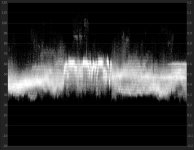
I noticed you recorded with CINE-D with a high exposure and non-default settings (did you tweak the contrast?).
As a result the histogram shows a very low contrast chart:

church-hist.jpg

Given the atmospheric disturbances and the narrow recording range in 8-bit your are overworking your encoder and the result will be a sub-optimum video quality.

From the Vimeo source:

church vimeo.jpg

From the upload after color correction:

church corrected.jpg

What I would suggest is to make a correctly exposed test shot, I would start with the Natural profile and no changes to any of the sharpness, contrast etc. And compare the results with the other camera.

One thing I noticed is that you clip the highlights in your NLE, your GH5 records WTW and before you render you should bring this into legal range.

So in summary, it is not your lens that is soft it is your incorrect exposure and uncorrected settings that make the image soft.
 
Last edited:
If we compare a luminance matched frame from the second downloaded video with the downloaded Vimeo shot from the other camera we see:

contrast enhanced.jpg

The right image may look sharper but that is due to the obvious edge 'enhancement' processing. Also there is horizontal camera shake in the left frame.
But if you look at the grass there is actually more detail in the left image.

But again the comparison is not fair because the exposure and settings prohibit the GH5 from making a quality image in the first place (the histogram shows a similar shape as in the prior message).
 
Thanks for sharing.

I noticed you recorded with CINE-D with a high exposure and non-default settings (did you tweak the contrast?).
As a result the histogram shows a very low contrast chart:

View attachment 123157

Given the atmospheric disturbances and the narrow recording range in 8-bit your are overworking your encoder and the result will be a sub-optimum video quality.

From the Vimeo source:

View attachment 123159

From the upload after color correction:

View attachment 123160

What I would suggest is to make a correctly exposed test shot, I would start with the Natural profile and no changes to any of the sharpness, contrast etc. And compare the results with the other camera.

One thing I noticed is that you clip the highlights in your NLE, your GH5 records WTW and before you render you should bring this into legal range.

So in summary, it is not your lens that is soft it is your incorrect exposure and uncorrected settings that make the image soft.

What i dont understand is results strait from the camera are ok with my other lenses with cini D which i always use,using the Sony resuts are fine from the camera,so you think the lens is not faulty in which case it will have to be sold and the GH5 used only for non wildlife filming,i have tried leaving exposure in P mode and results are the same so unlike other cameras the GH5s P mode is crap with that lens at least,i have been filming 40 years,also the the lens ok with filming up to 300mm
At least i have my HC-X1000 https://www.youtube.com/watch?v=zFu--XUsgfI
And RX10 for wildlife
 
Last edited:
What i dont understand is results strait from the camera are ok with my other lenses with cini D which i always use
I don't think there is anything wrong with cine-d, but the shots you provided are either overexposed or have changes in the contrast settings or master pedestal and given that telephoto scenes, due to atmospheric interference, tend to show less contrast you leave very little of the already narrow 8-bit resolution to the encoder.
 
Last edited:
Ok i now know the lens is no use to me and i will stay with my other cameras for wildlife.If at times it cant be left in P mode and take good detailed footage when i dont have time to play around with settings thats it.
 
Last edited:
Can you say 100% the lens is not faulty,if so it will save me time and money taking it to my retailer for testing.
 
If we compare a luminance matched frame from the second downloaded video with the downloaded Vimeo shot from the other camera we see:

View attachment 123161

The right image may look sharper but that is due to the obvious edge 'enhancement' processing. Also there is horizontal camera shake in the left frame.
But if you look at the grass there is actually more detail in the left image.

But again the comparison is not fair because the exposure and settings prohibit the GH5 from making a quality image in the first place (the histogram shows a similar shape as in the prior message).

That's precisely what I've told Flinty on several occasions. He's seeing edge enhancement and not more detail on the RX10iii. Having had both cameras (the RX10iii & currently the GH5), there's unquestionably more detail on the GH5.

But I do think he should check out his lens.
 
Back
Top