Paint menu FX9 - getting a perfect baked-in look

Will definitely give that a go next time I film this weekend. If that works, is it ok to switch back to the STD 5 matrix using the white balance performed in the neutral scene file?

If you change the paint menus you should re-white balance. It won't make a difference everytime, but it is good practice.
Personally, I wouldn't use STD5 for anything except tightly controlled indoor lighting setups, and even then I will rarely use it. STD5 is basically rolling back to a Betacam-era gamma curve with a small dynamic range and a higher risk of blowing out highlights (and not in a nice way like some gammas.) But for indoor interviews and faces it can be good enough. But don't take my word for it, hook up the camera to a good monitor and take a couple of hours to experiment is the best way to find out what works best for YOU.
 
Chris, you say the paint settings are for STD 5 profile. Have you tried them with Sony's Hypergammas at all? I find the highlight roll off better with HG than STD 5, so was wondering...
Thanks
 
Chris, you say the paint settings are for STD 5 profile. Have you tried them with Sony's Hypergammas at all? I find the highlight roll off better with HG than STD 5, so was wondering...
Thanks

Yes I have used Hypergammas, many times in the past, but never in a studio setting.

In a studio setting where you have total control of lighting you should set lighting levels to the level where there in NO compression of highlights. In other words no knee is required. There should never be in a controlled lighting scenario a need to "roll off" highlights. Rolling off highlights is required when your lighting levels are beyond your control and so high that your highlights will clip unless rolled off. Light your studio to a range of no more than six stops. Use a light meter to set levels if it helps. If your darkest to lightest areas of your studio fall within a six stop range your camera will handle that perfectly well without having to compress and roll off the highlights. If your Gaffa is lighting beyond that six stop range in a studio get another Gaffa who knows what he is doing.

Traditional studio practice is to decide what aperture you want to work with and then set the cameras for that. Let's say F/5.6. Next light the back of the set and increase light levels to a correct exposure for F/5.6. Now start to light your subjects to F/5.6. Now add your hair/rim/back lights. At no point do you add so much light to start to cause compression with a knee. Your knee should be turned off. Watch on a waveform monitor as you increase light levels until the peak of your levels just about kisses 90IRE... no more! Once you have F/5.6 everywhere now start to lower your back of set lighting if you want your talent to lift out from the lower light levels behind them. In other words now do the "artistic" lighting adjustments and touches to generate the mood you are trying to set. Like accent lights, slashes, gobos. Whatever takes your fancy. The knee and rolling off should only be used when lighting is beyond your control. Which in a studio should never be the case.

Chris Young
 
Feel free to try my matrix below.
I find most matrix settings will work the same with any gamma. Gamma is only the contrast .

The black level and the Matrix Level ( which is saturation ) vary to taste to the gamma and the shot itself.
I've used lower black levels than -3 with hypergammas but don't let them crush below 0.
Don't use any custom matrix settings with s-cinetone. It already has its own.
If you try F55-like ( which looks pretty good IMHO) then turn all those numbers to 0 or turn the settings off. (I don't remember the menus that well).

Re Cy's suggestions which are pretty good in general.
I agree Only use Standard 5 in a completely controlled environment otherwise if anything goes near or over hundred use hypergammas.
I've never turned off the knee entirely as Cy suggested but its an interesting idea. I've always left my knee on and set it to 92. But always turn off auto knee.
Many situations are semi-controlled, where you're lighting but in a real environment where you can't conbtrol windows or lights and all background elements.
That's where you want hypergammas because overexposed elements can look terrible in Std 5. Never use Std with a window.
I've never heard of or tried his 135 +10 set up .
Whatever you do - don't start screwing around with the matrix settings yourself unless you really study up. They not intuitive at all and one color affects all the others in completely weird ways. One color may look great while others will go wacky!

Matrix - ON - Std
Level : +2 or to taste
Phase : -8 though sometimes I go -7 or -9


R-G + 64
R-B - 10
G-R + 5
G-B 0
B-R - 5
B-G - 21
 
Last edited:
verexposed elements can look terrible in Std 5. Never use Std with a window.
I've never heard of or tried his 135 +10 set up .

Lenny

Paul Wheeler BSC FBKS was the first person I am aware of who when digital filmmaking started to take off with Cine Alta cameras was the one who after much extensive testing within the BSC (British Society of Cinematographers) came up with this "135+10 Matrix". The 135 refers to the three values that are altered. The first entry in the matrix is R-G. The third and fifth matrix values are G-R and B-R respectively. Those are the three matrix values that are adjusted


R-G Set to +10
R-B Set to 0
G-R Set to +10
G-B Set to 0
B-R Set to +10
B-G Set to 0

Below is a description of what happens to each channel, 1, 3 and 5 of a matrix when its settings are increased n a positive manner. In the case of only adjusting certain values within that channel, well then what you see is more of that effect added to those individual hues.

R-G The red is slightly more saturated, like the green
and magenta, but the magenta becomes slightly redder. The rest of the tones
remain standard. (losing a magenta bias can be a good thing)

G-R The green and the magenta become more saturated,
especially the magenta. The rest of the colors are practically
unaltered. (Remember the magenta is now more to the red)

B-R. The blue is slightly saturated. The magenta goes to
red and the green is somewhat more saturated and bluer.
(Again the magenta biases towards red)

These settings have no impact on the dynamic range or white balance. These are just painted values that were preferred by Caucasian viewers during the tests. All being based on the physiology of the human eye's perception of skin tones. These settings give skin tones a warmer hue. Agreed maybe not to everyone's taste but that's a subjective decision to which any DP is entitled. These settings were found to be a good basis to work off in post without having to do much to them. e.g. A suitable baked-in look for fast turnaround. Originally based on the STD 5 709 setting doesn't mean it can't be used with any other defined gamma setting. These paint settings are independent of any gamma curve used.

If you have access to a DSC CamBelles test chart try any gamma set with and without these 135+10 settings and draw your own conclusions. That's always the best way to find out if something is going to work for you. I just know that these settings are fairly widely used in the UK and Europe and I know quite a few here in Australia using these settings for live and quick turnaround for TV. The original OP's post was for a 'baked in' look for a TV 'news' type production that was hopefully an advance on the traditional Sony look. The Sony look whilst being technically pretty accurate in tonal rendition is probably not the nicest 'look' from a subjective point of view.

The change to positive value increases in the other channels will have the following effect on those channels.

R-B The red is very slightly saturated and the yellow is somewhat more orange. The rest of the colors are not affected.

G-B The green and the magenta desaturate slightly. The yellow is slightly greener and the blue remains standard. The red, blue and cyan are not modified.

B-G The blue, green and the magenta saturate, leaving the magenta somewhat less red compared to the standard. The green is somewhat more yellow. The red, yellow and cyan are not altered.

As you can see any adjustments to a matrix channel has a push-pull effect on other hues associated with that channel. It's like a spider's web. Distort it at one point and the surrounding parts of the web also suffer distortion. That distortion diminishes as you move further across the spider's web. You can check this effect out in Resolve by pulling and pushing on an image using the tool called "Color Warper - Hue -Saturation". Likewise with the main channels in a matrix when you push-pull on them. If you want to make adjustments in hue and saturation to any particular color without concurrent effect on other channels' hue and saturation you will achieve that by making those adjustments in the Multi Matrix/Adaptive Matrix on various cameras. Watch from 2:18 in Alister's good video explanation of how this is done.


A lot of this was discussed a few years back in a bunch of posts that started on the following page:

https://www.dvxuser.com/forum/sony-...as-temp-fs7-fs5/362537-green-grass-saturation

Art Adams wrote a good nuts and bolts description in layman's terms as to how your camera matrix works way back in 2012. As it is with every artist. How well you know your paints and how to mix them gives you more control of how your final painting will look. If you want to be an artist you need to learn how to mix paints. The end result is how your painting reflects your vision in reflecting light to the observer. In your camera, you are mixing those light values before you put them on the sensor canvas so that the transmitted image at the other end reflects how you want your image, 'art' to be perceived.

https://www.provideocoalition.com/geek-out_the_matrix_reloaded/

Chris Young
 
Thanks Chris, That's a great explanation and I will check out that Matrix when I get a chance. When I created mine it was much more of a catch as catch can experiment . I found a bunch of tutorials on the web with images of what happened on a vectorscope when you changed the matrix settings and I just kept working for days with a DSC chart, a vectorscope and a bunch of magazine photos. I had been a taught by a DP/Tech named Tony Salgado ( who is now in LA) to use photos with a variety of flesh tones and different kinds of color looks to see what my camera was doing . I still do that today. If you can come up with a look that makes every picture look good and true, you've probably hit the sweet spot and I used that Matrix for many years and passed it around to lots of people.
I would love to see a good explanation of what the color adjustments ion the A7 series cameras do.
I actually created this on an EX-1 and was very surprised that it traansferred exactly to an F3. When the FS7 came out , oddly a phase shift to -7 or -8 and then all 3 cameras would match .
 
Last edited:
Thanks Chris.
Apologies, I hadn't realised you were only talking about controlled studio environments!
My questions were more in relation as whether the settings would work and match up with other Sony cameras in day to day outdoor/indoor scenarios and such things as 2/3 camera shoots and OB's, etc where environments can be changeable.
 
I had been a taught by a DP/Tech named Tony Salgado ( who is now in LA) to use photos with a variety of flesh tones and different kinds of color looks to see what my camera was doing . I still do that today. If you can come up with a look that makes every picture look good and true, you've probably hit the sweet spot and I used that Matrix for many years and passed it around to lots of people.

Lenny. Look, my suggestion to the original poster was just that, a suggestion for his studio shoot to help him improve the STD 5 look. My explanation of what is happening in the channels is how it was explained to me many years ago. That proved to be a big help in getting my head around what was going down in the matrix because up until that point it was an experiment of diving into a well of color I didn't understand. Totally over my head at the time. What you are doing, and what you learned from Tony Salgado is what many of us have done since tube camera days. I've often experimented a lot to come up with a particular look to satisfy a client who wants something rather different looking. Not so much in later years as so much can now be manipulated to good effect even in the 709 space in post, with cameras shooting in 709 modes as a lot of them can handle 10 stops or more these days. Back in the early analog 1" and Betacam days and prior to NLE digital editing, when cameras could only manage six stops and where post-color manipulation in an analog linear tape suite was very limited, we used to poke around in the matrix far more than we do today. At least so in my case.

I would love to see a good explanation of what the color adjustments ion the A7 series cameras do.
I actually created this on an EX-1 and was very surprised that it traansferred exactly to an F3. When the FS7 came out , oddly a phase shift to -7 or -8 and then all 3 cameras would match .

What you say about the similarity between the EX1 and an F3 when an identical matrix is applied to both doesn't surprise me. That's the great thing about the SMPTE matrix. It was designed to be transferable between cameras that support SMPTE standards.

A7s, I hear what you are saying. They are an animal of a different breed. Those A7s and the FS5 and the likes don't run a standard SMPTE matrix. The design philosophy in the color handling of those cameras is much, much more limited than the SMPTE matrix when it comes to baked-in colors. I've played around with them and find the PP4, I seem to recall, is the closest to a STD 5 setting. But they are incredibly limited in color fine-tuning up against broadcast matrix-based cameras. Like phase adjustment of individual colors. As stand-alone cameras, I love what you can get out of them. In S-LOG they are far more impressive as you can use transforms and the LOG transforms I find match very well with the Cine line of cameras when using transforms, or even LUTs in post for that matter. That's basically how I've used my A7 series cameras, in S-LOG mode. This is obviously beneficial when you have a nice wide dynamic range for capture and post manipulation to play with.

Chris Young
 
Thanks Chris.
Apologies, I hadn't realised you were only talking about controlled studio environments!
My questions were more in relation as whether the settings would work and match up with other Sony cameras in day to day outdoor/indoor scenarios and such things as 2/3 camera shoots and OB's, etc where environments can be changeable.

Yes. By all means use those settings in outdoor scenarios. I do every week on football multi-cam shoots. With everything from 2/3" PDW cams to FS7s and the later FX cameras like the 6 and 9. Obviously it's then best to use a manual knee tailored to the response of each camera. I never use Auto Knee. They can 'pump' as you pan across rapidly changing backgrounds. For example in a stadium if you pan from a hard sunlit scene into a shadowed scene the auto knee will do what it was designed to do. It will adjust the camera's knee point and slope. Sometimes this can be very annoying as it looks like the exposure is changing. Well it is to a degree. The knee is changing the nature of the exposure in the upper luminance levels of the scene. I find you are best to adjust your knee setting manually for the highest luminance levels you are going to encounter. In other words to achieve the best compression ratio and smoothness of roll-off as previously discussed. The most noticable thing I observe in mixing 2/3", S35 and FF sensors is that obviously the larger sensors handle a greater dynamic range and can get away with less aggressive knee settings to get a nicer smoother roll-off as you approach peak video levels. You have more 'head-room' so to speak in which to handle signal overload levels.

Chris Young
 
Thanks Chris - What Knee settings do you use on the variety of cameras mentioned?

Well... that's a leading question. Depends on camera and sensor range. Most 709 type cameras seem to come with their knee points at about 95IRE. If you are working to 709 broadcast levels 1 volt is 100IRE. This leaves you only 5IRE to compress your over exposure highlights with a pretty savage slope. A harsh roll off in other words.

If I had to suggest a rough rule of thumb knee starting point I would suggest 85IRE. This is far enough above skin tones, you don't want any compression on skin tone highlights. As a start point as this now gives you 15IRE in which to model a slope to try to soften the compression curve. The slope characteristics vary quite a lot from camera to camera. The only way I know to roll a decent knee/slope ratio is do do it via a standalone Waveform Monitor. My procedure is to put a soft edge spotlight on a solid white surface in a totally dark room/studio and let the edge of the spot feather out to darkness. I then fill the frame with the spotlight circle and expose for a correct exposure at the fifty percent light level between the hot center of the spot and outer edge in darkness. Now while observing the WFM you can adjust the knee point and watch the compression of the waveform change as you adjust the knee. Once your waveform hits the 85IRE mark midway between the brightest center and darkest outer edge of your spot you can now start to adjust the slope to get the smoothest gradient on the signal on the WFM up to the 100IRE point.

Another way we used to do it for bright sun outdoors was to have someone in a white shirt stand in pretty well direct overhead sunlight. Then we would adjust for correct exposure on the front of the shirt. So that all buttons pleats, creases etc were visible. Now generally you will find the upper shoulders facing directly up into the sun would be blown, clipped, over exposed. Then we would start to adjust knee and slope to get the absolute shoulder in sun peaks looking reasonable at 95IRE

Earlier I said 709 levels. Bear in mind unless you have HDR monitors most delivery, OTA and cable TV, DVD, BD, Web when observed on PC monitors are all at 709 levels. That's basically the 709 world we live in. That's the media world most of us deliver into. The knee settings we use really need to be aimed at getting the best of our image into that limited six stop delivery world.

Chris Young
 
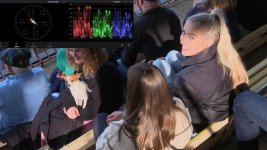
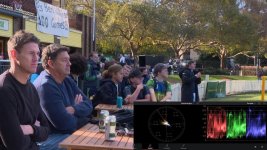
Thinking about the question further I had a dig around and found a couple of people B roll shots off an FS7 card from a recent game. These shots will hopefully demonstrate what I was trying to explain in my previous reply. Look at the following two pix out of Resolve with their accompanying waveform grabs. The highlights are all under clip level, 100IRE, they retain some color in the highlights and retain some highlight detail. The mid-tones are delivering acceptable levels and we still have detail in the darkest parts of the signal, deep shadows etc. This camera is running the previously discussed 135+10 Matrix. To see all this correctly the images should be viewed on a known Rec709 monitor

These were grabbed from a card out of one of the FS7s and the Knee settings on that FS7 are as follows.

Knee Menu

Setting ON
Auto Knee OFF
Knee 85
Slope +40
Knee Saturation ON
Knee Sat Level +15

Detail Menu

Knee Aperture ON
Knee Aperture Level +30

Black Level

Set to -3

Once you go into Knee compression you will start to get the R, G and B curves compressing at different levels so it helps to use the Knee Saturation and Knee Aperture to help hold color and detail in the compressed part of the RGB signal. In this case at +30. Also, this camera had its Black Level set to -3. You may also note that the skin tones are going right up the 11 o'clock skin tone line on the Vectorscope.

Punters + Scopes 01_1.3.1.jpg - Click image for larger version  Name:	Punters + Scopes 02_1.1.1.jpg Views:	0 Size:	78.9 KB ID:	5691842
 

Attachments

  • Punters + Scopes 01_1.3.1.jpg
    Punters + Scopes 01_1.3.1.jpg
    113.8 KB · Views: 0
Last edited:
I always just set my knee at 92 and slope at 50 and left the other settings alone, as I found getting more aggressive could lead to color issues and compression I didn't like. but Cy has been much more exhaustive in his testing so I'm sure his settings work. Above all though he's right about turning off auto knee and about what can happen to some colors if the knee is mishandling them. That's why I prefer cine or hyper gammas if I don't have very controlled lighting . They won't screw up your colors in the bright areas. Just put an ordinary grocery store orange in your shot and see what it looks like if you start to overexpose it . (By the way my settings were with older cameras - F3 and EX-1) - haven't tested with new ones since I always go to hyper and cine gammas.
No matter what gamma or knee you use though try to avoid getting important flesh tones into the compression range as they always look crappy.
 
I always just set my knee at 92 and slope at 50 and left the other settings alone, as I found getting more aggressive could lead to color issues and compression I didn't like. but Cy has been much more exhaustive in his testing so I'm sure his settings work. Above all though he's right about turning off auto knee and about what can happen to some colors if the knee is mishandling them. That's why I prefer cine or hyper gammas if I don't have very controlled lighting . They won't screw up your colors in the bright areas. Just put an ordinary grocery store orange in your shot and see what it looks like if you start to overexpose it . (By the way my settings were with older cameras - F3 and EX-1) - haven't tested with new ones since I always go to hyper and cine gammas.
No matter what gamma or knee you use though try to avoid getting important flesh tones into the compression range as they always look crappy.

I agree with pretty much all of that.
I rarely use a gamma that allows the use of knee, but when I do, I always turn it off completely. Yeah, knee might help control highlights once in a awhile on certain shots, but it is far more likely to do harm. I prefer just to keep it turned off and be careful about my exposure. Or better yet, choose gammas that don't even use knee. Knee always feels like 1980's technology just grandfathered into today's cameras -- which it is. The world has moved on and there are superior ways to wrangle better performance from our cameras.

BTW, for similar reasons, I don't rely on limiters or compression to keep my audio levels under control either.
 
Last edited:
I rarely use a gamma that allows the use of knee, but when I do, I always turn it off completely.

Maybe we are talking at cross purposes here. I've been talking about broadcast 709. I would agree with you Doug in most controlled situations we can work without knees, it's preferable but we don't have that luxury when mixing numbers of different brands, sensor sizes and types of cameras on live-to-air productions. They all have to be 'squeezed' into that limiting Rec 709 transmission space which means using knees if you want any dynamic range worth speaking of. On microwave links a signal that complies with Rec 709 should have no problems with input impedance, return loss, output impedance, video input level, sync input level, hum rejection, video frequency response plus another dozen or so other technical parameters. Cameras set to, set up and delivering 709 levels won't cause issues in these areas.

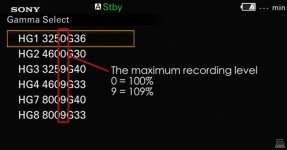
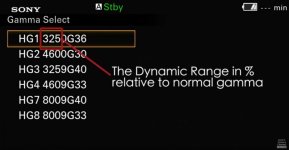
Hypergammas over 1 volt (100IRE) get clipped with disastrous results to the brightness peaks. Obviously, if we could go to 109IRE which most cameras can do we could have a far more linear signal level with a vastly increased dynamic range to work with, like the Sony Hypergamma 109 settings of Hypergamma HG8 8009G33. This allows up to an 800% dynamic range relative to 709. Totally unusable in live broadcasts. If talking Sony Hypergammas for broadcast at 100IRE we are restricted to HG1 and HG2 which respectively have 325% and 460% dynamic range relative to STD5 Rec 709. The trade-off here for the 325 and 460 greater dynamic range is that the signal/picture looks flatter because it is, it lacks contrast, and needs some grading. Those out-of-camera images cannot be mixed with regular contrast spec 709 images. So we stick with the higher contrast but lower dynamic range 709 which the whole of the live broadcast industry is built around. Given the luxury of post-production and the luxury of sitting down and grading images then yes work with a much image dynamic range you can grab such as LOG or even RAW. Most transmitters have a maximum input level of 105IRE. In reality, it never reaches that as the signals will go through a legalizer which will just chop off any signal parameters outside of the 709 levels. So your lovely high dynamic range image gets brutalized going to air. Better off massaging your 709 pix contrast, gamma curve and knee to get the greatest amount of picture information into your signal with the best smoothest looking highlight curve you can deliver. By doing so at least you are attempting to capture as much as possible of the camera's dynamic image to fit it into the restricted 709 transmission space.

Not broadcasting? Go for as much as you can get. Why use Hypergammas which need mild grading? Grab as much range as possible like using LOG. LOG still needs grading like the Hypergammas and takes no longer to grade and can deliver more dynamic range to fit into your chosen output color space. LOG can go out to a full-blown 2020 color space. You can't do that as well with the captured dynamic range when working with Hypergamma footage. Hypergammas are in between Custom 709 and the maximum you can capture with any given Sony camera that has LOG capability. For me, it's either 709 for live production or LOG if going through post. If I'm not forced to work in 709 then give me the widest capture range where S-LOG3 cine offers up to 1300% dynamic range. Way better than the 800% of HG8.

Chris Young

Hypergamma 01.jpg
 

Attachments

  • Hypergamma 01.jpg
    Hypergamma 01.jpg
    40.5 KB · Views: 0
Maybe we are talking at cross purposes here.

Yes, that is probably true. And I won't take offense at the Basic Video 101 lesson you've provided for me, and I'll assume it was written for the benefit of others. :-)

Personally, I have no interest in the gamma needs of live broadcasting, nor do I have any need to match multiple cameras with varying sensor sizes, models, brands, etc., If that is still the world you are woking in, so be it, but that was not what the OP was asking about. I realize the conversation has drifted a bit to a wider discusion of gammas, knee, dynamic range, etc. but I can't see any reason why anyone would want to use knee is 2022. The OP said he is looking for a in-studio WYSIWYG scene file that will get him very close to a finished image onboard the camera with a little minor grading in post. So, as I said earlier, STD5 might be an acceptable gamma for use in that environment, but whether the knee is turned on or not shouldn't make any difference whatsover. If knee is affecting the picture in a controlled environment, something has gone horribly wrong. And if someone is shooting outdoors, or in some other uncontrolled lighting situation, STD5 would be a very poor choice. A better option would be to use one of the Hypergammas, for which there is no knee mode at all. So, the bottom line is that whether someone is indoors or out, there is really no reason to ever use knee with a camera like the OP's FX9 or any other modern camera.

My use of the FX9 has been limited, but I have no doubt that very a good scene file could be dialed in with the camera's REC709 paint menus that would be superior to S-Cinetone. S-Cinetone is the Bud Lite of scene files. Good enough for a lot of people, but not for anyone that cares very much about taste. I can't tell you exactly what combination of settings would be best on the FX9 without having a camera in front of me to dial them in with my charts and scopes, but I can absolutely guarantee that knee wouldn't factor into any of it.

As for the choice between HG and S-LOG to achieve the most dynamic range, that is not such an easy choice. Sure, on paper at least, S-LOG will capture more dynamic range. But is that all that matters? I know for a fact that I can get a better overall picture out of my Z280, Z750, and Z90 with a custom REC709 scene file than I can with S-LOG --- no matter how much I try to massage it post. To a certain degree that is also true of my FS7, but the difference isn't so black and white on that camera. The FX6 is in a different class because it barely has any paint menus so you either have to shoot LOG or accept the shortcomings of S-Cinetone. But using S-Cinetone on the FX9 is mostly going to be for the lazy or uninformed. Oops, did I just say that out loud? :--)
 
Personally, I have no interest in the gamma needs of live broadcasting, nor do I have any need to match multiple cameras with varying sensor sizes, models, brands, etc., If that is still the world you are working in, so be it, but that was not what the OP was asking about. I realize the conversation has drifted a bit to a wider discussion of gammas, knee, dynamic range, etc. but I can't see any reason why anyone would want to use knee is 2022.

If knee is affecting the picture in a controlled environment, something has gone horribly wrong. And if someone is shooting outdoors, or in some other uncontrolled lighting situation, STD5 would be a very poor choice. A better option would be to use one of the Hypergammas, for which there is no knee mode at all. So, the bottom line is that whether someone is indoors or out, there is really no reason to ever use knee with a camera like the OP's FX9 or any other modern camera.

This is where the discussion has drifted. If you are not in a live broadcast situation then one is totally free to utilize the workflow that best serves your needs and delivers you the best image. And if it's not live then I don't use 709, or very rarely, only like if it has to go to air within a short time after being shot. Sadly for those of us who work in broadcast, those freedoms of choice aren't there. Unless it's an HDR broadcast 709 it is. Sure the 100IRE no knee Hypergammas fit the bill technically but you cannot mix that out of camera flatter looking signal with the higher contrast STD 5 709 cameras irrespective of their brand, sensor or dynamic range. Doug, far be it for me to try to teach Grandma how to suck eggs. It's probably best summed up by one of Sony's own educational presentations where they outline the following differences between 709 and Hypergammas. A link to the Sony material can be found at the bottom.

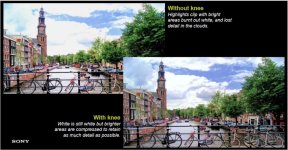
"The knee process.

An explanation of how the knee process is used to provide an extended dynamic range for
broadcast camcorders. The purpose of the knee.

This is a control for maintaining a good dynamic range for the image.
It also allows highlights to be recorded without clipping.
The knee function is a crude method of extending dynamic range.
It provides plenty of dynamic range for low lights and mid-tones.
It also provides a compressed dynamic range for highlights.
The knee function crudely copies the human eye
More dynamic range is given to low lights and mid-tones.
Less dynamic range is given to highlights.
The knee function has a hard roll-off point
The knee is a sudden switch from normal to compressed

What is Hypergamma?

Hypergamma curves were introduced to some professional camcorders
These camcorders have a menu selection for Standard or Cine.

Hypergamma 1 offers good low light and mid-tone representation
It clips in highlights at 100%, so is better for darker scenes.

Hypergamma2 offers a better dynamic range compared to Hypergamma 1
It trades off low-light and mid-tone range for extended highlights, clipping at 100%

Hypergamma3 and Hypergamm4 offers 109% versions"

Either way Hypergammas trade-off either at the high end or the low end. This means if you want to fit the maximum dynamic range you can onto a 709 display means the flatter Hypergamma image needs to be graded to get its extended range onto a 709 monitor which sadly is still the bulk of TVs and PC monitors used by clients and the viewing public. Whether it be live or produced end product 709 is still the dominant worldwide distribution standard for TV, DVD, and standard BDs.

https://pro.sony/s3/cms-static-content/file/15/1237494951415.pdf

Chris Young

Sony knee 01.jpg - Click image for larger version  Name:	Sony knee 01.jpg Views:	0 Size:	94.5 KB ID:	5691908
 
Last edited:
Chris, you're copying and pasting lot of good information, but I guess I just don't understand the overall point you're trying to make with it all. :-)

Here's my summary:

Knee: Ancient technolgy. Always a bad choice in 2022. A tool of fhe devil.

DCC: Ancient technolgy. Always a bad choice in 2022. A tool of fhe devil.

STD5: Okay for controlled lighting situations were maximum dynamic range is not needed, such as sit-down interviews and head shots.

Hypergamma: Allows the most dynamic range without going to LOG. Can be paired with other paint settings to create a WYSIWYG image (or very close to WYSIWYG image) that may, or may not, require some minor grading in post.

S-Cinetone: Promoted as being a WYSIWYG profile, but only looks best in a very narrow range of circumstances. Can always be improved upon with some easy grading in post using an ordinary NLE or Resolve.

S-LOG: Captures maximum dynamic range but will require competent grading in post with a dedicated color grading application, such as Resolve. May provide better results than shooting with Hypergamma, but it ultimately depends on the camera model and other factors. Don't assume S-LOG is always the best choice even when maximum dynamic range is desired.
 
I would completely disagree with Doug about the idea of ever shooting STD 5 709 with knee off unless you have absolute control of everything including someone simply wearing a white shirt. Its rare to have that limited a palette. Even scenes that were lit usually had some elements that would burn up without a knee and many were only semi controlled real world environments. Us ancient relics in this business had to shoot video for many years before hyper-gammas and Log . It was all 709. The knee was my very good friend as long as I knew how not to let it screw up a shot. Back then I would often have a tech (who often doubled as the audio guy) who could paint the camera setting to the shot and a good part of that was adapting the knee to the scene. Techs with good eyes were rare and they were artists and the DP's collaborator. People who were good at "painting" were in high demand though gradually with the advent of Log that specialty has sadly disappeared.

So I would never consider it a tool of the Devil - just a tool like any other and I would never shoot Std5 with the Knee off. I don't know anyone who did. It actually can function fairly well on whites as illustrated in the stills from Sony that Chris posted. In fact I prefer to only let it work in the whites which is probably why i set it a bit higher than Chris. Std 5 with a properly set knee can still produce great looking video and I shot plenty of extremely pretty and natural looking shots even without a paintbox. Just required skill.

Cine & Hypergammas are trickier to use for WYSIWYG. Alister Chapman said that they were designed to actually be underexposed by as much as a stop and then printed up in post though I never used them that way . As mentioned above they can look flat . For that reason I would usually tend to set my black level and saturation to the shot when using hypergammas. Of course that requires a decent monitor, but that can help giving you a WYSIWYG shot that looks like typical 709.

Auto Knee is absolutely a tool of the Devil though :-)
 
My use of the FX9 has been limited, but I have no doubt that very a good scene file could be dialed in with the camera's REC709 paint menus that would be superior to S-Cinetone. S-Cinetone is the Bud Lite of scene files. Good enough for a lot of people, but not for anyone that cares very much about taste. I can't tell you exactly what combination of settings would be best on the FX9 without having a camera in front of me to dial them in with my charts and scopes, but I can absolutely guarantee that knee wouldn't factor into any of it.

Out of interest, I would love to know what combo of settings you would dial into the FX9 for such a scenario. In fact, more than just interest - I will go and test these settings out this coming week!
 
Back
Top