Odyssey7Q February 2014 Firmware Update

Timecode is preserved across spanned clips for ProRes. No extra steps. Try it out.
I have tried it out. It doesn't work that way. If I drop the clips into a timeline, I still have to manually set the start timecode of each timeline to match the first clip's. Yes, I can then nest it, but that won't really represent my master clip. When I edit, I want the clip I'm editing from to be the whole clip and not a nest of 10 different clips. If I WAS to go this route, I would instead export the sequence as a new, complete ProRes clip for editing.

Again... yes... these are all things I CAN do... I don't want to have to jump through these workaround hoops when CD's promised software will do it instead. It's the reason software like this exists in the first place. I'm going to be doing 12 interviews at over 30 minutes each... so I'll have 120+ different clips over 12 different timelines to manage, including setting timecode on each timeline, and then either nesting or exporting all 12. OR... I can record on the Samurai and end up with 12 master clips with embedded timecode or use the promised Convergent software to get the same. I know it may seem like making a big deal of nothing, but I want to keep my workflow MY workflow.
 
The tool will merge spanned clips together once they're copied over to your Mac. With it you only have the one clip to manage, without it, import the collection and slot them together on your timeline. It's really not a big overhead, given the choice of 4k 12 bit super sampled to HD and 8 bit HD, I'd put the Atomos to one side ;-)
I didn't say I was shooting with the Sony...
 
I think the ProRes transfer tool is going to take a little bit longer. Programmer out sick. As others have mentioned, it is a convenience tool but not really necessary to do your work. Far from it. When I see the way AVC-HD and other files pull over off cards and into folders or even when I look at what we did on the nanoFlash for years, well handling these ProRes files isn't really a big deal.

Sorry for the inconvenience.
 
Without seeing in person the Odyssey that has the signal drop out every time the cable is touched, I would blame that cable or any adapter connectors on it.

Without seeing in person the Odyssey suffering power problems with V-lock batteries I would try powering it from another source. If that solves the problem then I would suggest borrow/renting the use of alternate V-lock batteries and an alternate V-lock charger to see if they are properly delivering power. I would also suggest looking at the Status Indicator on the Odyssey to see how the battery is delivering voltage at any given moment. You could put an amp meter in line if you are knowledgeable in such matters. If going to an alternate power source including the included AC power supply fail to stop the problem from occurring, then please contact us for Service.

I can only do so much with limited information.
 
Cheers for advice. In all honesty I don't expect a solution from this forum. I've contacted CD directly to that end. I am, however curious to see whether it's something that has happened to other people to determine better where the issue lies.
 
I think the ProRes transfer tool is going to take a little bit longer. Programmer out sick. As others have mentioned, it is a convenience tool but not really necessary to do your work. Far from it. When I see the way AVC-HD and other files pull over off cards and into folders or even when I look at what we did on the nanoFlash for years, well handling these ProRes files isn't really a big deal.

Sorry for the inconvenience.

Thanks for the info. Not inconvenienced... appreciate the word. As I said, I'd rather keep my editing workflow simple and familiar, so I'm happy to have the info so I can plan accordingly.
 
Cheers for advice. In all honesty I don't expect a solution from this forum. I've contacted CD directly to that end. I am, however curious to see whether it's something that has happened to other people to determine better where the issue lies.

I should add - I don't think this is necessarily a unit issue and might well have something to do with my configuration. I also expect teething problems when using new kit, especially with the myriad of cables & connections I've got going on. CD's response was pretty immediate and helpful, pinging me advice in real time as I was shooting!
 
Hi Mitch,

I am using this BNC cable - http://www.bhphotovideo.com/c/product/546905-REG/Pearstone_VBBC_303_VBBC_303_Premium_BNC_Video.html

This plate - http://www.westsideavstore.com/index.php?p=product&id=82

Everything was brand new.

and new L-Series batteries. The unit just switches off with no warning. Today whilst I was recording, I got a message saying "Low Voltage Warning" and the 2 seconds later, shazam, black screen. I was so lucky I didn't miss that shot!

Again, touched the BNC cable and got some weird looking images. If I unplug it and plug it back in, it's working.

Can I ask, has anyone else experienced these issues or is it just me?
 
Hi Mitch,

I am using this BNC cable - http://www.bhphotovideo.com/c/product/546905-REG/Pearstone_VBBC_303_VBBC_303_Premium_BNC_Video.html

This plate - http://www.westsideavstore.com/index.php?p=product&id=82

Everything was brand new.

and new L-Series batteries. The unit just switches off with no warning. Today whilst I was recording, I got a message saying "Low Voltage Warning" and the 2 seconds later, shazam, black screen. I was so lucky I didn't miss that shot!

Again, touched the BNC cable and got some weird looking images. If I unplug it and plug it back in, it's working.

Can I ask, has anyone else experienced these issues or is it just me?

If touching the BNC cable and the signal degrades it is definitely a bad cable. I don't see that cable rated as 3G. There is a difference the cable and connectors used to make it must meet SMPTE 424M spec.
http://en.wikipedia.org/wiki/SMPTE_424M

Just a high quality cable is not 3G. These are specific cables. On some cables the pin (center part) does not stick out far enough and that can cause problems. Also a sharp bend in a cable can render it useless. Always carry more than one known good 3G cable, things happen on location.

Also make sure the Nano Neutrik cable (power cable) is plugged all the way in and that the button pops back out, if it is not in all the way, the power connection can be wonky (technical term for intermittent). These tiny connectors can be temperamental.

Also sometimes even a brand new battery can be bad. keep an eye on the voltage shown in the Odyssey. If voltage drops below 7v then it may stop working very quickly if you start to stress the O7Q like HFR recording or 4K>hd. Some batteries have high internal resistance that causes voltage drops when more watts are drawn.
At 7 v I always replace the battery.
 
Last edited:
Mitch,

I attempted to use quad mode today, have successfully done so in the past with the previous firmware. Today I had Sony F800 outputing to Input A. In quad screen mode (4 images on the one screen), the image form the camera (HD-SDI 25P 4:2:2) would flicker and pulse like crazy. If I swtiched the monitor to input A full screen mode, the image is normal. Switch back to quad mode again, and it goes nuts.
Tried output to a diffrent monitor (SWIT), image was fine. Changed cables, still the same problem.
Any idea why? Bit disappointed if I can't even input 2 images yet..
 
Hi Mitch,

I am using this BNC cable - http://www.bhphotovideo.com/c/product/546905-REG/Pearstone_VBBC_303_VBBC_303_Premium_BNC_Video.html

This plate - http://www.westsideavstore.com/index.php?p=product&id=82

Everything was brand new.

and new L-Series batteries. The unit just switches off with no warning. Today whilst I was recording, I got a message saying "Low Voltage Warning" and the 2 seconds later, shazam, black screen. I was so lucky I didn't miss that shot!

Again, touched the BNC cable and got some weird looking images. If I unplug it and plug it back in, it's working.

Can I ask, has anyone else experienced these issues or is it just me?
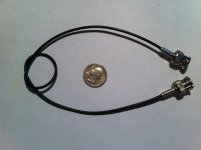
I don't believe this is a 3G rated cable or connector. There are many out there, but for on camera use I really like ours as they are Ultra-thin so flexible and don't get in the way. I never have a problem using these. They are $20 each and available thru any of our dealers.

In addition I would check your batteries and charger. Are you using Sony products for both or are they 3rd party brand? I have a spare charger for my Sony batteries that never gets them above 80%, but the proper Sony charger juices them fully. I also had a couple of non-Sony batteries that dropped below 50% of capacity in about six months. My Sony 970s are 8 years old and still working fine.
 

Attachments

  • cable.jpg
    cable.jpg
    63.8 KB · Views: 0
Mitch,

I attempted to use quad mode today, have successfully done so in the past with the previous firmware. Today I had Sony F800 outputing to Input A. In quad screen mode (4 images on the one screen), the image form the camera (HD-SDI 25P 4:2:2) would flicker and pulse like crazy. If I swtiched the monitor to input A full screen mode, the image is normal. Switch back to quad mode again, and it goes nuts.
Tried output to a diffrent monitor (SWIT), image was fine. Changed cables, still the same problem.
Any idea why? Bit disappointed if I can't even input 2 images yet..
Yes, this was a mistake in that it was left off the release notes. n Multi-Stream the current firmware does not support PSF or interlace signals. It effectively is broken for many users so we are looking to fix this ASAP. Apologies.
 
Hey Prendi,

You linked to a Pearstone cable. Not trying to slam Pearstone, but they are known as a "Bargain" brand. While I've had good luck with their Canon Batteries, I would maybe stick to the tried and true brands like Canarie. I've also had good luck with Olof's cables and I even have a Convergent BNC cable that seems to work well - except it's only 18" so it's a bit short.

But yeah, since the 7Q seems cable sensitive, just pay a bit more and get the best ones.
 
Mitch, Dan, et al?

I know it's trivial compared to all the coding work you guys have been conquering lately, but I was curious if there were any updates regarding rental options and the iOS control app? I have some stuff coming up that might benefit from it. any news would be much appreciated. thanks.

- Dylan
 
Back
Top