F3: Noise in Slog?

I've found some scenes grade better with a LUT on when I start, but others not - for instance highlight information, like shadows in clouds, is almost always lost when a LUT is applied, but this information can easily be recovered as soon as you drop the LUT.

It's not smart ass'y at all. Everyone has their own intention, workflow and goal.

Mine is to get footage into scene linear for vfx work and compositing. Also heavy grading in terms of relighting for which you really need to be in scene linear and every luma level counts - (adding shadows etc,.).

What's important to me is that super brights and the highlight sections of an SLog2 file are unfolded into a space where they have real world light intensities.

A LUT is just another form of transform. If you have LUTS that are clipping in some way then that's why you're seeing that. A sufficiently large enough LUT won't clip. Some transforms are easier to describe with an arbitrary table, others are better described mathematically.

LUTS can be used to compress grading operations down into a single unit. For example i have a LUT that balances between two different cameras so i can knock them both into a baseline state. I can use Nuke to extract and match grades and the only sensible result of that is a new LUT.

They're just tools

But the point of this original post (Sorry Sam) is that i do think you should start with a LUT to turn SLog2 into a place whereby grading is a creative issue, that first transform is a technical task ideally suited to a LUT. But that LUT used depends on which package you are using and finding the right LUT is something that Dennis is obviously very concerned about, rightly so.

cheers
Paul
 
It is not smart-assy at all, we're all here to learn, share, grow and optimize. As long as no one is insulting one another its all good.

I think you are looking far too deep and complex at what we're talking about here. We're not talking about codec, compressed vs uncompressed, color space or even RAW. And we are definitely not talking about converting slog to RAW bayer sensor data.

We are simply talking about about removing the slog as a starting point for grading. ie. What the waveform monitor would have read if slog was turned off in essence. It is pure gamma conversion and nothing else. Not sure where the notion of doing something else with it has come from.


Slog maps the photosite data onto a log curve output that mimics film and allows the camera to provide the maximum range of gamma and color that the sensor is capable of capturing. This is as close to raw as you can get with a log camera.

This is not exactly correct. slog has absolutely nothing to do with film at all, and log is not at all close to raw. I'd say far from it for many reasons.

The purpose of recording in slog is to provide far more equalization of data bits across the entire dynamic range of the sensor. This gives you a more equal number of bits per stop so that in grading you have a little more flexibility to move around specific tonal ranges. I provided a table a few pages back that show how the data bits are allocated for both 8-bit and 10-bit bit-depths.

Because log based gammas are more efficient and can pack a lot of stops into its limited space by leveraging the fact there is no need to waste so much data like it is wasted recording in a linear gamma based format, it gives us MORE data in the highlights which normally we would not get if shooting with REC709 or even some of the other cinegammas. More data in the highlights means the possibility of smoother, beautiful and soft highlights can be achieved in post.

slog also maximizes characteristics of the sensor and its noise floors, which is how and why we are able to get 0.5 to 1.5 stops increase in latitude when recording with it.


LUTs are for monitoring, not delivery.

Call it LUT, ICT, CDL, etc.. but if the Digital Intermediate workflow process is converting 10-bit slog to 12-bit cineon for the purpose of creating release prints, etc... then I don't see issues linearizing the 10-bit slog to 14/16-bits.
 
there aren't any original values to find, in an F3, anyway,

Yes there are they are the rec 709 values of the final o/p device

.. neither of which can display anything close to the DR of even an F3...

When grading raw stills you have values unseen but recoverable - you must grade to your output device - of course you are not going to see the full dr until you do secondaries

you simply can't get the most from the camera from a free version of Resolve, a computer monitor,

If your final delivery is a computer monitor a computer monitor is perfect for grading. If you use something else with a wider space you will just be dissapointed when you see it on a delivery device

Whats wrong with Resolve?


no training in grading.

You trying to sell a course? Only training needed is looking at the monitor. Most people have been looking at screens since before they could walk - they know what it should look like.

As for Slog being like film curve well no - it is an intelligent way of packing data into a small delivery box..
 
[quote paul]But the point of this original post (Sorry Sam) is that i do think you should start with a LUT to turn SLog2 into a place whereby grading is a creative issuel[/QUOTE]

You lost me here? Id want to start with a LUT, just not in the first node because luts are destructive used in that manner in resolve..
 
"This is not exactly correct. slog has absolutely nothing to do with film at all, and log is not at all close to raw. I'd say far from it for many reasons."

Log has a great deal to do with film: it is derived from the Cineon system which was designed to accurately transfer film color space into the digital world where linear conversion doesn't work. The Cineon system revolutionized this conversion by replicating the logarithmic way film emulsions record light and transforming this into digital data. Camera manufactures like Sony found that it was possible to offer a far wider color space by converting the sensor data into log space rather than linear video - Rec 709 in HD. TheF3 sensor data puts out 709 video only if you choose to constrain the video through one of the Cine Gammas.

"Yes there are they are the rec 709 values of the final o/p device"

I don't understand what you are saying here - the only "original value" would be what comes from the debayering process, and this data has no base state available to you - you see the debayered video through whatever color space you select, slog, cine gamma or roll your own. There isn't any "raw" form to view it in.


Call it LUT, ICT, CDL, etc.. but if the Digital Intermediate workflow process is converting 10-bit slog to 12-bit cineon for the purpose of creating release prints, etc... then I don't see issues linearizing the 10-bit slog to 14/16-bits."


There isn't any issue - I am reacting to what I see as some confusion as to the purpose of using LUTs to begin with. The point I was trying to make is that LUTs aren't some necessary step in going from log; they're a color space conversion that may or may not be useful in the final product. They all (except for ACES) constrict slog data to a more narrow space.


"When grading raw stills you have values unseen but recoverable - you must grade to your output device - of course you are not going to see the full dr until you do secondaries"


On what display device can you see 14 stops of dynamic range? And I don't see where secondaries have anything to do with tonal range.

"Whats wrong with Resolve?"

Nothing at all.

"Only training needed is looking at the monitor. Most people have been looking at screens since before they could walk - they know what it should look like."

I couldn't disagree more. When you're working with log or raw footage, getting an optimal image that makes the most out of the recorded material requires a fair degree of experience. A decent grading suite probably starts at $500/hr. Do you need a grading suite? No, obviously not. Do colorists know more than the average cameraman (like me)? You bet. It's one thing to diddle around until you have something that looks nice and being able to dig into scenes whose real potential isn't seen until someone skilled has unlocked it. Highlight detail is very commonly lost in many grades, as is continuity in look through material recorded in differing environments. I can make nice pictures with my Baselight system, but I have seen the same material graded by an experienced colorist and see all kinds of possibilities I was unable to get to. Not to mention that much material is graded not legal for broadcast - who cares if it's for web, but most of what I do is for broadcast. If you submit a spot to a network or station it will go through a video normalizer, and you may find your pretty pictures have lost much of what you liked because they weren't legal. The legalizer does ugly things to video that is out of range, so it pays to know how to correct for the delivery system. As computer and broadcast gammas are different, your final product should be graded appropriately. This all takes more than just "looking at the monitor." Is the monitor calibrated? What is the viewing environment. Do you care? If you are a nut about how your audience sees what you have shot, some learning is required. One reason the F3 didn't take off like the Alexa has is that many users came from EX1 and other automated cameras to a camera which required a lot more from the user. Frequently the results weren't good; cheap lenses and misunderstanding of the cameras many gamma and matrix options produced a lot of not so great footage. This was not the fault of the camera, although I can't say Sony has made the menu system easy or intuitive to work with. The log concept - log video as opposed to linear video- can be confusing as this LUT discussion demonstrates. The relation to film IS central, as no video camera has yet produced the range and organic falloffs that film does (maybe RED users will disagree), and yet the design of each new camera - the F5/55 with slog 2 and raw output cameras attempt to record light and color as film does. Check out articles on how "Nebraska" was shot, and how much work in both shooting and post went into trying to emulate the rich texture and range of Kodak's B&W stocks.


We're probably getting into semantics here but by true definition slog does not have anything to do with film. I can only suggest you read page 1 of Sony's white paper on slog:

http://www.starcentral.ca/forums/SLOG.pdf

"The S-Log gamma function is optimized for CCD cameras. The logarithmic curve was carefully designed by analyzing the noise floor characteristics and the tonal reproduction of the imaging device. Since negative film stock and the CCD imager behave differently to incoming light, especially in the low-light and high-light region, the S-Log curve differs from those tailored for film based images. The S-Log curve provides sufficient quantization bits to offer exceptional tonal reproduction in both the low-light and high-light region. The appearance on a monitor is also taken into consideration, so that an S-Log image could be viewed without discomfort. CCD imagers respond to incoming light in a far more linear fashion than film, thus there are no “toes” or “shoulders”. When shooting in S-Log, a color grading process is mandatory. Using the traditional photo-chemical analogy, S-Log is the “camera negative” and the final look of the “release print” is defined in the post production process."


There may be similarities in the sense that both slog and cineon use logarithmic curves to transpose data values for the sole purpose of storing data more efficiently, but my opinion and how I look at it is slog is built for CCD or CMOS sensors, not film.
 
Mate Ive done eizo monitors and all, now, for my market.. people on imacs in s*%tty offices Ive come to the serious conclusion that grading on an imac in a s*%tty office is the way forward, my second monitor is a Dell so I can see what it will look like on a PC - and I have scopes which would be a good guide even if my monitor was green and white! If one was prepping for a cinema release other tools would be needed, and broadcast too.

Yep top colourists are good, for sure. Nothing special in what they do, but they have the hours served and that can be special (a contradiction) BTW ive been 'colouring' with photoshop since the coolscan1 in 1996

As for a LUT (or whatever you want to call it) restricting a space have a watch (right through).. https://vimeo.com/73033931

And we know what a log curve looks like - it is too flat to be visually pleasing we are talking about a start point that unwraps that flatness.

Glass? most of it can resolve 1080, no worries ive tested all my crappy glass and only my 28/2 at 2 wont resolve 1080.

As for video cameras that match film, well IMO the nikon D3 (in stills mode) matches film - mind blowing smooth highlights, I think the F55 doing raw does - ive not dinked with an alexa.
 
Mate Ive done eizo monitors and all, now, for my market.. people on imacs in s*%tty offices Ive come to the serious conclusion that grading on an imac in a s*%tty office is the way forward, my second monitor is a Dell so I can see what it will look like on a PC - and I have scopes which would be a good guide even if my monitor was green and white! If one was prepping for a cinema release other tools would be needed, and broadcast too.

Yep top colourists are good, for sure. Nothing special in what they do, but they have the hours served and that can be special (a contradiction) BTW ive been 'colouring' with photoshop since the coolscan1 in 1996

As for a LUT (or whatever you want to call it) restricting a space have a watch (right through).. https://vimeo.com/73033931

And we know what a log curve looks like - it is too flat to be visually pleasing we are talking about a start point that unwraps that flatness.

Glass? most of it can resolve 1080, no worries ive tested all my crappy glass and only my 28/2 at 2 wont resolve 1080.

As for video cameras that match film, well IMO the nikon D3 (in stills mode) matches film - mind blowing smooth highlights, I think the F55 doing raw does - ive not dinked with an alexa.

Grading to a standard is important. It's the only way you can deal with the fact practically every screen out there is different.
I still laugh when I see people trying to tell me that by puck calibrating their RGB computer monitor, they now have a grading screen.
I have an FSI Grade 1 monitor for accurate color grading.
It is one of the most important items I own for video.
It always amazes me that people own these incredibly expensive rigs, cameras, etc. and then they go and color grade on a grey/green flat 5 year old dreamcolor with magenta highlights and the wrong color temperature for the room they are in.

I don't care if everyone else's PC screen is green or white. I want an accurate repeatable color space and output to judge nuances.
I grade other people's films in part to earn a living, as well my own. I am not too bad at what I do, but I have seen some real pro's out there.
Nothing special in what they do?
I can tell you that a good colorist IS something special.
They are fast, know how to pull things out of a hat and can make a HUGE difference to people's work.

Don't even get me started about rotoscoper's! :cheesy:
 
Last edited:
Not caring how your work looks to its consumers is IMO cranky. I'm sure most commercial audio engineers know very well what their stuff sounds like in an iPod. In fact it is known that audiophiles often dislike modern mixes because they don't sound right on their posh set ups. If I were grading for cinema it would be different. I started out shooting for black and white newsprint and very quickly learned the value of matching the delivered to the delivery device - about four stops in that case - less after analogue transmission - doesn't mean I can't pump out a nice print too.
 
Those "pucks" aren't that bad and better then not doing any monitor calibration at all. At least you get proper whites and improved contrast, I think they are worth it for those of us who can't afford $5000 monitors.

Good thing however is that the newer LED screens typically offer far more color than the lower-end consumer grade LCD's.

There's always something else to buy isn't there... :huh:
 
Most large facilities are using sRGB colourspace for their hundreds of artists (with pockets of high end projection for colour critical work). They are easy to calibrate and monitoring LUTS are well defined. Consumer panels are really pretty good these days and only getting better. I have a DreamColor but i also have a 30" HP and frankly there's very little between them. If anything. The new wave of monitors with full sRGB space are very reasonably priced and then the OLEDs in monitors such as the O7Q have been shown to compete very close with high end dolby/canon grading monitors. It's not like it was 5 years ago.

If i was starting out now i wouldn't bother with a DreamColor, frankly someones viewing conditions would probably affect the image more than the panel inside.

The high end of reference monitors is about improving dynamic range and that's fine.

The vast majority of cameras are in the REC709 colourspace which is a pretty good baseline (down to the bayer filters). The ACES colourspace range is insane and once that becomes common place you have the power to manipulate colours into many areas that cannot be seen on most display devices. So you do have to ask why... :)

As for other points, Log curves come from cineon days and do encompass the response of film negative however Slog as Dennis points out is a Sony camera specific design.

Sam, are LUTs destructive in Resolve? All of them or just some? In that case you're right. To mind mind a LUT should be capable of unfolding the Slog2 curve into it's full 21 stops of range. Nothing lost. Perhaps the issue is that we are using the wrong LUTs or pipeline. The idea is that you can unfold the Slog, then with the rest of the node graph pull and push exposure without clipping until you've massaged it into the smaller range of whatever output you're going for. Right?

cheers
Paul
 
Sam, are LUTs destructive in Resolve? All of them or just some? In that case you're right. To mind mind a LUT should be capable of unfolding the Slog2 curve into it's full 21 stops of range. Nothing lost. Perhaps the issue is that we are using the wrong LUTs or pipeline. The idea is that you can unfold the Slog, then with the rest of the node graph pull and push exposure without clipping until you've massaged it into the smaller range of whatever output you're going for. Right?

cheers
Paul

Did you watch my vid? My conclusion (which may be wrong but is my current best guess) was that using a LUT on the LAST node is not destructive. http://www.sammorganmoore.com/backlot/musings-on-davinci-resolve-lut-placement

So what you do is maybe to start make three nodes and put the lut on the last, you can then correct in the first two

The only annoying thing is that ShifH doesnt work nicely then.

And I use ShiftH to find grey.. http://www.sammorganmoore.com/backlot/davinci-resolve-finding-grey

S
 
As of today dec 2013 I would say my standard 'flow is ..

add four nodes,
node three - add macgregor F35 lut
node one, grey balance
node two selectively recover the shadows to taste - will induce noise
node three remove red from shadows using a qualifer and curve

Once one has these down one can 'grab still'* and start work on the next shot by make that still active (orange box) righ click, append node graph of your next shot..

The ideal exposure is not known for this flow but Id guess grey card at maybe 45-50 or 35-38 with a scene one must hold the highlights.

.cube luts need to be stored in the cinespace(?) folder.. from memory MacintoshHD:Library:Application Support: Davinci:LUts:Cinespace

S

*if you store that grabbed still in 'Gallery Powergrade' you can access it in any project. Result: if you spend a long time building that 'look' it is easy to move between projects.
 
Last edited:
I never said slog was making a video camera out of a film camera. What's important, and very relevant to this discussion, is that log technology, like film, frees video from linear color space allowing for the amazing range now available in tone and gamma. It makes the grading process much easier to grasp. If you have any experience with printer lights or telecine grading what's going on with log become vastly simpler to get. I am very familiar with both Sony and Panasonic's efforts to design HD sensors, and their goal was to equal or exceed the range of film using digital imaging. Maybe it's more accurate to say that log was born from an understanding of film and a desire to replicate it, minus the artifacts (grain). Cineon was a big step by showing it was possible to transfer film log data to digital data and inspired sensor designers. Any way you look at it, film log has been central to the design of modern sensors and continues to be the gold (or silver) standard.
 
I never said slog was making a video camera out of a film camera. What's important, and very relevant to this discussion, is that log technology, like film, frees video from linear color space allowing for the amazing range now available in tone and gamma. It makes the grading process much easier to grasp. If you have any experience with printer lights or telecine grading what's going on with log become vastly simpler to get. I am very familiar with both Sony and Panasonic's efforts to design HD sensors, and their goal was to equal or exceed the range of film using digital imaging. Maybe it's more accurate to say that log was born from an understanding of film and a desire to replicate it, minus the artifacts (grain). Cineon was a big step by showing it was possible to transfer film log data to digital data and inspired sensor designers. Any way you look at it, film log has been central to the design of modern sensors and continues to be the gold (or silver) standard.

I'm not sure i agree with this.

Log encoding is a way of mathematically compressing the real world linear light into a smaller container by allowing the placement of values to be closer to how our eyes perceive the world. It's more of an acquisition format. A sensible way to compress light.

Yet any post manipulation of a log signal happens in linear space, either explicitly or implicitly. When you take log into resolve it will unfold it into linear for the math and then for whatever display transform you want. Even the act of displaying log goes through a transform to match the way our monitors work.

You would never add a log value to a log value to increase light as the result would be physically incorrect.

Am i missing something?

cheers
Paul
 
Well Im referring to Resolve my vid above clearly shows the highlights being 'sawn off' and unrecoverable, where as with a grade that blows some highs they can be recovered with a secondary..
 
Sam, are LUTs destructive in Resolve? All of them or just some? In that case you're right. To mind mind a LUT should be capable of unfolding the Slog2 curve into it's full 21 stops of range. Nothing lost. Perhaps the issue is that we are using the wrong LUTs or pipeline. The idea is that you can unfold the Slog, then with the rest of the node graph pull and push exposure without clipping until you've massaged it into the smaller range of whatever output you're going for. Right?

I don't believe all LUTs are destructive, I'm quite certain it will depend on the design of the LUT (ie. the handmade F3 LUT I posted uses 15-bit, or 32,000 points for conversion). I'm not sure if software interpolates low bit resolution LUT's which could be where the problem is, but truthfully when Sony released a beta LUT for the F65 earlier this year I started using it on the F55 slog2 and it looks very good as a starting point for grading. I ran into some issues with VFX on certain clips, but otherwise never saw any destruction using this beta LUT.

Later during summer Sony released another set of LUT's, 4 of them, and only one of them was recommended as "ok" for use in grading. It was called "slog2-sgamut to Rec709 Cine+709" and the LUTs are available on Sony forums or also on my blog. (but they are for F55/F65 not the F3)
 
Been a very busy boy lately, and have not graded anything from F3 in a few years... but i'd like to throw in a few thoughts

1) no LUT is destructive on it's own, but placed in a sub-optimal way it can do the damage anyway but to use them optimaly you have to grade in LOG
2) most gradeing systems do not respond to the artist in a subtle way if you are gradeing in LOG, makeing gradeing in LIN much more interactive

Yea easy for me to say to "grade in LOG, use the LUT in the viewer and output only" i have tools that are made to work that way, i belive Resolve's implementation of LOG gradeing is very much a work in progress, and currently problematic, the other low cost options just do not have that option on offer.

at a minimum i would get density correct before the LUT, then grade in LIN on systems that do not map the operator controls to respond in a manner that will not drive one nuts in short order

one last thought - Baselight editions MAY support LOG gradeing, Baselight8 does and they do advertise the full baselight toolset in editions.... might be a good answer if you are on a newish Avid already

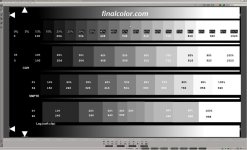
and one more last thought... chk out this chart from Kevin Smith...
baseline.jpg

a Cineon->709 LUT will take the LOG on the last strip and display it as the SMPTE strip just above it everytime... and correctly exposed Slog (or Slog2, Clog, LogC) is nowhere near the Cineon given the hairtrigger exposure needed to unfold it correcly... but we have a scanner op going shot by shot through a film to get exposure correct before scanning.... days per reel.. i now have an assistant going through Red / Alexa / F55 shows shot by shot doing just the same...
 
"one last thought - Baselight editions MAY support LOG gradeing, Baselight8 does and they do advertise the full baselight toolset in editions.... might be a good answer if you are on a newish Avid already"

Baselight Avid Windows has Truelight, a LUTish option that contains many LUTs and colorspaces, and allows you to import your own if they're not there already. You can start grading with a Truelight look or not - whatever works for you. I find it quicker to work without Truelight although I do edit with the auto AVID LUTs on, and then remove them before grading.
 
Back
Top