F3: Noise in Slog?

Totally disagree.

Totally disagree with your total disagreement :)

Simply a log curve is a mathematical transform to fit a lot of information into 'a small box for transportation' (that box being 1024*3)
eg.
A goes to A*0.8 = Alog
B goes to B*0.7 = Blog
etc
The first step of untangling that is, logically,
Anew= Alog/0.8
Bnew= Blog/0.7

The trouble is once on untangle it you end up with a maybe 11 stop map that wont display in a 6stop (709) space

Looking at raw stills software one is then presented with an image that looks good and an exposure slider than enables you to choose which of those 11stops to place into the 6stop space.. or with additional secondaries or other manipulations one can do further work

In stills/raw software the image usually looks 'right' in terms of gamma and saturation out of the box, but is not expressing the full recorded DR.

Depending on your experience in post (some of us have been using things like C1 for years, others come from other places) this is a great start point.

You are of course technically correct that you don't need a LUT to work a log file to perfection, but my emperical observation is that your average stills/lightroom user, does a better job than your average self de-logger in handling a file with a wider DR than the delivery space.
Exactly the situation I had with my Sinar in 2005 before software like lightroom had start point(s) laid out on a plate - I was presented with a huge (16bit), but disorganised, box of data and told by Sinar 'go figure'. Figuring it out made me feel like a real man, but was actually time inefficient and best left to geeks with the right toolkit.

As for Dlogging the F3 - I tried to make a start point by matching it to my nikon D3 stills camera. It seems like a reasonable start point.
http://www.sammorganmoore.com/backlot/d3ing-the-f3


S
 
Last edited:
Totally disagree. Said it before, will say it again.
LUT's are shortcuts. Nothing more.
The notion that somehow mathematically it is going to give you something more ("light behaving in a real world manner") than the actual image as exposed is a falsehood.
You CAN grade properly without having delogged.
You can take any image that has not been delogged and arrive at the same image with the best LUT applied to it.
Find a black point and a white point and then go to it.
In real life you are going to tweak an image after a LUT anyhow and that can be just as time consuming. The blacks a little too crushed, a magenta cast, etc.
I find the time it takes to rebalance an image shot in LOG is so little anyhow that often I don't even bother with LUT's most of the time.

:)

If you really want to grade a cinegamma that has had the knee and toe altered in a way that is mathematically uncertain that's totally up to you, personally i prefer to grade from a known baseline which makes it easier shot to shot. Of course it's *possible* to grade by eye, but often it is slower and less consistent. Grading should be a creative process, not a technical one.

LUTs are nothing more than a convenience that speed up that first 'technical' stage of workflow.

But beyond that. How do you personally, for example, remap highlights in your grades so they act like real world highlights? A car headlight for example, do you power window it to protect it as you bring the surrounding exposure down? Why? Why not remap your source into scene linear and then bring the overall exposure down and have the headlights act as they would in the real world?

More importantly if you grade skin down which has gone through a curve then the math that is used to bring down the highlight portion of the skin, compared to the shadow will actually be wrong. The highlight will be brought down *more* than it should, because the grading application does not know what the real world relative value of that tone is.

Also i'm not just talking about delogging, i'm talking about any footage that has come in from a non standard source.

It's about speed, accuracy and creative intent

cheers
Paul
 
I wonder how many LUTs are actually capable of mathematically linearising specific cameras' log curves? It seems to me that most simply approximate a linear representation of the image, at which point you still don't have a truly linear baseline from which to grade further (I'm assuming that linear baseline is key to accurate tonal response when pushing the image further in the grade?).

And if LUTs can't provide you with a mathematically linear correction to your log images, is there really any advantage to them compared to manual curve adjustments made by-eye to approximate that linear response?
 
Linearizing slog from the F3 is actually easy because Sony has provided a white paper on it which gives specifics to the equation in which slog values are calculated.

But I am more agreeing with Sam & Paul that even though of course it is possible to grade log images, it could be far more beneficial to perform some adjustments such as *exposure* or highlight wrangling to a linear gamma - because with linear you have more data resolution to work with whereas with log curve gamma there are lots of areas where data resolution is there but it is compressed so even the slightest of image adjustment in post can further compress and flatten out parts of the image. And last time I checked grading tools in Davinci work in linear not log curve correct?

Sam you might be onto something which may change how I chose to grade my slog going forward.
 
Last edited:
I wonder how many LUTs are actually capable of mathematically linearising specific cameras' log curves? It seems to me that most simply approximate a linear representation of the image, at which point you still don't have a truly linear baseline from which to grade further (I'm assuming that linear baseline is key to accurate tonal response when pushing the image further in the grade?).

And if LUTs can't provide you with a mathematically linear correction to your log images, is there really any advantage to them compared to manual curve adjustments made by-eye to approximate that linear response?


+1
Right on target for the first point.
In my experience, yes and no for the second.
The real advantage to LUT's is speed. Which is actually quite important.
However, I personally consider LUT's like presets. Shorthand to get you closer. But I certainly don't consider them an absolute science the way some do here.
Typically my presets can approximate many different LUT's. Flipping through them with a log image is often quicker than recorrecting a base LUT.
For instance, even if I pull 50 clips into a LUT, I guarantee that at least half of them will need serious primary and secondaries work anyhow.
It is VERY seldom that things are right on when shot.
Thus the time saved from LUT's is not that major compared to the work I will do anyway.

"Originally Posted by paulcurtis"
LUTs are nothing more than a convenience that speed up that first 'technical' stage of workflow.

So we don't disagree. This is exactly what I was saying.
 
+1
But I certainly don't consider them an absolute science the way some do here.

We all agree!

Delogging a curve is a science, however, it is literally (if done right aka tachnically correctly) undoing a mathmatical transform, but, that is indeed only a start point, It may not look good.

But similar to click grey balance it is a really good start point for speedy work..

S
 
LUTs are the basis of the ACES workflow. A 3D cube LUT of sufficient 'resolution' can totally linearise a camera, including crosstalk between the colour channels.

cheers
Paul
 
As per my post 204 I might be inclined to setup my nodes like this :

First node: linearize slog
Second Node: base exposure
Middle node(s): all the adjustments for your grade you might normally do
Final node: linear to your choice of gamma depending where your images will go.

To me it makes more sense to grade this way. And having the option to have a linear version of your grade opens up a lot more options in terms of other post workflows.
 
Last edited:
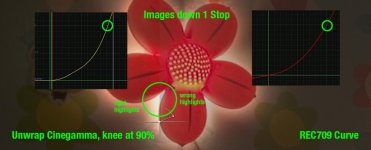
Here's a visual example of what i'm talking about.

This is illustrative not accurate

Image captured through a cinegamma which allows for >100% highlights. On the right is a standard 709 curve on the left is a custom curve roughly tweaked to reverse the effects of knee and toe of the picture profile (so black gamma adjustment and slope of the knee).

If you take the image down 1 stop then you see that through the 709 curve, the highlights are brought down incorrectly, because actually the cinegamma curve is not a 709 curve at the knee and above. Not even close.

Doing a quick custom curve to make the 100% cross over point lower shows a more real world exposure difference.

This is done in Nuke with curves because it's visually easier to show and this is my pipeline. I'm sure other pipelines would handle things differently. In reality i'd wrap up a technical grade for a particular camera or scene into a LUT. For example i can match two cameras at the same time this way as well as pull the colour space to what i want - all in one LUT.

curves.jpg

I hope this helps explain what i'm getting at, sometimes i'm perhaps not as clear as i am in my head :)

Yes, you can do all of this in the grade, but using a LUT in this way can save time and improve accuracy. Back to the subject of the thread though. I still haven't found a decent SLog2 to Linear LUT out there... Only to REC709 and it creates some odd exposure shifts and dodgy highlight handling... What Slog2 LUTS is everyone using?

cheers
Paul
 
Paul earlier this year I made a handmade LUT for the F3 slog to remove slog, that is restore the slog image back to original values. I have not extensively tested it because I ended up selling the F3 and no longer had easy access to one. Anyone is free to try it, but no guarantees: F3 de-slog LUT

I am however in the process of developing a pure and 100% accurate mathematical based F3 de-slog LUT which Morgan will be testing and providing some feedback on.

Stay tuned.
 
Paul earlier this year I made a handmade LUT for the F3 slog to remove slog, that is restore the slog image back to original values. I have not extensively tested it because I ended up selling the F3 and no longer had easy access to one. Anyone is free to try it, but no guarantees: F3 de-slog LUT

I am however in the process of developing a pure and 100% accurate mathematical based F3 de-slog LUT which Morgan will be testing and providing some feedback on.

Stay tuned.

I'll give that a go, how did you make it or what methods are you using to reverse engineer?

I have a series of macbeth charts at differing exposures, between all of them i have a complete range of 14 stops. I'm hoping i can plot points on a graph but then part of me is thinking this is ridiculous and someone must have done this already so been scouting for examples. I'm aware of some beta work with OCIO and ACES with Slog2 interpretation but i'm not sure that's fully fleshed out.

I think it's complicated by the fact that the RGB values don't track identically, you're going to need a 3D LUT to allow for that, hence me looking to the ACES work for all the heavy lifting...

thanks and keep me posted on your progress

cheers
Paul
 
The quick and dirty handmade method I used was to shoot a pure black to white gradation in slog and apply a curve to map all the values back to the original values. I didn't spend a lot of time on that version, it is not extremely accurate, and does not factor in the R G B channels separately.

You can try using a 14 stop chart but it would probably not be enough "steps" to really map out the slog curve with great accuracy.

A better LUT will be the one with at least 14 bit resolution, or even higher.
 
"I made a handmade LUT for the F3 slog to remove slog, that is restore the slog image back to original values"

Not quite sure what you mean by this. Applying any LUT reduces the DR to fit within the more limited REC 709 viewing hardware - I don't see how a 14 stop LUT is possible outside of ACES, especially given the 13.5 stop range of the F3. LUTS are just a preset form of grading, but shift range to a smaller space and make fairly crude adjustments to increase contrast and saturation. The Sony LUT is designed specifically for the Sony log curve and isn't bad. I wouldn't use any of them for a delivery finish, they just make monitoring and editing easier, especially for clients. The only "original values" are what come out the debayering process, all of which are mapped onto whatever color space is applied to create video - any of which apply a different look to the video that is created. The only "original" data would be raw, which is unavailable on the F3. Returning slog to the original values brings you back to the logarithmic slog mapping - anything before that stage is debayered data which can't be seen without some translation.
 
"I made a handmade LUT for the F3 slog to remove slog, that is restore the slog image back to original values"

Not quite sure what you mean by this. Applying any LUT reduces the DR to fit within the more limited REC 709 viewing hardware - I don't see how a 14 stop LUT is possible outside of ACES, especially given the 13.5 stop range of the F3. LUTS are just a preset form of grading, but shift range to a smaller space and make fairly crude adjustments to increase contrast and saturation. The Sony LUT is designed specifically for the Sony log curve and isn't bad. I wouldn't use any of them for a delivery finish, they just make monitoring and editing easier, especially for clients. The only "original values" are what come out the debayering process, all of which are mapped onto whatever color space is applied to create video - any of which apply a different look to the video that is created. The only "original" data would be raw, which is unavailable on the F3. Returning slog to the original values brings you back to the logarithmic slog mapping - anything before that stage is debayered data which can't be seen without some translation.

It's an interesting point. Would a LUT restrict the output range?

It depends on the size of the LUT and there are plenty of full range LUTs for moving between linear and log (look at OCIO) and there's also a concept of shaper LUTS to shape input values into forms to be fed into LUTS to deal with >1 values in systems that cannot handle full range.

This is very much pipeline dependent so YMMV.

But to go from 10 bit log to 14/16 bit linear should be entirely possible with a suitable LUT. The purpose is two fold, one is linearise the log curve and the other is to peg grey at the right place in the pipeline allowing for over brights (and from Slog source, quite a few of them). 18% grey is pegged at 0.18 in linear, everything else scales above according to the range of capture.

You're right in that the first transform from RAW into a colourspace of choice is something that cannot be easily reversed.

cheers
Paul
 
Last edited:
I admit I have been talking about two things here which might have been confusing when I said 'original values'.

One thing is to simply remove slog from the images using a high quality data transformation process. In terms of 'original values' it means that values are restored from slog values to original - but done so using the actual log curve formula so that all tonal values between black and white are mapped properly vs. simply sliding grey back to 50% and not considering the rest of the curve.

The other type of 'original values' some of us including myself are now thinking about is bringing back the slog images as near to original linear values as possible.

There is a lot of information on the web that says LUTs are either destructive or should NEVER be used for a final grade. Those words even come from professionals in articles or in interviews and all concur to NEVER use a LUT to grade! Never!

But in Art Adam's own article on 'slog vs raw' it is said that it is possible to hold 99% of the information held in a 12-bit RAW file in a 10-bit log file. So wouldn't it also then make sense that if you convert a 10-bit log file back to 12-bit or 14-bit that you would still have 99% of the information? Of course you would and as Paul had mentioned it should entirely suitable to go from 10-bit log to 14/16-bit linear with a suitable LUT.

To shed more perspective on that, a LUT with 14-bit resolution will give you 16,000 steps or points to transfer the image from log to linear gamma. 15-bit would give you 32,000 steps, and 16-bit would give you 65,000 points.
 
Also, depending on implementation, values can be interpolated when using a LUT.

One thing i'm concerned about is the accuracy of the container used to move the images around. I've been trying to work out a way using QT to transport these files around but it's a bit of a minefield.

For example this link http://www.stopp.se/lab-testing-the-pro-in-apple-prores/?cpage=1 provides a good overview of how different software fails to understand the content in a ProRes file (RGB vs YCrCb for example).

So lets say you have SLog2 in a quicktime prores file. You take that into Resolve or your NLE of choice. Your NLE - isn't it going to assume that it has a REC709 gamma? Then what you are looking at will be a Slog -> REC709 interpolation. You then want to transform that into original values but you're doubling up on transforms.

So we need to understand what a particular software app will do with a log QT file.

My only file reference is something like Nuke where there is more control over how a QT is interpreted, including assuming linear data.

Is this correct? What i'm saying is that it's not good enough to just have the right LUT, you also need to be mindful of the container files themselves?

cheers
Paul
 
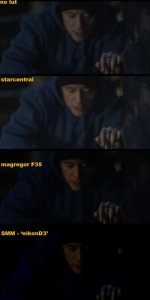
I did this little test.. the image I know is under exposed so no image below represents a final.

But just adding luts we see Starcentral actually lifts a little, maggregors 'F35' crushes quite a lot my 'D3' LUT (a first go) hits the image with a jack hammer!

It is for sure that mine would have the least noise! (and may also have such crushed DR as to be a little impractical)

S

lutcompare.jpg
 
thanks for sharing Morgan, interesting stuff.

Note that my 'handmade' F3 de-slogger uses around 15-bit precision for data transformation, so it is using approximately 32,000 values to re-map which seems more than adequate.

Also note to others reading this, I am still doing research on creating a pure mathematical de-slogger for the F3 which additionally would be able to provide a high-bit linear version...


What i'm saying is that it's not good enough to just have the right LUT, you also need to be mindful of the container files themselves?

I would say YES you need to be mindful of the containers themselves.

Only because I know from when working with Davinci resolve to transcode and output files, depending on the specific ProRes quality setting I chose, any specific DATA LEVELS (ie. 64-940, or 0-1024 for "uncaled full range data") would be overwritten. The effect of this are flatter looking files which you may not have intended.
 
Last edited:
I'm not trying to be a smart ass here, but there aren't any original values to find, in an F3, anyway, if that's what we're talking about. Any kind of output from an F3, such as uncompressed 444 still has some kind of transformational wrapper on it, slog, cine gamma, or your own picture profile. There isn't anything that's not video that has been adjusted by some parameters. And I'm puzzled at the attempt to delog slog as though the slog was somehow constricting data information. Slog maps the photosite data onto a log curve output that mimics film and allows the camera to provide the maximum range of gamma and color that the sensor is capable of capturing. This is as close to raw as you can get with a log camera. A LUT or any delog corrections are just that - a grade. Again, ACES is an exception, but a very dense subject probably not relevant for users here (including me).Baselight has a proprietary variation of ACES, Truelight, but you can also import cube LUTs into TrueLight and use them as a starting point for a grade. LUTs simply shift and often compress gamma ranges and also increase saturation. A LUT is NOT designed to correct some flaw in slog - it's merely an easier way to work with it. No LUT will look good in every situation and none are any magical solution to make a better image. They are used by some colorists as a time saving step in fairly generic lighting situations. LUTs are for monitoring, not delivery. Adams is right - you can take a scene with a LUT and grade it and often get a great result, but virtually everyone reading this will be viewing the result on either a computer screen or a broadcast monitor, neither of which can display anything close to the DR of even an F3. When you get into ACES and more sophisticated workflows, you are getting into theatrical distribution by far more sophisticated devices. The LUTs supplied by Sony are optimized for their sensors and are as good as any I've seen. You can modify these but they will still react differently depending on the look of each scene. If you want the maximum gamma and color potential you have to start with slog, then either grade or just drop a LUT on, depending on what gear you have to view and manipulate the data and what capabilities you have in grading. I've found some scenes grade better with a LUT on when I start, but others not - for instance highlight information, like shadows in clouds, is almost always lost when a LUT is applied, but this information can easily be recovered as soon as you drop the LUT.

The F3 is generally capable of producing a better image than most users can achieve - you simply can't get the most from the camera from a free version of Resolve, a computer monitor, and no training in grading. Applying a LUT can sometimes make a very nice picture - but maybe also maybe not. Slog2 gives you an even better starting point, but is even harder to expose properly as it looks two stops under through the viewfinder, is very tough on clients, and hard to edit. AVID latest software allows you to apply any number of colorspaces and LUT on all your clips to edit with, then you can remove all of them when the edit is ready so the clips can be graded properly.
 
Back
Top