New Technicolor Profile Is Amazing

well, this is a video-oriented forum

but even so, for things such as color rendition and dynamic range, it just doesn't matter; I've always run all my picture style tests over a still, because it can always be the same one: I chose one RAW file that I like, and can easily see how that same show would have looked if I had used different settings and picture styles
 
Professionals whose cheapest equipment they'll ever use is DSLR are excited while the happy amateurs are calling it useless...... lol.

This. If you don't grade your footage now and don't see the value in it, skip on Technicolor... if however you are actually grading and finishing your products, then you're going to want this... I can't believe how easy it is to dial in just about any particular "look" from the raw footage. I'm really enjoying this profile so far.
 
Every constructive test and question posted has something to be learn from and shouldn't be discouraged.

Thank you for your still post. I enjoyed it and agree that, although many people here focus on video, doesn't mean we cant also look at how it effects stills.
 
This. If you don't grade your footage now and don't see the value in it, skip on Technicolor... if however you are actually grading and finishing your products, then you're going to want this... I can't believe how easy it is to dial in just about any particular "look" from the raw footage. I'm really enjoying this profile so far.
Couldn't agree more, If your not grading this is useless, but its the easiest thing I've ever graded.
 
Here are 2 different corrections both with 20% chroma added, but I changed the LUT Curve to a less severe curve then added Gamma + 1.05 and contrast +5.
Tells me that each scene reacts differently and different curves will create more options.
CineStyle can be a very powerful tool.

Canon 60D Tamron 17-50mm @ 50mm @2.8
HD mov. H-264 1080p 25fps frame grab
CineStyle 0,-4,-2, 0
 

Attachments

  • CineStyle-+-Less-Extreme-Curve-+-Gamma-1.05-Contrast-+5-+20%-Chroma.jpg
    CineStyle-+-Less-Extreme-Curve-+-Gamma-1.05-Contrast-+5-+20%-Chroma.jpg
    43.3 KB · Views: 0
  • CineStyle-No-Corrections.jpg
    CineStyle-No-Corrections.jpg
    41.3 KB · Views: 0
  • CineStyle-+-LUT-Curve-+-20%-Chroma.jpg
    CineStyle-+-LUT-Curve-+-20%-Chroma.jpg
    40.4 KB · Views: 0
Last edited:
Here are 2 different corrections both with 20% chroma added, but I changed the LUT Curve to a less severe curve then added Gamma + 1.05 and contrast +5.
Tells me that each scene reacts differently and different curves will create more options.
CineStyle can be a very powerful tool.

Canon 60D Tamron 17-50mm @ 50mm @2.8
HD mov. H-264 1080p 25fps frame grab
CineStyle 0,-4,-2, 0

You're joking, right?
 
You're joking, right?

Better to explain what you find wrong with the test and how you would improve on it, as apposed to making a useless remark.

CineStyle was released less than 2 weeks ago. We need to experiment to understand how to get the most out of it.

What I have been testing is different curves for different lighting situations. One curve won't work in every situation. It may be better to create a variety of slightly different curves as presets, along with a few preset gamma/contrast corrections as presets to add. This will quickly get you to the closest correction for different lighting situations.

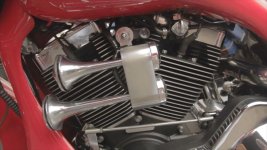
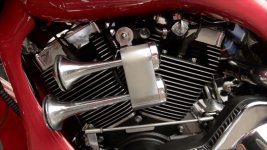
The test frame grabs I shot yesterday required different curves. The LUT curve would not work well on the night shot. The curve I created quickly for that situation is much less contrasty, but an even softer curve may be more appropriate.

CineStyle 0,-4,-2, 0
 

Attachments

  • Harley-lights--correction.jpg
    Harley-lights--correction.jpg
    85.3 KB · Views: 0
  • Red-Harley--no-correction.jpg
    Red-Harley--no-correction.jpg
    71.2 KB · Views: 0
  • Night-clip-correction.jpg
    Night-clip-correction.jpg
    68.9 KB · Views: 0
  • Harley-lights--no-correction.jpg
    Harley-lights--no-correction.jpg
    71.4 KB · Views: 0
  • Night-clip-no-correction.jpg
    Night-clip-no-correction.jpg
    61.1 KB · Views: 0
  • Red-Harley- -correction.jpg
    Red-Harley- -correction.jpg
    78 KB · Views: 0
Last edited:
Sorry for being so vague, but I thought the sarcasm was obvious.
In your post you say that if you take a source image and apply curves you get this look....
Then you say if you take the same source image and apply different curves and add contrast, bump gamma, then the source image looks different and gives us options.

Did you really expect a different result?

I think the thing that I find most distressing is that when this profile first came out you'de find posts everywhere saying stuff like, "this new profile is fantastic" "you can see all
the details in the shadows, etc etc. Then 3 lines down you'de see something like, "I wonder what this LUT does and how do I apply it to the footage"

Technicolor and Canon worked for over a year to get this great tool available so that TECHNICOLOR would get the best source footage from 5D users that was coming to them.
Lowly users like me that don't shoot 5D footage of "House" or what ever show get to benefit from this great tool also. (even though my footy isn't going to Technicolor)

Some really smart people at Technicolor and Canon basically said If you want the best image possible out of this camera, shoot with this profile and then apply this curve (LUT).
This will give you the best SOURCE image possible. If you want to color correct afterwards, go for it. If you want to add blur or tint it green afterward, go for it. but if you want to start with the best source image to do that with shoot with the profile then apply the the LUT. THEN do what you want with it.

Sure, you can change the curves instead of using what they suggest, you can apply contrast, gamma, etc...... Heck, you don't even have to use ANY curves if you don't want to (I would never use that horrible flat looking image for anything)
but again, There's some really smart people that worked for over a year to get this (easily applied) combo to give the best image possible. I'm gonna assume they know what they're doing and I'm gonna do what they say to do.
If you look at a histogram of an image shot with a 7D with a default canon profile, and then one shot with the technicolor profile (and then imagine the LUT curve placed on these images), you'll clearly see the advantage you're getting.

(ps, don't get pissed at me, you clearly add a lot of great info to the forum, I just think you're going the wrong way on this issue.)
 
Sorry for being so vague, but I thought the sarcasm was obvious.
In your post you say that if you take a source image and apply curves you get this look....
Then you say if you take the same source image and apply different curves and add contrast, bump gamma, then the source image looks different and gives us options.

Did you really expect a different result?

I think the thing that I find most distressing is that when this profile first came out you'de find posts everywhere saying stuff like, "this new profile is fantastic" "you can see all
the details in the shadows, etc etc. Then 3 lines down you'de see something like, "I wonder what this LUT does and how do I apply it to the footage"

Technicolor and Canon worked for over a year to get this great tool available so that TECHNICOLOR would get the best source footage from 5D users that was coming to them.
Lowly users like me that don't shoot 5D footage of "House" or what ever show get to benefit from this great tool also. (even though my footy isn't going to Technicolor)

Some really smart people at Technicolor and Canon basically said If you want the best image possible out of this camera, shoot with this profile and then apply this curve (LUT).
This will give you the best SOURCE image possible. If you want to color correct afterwards, go for it. If you want to add blur or tint it green afterward, go for it. but if you want to start with the best source image to do that with shoot with the profile then apply the the LUT. THEN do what you want with it.

Sure, you can change the curves instead of using what they suggest, you can apply contrast, gamma, etc...... Heck, you don't even have to use ANY curves if you don't want to (I would never use that horrible flat looking image for anything)
but again, There's some really smart people that worked for over a year to get this (easily applied) combo to give the best image possible. I'm gonna assume they know what they're doing and I'm gonna do what they say to do.
If you look at a histogram of an image shot with a 7D with a default canon profile, and then one shot with the technicolor profile (and then imagine the LUT curve placed on these images), you'll clearly see the advantage you're getting.

(ps, don't get pissed at me, you clearly add a lot of great info to the forum, I just think you're going the wrong way on this issue.)

I think your missing his point. He is saying the LUT is not a one fix all trick, and we can get more usability and customization out of our images if we define our own s-curve. The LUT was also defined using perfect exposure, and even contrast across the scene, as soon as those situations change, you have to adapt your Color Correction. Will you get more noise/artifacts if you boost things? Probably, but in the end its deciding where the balance is between that and a good image.
 
Still don't see much of a difference between Cinestyle + LUT vs. Canon Standard profile.

2ike0sw.png
 
Still don't see much of a difference between Cinestyle + LUT vs. Canon Standard profile.

Look a the carpet in the bottom right in shadow, I can see detail in your downscaled versions. Is it a huge difference? No. It wasn't designed for the "soccer mom" shooter, it was designed for people who are trying to match it against film. Also try color correcting both. Chances are you'll find CineStyle easier and that it yields better results... once again, not earth shattering, but enough that if your trying to milk every inch out of these cameras, it makes a difference.
 
Look a the carpet in the bottom right in shadow, I can see detail in your downscaled versions. Is it a huge difference? No. It wasn't designed for the "soccer mom" shooter, it was designed for people who are trying to match it against film. Also try color correcting both. Chances are you'll find CineStyle easier and that it yields better results... once again, not earth shattering, but enough that if your trying to milk every inch out of these cameras, it makes a difference.

So the LUT is supposed to be a quick and dirty way of bringing back contrast?
 
So the LUT is supposed to be a quick and dirty way of bringing back contrast?

Yes, the LUT is for approximating what a graded image will look like (mainly for Technicolor's DP Lights). It can be used for making grading easier, but a custom curve has more control. Again its a balance between how much control you need and how much time you want to put into the grading process.
 
The Cinestyle + LUT has more shadow detail and the brighter areas of the image don't clip nearly as much as in the standard profile. It's meant to allow you to gain additional dynamic range in your image and allow for greater versatility when trying to grade your footage.

The Cinestyle + LUT has a much organic feel whereas the Standard profile is quite crunchy in comparison.

If they weren't side by side you may not notice it as much, but side by side there's a subtle but distinct difference.
 
"cinestyle + LUT" is just between "neutral with contrast=-2" and "portrait with contrast=-2"

I've already made up my mind: I'll keep trying to get in-camera something that is close to my final look, with some wiggle room but not as much as the Technicolor picture style provides for regular shots
 
we can get more usability and customization out of our images if we define our own s-curve.

Exactly.

The custom curves designed for different lighting situations required the least amount of secondary correction. The curves are too crude to fine adjust. Adding minimal Gamma + contrast is predictable and repeatable to fine tune a specific curve.
Gamma + 1.05 and contrast +5 is a very minor correction, but revealed more detail, and only took 1 second to drop it on the timeline to see the benefit or not.
If we understand how different curves apply to changing lighting and save them as presets, we can get very close in the least amount of time. Time isn't just money, time is everything.
In a one day shoot I may have hundreds of different shots to correct. If I can cut my grading time in half, the workflow system is working.

After a short time shooting Cinestyle with a fast color correction workflow I can safely say I will be shooting everything with it at 0,-4,-2, 0. regardless of the lighting conditions. It's very much like film negative, which also when exposed properly requires a great deal of color correction.
 
Last edited:
I think your missing his point. He is saying the LUT is not a one fix all trick, and we can get more usability and customization out of our images if we define our own s-curve. The LUT was also defined using perfect exposure, and even contrast across the scene, as soon as those situations change, you have to adapt your Color Correction. Will you get more noise/artifacts if you boost things? Probably, but in the end its deciding where the balance is between that and a good image.

No, I get/understand his point, I just don't think I agree with it. I think the LUT IS a one fix all trick and here's why. (and why I think many don't get this)

This Technicolor profile has been designed for one purpose and one purpose only. It has nothing to do with color correction or changing the artsy "look" of your image.
It was designed to "fix" the bad parts of the H264 codec. Bad parts being the low and high end where it tends to fall apart a little. So the roll on and roll off of the "S" curve is the most important part.
Can you change the curves? Of coarse you can, but odds are, you're messing up the "fix" a little bit. Why not just take the default lut and apply it to every clip you shot with the Technicolor profile and boom, you're done! The workflow is litterally seconds! Now go look at your clip and see what (or if) you need to color correct, brighten, etc.

The part I don't think most get about this is that you're using a "Picture Profile". so most think it's for changing the "Look" just like the neutral, or faithful, or whatever profile.
Soooo, I'll use a bad analogy to make my point a little clearer. (maybe...)

If a picture profile was a type of hammer..... because hammers are used to bang on things, and pic profiles are used to change the "Look" of the image capture.
The "neutral" profile was a ball peen hammer
The "faithful" profile was a claw hammer
The "ultraflat" profile was a sledge hammer
The "Marvel" profile was a jewelers hammer

But what if someone came along (Technicolor)
and said I want to take that sledge hammer (ultraflat profile)
and I want to modify it a little. (make it tcolor cinestyle w/lut)
and use it as a DOORSTOP (fix the codec)

Does it work well as a doorstop, (fix the codec) yes it does. Holds the door open even during 20 mph wind.

Long story short......This is not designed as a color correction tool/setting. instead, they're using (and have adapted) a color correction tool to fix a problem with the codec. (i.e. keep the recorded image out of the h264 "danger areas") I'm not sure where you heard the lut was defined using perfect exposure and even contrast? The lut supplied is the "polar opposite" of the inverted "s" of the profile.

It's almost a mute point for me because 95% of my 60d stuff is shot in studio with good lighting, then crunched down to 16x9 SD for broadcast. I probably wouldn't even see the difference. Now, if you're shooting a 5D for "House" or "Fringe" then you're going to do it the best you can.
 
Back
Top