Magic Lantern Firmware

hey,
I havent't uploaded the new update yet on my 550D but using the one from july I haven't found any option to make the lcd and the hdmi output active at the same time. Is that possible somehow? I would need it in movie mode in particular for recording so that i can output the signal for monitoring. Thanks!
 
It's not possible (but you may try to use 2 monitors and a splitter).

Mordy: is there a way to emphasize the sticky topics somehow when there are new posts? As it's now, I look at the forum page, I see the bold non-sticky ones and I know there's something new. But for the sticky topics, I need to read the fine print to figure out if there are new posts or not.
 
Mordy: is there a way to emphasize the sticky topics somehow when there are new posts? As it's now, I look at the forum page, I see the bold non-sticky ones and I know there's something new. But for the sticky topics, I need to read the fine print to figure out if there are new posts or not.

That's actually a really good point, a1ex. I never noticed that the stickies stay bold regardless of new messages. I'll look into that.

Meanwhile, if you are subscribed to the sticky threads in question, you can be notified of new messages when you click on Subscribed Threads under Quick Links.
 
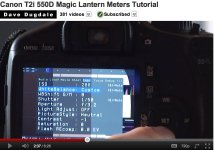
Dave Dugdale has a pretty good tutorial on white balance under ML, but I can't seem to figure out how he gets the ML menu to show up with the background visible, especially when adjusting white balance such as in the attached picture. Any ideas? (I'm using the unified 0.2.1 version on a Canon T2i) Thanks! David

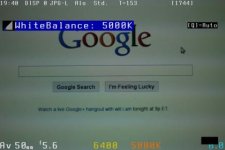
ml1.jpg
 
Mordy: is there a way to emphasize the sticky topics somehow when there are new posts? As it's now, I look at the forum page, I see the bold non-sticky ones and I know there's something new. But for the sticky topics, I need to read the fine print to figure out if there are new posts or not.

BTW- we went ahead and fixed the formatting of sticky posts. They should behave like regular threads now (bold on new content). Thanks again for pointing that out.
 
I can't seem to figure out how he gets the ML menu to show up with the background visible
Change some setting from the Expo menu and the LiveView image will appear.

Is it just no longer possible to see the histogram while setting a WB via ML? That seems pretty useful.
This was never possible (in Dave's tutorial, you can see half of the histogram which is actually a redraw bug).
 
Change some setting from the Expo menu and the LiveView image will appear.

Hi A1ex,

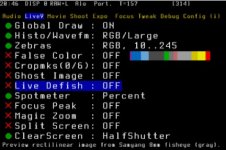
In vers .0.2.1 I have the following in the Expo Menu:

ISO
White Balance
WBShift G/M
Shutter
Aperture
Light Adjust
Picture Style
REC Picture Style
Contrast
Saturation
Flash AEComp

Which one? I've gone through all the settings!
 
Were you in LiveView when you changed these settins? Almost all of them should display the LiveView image while you are changing that setting (all other menu items will disappear).

Note: this won't work if you open ML menu with MENU->UNLOCK (you should open ML menu right from LiveView).
 
Oh.... I have a T2i. Any additional ideas?

ACTUALLY, that does seem to work on whit balance after all. I guess I was more wondering about the ML menus still having the image visible behing the menu.

Thank you again!
 
There's a photo attached on previous page from 9:31 PM.... that is what I was looking for. Will the current ML build allow that on the 550D?
 
That photo shows a redraw bug (the histogram isn't updated and neither erased). The feature you talk about was never implemented in ML.
 
Back
Top