Made a new killer FS100 Picture Profile

Erm, guys, just to point out - the still I showed was from a slide deck I use to show how NOT to do it... As an ICE for Sony, I do my FS100/700 workshops, so have to demonstrate how things go wrong as well as how things go right.

So the current speil is about exposing a 109% PP as if it were 100%, and adjusting your black point according to the scene... plus the Spaghetti Sauce analogy for PPs: you can't have just one. You need a High Contrast one, you need a Low Contrast one at the bare minimum; you probably want an indoor office lit one, an indoor properly lit one, a cloudy outdoor one, a sunny outdoor one, and a chromakey one if you do that sort of thing. That means looking at the Histogram and doing something about it (or the waveform monitor if your outboard monitor/recorder does it). The codec isn't that intelligent - you need to plant black with as much care as you plant your whites. Yes, the codec will spread the brightness ranges you set over your range ACCORDING TO YOUR CHOICE OF , but it is up to you to plant the Alpha and Omega of that range.

With the camera arms race raging it's quite funny to see the specs of these new cameras 14 stops of RAW at >>HD yet the delivery medium is nearly always 8 bit REC709 (or sRGB) HD if we're lucky. There is only so much of that quart that can be squeezed into a pint pot.

It's not funny, it's beautiful. Our job as editors/graders is to take that amazing dynamic range and alter the curves, the gamma, the mapping of input to output, to fit the REC709 display. It's our job. Look at a Red Raw image - it looks horrible. But it's just unformed clay. We push it, we pull it, we form it into a brightness range - have you ever printed B/W negatives? Look at how Ansel Adams took an understanding of how silver halides reacted to light and formed a system of mapping exposure to final print. It's the only way we can communicate what we 'see' as photographers/videographers to how our audience will see (on their REC709 devices). REC709 gives us a platform to aim for. We don't want/need 1:1 mapping unless we're ENG shooters doing Live stuff.

But... the nurse says I must rest now. I hope the crayon is legible.
 
So Piotr you think I don't know how to expose?

I'm sure you do; I just think Jay's logic was convincing. And that none of us - myself included - exposes perfectly 100% of time, especially in R&G; this is what post is for:)

I hope no offence taken, Nirv?
 
Matt what were your knee and slope settings in camera when this was shot?
I for one have shot material with Nirvs settings and have gotten similar results as he has stated.

To simply talk about the black level settings without posting what the in camera settings were
does not really prove the point.

Correct me if I am wrong, but I thought the point of this forum or at least why I joined was to get
the most out of my FS100 and to become a better DP through the collaboration and sharing of info with others.


I to have tried a lot of different settings or PP and so far the ones that have worked the best for me are Nirvs, Franks and Kyles.
If someone hits on something that works we should all try it out then come back to the table and discuss the results.
There is a lot of great knowledge on this forum as there are egos to fill, no pun intended toward you as I find you very knowledgeable.

I guess what my point is without going on and on is that we all gain more by working together. If someone has an idea or a way of getting
more out of the FS100 I try it out, if it works I keep it if it doesn't I move on.

Right now my focus is on learning to get consistently good shots with great lighting on a fast pace schedule, very difficult to do I find
and so I am very appreciative for the people on this forum who do the work in the camera settings I do not have the time to do.
Thanks again for all the hard work, we all benefit as a whole.


Oh Nirv, I too have spent a long time looking at images shot with picture profiles of my own and other's design, playing with black levels. Here's what I'm basing my rants on. The following isn't really a rant, just my side of the 'big-end little-end' debates/wars...

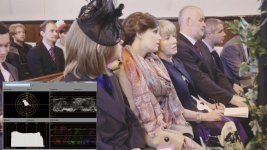
View attachment 62158

The black level set here in the FS100 is set too high, so it's been dragged down to compensate in FCPX - the blockiness you see in the WFM is degradation to the image. Like pulled pork, the image is shredded when you try and pin back the levels to where they should be. If are the white levels that are 'too high' redistributed if you over expose? No. They're gone. Same sorta thing happening here.

As Frank's always said, one needs to play with the black levels using the histogram to ensure the blacks are near the bottom, not pushing it ever higher - raise the black level to +7 in many cases and you're amplifying the blacks to a level where they're grey. The histogram has an empty space at its left, the waveform monitor shows nothing below 20IRE - the samples are distributed above that, and have to be redistributed. With the limited samples in the mid range, that means quantisation.

Hence Andy Shipsides' and Adam Wilts' PP investigations that show a little bit of wiggle room at the bottom end, but they're not really full-on 'stops of latitude'.

Or am I reading this wrong?
 
Last edited:
I think I would disagree here. Let me explain my thought. The image data is saved in an 8 bit container, which means that each channel can take a value between 0 and 255 (IRE 0-109), right? Now, if you feed that container with, let's say, an image data going from IRE 54.5 to 109, the darkest spot A will get a RGB value of 127,127,127. The next possible step in this quantisation would be spot B with, as an example, a RGB value of 128,127,127.

Now, in post production... Scale that 8-bit recorded image data down (with a color correction to get the blacks right like you described above) to a range of IRE 0-109 and you'll get a RGB pixel value of 0,0,0 for the darkest recorded spot A and a RGB value 2,0,0 for spot B. Which means, that there will be no pixel with a RGB value of 1,0,0. Image data is jumping directly from 0,0,0 to 2,0,0. So, 50% of the possible image data is lost. Which will lead to heavy rainbow effects.

To my understanding, pulling up black levels means that we're indeed losing quantisation, compared to shooting image data directly into the full IRE 0-109 range. Don't you agree?

And, Nirv, thank you for your contribution to the fs100 picture profile quest! I know you invested a lot of time into the whole profile discussion and made a lot of efforts getting more out of our cams. Thanks!

Jay

Who set's their black level to 50 ire? Wow I must've missed that firmware update.

The problem is Jay you leapt on a late night missive where I threw out an off the cuff example and assume that's how I shoot. I have explained many times before why I set up the camera the way I do and it's for a very good reason.

I set the camera up so I shoot with a raised black level but I maximise the usefulness of the 100-109 ire region. When I bring the footage into FCPX I simply use a bit of -ve lift to sit the bottom of the waveform where black was in the scene i.e not 0. If there are peaks above 100 I use my plugin to apply a roll off to those values. So you see, I don't scale anything just apply another knee and slope to hot values.

So why not shoot 0-100 in the first place? Because by exposing in this way I'm keeping darker tones out of the way of Cinetone's black crushing bottom end. Once mid tones are in there they are gone. and as a by product forcing more of the 8 bit samples into a useful area of the image. Let's say I get 10 ire more mid tone image detail to play with, I consider this worth the trouble given the frailty of 8 bit media.

So whether my workflow is considered just more spiel or just poor exposure, it works for me. YMMV.
 
I have problem with skin tone too much pale . It is funny becouse I had problem with too much red before . Could you advise me, please0.jpg
Shoot is straight from card . I do not want too much grading just simple add some contrast ,but that is not help me too much .
 
Last edited:
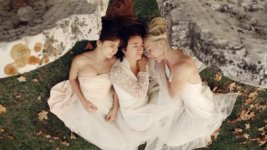
dance_cimetiere_lebic4.png


I've been using Frank's latest PP for this shoot and I love it ! Love the skintones, no more redish highlights, fabulous PP really ! The only change I've made to the PP was to put the Black Level setting back to 0. I've used the PP (with the Black Level at +7) for a dark interior shoot recently and I had some banding issue in the shadows after pulling the blacks down.
 

Attachments

  • dance_cimetiere_lebic4.jpg
    dance_cimetiere_lebic4.jpg
    21 KB · Views: 0
Last edited:
I have problem with skin tone too much pale . It is funny becouse I had problem with too much red before . Could you advise me, please
Shoot is straight from card . I do not want too much grading just simple add some contrast ,but that is not help me too much .

Look where your shadows are Tom - way too high. and skin is following them.
You have to set your blacklevel in the PP for every shot a bit above zero (or so, that it almost touches the left side on the histogram),
so your skin tones fall into the right place. I try to keep my skin at around 45 IRE with skin highlights at 60 IRE max.


Finetune while grading - pulling the mids down for starters that adds some umph on the skintones.
The PP is a bit desaturated to make sure color channels don't clip - so there is nothing wrong with pulling some saturation in, while grading.

Frank
 
Last edited:
dance_cimetiere_lebic4.png


I've been using Frank's latest PP for this shoot and I love it ! Love the skintones, no more redish highlights, fabulous PP really ! The only change I've made to the PP was to put the Black Level setting back to 0. I've used the PP (with the Black Level at +7) for a dark interior shoot recently and I had some banding issue in the shadows after pulling the blacks down.

CAn we see some of this in motion on Vimeo?
 
It is so hard to be constantly thinking about so many things when doing a docu. I set black level +15 so it was too high . I still have to learn basic things . I do not wan to make a mess here asking many question .
Thank you so much .
 
Cheers Frank, I have inputted the profile in and looking forward to trying it out tomorrow, found a subject of lots of colour variations, a certain red truck apparently the holidays are coming. Anyone from sony looking in to do a firmware update, please may we have the facility to rename these profiles. Would be very useful.

Cheers Frank,

Rich
 
Asking questions is, why we are here. Nothing wrong with that.

Frank

Thanks so much

Yours PP is great ,but sometimes it seems to adds to much magnate skin colour. It is easy make colour correction, ( I set mid-tones to cold )
Maybe I do something wrong . I tried with black level and change little colour balance but still the same . Any way this PP is very good and if I see someone with red skin PP helps to hide it ,and for the other case I do some colour correction to make more natural skin tone .
 
Asking questions is, why we are here. Nothing wrong with that.


Frank

On the ultimate profile, which I have been using lately, I understand the setting blacks per shot if possible. What is a safe setting if having to run and pick-up some other shots.

What about the other end? I find I can easily pull back details that are in the 100-109 range.

What do you (Frank) shoot for on the high side. Set zebras at 95, let a few show up, set them at 100 and have a hard wall - no zebras, or run the 100+ and allow the areas zebra'd tone clipped.
 
Shot this edit with the glog ultimate (frank, i talked to you in a previous thread about trying this PP, turns out I already had it on my camera, i forgot that was the glog ultimate :P)

Shot with the sony 18-200mm kit lens
It's 1920x818 so full screen it
password - jump
 
Back
Top