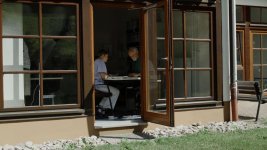
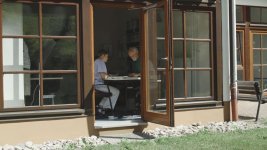
Made a new killer FS100 Picture Profile

Postmaster

Dark Side of the Camera
Gentlemen, lo and behold:

After further trying, to milk out the last bit of the FS100 sensor,
I think I finally came up with the "magic formula".

It holds and rolls highlights better than any of my other profiles, gives more DR than ever and also is the closest you can get to S-Log in a FS100.

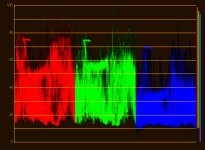
If you ever looked as a S-Log or Arri Log waveform or RGB parade you can see that most of the data lives between 20 and 80 IRE.
This is what you get with this PP.

I gave it a test ride today, when I shot a commercial and I can't hardly belief this came out of my FS100.

Here is some comparisons of what you can expect´ (before and after grading)
I release the PP details later today on my blog and here in this tread, so watch this space.

Frank
fat7.jpgSequence-02.jpg
Sequence-03.jpg
 
Last edited:
The second one is the original file, the first one is just the luma curve lowered till the levels just touch zero IRE.
So it's 100% non destructive (unless you don't stretch the levels) and doesn't introduce banding and other ugly artifacts.

fat5.jpgSequence-01.jpg
 
Last edited:
Wow, Frank you are awesome! I and I know many of us here truly appreciate your work that you've done for FS community!!! You are genius! Thanks for helping and trying to get the maximum from the camera and share you knowledge and experience. Big thank you! I hope to test your new profile as soon as possible.
 
Looks lovely. Outstanding even.

Doesn't look like FS100 at all.

Anyone else thinking it was a shame Frank didn't represent the FS100 at the Zacuto shoot?
 
Last edited:
I have a shoot coming up on Saturday I will try the new profile then. Frank is the profile up yet?
 
I use G-log, Glencolor, K-tone and Abel Cine norm all the time, the frames posted look fantastic. Thanks for all the work Frank, and your willingness to share it with the community. This one will definitely be added to my camera.
 
Those profiles look great Frank.

When are you going to get an FS700 so you can start working your magic profiles on that camera :) Sony should just give you an FS700 since you've probably sold them quite a few cameras based on your work and your profiles.
 
Looks like it's got a lot of potential, Frank.

Gonna try this out with the NanoFlash whenever you post it.
 
Sony should just give you an FS700 since you've probably sold them quite a few cameras based on your work and your profiles.

I second that :)


So here are the G-LOG Ultimate settings:

ZEBRA: set your zebras to 100 and make sure they never show up (unless in lights, chrome or other super bright and shiny things)
BLACK LEVEL: variable – as in G-Log, set your black levels a hair above zero IRE (or until the histogram touches the left side)

DON’T GET CONFUSED WHAT YOU SEE ON THE CAMERA SCREEN, HAVE FAITH, EVERYTHING WILL FALL IN PLACE.

GAMMA: Cinematone2
BLACK GAMMA: High/+7
KNEE: Manual/80%/+1
COLORMODE: Cinematone2/+8
COLOR LEVEL -2
COLOR PHASE -7
COLOR DEPTH: R -3/G +2/B +5/C 0/M 0/Y 0
WB SHIFT: all zero
DETAIL: Level -3/BW Balance Type3/Limit7 everything elese at zero

If you are in Premiere, the “Luma Corrector” gives you the best, non destructive performance.
Just grab the Pedestal slider and lower all the levels till they touch the zero IRE line. Done.

Make sure you dial in the color temperature (WB) manually with the little wheel, don`t do auto or push button (greycard) balance,
since that will screw up your color on the magenta/cyan axis.

Every color cast you might get, by doing this, is easily fixed in post.

I hope you guys have fun with the new PP.

Here is the link to my blog article with some more pictures:
http://frankglencairn.wordpress.com...imate-1-0-picture-profile-for-the-sony-fs100/

best, Frank
 
Frank,

What black level setting did you have for those scenes that you posted please?

Thanks
 
I don:t remember, since I set a different level for every scene.
All I can say, they where somewhere between +3 and -15.
Mostly deep in the minus side.

And yeah, I know, the RGB parade doesn't look like that.
That's the "magic" :)
 
Last edited:
I don:t remember, since I set a different level for every scene.
All I can say, they where somewhere between +3 and -15.
Mostly deep in the minus side.

And yeah, I know, the RGB parade doesn't look like that.
That's the "magic" :)

Care to explain the magic because I'm not seeing what you're seeing.

Cheers
 
What I mean is, that even if I set my black levels around zero while shooting,
they are not at zero when I import the clips into the NLE (and look at the RGB parade or Waveform).

This is nothing I "engineered" in the PP, I was surprised myself, when I saw it.

Looks like I just found a sweet spot.

Frank
 
What I mean is, that even if I set my black levels around zero while shooting,
they are not at zero when I import the clips into the NLE (and look at the RGB parade or Waveform).

This is nothing I "engineered" in the PP, I was surprised myself, when I saw it.

Looks like I just found a sweet spot.

Frank
Ah OK.

I use FCPX and the blacks levels are where you set then in the preset. FCPX interprets full range files correctly so -15 black will send the black point way -ve. Maybe premiere is doing something different?

I'll compare your preset with mine and see what the difference in waveforms look like.

Cheers for your preset.
 
Wow, just sweet. I was doing a shoot yesterday. Very sunny out (unusual for the rainforest where I live). I was shooting under a tree, out
into a river in bright sunlight. I was using your (older) profile, and I saw why you say the black level is adjusted to the scene. Because there was so
much 'brightness' in the bright part of the picture, I bumped down the exposure (via ND) and bumped up the black level, and started seeing detail
under the tree, which had previously been 'crushed' so that it was just total black. It was crazy, I didn't realize the dynamic range this litte
guy has. So if you say this profile is even better, I'm stoked!! I'm going to try it as soon as I can. It looks really nice and the 'grading'
step just makes logical sense to me. I almost hope you DON'T get an FS700 (even though you SHOULD get one from Sony for all your work) because
you just keep giving added value to the FS100 for those of us who don't have the FS700! Nice work and thanks a ton!
 
ZEBRA: set your zebras to 100 and make sure they never show up (unless in lights, chrome or other super bright and shiny things)
BLACK LEVEL: variable – as in G-Log, set your black levels a hair above zero IRE (or until the histogram touches the left side)

Frank;
Why the warnings about staying inside 64->940? Is it to deal with the limitations of PP?

Seems not to be a concern if you use software that maintains 0-1023 such as Avid MC?

I loaded this profile, will give it a go.. but typicaly i use the full range if DR in the shot calls for it
 
Frank, thanks as always for your hard work! I second (third? fourth?) the proposal for Sony to give you an FS700... ;-)

Just one thing in your post:

If you are in Premiere, the “Luma Corrector” gives you the best, non destructive performance.
Just grab the Pedestal slider and lower all the levels till they touch the zero IRE line. Done.

From what I can see, if you have any whites over 100 IRE in your clip, Lima Corrector will clip them, regardless of what settings you use. I think it is safer to use Fast Color Corrector. See:

http://www.dvxuser.com/V6/showthrea...re-CS5&p=1986183914&viewfull=1#post1986183914

(2 posts)

Cheers!
 
Back
Top