
Navigation
Install the app
How to install the app on iOS
Follow along with the video below to see how to install our site as a web app on your home screen.
Note: This feature may not be available in some browsers.
More options
You are using an out of date browser. It may not display this or other websites correctly.
You should upgrade or use an alternative browser.
You should upgrade or use an alternative browser.
Made a new killer FS100 Picture Profile
- Thread starter Postmaster
- Start date
Jeff Kirkland
Member
Yes, just use one of the six.

moldcad
Veteran
Hi Frank,
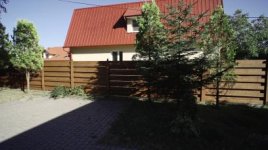
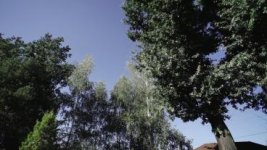
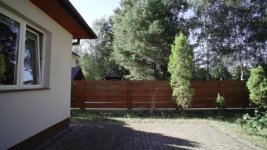
I love this profile of yours and use it often, but would like you to take a look at a couple of snapshots and tell me what's going on at the green foliage / blue sky contrasty borders, when they become grayish at the highlight roll-off. Without your profile, I suffered from a similar artifact we all know - shifting through yellow before clipping...
What do you think I could improve in the profile to avoid that? I tried under-exposing a bit which of course gets rid of these, but then the deep shadows become too dark (and the main point of your grading prescription - bringing shadows further down - become futile of course). BTW, the attached grabs are straight from the camera (no luma down-shift).
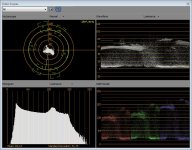
The Scopes apply to the very first grab...
TIA!
I love this profile of yours and use it often, but would like you to take a look at a couple of snapshots and tell me what's going on at the green foliage / blue sky contrasty borders, when they become grayish at the highlight roll-off. Without your profile, I suffered from a similar artifact we all know - shifting through yellow before clipping...
What do you think I could improve in the profile to avoid that? I tried under-exposing a bit which of course gets rid of these, but then the deep shadows become too dark (and the main point of your grading prescription - bringing shadows further down - become futile of course). BTW, the attached grabs are straight from the camera (no luma down-shift).
The Scopes apply to the very first grab...
TIA!
Attachments
Last edited:

Postmaster
Dark Side of the Camera
Hmmm.. when you look at the RGB parade, you see that there are lot's of blue.
Try to balance all 3 colors to just touch the 192 line.
Also the profile is not very saturated, so you always can pump at least 10% saturation in it, to match, what your eyes saw.
If that doesn't help, send me the frame and I have a look at it.
Try to balance all 3 colors to just touch the 192 line.
Also the profile is not very saturated, so you always can pump at least 10% saturation in it, to match, what your eyes saw.
If that doesn't help, send me the frame and I have a look at it.
Frank what is the WB Shift Filter Type in your settings LB-CC or R-B
Between you and Nirv I have some pretty great settings to
work with on my next shoot. Thanks for the profile.
( forget it I figured it out myself thanks anyway)
Between you and Nirv I have some pretty great settings to
work with on my next shoot. Thanks for the profile.
( forget it I figured it out myself thanks anyway)
I second that
So here are the G-LOG Ultimate settings:
ZEBRA: set your zebras to 100 and make sure they never show up (unless in lights, chrome or other super bright and shiny things)
BLACK LEVEL: variable – as in G-Log, set your black levels a hair above zero IRE (or until the histogram touches the left side)
DON’T GET CONFUSED WHAT YOU SEE ON THE CAMERA SCREEN, HAVE FAITH, EVERYTHING WILL FALL IN PLACE.
GAMMA: Cinematone2
BLACK GAMMA: High/+7
KNEE: Manual/80%/+1
COLORMODE: Cinematone2/+8
COLOR LEVEL -2
COLOR PHASE -7
COLOR DEPTH: R -3/G +2/B +5/C 0/M 0/Y 0
WB SHIFT: all zero
DETAIL: Level -3/BW Balance Type3/Limit7 everything elese at zero
If you are in Premiere, the “Luma Corrector” gives you the best, non destructive performance.
Just grab the Pedestal slider and lower all the levels till they touch the zero IRE line. Done.
Make sure you dial in the color temperature (WB) manually with the little wheel, don`t do auto or push button (greycard) balance,
since that will screw up your color on the magenta/cyan axis.
Every color cast you might get, by doing this, is easily fixed in post.
I hope you guys have fun with the new PP.
Here is the link to my blog article with some more pictures:
http://frankglencairn.wordpress.com...imate-1-0-picture-profile-for-the-sony-fs100/
best, Frank
Last edited:

robmneilson
Veteran
I shot something really quick with this PP. The grade is a bit off in shots, but I had to rush this since I shot it in a couple hours right before the contest deadline. So please forgive the rough edges.

robmneilson
Veteran
This is VERY interesting! We just got an FS100 at work, and I intend to fully push this around as much as I can. Thanks for doing all this work, Frank! We all benefit because of your resourcefulness.
With gratitude,
Dillon
Seriously, it's a bit time intensive to experiment with the profiles. Thanks for allowing me to be far lazier than I should be Frank!
alaskacameradude
Veteran
Frank,
I've been getting into using Adobe's new CS6. I'm a former FCP user. Loved FCP 7 and the suite of tools it had and was hoping
for the new version to be a 'faster' version but otherwise similar. Not a big fan of FCPX although there are a couple neat things.
So trying out CS6 and wow, it's like the FCP 8 I was hoping for. Now for how this relates to your PP.....
I do some video work for the local fire dept. Shot some a couple weeks ago with your PP, but misplaced the Heliopan and was having
to shoot using 'shutter speed' to control exposure. Finally found the Heliopan and this past Saturday, got to shoot some footage of them
actually burning down a 5 story house which was donated for 'training'. Pulled the footage into Premiere Pro and slapped together a quick
:30 spot for them to solicit volunteer firefighters. Sent the spot from Premiere Pro to After Effects for further processing (I added in your
Luma Corrector step in Premiere Pro, but then disabled it to send to AE because I wanted to see what I could do with it in AE). Found
this REALLY neat plug in in AE called Color Finesse 3. It has a bunch of 'filmstock' simulations from Eastman Kodak and Fuji Films. It
also has a HSL adjustment that allows you to adjust the pedestal. It has curves adjustments, secondaries and all kinds of neat stuff.
It has an onscreen waveform, vectorscope, curves, master, red, green, and blue histograms and master, red, green, and blue curves.
It also does NOT clip, when you pull down your 'superwhites' if I pull down video that was 'flat' on top at 100, to below 100, I get back the
'rounded tops' on the waveform. Just a really neat plug in that comes standard with AE, what a really nice bonus. So following your
steps, but using Color Finess in AE and adjusting the pedestal there instead of using the 'Luma Corrector' in Premiere Pro, I got some
of the best looking footage I have ever shot in my entire life using this new preset. It really looks nice, hate to say it, but 'filmic'.
Wow, thanks again. I'll post it up, once I finish everything on it (still kicking around text, graphics and music and so on.)
I've been getting into using Adobe's new CS6. I'm a former FCP user. Loved FCP 7 and the suite of tools it had and was hoping
for the new version to be a 'faster' version but otherwise similar. Not a big fan of FCPX although there are a couple neat things.
So trying out CS6 and wow, it's like the FCP 8 I was hoping for. Now for how this relates to your PP.....
I do some video work for the local fire dept. Shot some a couple weeks ago with your PP, but misplaced the Heliopan and was having
to shoot using 'shutter speed' to control exposure. Finally found the Heliopan and this past Saturday, got to shoot some footage of them
actually burning down a 5 story house which was donated for 'training'. Pulled the footage into Premiere Pro and slapped together a quick
:30 spot for them to solicit volunteer firefighters. Sent the spot from Premiere Pro to After Effects for further processing (I added in your
Luma Corrector step in Premiere Pro, but then disabled it to send to AE because I wanted to see what I could do with it in AE). Found
this REALLY neat plug in in AE called Color Finesse 3. It has a bunch of 'filmstock' simulations from Eastman Kodak and Fuji Films. It
also has a HSL adjustment that allows you to adjust the pedestal. It has curves adjustments, secondaries and all kinds of neat stuff.
It has an onscreen waveform, vectorscope, curves, master, red, green, and blue histograms and master, red, green, and blue curves.
It also does NOT clip, when you pull down your 'superwhites' if I pull down video that was 'flat' on top at 100, to below 100, I get back the
'rounded tops' on the waveform. Just a really neat plug in that comes standard with AE, what a really nice bonus. So following your
steps, but using Color Finess in AE and adjusting the pedestal there instead of using the 'Luma Corrector' in Premiere Pro, I got some
of the best looking footage I have ever shot in my entire life using this new preset. It really looks nice, hate to say it, but 'filmic'.
Wow, thanks again. I'll post it up, once I finish everything on it (still kicking around text, graphics and music and so on.)
Postmaster
Dark Side of the Camera
Yup, Finesse works pretty well with my PPs, but most guys won't go the extra mile for a AE roundtrip.
I'm always happy to see what folks produce with my PPs, can't wait to see some grabs.
Frank
I'm always happy to see what folks produce with my PPs, can't wait to see some grabs.
Frank
nemisis633
Active member
Frank,
I just did a music video shoot over the last weekend using G-Log Ultimate. THANK YOU. THANK YOU. THANK YOU. You successfully managed to make shooting with the FS100 a much more consistent and less stressful experience. It was great to be able to actually focus on shooting and not the crazy highlight handling. I haven't gotten a chance to really tear into the footage yet, but here's a quick screen grab with a very basic curve applied.
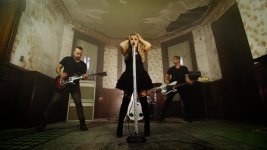
I just did a music video shoot over the last weekend using G-Log Ultimate. THANK YOU. THANK YOU. THANK YOU. You successfully managed to make shooting with the FS100 a much more consistent and less stressful experience. It was great to be able to actually focus on shooting and not the crazy highlight handling. I haven't gotten a chance to really tear into the footage yet, but here's a quick screen grab with a very basic curve applied.
Postmaster
Dark Side of the Camera
Wow, looking great.
alaskacameradude
Veteran
gabe-
again, thanks for sharing.
the firefighters spot looks great.
in reading this thread, is the vimeo posted edit the one that went thru pp and then after effects using the plug-in color finesse 3?
by the way, was that the fs100's 60fps slo mo or did you accomplish that in the timeline?
be well.
rob
smalltalk productions
again, thanks for sharing.
the firefighters spot looks great.
in reading this thread, is the vimeo posted edit the one that went thru pp and then after effects using the plug-in color finesse 3?
by the way, was that the fs100's 60fps slo mo or did you accomplish that in the timeline?
be well.
rob
smalltalk productions
alaskacameradude
Veteran
gabe-
again, thanks for sharing.
the firefighters spot looks great.
in reading this thread, is the vimeo posted edit the one that went thru pp and then after effects using the plug-in color finesse 3?
by the way, was that the fs100's 60fps slo mo or did you accomplish that in the timeline?
be well.
rob
smalltalk productions
Rob,
So, yeah that video, I did the basic edit in PP. I then sent it to AE and used color finesse 3 on it. I could have done the
same in PP, but I'm not real good with PP yet, and haven't figured out how to have the video scopes up at the same time I
edit. Color Finesse is really nice, in that it has all the video monitoring tools you could ever want up on the screen with the
video. Since it was just a :30 spot, I used AE to finish it out after I did the basic edit in PP. This is actually a strong point of
Adobe's creative suite 6.....it's a lot like Apples Final Cut Studio used to be where you can 'send' things to other parts of the
suite, I like it.
The slo mo IS the 60fps from the FS100. I LOVE that mode! I have actually used the slo mo in the FS100 and then slowed
it down 50% in the timeline on a dance promo piece I did recently and that worked pretty good as well, giving me 5 times slo motion.
Rob,
So, yeah that video, I did the basic edit in PP. I then sent it to AE and used color finesse 3 on it. I could have done the
same in PP, but I'm not real good with PP yet, and haven't figured out how to have the video scopes up at the same time I
edit. Color Finesse is really nice, in that it has all the video monitoring tools you could ever want up on the screen with the
video. Since it was just a :30 spot, I used AE to finish it out after I did the basic edit in PP. This is actually a strong point of
Adobe's creative suite 6.....it's a lot like Apples Final Cut Studio used to be where you can 'send' things to other parts of the
suite, I like it.
The slo mo IS the 60fps from the FS100. I LOVE that mode! I have actually used the slo mo in the FS100 and then slowed
it down 50% in the timeline on a dance promo piece I did recently and that worked pretty good as well, giving me 5 times slo motion.
Gabe, I usually grade on Davinci, but after reading your post I decided to try Color Finesse since I have the whole CS6 suite. I too am a final cut user
for many years now. I still like Davinci, but I must say for a quick color grade Color Finesse is pretty dam good, I was very impressed with it.
I think now I will be using it on all of my work except the stuff that really needs special attention. Thanks for the info
Last edited: