
Navigation
Install the app
How to install the app on iOS
Follow along with the video below to see how to install our site as a web app on your home screen.
Note: This feature may not be available in some browsers.
More options
You are using an out of date browser. It may not display this or other websites correctly.
You should upgrade or use an alternative browser.
You should upgrade or use an alternative browser.
Made a new killer FS100 Picture Profile
- Thread starter Postmaster
- Start date
Thank you very much Franck for sharing this new PP and your experience with us. Your are a very good filmaker too i follow your work.
I really like your new PP, the only thing i've noticed is that red color looks like more orange than red (like basic PP sony F3) so if needed i use hue correction in Premiere pro to resolve this color problem. This PP is very well for preserve highlight, bravo.
thanks again franck!
I really like your new PP, the only thing i've noticed is that red color looks like more orange than red (like basic PP sony F3) so if needed i use hue correction in Premiere pro to resolve this color problem. This PP is very well for preserve highlight, bravo.
thanks again franck!
Hi Frank. Thanks from me too as I try out your updated profile. Very nice results here in the bright Florida sunshine....at least until the hurricane gets here in the next day or two!! One question: Since I am shooting in very bright conditions and have to use the variND filter, I'm getting a slight color cast. In your original instructions, you said to NOT use a white/neutral card for white balance but to dial in the Kelvin temp manually. Does this mean that I need to remove the color cast in post since I can't do a white card balance? Thanks again.
dave
dave
Frank thanks for all the hard work putting together an outstanding PP.
Here is a little test I did with it. The lens whacking was using a different PP with standard gamma and +10 black level witch I reget.
I did some color work; blue/green lows, warm mids, light blue highs and a lil desaturation.
Here is a little test I did with it. The lens whacking was using a different PP with standard gamma and +10 black level witch I reget.
I did some color work; blue/green lows, warm mids, light blue highs and a lil desaturation.

Postmaster
Dark Side of the Camera
I really like your new PP, the only thing i've noticed is that red color looks like more orange than red (like basic PP sony F3) so if needed i use hue correction in Premiere pro to resolve this color problem. !
I care much about skintones. So my focus is always on them, when I make a profile.
It's a always a compromise, with the menu settings you can only do so much.
So I took better skintones over true color on other things.
And yes, most of my profiles are made to get finished in post.
Frank
Tim Lawrence
Member
sorry if this is off topic, but I've been outside of the community for awhile, what is the verdict on the FS100 as far as can it output RGB through it's HDMI connector? or does it only output YUV 4:2:2 over it's HDMI connector.
stevedocmaker
Well-known member
... the only thing i've noticed is that red color looks like more orange than red (like basic PP sony F3) so if needed i use hue correction in Premiere pro to resolve this color problem. This PP is very well for preserve highlight, bravo.
I've tried the same settings with the Pro color mode and reds are slightly more accurate.
alaskacameradude
Veteran
I second that
So here are the G-LOG Ultimate settings:
ZEBRA: set your zebras to 100 and make sure they never show up (unless in lights, chrome or other super bright and shiny things)
BLACK LEVEL: variable – as in G-Log, set your black levels a hair above zero IRE (or until the histogram touches the left side)
DON’T GET CONFUSED WHAT YOU SEE ON THE CAMERA SCREEN, HAVE FAITH, EVERYTHING WILL FALL IN PLACE.
GAMMA: Cinematone2
BLACK GAMMA: High/+7
KNEE: Manual/80%/+1
COLORMODE: Cinematone2/+8
COLOR LEVEL -2
COLOR PHASE -7
COLOR DEPTH: R -3/G +2/B +5/C 0/M 0/Y 0
WB SHIFT: all zero
DETAIL: Level -3/BW Balance Type3/Limit7 everything elese at zero
If you are in Premiere, the “Luma Corrector” gives you the best, non destructive performance.
Just grab the Pedestal slider and lower all the levels till they touch the zero IRE line. Done.
Make sure you dial in the color temperature (WB) manually with the little wheel, don`t do auto or push button (greycard) balance,
since that will screw up your color on the magenta/cyan axis.
Every color cast you might get, by doing this, is easily fixed in post.
I hope you guys have fun with the new PP.
Here is the link to my blog article with some more pictures:
http://frankglencairn.wordpress.com...imate-1-0-picture-profile-for-the-sony-fs100/
best, Frank
Frank, just a question as I am just starting to dabble in Premiere PRO 6 (I'm a FCP 7 editor that is learning Premiere as I go).
I shot some stuff with your G-Log Ultimate settings and imported it into Premiere Pro. Then put 'Luma corrector' on the
video and brought up the Waveform and RGB Parade to lower the pedestal until levels touch zero. After I had done that, I
noticed that Premiere Pro had a box checked for IRE 7.5% setup (in the Waveform panel) When I unchecked that box,
I needed to go back and retweak the pedestal settings. I am assuming that I should uncheck that box because
as I recall that was only something to worry about with NTSC DV. But I wanted to check with you, because it DOES change
the 'tweaking' of the Luma Corrector's pedestal slider.
alaskacameradude
Veteran
OK, I think I found my own answer here:
http://library.creativecow.net/articles/devis_andrew/Premiere-Pro-CS6-Basics_48/video-tutorial
So if you are grading FS100 footage (which is HD) you should uncheck the box labeled setup 7.5 IRE. That would be my understanding
anyways.
http://library.creativecow.net/articles/devis_andrew/Premiere-Pro-CS6-Basics_48/video-tutorial
So if you are grading FS100 footage (which is HD) you should uncheck the box labeled setup 7.5 IRE. That would be my understanding
anyways.
Jeff Kirkland
Member
Thanks for the profile, Frank. Used it on a small outdoor shoot over the weekend and I am very pleased with the result. Definitely keeping this PP permanently on my FS100.
Prophetmatt
Well-known member
Frank, used the profile for a wedding outdoors and reception inside, LOVED what came out! Makes me want to purchase another fs100!!
Postmaster
Dark Side of the Camera
Glad you guys can use my profiles.
Love to see some more screengrabs, from work done with it.
Frank
Love to see some more screengrabs, from work done with it.
Frank
I've only had my fs100's a short while now and this is the first time I've played with grading and picture profiles. I used Franks profile for a wedding last week. The outdoor stuff looks amazing, the footage is so rich looking. However, I had to work inside a lot in dark venues and am wondering is there another profile I should use for inside or something I should tweak in this one to get a bit more brightness.
I've got the histogram on and also have a smallhd monitor. I don't have access to scopes until the footage is on the timeline in cs6 so was wondering how to set the black levels with a histogram?
Appreciate this Frank, can't wait until I really start getting my head around this more.
Michael.
I've got the histogram on and also have a smallhd monitor. I don't have access to scopes until the footage is on the timeline in cs6 so was wondering how to set the black levels with a histogram?
Appreciate this Frank, can't wait until I really start getting my head around this more.
Michael.
alaskacameradude
Veteran
Glad you guys can use my profiles.
Love to see some more screengrabs, from work done with it.
Frank
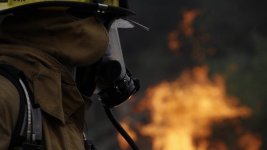
You bet! Here you go.



Prophetmatt
Well-known member
LOVE THIS PROFILE!
Below is the non edited version...
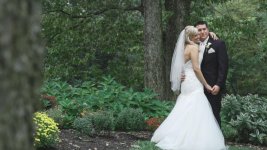
used the Luma Corrector below...
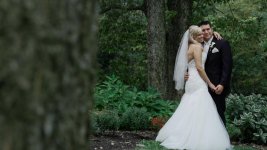
Below is the non edited version...
used the Luma Corrector below...
Postmaster
Dark Side of the Camera
However, I had to work inside a lot in dark venues and am wondering is there another profile I should use for inside or something I should tweak in this one to get a bit more brightness.
.
Try this:
G-LOG A 2.1
Black Level: 0 (set per scene)
Gamma: Standard
Black Gamma High, +7
Knee 105, 0
Color Mode: Pro, +8
Color Level: -2
Colorphase: -7
Colordepth: R -3, G +2, B +5, C 0, M 0, Y +2
WB Shift: LB-CC, 0, 0
Detail: Level -2, Manual off
Frank
Prophetmatt
Well-known member
This profile keeps me impressing me more and more. I love the color I'm grabbing from different shooting areas. This is from this evening at the local box.


mraaron895
Well-known member
I was 2nd unit DP on a nike commercial shoot and used this profile, the results came out great! 1st unit was on the C300 and shot C-LOG and the footage matched perfectly. I can't show any of the results yet, but I'll be sure to update once I get the OK.