GH4 Leeming LUT One – the best LUT for the Panasonic GH4

I'm late to the party on this, but I wanted to share my first project with Paul's awesome LUT! Here's a still from a music video...First is the original, second with the Leeming LUT and some exposure/contrast tweaks, third is the final look I'm working on. I think I overexposed the two faces of the main talent in my attempt to ETTR, but I was able to rein it in a bit. I'm fairly new to this kind of in-depth color grading, so this was a pretty fun challenge!


Test_RAW.jpgTest_Leeming.jpgTest_Final.jpg

Shot on Sigma ART 18-35mm, Metabones SB XL, I think the f-stop was at 2.2, ISO at 200. There was a lot of natural light in that warehouse, so I just hit them with some diffused spotlights from each side and a LED panel front and center, kind of over top the main talent.
 
According to my browser, your "final" image lifts the blacks, which is a matter of taste, but it also gives a distinctive shift (the white drumhead) from ever-so-slightly green to did-you-really-mean-to-do-that magenta. I think the white balance of the first two images is better than the white balance of the final one.
 
Hell has frozen over.... :D

Coming soon! ;)

Leeming_LUT_One_Vlog_Edition.jpg
 
Wow, very cool. Would be extra exciting if your LUT would help eliminate that awful blotchy, artifacty, banded stuff. Very interesting indeed. I purchased the CinelikeD LUT and I'm very much looking forward to this one.
I would love that too, but unfortunately V-Log in 8bit still has all the inherent issues (you can see it in the sky and on the white building wall in the background) when recorded internally.

I've tried to minimise them, but this LUT is not going to replace my Cinelike D one for internal recording.

For 10bit recording though, this LUT should present as a superior LUT to Panasonic's own, with a much closer to final look than Panasonic's as well.

Oh and I'm also in the process of building another Creative LUT for my original one, to pre-grade it to the same level as the one you see above. I'm designing it for use in Premiere Pro (Lumetri Color allows a Basic LUT plus a Creative LUT) but any NLE with stackable LUT ability will be able to make use of it. Also coming soon, along with a pack of true Creative Looks designed to work in concert with the original Leeming LUT One.

The Creative LUTs will be free to everyone who bought my LUT.

I'm still deciding on the V-Log LUT price, but there will be a significant discount at the very least to anyone who already owns one of my paid-for LUTs :)

Cheers!

Paul :)
 
I would love that too, but unfortunately V-Log in 8bit still has all the inherent issues (you can see it in the sky and on the white building wall in the background) when recorded internally.

I've tried to minimise them, but this LUT is not going to replace my Cinelike D one for internal recording.

For 10bit recording though, this LUT should present as a superior LUT to Panasonic's own, with a much closer to final look than Panasonic's as well.

Oh and I'm also in the process of building another Creative LUT for my original one, to pre-grade it to the same level as the one you see above. I'm designing it for use in Premiere Pro (Lumetri Color allows a Basic LUT plus a Creative LUT) but any NLE with stackable LUT ability will be able to make use of it. Also coming soon, along with a pack of true Creative Looks designed to work in concert with the original Leeming LUT One.

The Creative LUTs will be free to everyone who bought my LUT.

I'm still deciding on the V-Log LUT price, but there will be a significant discount at the very least to anyone who already owns one of my paid-for LUTs :)

Cheers!

Paul :)

Nice! Thanks for all of your hard work, you're really appreciated.
 
Does anyone have comments, positive or negative, about application of this LUT to Cinelike-D footage from a G7?

(I have not read all 384 posts in this thread and so apologize if this question has already been answered.)
 
Does anyone have comments, positive or negative, about application of this LUT to Cinelike-D footage from a G7?

(I have not read all 384 posts in this thread and so apologize if this question has already been answered.)
A couple of people have used it with success, but I am in the process of building a proper G7 version that I can put my name to that will be 100%, definitely accurate.

Should be soon!

Cheers,

Paul :)
 
It's a boy!! :D

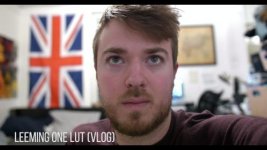
Leeming LUT One now has an evil twin, known as Leeming LUT One (V-Log Edition)!!!

This has been designed for use with external 10bit 4:2:2 recorders such as the Video Devices PIX-E series, which can take LUTs for preview while recording the uncorrected log image.

As such, the LUT has been created with a near-final look built in, for ease of seeing the final image in the recorder and also for ease of use once you are editing, to give you a beautiful image with little further work required beyond perhaps adjusting a few levels depending on your shot.

This is a different concept to the Cine-D version of the LUT, which was designed with grading in mind and which presented a much flatter image to start from.

NOTE: All the problems with V-Log L in 8 bit 4:2:0 land are still here. Yes, you can use this with internal recording (the example image is internally recorded). Yes, you will see magenta/cyan chroma blocking on flat white surfaces. Yes, you will see more banding in the sky etc compared to Cine-D. The LUT is not a panacea for these problems, although I have tried to minimise them.

So I still recommend the Cine-D version of my LUT for the best image the GH4 can produce if you're going to record internally (and even externally, to be honest).

But if you are dead set on using V-Log L on the GH4, this version of the LUT will definitely give you a better out of the box experience than the one provided by Panasonic. That much I can guarantee you! :D

To those of you who have already bought the Cine-D version of my LUT, I have a special 'thank you' crossgrade promotional price of just US$5 on my website for you. Just choose the CROSSGRADE option when buying.

For those who have not bought any of my LUTs before, the price of this LUT will be US$15 (the same as the Cine-D version).

If you want to buy both at the same time, please add the Cine-D and V-Log (crossgrade) options to your cart (total of two items) before checking out, which should total US$20 if you've done it right.

Thanks again everyone for your support and feedback! I look forward to hearing from those of you who use this version of the LUT, and as with my Cine-D version, I am intent on making this as good as possible so if you find bugs, let me know and I will fix them!

Cheers,

Paul :)
 
Last edited:
For those of you using the Cine-D version of my LUT (which is basically the only version anyone's had available up to now), I have not forgotten you!

Quite a few people have mentioned that while they like the LUT, they don't always like having to grade it once it's been corrected with the LUT. Worse still, those people have sometimes gone back to other profiles or LUTs because they'd rather just drop a look and be done with it.

This shall not stand!! :P

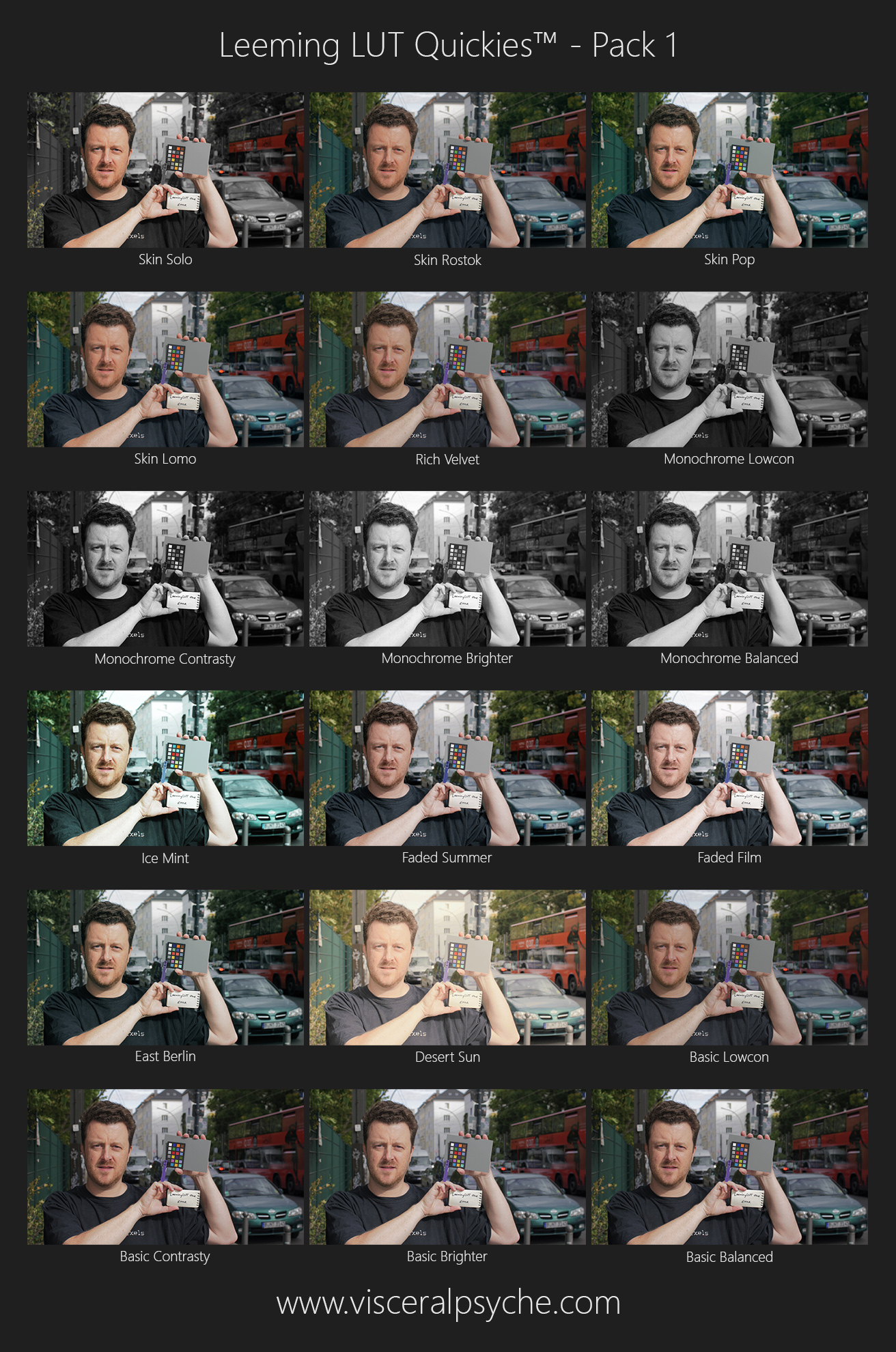
Introducing Leeming LUT Quickies to the rescue (because who doesn't love a quickie?!) :D

Leeming_LUT_Quickies_Pack1_Samples.jpg


18 pre-graded looks designed specifically to match the flatter, corrected output of Leeming LUT One (Cine-D Edition).

Now you simply have to apply Leeming LUT One, apply one of the Leeming LUT Quickies in the creative looks section of your editor, and you're done! Maybe tweak the levels depending on the shot. That's it!

No more excuses :D

Oh, and did I mention that these 18 looks are FREE?

Grab them via the link on my website. Instructions are included in the ZIP file.

Enjoy the hours of productivity saved. Don't say I never did anything nice for you :P

Cheers from Berlin,

Paul :)
 
Last edited:
Thanks Paul for the cool stuff. For this one I used the Portrait setting, the skin tones are great out of the camera. Have you tried to play with this setting?

 
Thanks Paul for the cool stuff. For this one I used the Portrait setting, the skin tones are great out of the camera. Have you tried to play with this setting?

Portrait used to be my go to setting, until I developed the LUT. Cinelike-D has more dynamic range, which is why I switched. The LUT completes the package to give perfect skin tones with superior dynamic range. A killer combo ;)

Cheers,

Paul :)
 
I'm liking the new Leeming V-Log LUT. But it significantly darkens some of my footage (recorded with an external 10-bit device). It's much darker than the official Panasonic V-Log LUT, and darker than many of the other V-Log LUTS released after Panny made VLog-L available. Lifting the blacks after applying the Leeming V-Log LUT just washes out the shadows. Any chance that you might release a "Basic Brighter" version of the LUT, as you did with the new Cine-D Quickie LUT package?

I realize the the Leeming V-Log LUT is designed for footage exposed to the right -- but sometimes lighting conditions and lens limitations don't allow for super bright exposure.
 
Last edited:
I'm liking the new Leeming V-Log LUT. But it significantly darkens some of my footage (recorded with an external 10-bit device). It's much darker than the official Panasonic V-Log LUT, and darker than many of the other V-Log LUTS released after Panny made VLog-L available. Lifting the blacks after applying the Leeming V-Log LUT just washes out the shadows. Any chance that you might release a "Basic Brighter" version of the LUT, as you did with the new Cine-D Quickie LUT package?

I realize the the Leeming V-Log LUT is designed for footage exposed to the right -- but sometimes lighting conditions and lens limitations don't allow for super bright exposure.
Yes, it is indeed designed for ETTR footage :) That said, I do intend to release a brighter, flatter version to match the Cine-D LUT exactly, so that the Quickies work with both LUTs equally well. Stay tuned! (It will be a free update to existing Vlog Edition users)

Try increasing the exposure slider with the LUT applied, instead of raising the black levels, and see if that makes the image look better.

Cheers,

Paul :)
 
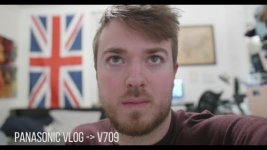
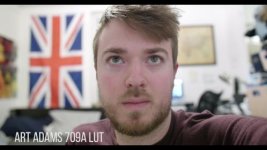
Liking it so far Paul, I'm in desperate need of an accurate vlog to rec709 LUT to start from, and this looks like the closest I've seen so far! Did you collaborate with Joe on this one as well? I wouldn't say it's "darker" than the VLOG->V709 LUT, but it has a significantly higher amount of contrast and saturation, at least from my initial tests.

Here's some frames from slapping the LUT onto some test footage I shot a few days ago. 10 bit color, I have v2.3 vlog so I exposed skin tones to 70% zebra in Cinelike D, then switched over to VLOG. To my eyes, the Leeming LUT produces very saturated magenta colors, but that can always be me comparing it to Art Adams LUT (which has a yellow cast), and the fact that I have a naturally red face lol.

vlog80p.00_06_45_06.Still001.jpgvlog80p.00_06_54_16.Still002.jpgvlog80p.00_07_04_02.Still003.jpg
 
Liking it so far Paul, I'm in desperate need of an accurate vlog to rec709 LUT to start from, and this looks like the closest I've seen so far! Did you collaborate with Joe on this one as well? I wouldn't say it's "darker" than the VLOG->V709 LUT, but it has a significantly higher amount of contrast and saturation, at least from my initial tests.

Here's some frames from slapping the LUT onto some test footage I shot a few days ago. 10 bit color, I have v2.3 vlog so I exposed skin tones to 70% zebra in Cinelike D, then switched over to VLOG. To my eyes, the Leeming LUT produces very saturated magenta colors, but that can always be me comparing it to Art Adams LUT (which has a yellow cast), and the fact that I have a naturally red face lol.

View attachment 109966View attachment 109967View attachment 109968

That's a great example :)

I didn't collaborate with Joe on this one (yet? Joe may wish to double check my work?).

Interesting that you feel it has more magenta. It's actually one of the colours I toned down as V-Log naturally seemed to boost it in camera.

In terms of contrast/saturation, this was designed from the outset to be both accurate and ready to use as a monitoring LUT, hence the higher contrast and saturation.

I plan to build a second LUT to go with it which matches the flatter Cine-D version, for use with the Quickies (and other cameras once those LUTs are completed). That LUT will probably look a lot closer to the other two examples you've shown (but with the same colour accuracy as the current version).

Thanks for posting the sample!

Cheers,

Paul :)
 
Back
Top