visceralpsyche
Well-known member
EDIT: Current version of the LUT is v323 and the Cine-D version is cross-compatible with the G7. New customers will get v323 from the beginning 
EDIT2: Note that from v201 onwards, the recommended in-camera values are 0 -3 -5 0 0 as per the latest manual. In other words, Contrast 0, and not -5, as was the original recommendation for v126 of the LUT. The manual on the website and in your emails will always be the correct version to use with the latest LUT.
I'm very happy to announce the release of Leeming LUT One, the best LUT for the Panasonic GH4!
WHAT IS IT?
Leeming LUT One is a true Look Up Table (LUT) for the Panasonic GH4's Cinelike D profile, the best linear profile for dynamic range in the camera (and one that doesn’t cost $99 to enable). This is different to a Look, which is a set of creative colour values to make the image evoke a particular mood.
Leeming LUT One is designed to give your image the best starting point for further grading, especially recorded internally, while correcting all the deficiencies of the Cinelike D profile regarding colours and tones. By simply applying the LUT, your footage will be corrected for colourimetry and low end colour noise will be minimised when a natural curve is applied.
BUT, BUT, V-LOG L HAS BETTER DYNAMIC RANGE!
Actually, no, it doesn't. With the correct in-camera settings for Cinelike D (0 -3 -5 0 0 and 0 everything else), Cinelike D and V-Log L have the same effective dynamic range. What does effective dynamic range mean? It means that both profiles are feeding the MPEG encoder the largest range of luma values possible from the sensor. The big difference between the two is the way these values are mapped, and here's where the problems for V-Log L begin.
When V-Log L was released, I was excited to try it out. The promise of another 1-2 stops of dynamic range was not to be sneezed at. Thanks to a glaring oversight by Panasonic, they left the back door wide open to enabling V-Log L in camera without buying an activation key. Thus, testing began worldwide almost immediately.
Then I and others started to notice the problems. The most obvious one was weird magenta and cyan colour splotches throughout all internal footage (chroma smearing), leading to ugly macroblocking-like effects on any flat surface, as well as other areas of the image. It turned out that this was due to the less than 8 bit precision Panasonic were encoding their log values with in camera. Colour tonality was severely reduced, and the result was these ugly artifacts.
What had apparently not been addressed by all the beta testers nor Panasonic themselves (to this day), is that V-Log L really wasn't suitable for internal 8 bit 4:2:0 recording, due to this severe lack of colour and tonal resolution. For 10 bit 4:2:2 external recording (at an added cost of the recorder, batteries etc) V-Log L held up much better, giving a fair look into the extra dynamic range promised, but with other issues still evident, like a shift to green in a lot of footage at higher ISOs.
So back to which has better dynamic range – Cinelike D or V-Log L? Because of all the colour artifacts and limited bit distribution in the internal encoded footage, V-Log L, while holding a flatter profile, is limited in dynamic range by the usable low end, which manifests as very noisy and blocky, since it is forced to use less precision to render the blacks than the highlights. Cinelike D on the other hand uses the full 8 bits of precision to render from white to black, meaning less colour noise thanks to greater precision in the blacks. When exposed per ETTR (Expose To The Right) principles, Cinelike D offers effectively the same usable dynamic range as V-Log L, with the benefit of almost non-existent chroma smearing, meaning flat swathes of colour hold their precision between nearby tones much better, for cleaner colours.
OK, SO TELL ME ABOUT LEEMING LUT ONE.
The biggest problem to date with Cinelike D has been its less than optimal colour and tonal reproduction. Panasonic maximised the dynamic range to give the best output the sensor was capable of, but at the expense of making the colours all wrong. What they appear to have maximised is the Y, U and V component separation, to give the largest and cleanest range of discrete values to encode into the image with minimal noise floor.
Leeming LUT One uses this information to construct a far better, colour accurate image which retains the dynamic range but finally gets the colour and tone right. Now you have all the dynamic range the sensor is capable of, with the added benefit of true colour reproduction. Because the raw image information is encoded at maximum precision possible, it ends up giving a cleaner post-LUT image than V-Log L, due to the aforementioned deficiencies of that profile and LUT combination.
ART MEETS SCIENCE.
When I was building the LUT, I realised that I could use the above information to not only meet or exceed the dynamic range benefit of V-Log L, but also reduce the amount of colour noise in the post-LUT image. This is the part where art meets science. I have built the LUT to be visually accurate, but also considered the noise floor colours that are most obvious to the human eye, and compensated for them.
This is the main reason it took so long to develop. Getting a colour accurate LUT is as simple as using a colour chart. But getting the noise floor to hide itself is not so easy, without potentially destroying the colours in the mids and highlights.
So I did a lot of night testing to see how colours react and iterated until I felt the colour balance was the best it could be, while not becoming visually distracting when the noise floor is lifted.
Of course, push the noise floor too much and noise is inevitable. But my idea was to build a LUT that both fixes the colour problems of Cinelike D, but also allows for what would be considered normal grading as well as shadow and highlight response. We don't generally lift blacks to an insane degree in normal shooting, so I used that knowledge to keep colours accurate in the mids while reducing the colour bleed that causes us to see colour noise in the shadows.
Luma noise is of course present, but as it's not contaminated by rogue colours it looks much more filmic and not at all distracting.
THE RESULT.
A single LUT that works across all white balances, provides the best colour, the best dynamic range and the least amount of colour noise for the GH4, which can be used with all GH4s, regardless of whether or not they have V-Log L installed, saving you $99 and giving you a superior image as well!
That's Leeming LUT One.
INSTRUCTIONS.
The most important points are to set up the camera correctly, white balance the shot, and use ETTR principles to retain all highlight information.
Don't clip anything, as it cannot be recovered! This is the biggest mistake people make when shooting.
Forget +1 EV etc. Expose to the right, hold the highlights you want using the zebras (explained in the manual), and in post-production, bring up the shadows and bring down the highlights as required to give the best, balanced picture with beautiful colours and tonalities and minimal colour noise.
From there you can grade for look with the best possible starting point.
FAQ.
Q: Why use 0 -3 -5 0 0 etc?
A: Here's the breakdown of each setting, and why it's the optimal one (established through extensive testing of each setting):
Contrast 0 gives the biggest dynamic range by evening out the distribution of tones across the histogram, meaning more latitude can be recorded while not compressing the highlight and shadow areas inordinately.
Sharpness -3 is where the image is sharpest without introducing ringing or other artificial artifacts.
Noise Reduction -5 effectively turns off noise reduction, which is optimal as even a small amount tends to lose luma detail from the image, resulting in ugly blocking artifacts. With the noise colour control of Leeming LUT One, filmic luma noise is retained without ugly colour noise, giving the nicest image possible.
Saturation 0 keeps as much of the true colour information as the sensor originally captured, without adding any (running the risk of super-saturating bright colours) or taking any away (losing colour precison and tonality, leading to colour errors and artifacts.
Hue 0 is the default setting of the camera which bypasses any colour shift processing. Hue is compensated for with Leeming LUT One, so changing this away from the default will only introduce errors.
Highlight/Shadow 0 prevents any inverted curve solarisation or posterisation artifacts.
Master Pedestal 0 keeps the full bit precision with no truncation at the low end. This results in the best colour bandwidth for the least amount of ugly colour noise in the shadows. Raising this away from 0 just compresses your colour bandwidth for no gain.
Luminance Level 0-255 give you the full bit precision of colour mapped values, for the best tonality.
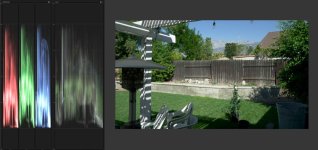
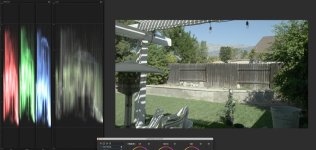
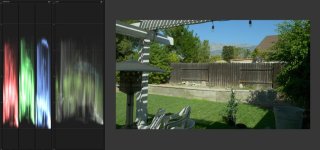
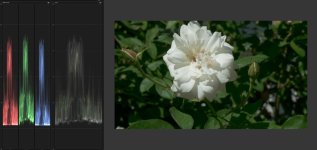
SAMPLES.
Click on the link underneath each image to open the full 4K uncompressed PNG for pixel peeping in a new window:

http://www.visceralpsyche.com/misc/web_images/Leeming_LUT_One_Sample_ISO400_1.png

http://www.visceralpsyche.com/misc/web_images/Leeming_LUT_One_Sample_ISO6400.png

http://www.visceralpsyche.com/misc/web_images/Leeming_LUT_One_Sample_ISO1600_2.png

http://www.visceralpsyche.com/misc/web_images/Leeming_LUT_One_Sample_ISO400_2.png

http://www.visceralpsyche.com/misc/web_images/Leeming_LUT_One_Sample_ISO1600_1.png
I look forward to your thoughts, footage and discussion
Cheers from Berlin,
Paul
EDIT2: Note that from v201 onwards, the recommended in-camera values are 0 -3 -5 0 0 as per the latest manual. In other words, Contrast 0, and not -5, as was the original recommendation for v126 of the LUT. The manual on the website and in your emails will always be the correct version to use with the latest LUT.
I'm very happy to announce the release of Leeming LUT One, the best LUT for the Panasonic GH4!
WHAT IS IT?
Leeming LUT One is a true Look Up Table (LUT) for the Panasonic GH4's Cinelike D profile, the best linear profile for dynamic range in the camera (and one that doesn’t cost $99 to enable). This is different to a Look, which is a set of creative colour values to make the image evoke a particular mood.
Leeming LUT One is designed to give your image the best starting point for further grading, especially recorded internally, while correcting all the deficiencies of the Cinelike D profile regarding colours and tones. By simply applying the LUT, your footage will be corrected for colourimetry and low end colour noise will be minimised when a natural curve is applied.
BUT, BUT, V-LOG L HAS BETTER DYNAMIC RANGE!
Actually, no, it doesn't. With the correct in-camera settings for Cinelike D (0 -3 -5 0 0 and 0 everything else), Cinelike D and V-Log L have the same effective dynamic range. What does effective dynamic range mean? It means that both profiles are feeding the MPEG encoder the largest range of luma values possible from the sensor. The big difference between the two is the way these values are mapped, and here's where the problems for V-Log L begin.
When V-Log L was released, I was excited to try it out. The promise of another 1-2 stops of dynamic range was not to be sneezed at. Thanks to a glaring oversight by Panasonic, they left the back door wide open to enabling V-Log L in camera without buying an activation key. Thus, testing began worldwide almost immediately.
Then I and others started to notice the problems. The most obvious one was weird magenta and cyan colour splotches throughout all internal footage (chroma smearing), leading to ugly macroblocking-like effects on any flat surface, as well as other areas of the image. It turned out that this was due to the less than 8 bit precision Panasonic were encoding their log values with in camera. Colour tonality was severely reduced, and the result was these ugly artifacts.
What had apparently not been addressed by all the beta testers nor Panasonic themselves (to this day), is that V-Log L really wasn't suitable for internal 8 bit 4:2:0 recording, due to this severe lack of colour and tonal resolution. For 10 bit 4:2:2 external recording (at an added cost of the recorder, batteries etc) V-Log L held up much better, giving a fair look into the extra dynamic range promised, but with other issues still evident, like a shift to green in a lot of footage at higher ISOs.
So back to which has better dynamic range – Cinelike D or V-Log L? Because of all the colour artifacts and limited bit distribution in the internal encoded footage, V-Log L, while holding a flatter profile, is limited in dynamic range by the usable low end, which manifests as very noisy and blocky, since it is forced to use less precision to render the blacks than the highlights. Cinelike D on the other hand uses the full 8 bits of precision to render from white to black, meaning less colour noise thanks to greater precision in the blacks. When exposed per ETTR (Expose To The Right) principles, Cinelike D offers effectively the same usable dynamic range as V-Log L, with the benefit of almost non-existent chroma smearing, meaning flat swathes of colour hold their precision between nearby tones much better, for cleaner colours.
OK, SO TELL ME ABOUT LEEMING LUT ONE.
The biggest problem to date with Cinelike D has been its less than optimal colour and tonal reproduction. Panasonic maximised the dynamic range to give the best output the sensor was capable of, but at the expense of making the colours all wrong. What they appear to have maximised is the Y, U and V component separation, to give the largest and cleanest range of discrete values to encode into the image with minimal noise floor.
Leeming LUT One uses this information to construct a far better, colour accurate image which retains the dynamic range but finally gets the colour and tone right. Now you have all the dynamic range the sensor is capable of, with the added benefit of true colour reproduction. Because the raw image information is encoded at maximum precision possible, it ends up giving a cleaner post-LUT image than V-Log L, due to the aforementioned deficiencies of that profile and LUT combination.
ART MEETS SCIENCE.
When I was building the LUT, I realised that I could use the above information to not only meet or exceed the dynamic range benefit of V-Log L, but also reduce the amount of colour noise in the post-LUT image. This is the part where art meets science. I have built the LUT to be visually accurate, but also considered the noise floor colours that are most obvious to the human eye, and compensated for them.
This is the main reason it took so long to develop. Getting a colour accurate LUT is as simple as using a colour chart. But getting the noise floor to hide itself is not so easy, without potentially destroying the colours in the mids and highlights.
So I did a lot of night testing to see how colours react and iterated until I felt the colour balance was the best it could be, while not becoming visually distracting when the noise floor is lifted.
Of course, push the noise floor too much and noise is inevitable. But my idea was to build a LUT that both fixes the colour problems of Cinelike D, but also allows for what would be considered normal grading as well as shadow and highlight response. We don't generally lift blacks to an insane degree in normal shooting, so I used that knowledge to keep colours accurate in the mids while reducing the colour bleed that causes us to see colour noise in the shadows.
Luma noise is of course present, but as it's not contaminated by rogue colours it looks much more filmic and not at all distracting.
THE RESULT.
A single LUT that works across all white balances, provides the best colour, the best dynamic range and the least amount of colour noise for the GH4, which can be used with all GH4s, regardless of whether or not they have V-Log L installed, saving you $99 and giving you a superior image as well!
That's Leeming LUT One.
INSTRUCTIONS.
The most important points are to set up the camera correctly, white balance the shot, and use ETTR principles to retain all highlight information.
Don't clip anything, as it cannot be recovered! This is the biggest mistake people make when shooting.
Forget +1 EV etc. Expose to the right, hold the highlights you want using the zebras (explained in the manual), and in post-production, bring up the shadows and bring down the highlights as required to give the best, balanced picture with beautiful colours and tonalities and minimal colour noise.
From there you can grade for look with the best possible starting point.
FAQ.
Q: Why use 0 -3 -5 0 0 etc?
A: Here's the breakdown of each setting, and why it's the optimal one (established through extensive testing of each setting):
Contrast 0 gives the biggest dynamic range by evening out the distribution of tones across the histogram, meaning more latitude can be recorded while not compressing the highlight and shadow areas inordinately.
Sharpness -3 is where the image is sharpest without introducing ringing or other artificial artifacts.
Noise Reduction -5 effectively turns off noise reduction, which is optimal as even a small amount tends to lose luma detail from the image, resulting in ugly blocking artifacts. With the noise colour control of Leeming LUT One, filmic luma noise is retained without ugly colour noise, giving the nicest image possible.
Saturation 0 keeps as much of the true colour information as the sensor originally captured, without adding any (running the risk of super-saturating bright colours) or taking any away (losing colour precison and tonality, leading to colour errors and artifacts.
Hue 0 is the default setting of the camera which bypasses any colour shift processing. Hue is compensated for with Leeming LUT One, so changing this away from the default will only introduce errors.
Highlight/Shadow 0 prevents any inverted curve solarisation or posterisation artifacts.
Master Pedestal 0 keeps the full bit precision with no truncation at the low end. This results in the best colour bandwidth for the least amount of ugly colour noise in the shadows. Raising this away from 0 just compresses your colour bandwidth for no gain.
Luminance Level 0-255 give you the full bit precision of colour mapped values, for the best tonality.
SAMPLES.
Click on the link underneath each image to open the full 4K uncompressed PNG for pixel peeping in a new window:
http://www.visceralpsyche.com/misc/web_images/Leeming_LUT_One_Sample_ISO400_1.png
http://www.visceralpsyche.com/misc/web_images/Leeming_LUT_One_Sample_ISO6400.png
http://www.visceralpsyche.com/misc/web_images/Leeming_LUT_One_Sample_ISO1600_2.png
http://www.visceralpsyche.com/misc/web_images/Leeming_LUT_One_Sample_ISO400_2.png
http://www.visceralpsyche.com/misc/web_images/Leeming_LUT_One_Sample_ISO1600_1.png
I look forward to your thoughts, footage and discussion
Cheers from Berlin,
Paul
Last edited: