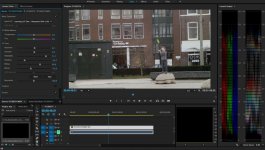
GH4 Leeming LUT One – the best LUT for the Panasonic GH4

what kind of lenses was this testing with or did you find it didn't matter? I have some native lenses as well as adapted and Rokinon lenses and the adapted lenses always tend to be a bit softer.

I'm using a Metabones Speed Booster with Carl Zeiss ZE prime lenses for testing (primarily the 35mm/f2 for LUT testing).

Don't forget about the OLPF making the image a bit softer to avoid aliasing artifacts. -3 basically negates that OLPF softness at the point in the chain where it won't cause aliasing, but retains a clear image.

Cheers,

Paul :)
 
I'm using a Metabones Speed Booster with Carl Zeiss ZE prime lenses for testing (primarily the 35mm/f2 for LUT testing).

Don't forget about the OLPF making the image a bit softer to avoid aliasing artifacts. -3 basically negates that OLPF softness at the point in the chain where it won't cause aliasing, but retains a clear image.

Cheers,

Paul :)


Ever seen the footage on a 4k screen? I mean a big one?
-5 comes much closer to what a RED (Epic or Dragon) does. But still shows many sharpening issues (still small halos left).
Also the grain is much finer when switching to -5. ;)
 
Ever seen the footage on a 4k screen? I mean a big one?
-5 comes much closer to what a RED (Epic or Dragon) does. But still shows many sharpening issues (still small halos left).
Also the grain is much finer when switching to -5. ;)
I know what you mean (I have a Dragon to compare to and started with Red cameras in 2008). The Red cameras definitely need a bit of post sharpening (Unsharp mask 100,1,0 tends to work nicely) to help compensate for the OLPF.

So I will say that if you intend to do some post sharpening then yes, -5 is a valid setting for sharpness in the GH4.

For the rest I'd say stick with -3 sharpness as it's where the image becomes clear but not artificially sharp.

Maybe switch to -5 sharpness at higher ISOs for less noise sharpening.

Cheers,

Paul :)
 
I know what you mean (I have a Dragon to compare to and started with Red cameras in 2008). The Red cameras definitely need a bit of post sharpening (Unsharp mask 100,1,0 tends to work nicely) to help compensate for the OLPF.

So I will say that if you intend to do some post sharpening then yes, -5 is a valid setting for sharpness in the GH4.

For the rest I'd say stick with -3 sharpness as it's where the image becomes clear but not artificially sharp.

Maybe switch to -5 sharpness at higher ISOs for less noise sharpening.

Cheers,

Paul :)

I might also suggest to use -5 if using native electronic m43 lenses. Those things get insanely sharp and have their own built in lens corrections the cameras perform. This is true of Panasonic and Olympus lenses. In the past I have felt that there needed to be a certain level of compensation based on the type of lens used because they can look very different on the GH4. If I use Rokinon lenses then yes they are a bit too soft at -5. Slap on my Panasonic/Leica 25mm f1.4 and it gets much sharper and does start to look more electronic. I think shifting the sharpness a notch or two can help compensate for that in camera lens correction the native lenses have. Adapted lenses have no in camera corrections so they don't suffer from that extra later of edge enhancement. At least this is what I have found.
 
Paul can you chime in on this? I am transitioning to the Lumix native lenses and am curious whether -5 may be a better setting than -3 on these. Definitely looking for a natural, non-digital look.

I might also suggest to use -5 if using native electronic m43 lenses. Those things get insanely sharp and have their own built in lens corrections the cameras perform. This is true of Panasonic and Olympus lenses. In the past I have felt that there needed to be a certain level of compensation based on the type of lens used because they can look very different on the GH4. If I use Rokinon lenses then yes they are a bit too soft at -5. Slap on my Panasonic/Leica 25mm f1.4 and it gets much sharper and does start to look more electronic. I think shifting the sharpness a notch or two can help compensate for that in camera lens correction the native lenses have. Adapted lenses have no in camera corrections so they don't suffer from that extra later of edge enhancement. At least this is what I have found.
 
Test and look. Repeat and rinse…..

Exactly :)

I don't have any native M43 lenses but if they are being artificially sharpened by the camera's internal profiles then I'd go for -5. Ultimately though, testing is the best way to know what you feel is right, npm.

HTH!

Cheers,

Paul :)
 
Here is a shot of our backyard with just the Leeming LUT applied. All other settings are correct except a -5 sharpness. Shot with a Panasonic/Leica 25mm f1.4 lens at f5.6 to maximize sharpness of the lens. Used a higher shutter speed so ND filters wouldn't affect the outcome.

This is an example of how sharp native lenses can be even at -5 sharpness which is still sharper than my Rokinon lenses at -3 sharpness. It is a bit "fuzzy" however and -3 does have more "punch" but really does look significantly sharper than what RAW cameras would capture. Not that a 100mbps H264 is anywhere near the potential workflow of RAW to be messing with sharpening in post too much.

Excuse the weird stuff in the backyard. We just bought this house and since its winter have not had a chance to do any yard work yet.

I-Love-the_GH4-LUTonly.jpg
 
Hi, I'm sorry to chip in with a noob question again but will the Leemig LUT hold up as proper rec709 footage and maintain most of its DR when a commercial rec709 'look' LUT is applied (Osiris, Visiocolor etc)? I love quickies ;) but need to know if it's somewhat compatible. So Cine-D >Leeming LUT = rec709 > commercial look LUT?
 
Hi, I'm sorry to chip in with a noob question again but will the Leemig LUT hold up as proper rec709 footage and maintain most of its DR when a commercial rec709 'look' LUT is applied (Osiris, Visiocolor etc)? I love quickies ;) but need to know if it's somewhat compatible. So Cine-D >Leeming LUT = rec709 > commercial look LUT?
Yes, it is proper Rec709 colour so any commercial LUT should give correct results.

I love the Quickies too, which is why I designed them! :D They should be every bit as good as any other commercial LUT, if not better when used together with Leeming LUT One, since they are designed to work in perfect harmony with the corrected output.
There will be more Quickie packs coming soon BTW, so if you have particular looks you would like to see emulated, let me know and I can probably develop them :)

Cheers,

Paul :)
 
I might also suggest to use -5 if using native electronic m43 lenses. Those things get insanely sharp and have their own built in lens corrections the cameras perform. This is true of Panasonic and Olympus lenses. In the past I have felt that there needed to be a certain level of compensation based on the type of lens used because they can look very different on the GH4. If I use Rokinon lenses then yes they are a bit too soft at -5. Slap on my Panasonic/Leica 25mm f1.4 and it gets much sharper and does start to look more electronic. I think shifting the sharpness a notch or two can help compensate for that in camera lens correction the native lenses have. Adapted lenses have no in camera corrections so they don't suffer from that extra later of edge enhancement. At least this is what I have found.

+1
 
I recently helped Video Devices shoot a two part tutorial on creating a LUT for use with their PIX-E series of 4K recorders, and that tutorial is now live :)


It gives some insight into how I use Adobe Premiere Pro CC to create my LUTs, as well as how to use them effectively with the Video Devices PIX-E5 and -E7 series.

Hope you enjoy them!

Cheers,

Paul :)
 
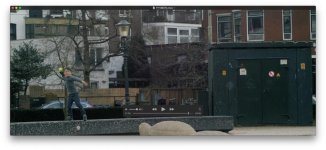
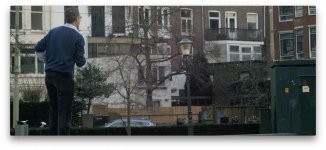
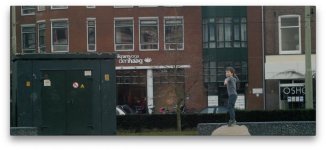
Ok, once more I feel like a total noob. It seems I have trouble with the ETTR method. Below was my first try out with the Leeming LUT and ETTR. Just went across the street and filmed something random to test it. I exposed for the sky (it was an overcast winter day, almost before sunset), the histogram was leaning towards the right.

Lens: OM Zuiko auto-S 50mm f1.8 with standard M42 adapter (I deliberately used an old vintage lens with less contrast to learn it the hard way without all the benefits of the sigma speedbooster combination)
ISO 350. Aperture 2.8. Focus on infinity
Output LUT: Quickie LUT Skin Pop

The whites were way of in Pr CC so I had to push the highlights and whites and pull down the blacks and shadows. However, I still see a lot of noise in the greens and the shadows, also the guys blue shirt shows a lot of noise. What should be the order of adjustment?
When it comes down to using NLE's I feel like a noob, so any expert insight here would be very much appreciated. I want to learn! :)
1.jpg2.jpg3.jpg4.jpg
 
One thing is that if the sky isn't visible in your shot, you can expose further right. ETTR means to expose for the brightest object in your scene (you can probably ignore street lights etc at night though). Looking at your histogram, you could have made the overall clip brighter if the only background was the buildings.

Your input LUT is correct but I see that the Creative portion of Lumetri is disabled? That's where you should put your Quickie LUT to use both in harmony with each other. (maybe you did and just disabled it for the screenshot?)

Also, if the dynamic range of the scene is such that you aren't filling the histogram while shooting, that's perfectly ok :) Expose to the right without clipping the highlights, then do as you did and drag the Black slider down once in post, to add contrast (you would do this after applying the Quickie, so you can see final results).

It's hard to tell from the small JPGs but probably the noise on the greens and man's shirt is due to the overall image being underexposed a bit.

All that said, it looks quite filmic as an image so I wouldn't worry too much. You're on the right track! :)

Cheers,

Paul :)
 
Looks easy enough to do :) Consider it on the list!

Cheers,

Paul :)

Really loving the Leeming LUT in my limited testing so far. The image that comes out of the camera scares me by how orange it is, but then your LUT cleans it right up and gives me a nice start.

About the video posted above, I second loving that look. I have tried to achieve a similar look (that a different video had), and I've gotten something close using lumetri in Premiere, but don't have the experience making LUTs to get it the way I like it. Maybe I'm just being too picky. But hoping someone who has obviously put a lot of time and practice into making the LUTs that you have, will get a closer result.
 
Back
Top