GH4 Leeming LUT One – the best LUT for the Panasonic GH4

Imaginet, thanks also for your video - it has a really cinematic vibe to it and reminded me of some of Michael Mann's port scenes in his films.

Cheers,

Paul :)
 
To all - thanks for all your efforts and sharing your footage created with this LUT over the last few months. It's been so gratifying to see the high quality images produced by you all and knowing that I had a small part in making them look their best!

I'd like to wish you all a very merry Xmas and a happy New Year and would like to say that I have more plans for expanding the list of cameras usable with the LUT in early 2016, so do stay tuned!

Lots of love and peace to you all from Berlin,

Paul :)
 
Happy New Year everyone :)

I'm happy to announce that Leeming LUT One is going to become a family of LUTs, designed for unified operation and a consistent, Rec709 correct look across multiple camera types.

The idea is that you will be able to shoot with any supported camera, apply the relevant LUT for that camera in post at the start of the chain, and have a standard baseline from which to begin grading, with matching colour and levels.

The first additional camera to be supported is the Sony RX10 MkII (v102 of the LUT for that camera is available as of today), but I plan to add more Panasonic cameras such as the G7 and GX8 etc as soon as I am able to get proper test footage made for them (volunteers, step up now for your free LUT if you have a camera and an X-Rite or Gretag Macbeth chip chart you can work with).

I've updated the manuals to reflect the changes and split them into a LUT installation manual and a camera specific manual for each supported camera.

Hope you like the changes, and as always, if you have bought the LUT for any camera, future updates will automatically be emailed to you, so no need to worry that you aren't working with the latest and greatest!

Cheers from Berlin,

Paul :)
 
I would love it, if SOMEHOW, you could make an expanded version to let us NOW make video for the upcoming REC2020 color space that newer TVs and computers will be adopting very soon.
 
This would be better handled as a colour space conversion at the end of the processing chain for now.

That said, I'm not sure that current LUT technology is set up to do this within NLEs such as Premiere Pro etc? Do you have links to anything showing the process that might be helpful?

Cheers,

Paul :)
 
Hey there! I just purchased your LUT, and am looking forward to playing with it soon.

Any chance you'll make the LUT work with GH3 footage?
 
Hey there! I just purchased your LUT, and am looking forward to playing with it soon.

Any chance you'll make the LUT work with GH3 footage?
Do you have a GH3? Does it have Cinelike D on it? If you do (and have access to a color chart such as the X-Rite or Datacolor ones) send me an email and we can do some testing to build in support (and give you a free LUT to say thanks!).

Cheers,

Paul :)
 
I do have a GH3, but it does not have Cinelike D on it, unfortunately. I guess that means your LUT wouldn't work on it, right?
 
I do have a GH3, but it does not have Cinelike D on it, unfortunately. I guess that means your LUT wouldn't work on it, right?
I can create a LUT for whatever profile gives you the highest dynamic range. My usual starting point from scientific principles is to keep saturation at 0, take contrast down as low as it will go, NR off (or as low as it will go) and keep the rest neutral.

If you can find the combination of settings that gives you maximum dynamic range around those principles, and then do some test shots with them which I can work with (five second clips are enough) at the ISO which also gives maximum dynamic range, I can put together a LUT that will match the GH4 one exactly, insofar as the limits of the camera go!

Cheers,

Paul :)
 
Just purchased the LUT and I'm giving it a shot on the next short film we're shooting (in 9 days). Looking forward to what this can do for us.

On a side note, is it normal to see noise in the shadows before lifting it to rec709? I did a quick test with the profile settings you specified, but I'm not 100% I've done it right. Doing more tests this weekend. I'm just hoping for some good clean blacks since this is a moodier project.

Thanks for your hard work!
 
Just purchased the LUT and I'm giving it a shot on the next short film we're shooting (in 9 days). Looking forward to what this can do for us.

On a side note, is it normal to see noise in the shadows before lifting it to rec709? I did a quick test with the profile settings you specified, but I'm not 100% I've done it right. Doing more tests this weekend. I'm just hoping for some good clean blacks since this is a moodier project.

Thanks for your hard work!
Thanks!

The trick to clean shadows for moody images is Exposing To The Right, then dropping it down in post to achieve the look you want, without crushing the blacks.

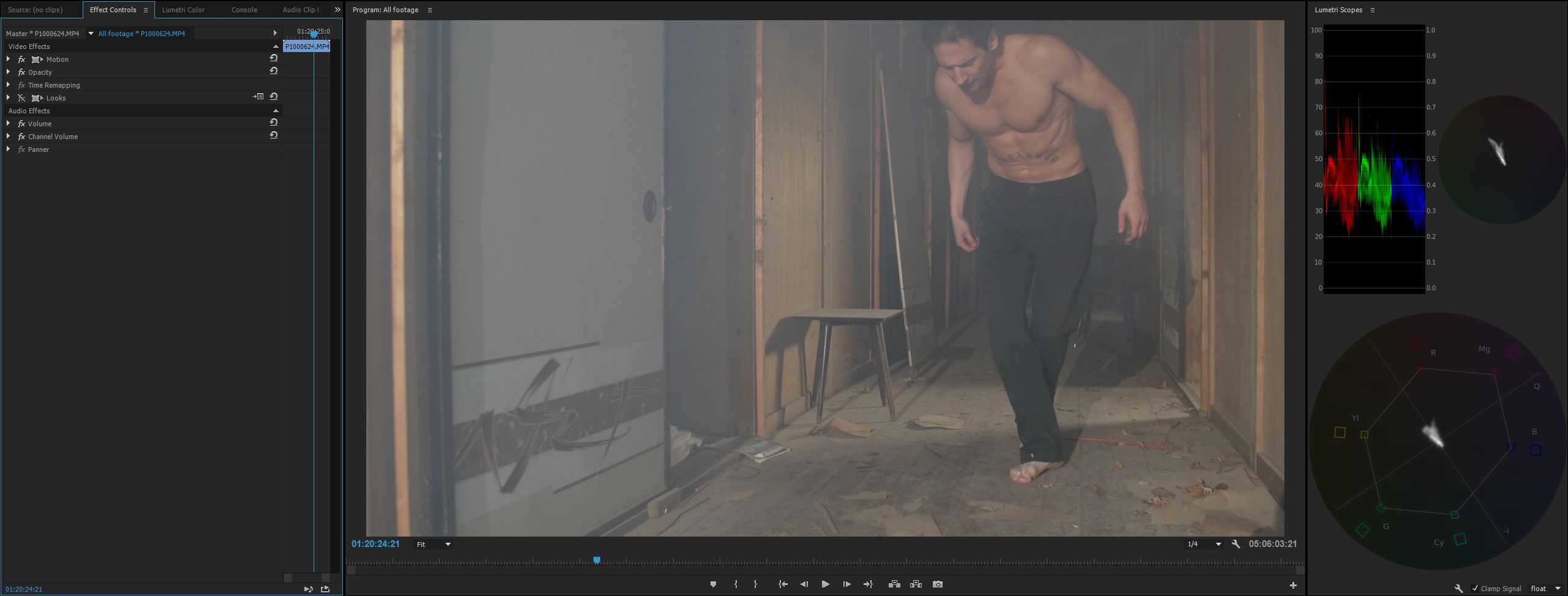
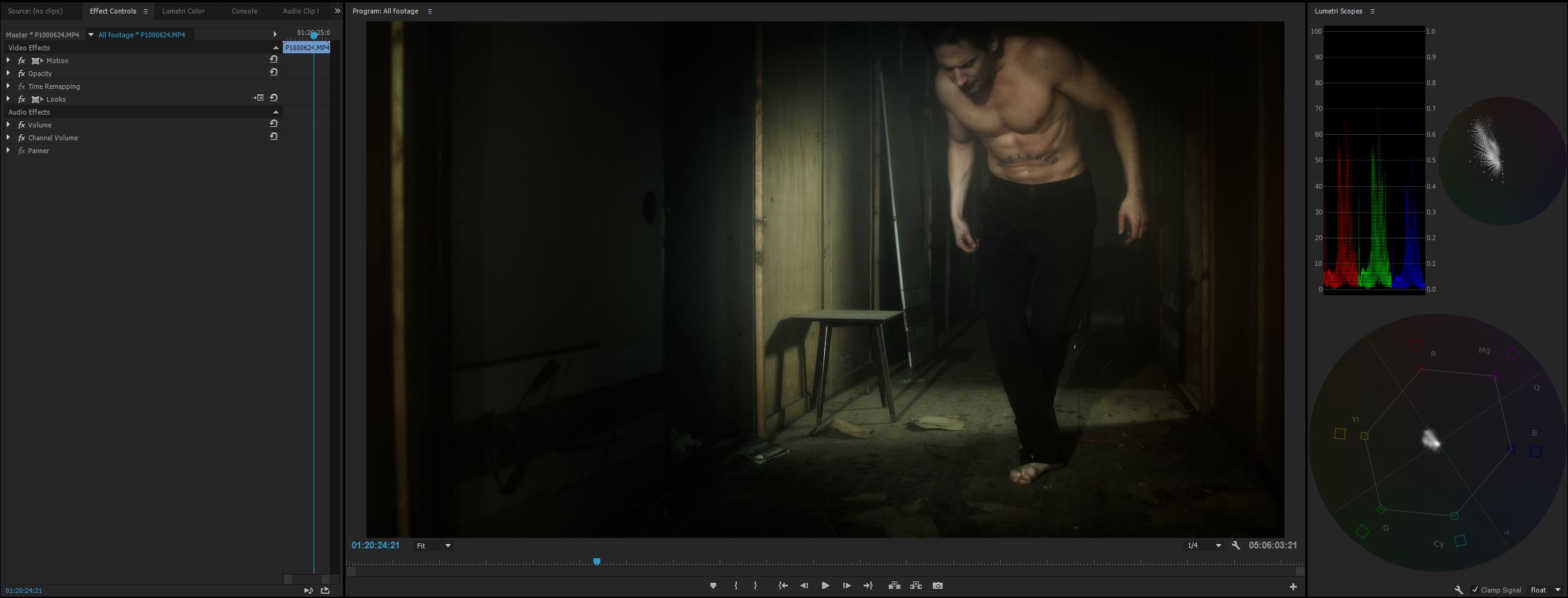
Here's an example of what I'm talking about, from a feature film called "The Trade" that I shot on the GH4 (not released yet, but you can watch the teaser trailer here).

Before (full 4K PNG file to pixel peep here)

ETTR_Mood_Grading_Before.jpg


After (full 4K PNG file to pixel peep here)

ETTR_Mood_Grading_After.jpg


As you can see, very moody, yet the blacks are clean as a whistle thanks to ETTR principles being followed while shooting (see the histograms). Note that this shot is NOT log, although it may look that way at first.

The histogram doesn't go to 100% in this frame, but another part of the shot did (which is something else to make sure of while blocking - what's the brightest part of the shot - expose for that!)

Remember though, moody doesn't mean that you forego lighting. It just means that your lighting is used to shape your images like the example above. On set it looks too bright, but knowing how post production works I can shoot ETTR and get back to my vision once in post :)

HTH!

Cheers,

Paul :)
 
Last edited:
I just posted this on Facebook, so I thought I may as well share it here too :)

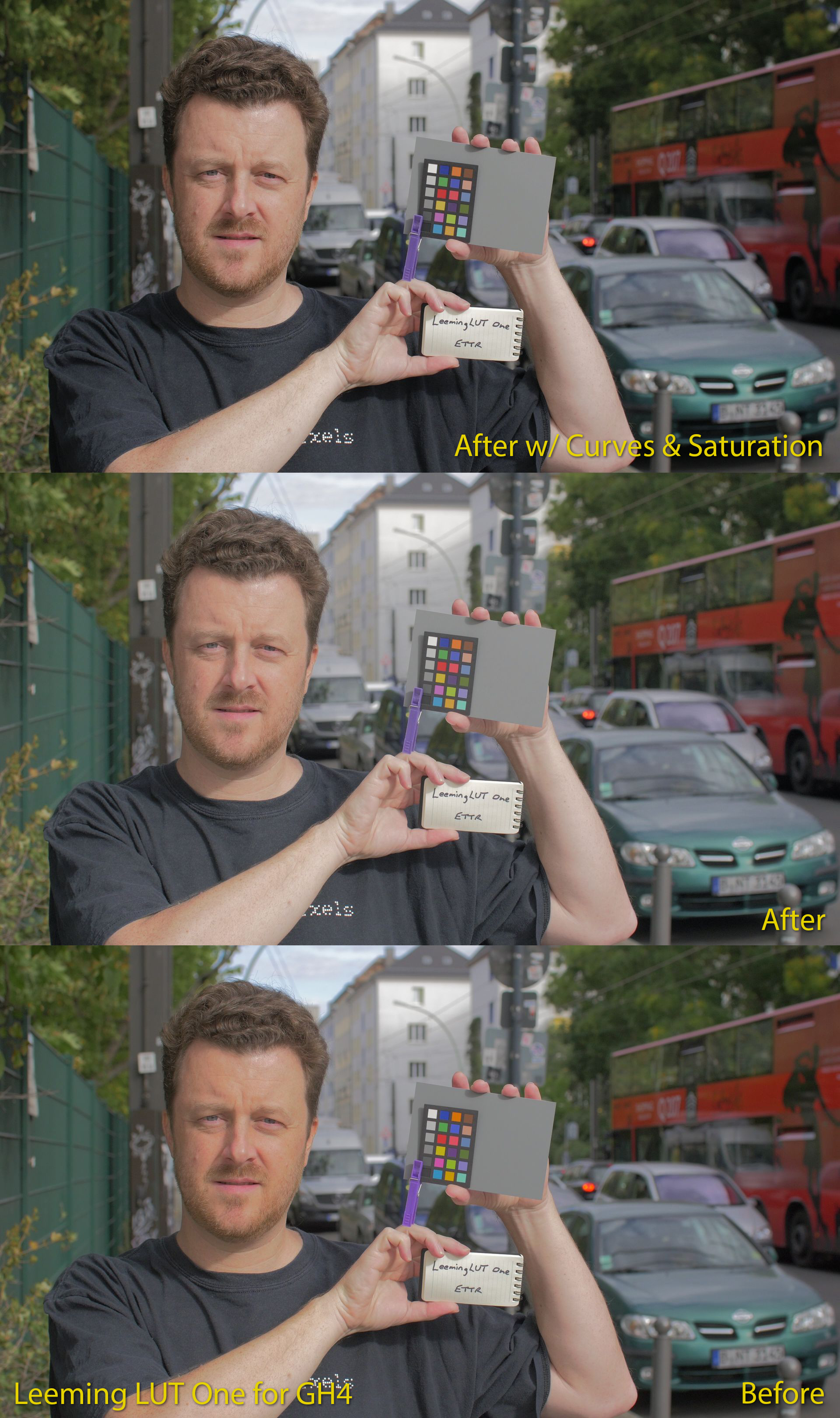
A quick before/after/levels comparison to show you what the LUT is doing, and how quickly you can take the image and perfect it. This example was literally applying the LUT, then dragging saturation to 90% and pulling shadows down slightly with the curve function in Lumetri. About ten seconds of work.

LeemingLUTOne_Before_After_Example.jpg


Cheers!

Paul :)
 
Back
Top