GH5 How interested are you in a GH6 anymore?

Do any of you know whether the GH5M2 has proper masks in the viewfinder for the “Video Guide Lines” at different aspect ratios? The video is recorded at 16:9 or 17:9, but it’s possible to add lines in the viewfinder for 2.39:1, for example, to aid composition for cropping in post. But these guide lines are too subtle for quick and intuitive composition.

I see the upcoming firmware for the GH5S gives more options for this guide-lines feature. Hopefully a solid mask.
 
Cinema cameras let you control the opacity of it, so ideally it would be 0-100% and the user could adjust accordingly based on preference, eyesight, etc.
 
That's one of my bugaboos. Why can't every camera let you guideline 1:1, 2:3, and 9:16. Or an arbitrary guideline. should be an easy programming fix
 
These camera interfaces are as flexible and innovative as a VCR. Imagine if they ever used Android and decent high resolution touch screen. I know I'm talking crazy.
 
Last edited:
These camera interfaces are as flexible and innovative as a VCR. Imagine if they ever used Android and decent high resolution touch screen. I know I'm talking crazy.

Thats the one advantage smart phones have. Endless programming potential. Cameras use firmware which is a pretty rigid programming environment. A firmware is set to do X, Y and Z. Sometimes that can be tweaked to improve what it can do but its not a full blown programming language. Plus the camera processors are designed to do a core set of functions. Get raw data, process raw data, turn it into a video format, apply setting, encode to video, dumb to card or HDMI, provide some tools for the camera to use as guides and a few other bells and whistles like auto focus, auto white balance, auto exposure and so forth. Its not a iPadOS where one can suddenly add in live chroma keying like a iOS app can. There is only so much processing power there and camera processors are not designed to have unused processing power. They add as much processing for the camera to function up to a designed level.

This is why some camera like the GH4 had to eliminate things like manual white balance when shooting certain modes. The camera only had so many processing cycles to use so something had to be sacrificed.

Smartphones have an endless programming environment which is why we get apps like live chroma keying or Adam Wilts light/color meter app. It has a ton of processing power beyond what is needed to shoot photos and video since its a general purpose programming environment meant to handle a lot of different tasks like editing and gaming.

If a phone could ever get a m43 sensor imagine what it could do with its machine learning and processing power. With all that said phones will always suck with video for one key reason. No aperture control of the lenses. Its a mortal sin to shoot video at various different shutter speeds to suit the lighting. Adjusting shutter for stills is perfectly fine but not for video. I don't care how good cell phone video gets. Until they figure out a way to adjust exposure that does not use shutter then its a no go for serious work. Using variable ND is an option but to this day still kind of a pain to have on a phone and adjust constantly. Plus always shooting wide open on a lens doesn't give the shooter any DOF control.

Its neat what cell phones can do but before I see increased low light of cell phone video I would love to see them actually handle bright light shooting better. Cell phone video outdoors in bright sunlight just kills me.
 
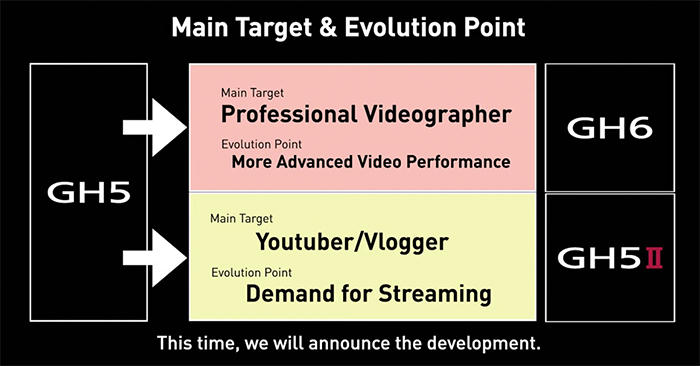
A Japanese tech magazine thinks that Panasonic will now concentrate on video with the MFT (duh, you say). But then they say it's going to be concentrating more on vlogging, streaming and conferencing. They're speculating but they're closer to the source.
 
I think vlogging streaming and conferencing is a good concept

(still need that 10-100)

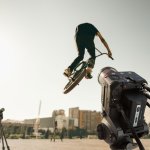
None of these makers ever even get around to making a video showing what thier cameras can do. The Panny cube.. they have a load of heros out filming a skateboarder in the sun with no ND but dont actually demo its proper cababilities for going live over the net.

Except BM who seem to have some kind of infrastucture and joined up thinking.
 
Im not even joking

ast-1213201.jpg

Do they not realise what damage images like this do to the reputation ?

So full of errors. No monitors (in a dynamic situation) third camera clearly not wired. No NDs. Fooking kids.
 
Im not even joking

View attachment 143339

Do they not realise what damage images like this do to the reputation ?

So full of errors. No monitors (in a dynamic situation) third camera clearly not wired. No NDs. Fooking kids.

Maybe the target audience is not people who know of such things. I remember people giving Coughlin guff for how his amira was rigged in his hero shot, but he said he rigs it differently for work and it just looked cleaner that way for the advertising photo of him.

Anyway, I could believe that those pannies needed to stop way down for focus since nobody's pulling them and they can't AF. There - exposure solved ;)
 
...None of these makers ever even get around to making a video showing what thier cameras can do..
The way it's right now is that the technical specifications are handled by the YouTube'rs. The actual use is handled by the YouTube'rs. The demo videos are made by the YouTube'rs. Back in the early 2010's, Canon paid for the production of the new models. IIRC, the last one was "Trick Shot" for C300 MKII. For the manufacturers, it's cheaper this way. All they have to do is to give out several dozen loaners. And they carry no legal consequences for any possible misrepresentations. Even when their cameras get shut down by an algorithm.
 
Maybe the target audience is not people who know of such things. I remember people giving Coughlin guff for how his amira was rigged in his hero shot, but he said he rigs it differently for work and it just looked cleaner that way for the advertising photo of him.

Anyway, I could believe that those pannies needed to stop way down for focus since nobody's pulling them and they can't AF. There - exposure solved ;)

I did think the picture a bit unrealistic, but for different reasons.
My main issue is that if the hero bike position is to be in all 3 shots, the third (distant) camera may be too far away - or would see the near camera in its shot. Would have been more effective (and possible) if the cameras had been lower and a bit closer...

But in terms of monitoring, the foreground camera has cables connected for sdi out, time code and genlock. It also has an ethernet cable connected. SDI could go to a monitor mounted on the tripod for local control of framing (and below the bottom of frame in the current shot.) Of course the ethernet allows for control (and possibly viewing) of multiple cameras. While other cameras can be controlled via wifi or bluetooth.

If the shot is intended to be just for the bike trick, of course, focus would typically be preset at the appropriate distance. Very few AF systems would act quickly and accurately enough to properly capture distance for a bicycle entering frame to do that kind of jump. Having the extra DOF from a MFT sensor actually helps for this kind of shot.

So far, I've personally found the autofocus with the BGH1 to work significantly better than the GH5s AF to the point that the BGH1 has become my go-to for Ronin-S shooting where AF may be needed (though my hope is that the new GH5s firmware will bring its AF to the same level).
In fact, a couple of weeks ago I did a shoot where the BGH1 as an unmanned second angle stayed on AF for an interior location shoot with an actor moving as close as 2.5' and as far as 25' from the locked off BGH1 and it performed wonderfully.

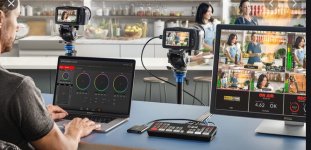
One problem with the BGH1 is that it's really hard to show off its features in a publicity shot. While it's definitely a niche camera, it fills a lot of different niches -- of all sorts. And for pandemic crewing which has often demanded multiple camera setups with a single operator, at times we've used multiple BGH1's in conjunction with other cameras in situations where the entire crew would be one person in the control room and one crewmember in the studio.
 
The publicity pic is simple - from some kind of desk you show a few angles on screen and have the set in the BG out of focus

.switcher.jpg
 
Last edited:
Bildschirmfoto-2021-05-28-um-10.10.32.png
 
Do any of you know whether the GH5M2 has proper masks in the viewfinder for the “Video Guide Lines” at different aspect ratios? The video is recorded at 16:9 or 17:9, but it’s possible to add lines in the viewfinder for 2.39:1, for example, to aid composition for cropping in post. But these guide lines are too subtle for quick and intuitive composition.

I see the upcoming firmware for the GH5S gives more options for this guide-lines feature. Hopefully a solid mask.

And … sure enough (but slightly surprisingly), they’ve fixed everything I wanted in firmware 2.0 for the GH5S. You can now optionally mask (at several transparancy levels including solid opaque) the area outside the Video Guide Line (viewfinder aspect ratio) that you have selected.

Previously the Video Guide Line was a faint, barely visible dotted line that was useless for compositional purposes.

Additionally, whereas before there were Video Guide Lines for only the 1:1, 16:9, 2.35:1, and 2.39:1 aspect ratios, we now have more choices of viewfinder aspect ratios:

  • 2.39:1
  • 2.35:1
  • 2.00:1
  • 1.85:1
  • 16:9
  • 4:3
  • 5:4
  • 1:1
  • 4:5 (so vertical/portrait orientation)
  • 9:16 (for vertical phone video on social media).

Nice.

Plus of course ProRes RAW output over HDMI to a Ninja V. Could make the GH5S a pretty potent cinema tool.

I haven’t tested any of the autofocus improvements. Still don’t have a native Panasonic lens for the DFD stuff.
 
Sooo...you know me and cameras and I have owned and used all of them, but I rarely provide Panasonic some love so I'm here to do just that.

Bought a S5 earlier today and we spent most of the day getting to know each other.

I know it's from a different family but I'm here to remind myself how smart Panasonic cameras can be, and I think the GH6 should be an exciting system.
 
After moving to a P4k for video and a Canon M6 for stills I'm honestly considering picking up a GH5S for ProResRaw. I hate having two bodies and not having a hybrid to do it all. The M6 has 4k video but its not even close to the same league as 10bit log 4k video from the GH5S with dual native ISO. Stills take a hit but to be honest 32MP may actually be too much. The files are larger, take longer to transfer and load and take much longer to process.

Also saw the S5 is now the same sale price as the GH5S but I'm still highly opposed to FF due to an utter lack of good telephoto. Plus I'm just not a fan of the over priced L series glass and the newer limited mirrorless lens mounts. I bought the M6 due to the flawless EF mount adapter where 100% of everything works.

So I'm really considering the GH5S again and a Ninja V. That way I get a killer hybrid for family stuff that can shoot decent stills good enough to watch on my 4k Apple TV and mobile devices and do up to 10x8 prints or in some cases decent 14x11 prints. It shoots killer 4k log video that can eventually support HDR delivery to actually enjoy on HDR TVs. When I need it I can add on the Ninja V and still shoot raw for serious projects. More cumbersome yes but I tend to gear up a lot more for client work anyway. Plus I bought a Weeble S gimbal to use with the P4k and it will work even better with the lighter and smaller GH5S so stabilization is actually better than IBIS.

Having a raw format that will once again just work inside of FCPX might be worth the sacrifice. Plus I now know the 10bit GH5 files playback flawlessly on the M1 Macs due to their native 10bit compressed hardware acceleration. Thats a game changer now where I can now use GH5S files in any QuickTime application or play directly from Finder and they play back with perfect hardware acceleration. Part of moving to a P4k was to shoot 10bit formats that performed well out of the box.

Plus I really do miss how Panasonic does just about everything. The cameras just make sense to me and provide the most comfortable user experience I have ever had with a camera. Maybe thats because I have been using them since the GH1 but they just make sense to me.

Maybe I will keep the M6 around for higher end client stills but I think I might be better off selling it and the P4k and waiting to compliment the GH5S with a GH6 or a G9 for stills work. The G9 is very affordable and a really good stills camera.
 
Not that I currently use HEVC, but just wanted to mention that one reason I was bouncing around different cameras was because of H.265. A lot of new systems are offering it and/or the best specs in HEVC, but my older computers were useless with it and I had little patience for transcoding, so it really pushed me away from the cameras until I bought a M1.

Also, as far as a zoom - even though I'm thinking you probably want something faster with more reach - Panasonic recently released the 70-300mm, which is reasonably priced for what it is (a zoom lens for the L-mount system), and it's the only L-mount lens I'm planning on purchasing.

https://www.bhphotovideo.com/c/product/1621273-REG/panasonic_s_r70300_lumix_s_series_70_300mm.html
 
I updated my GH5S and the Ninja V and tried a few clips in ProRes RAW. Files are really big. A 40 sec UHD 60P clip is 10GB just over twice the size of a ProRes 422 file. Colour space is Vlog/VGamut so appears as a VLog file for me in EDIUS. It's like a 12 bit VLog file. EDIUS does not have the ability to directly change ISO or WB which would be the main reason to shoot RAW. I can change these in the PCC filter just like any other file though so not sure if the mechanism is the same or different at the moment. Will have to do some more tests to see how different it is from just shooting VLog to ProRes 422 on the NINJA V At least both updates are free.
 
Back
Top