GH2 100Mbps Flow Motion v2 Patch - Banding & Blocking Be Gone!

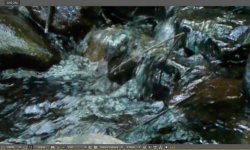
The AF100 actually looked pretty decent in the GH2 comparison footage on a previous page of this thread. However, those were static shots without a great deal of motion. Let's see how the AF100 and GH2 do with my favorite outdoor scene, a lyrical stream of running water:

AF100 - 24p:

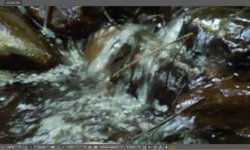
GH2 - Flow Motion v2.02 - 24p:

Sorry about the color cast on the GH2 footage, it was taken before I worked out how to match the GH2 to the AF100.

Here are unedited 200% crop frame grabs from the above videos:

AF100 - 24p:
AF100 24p - Flowing Water.jpg

GH2 - Flow Motion v2.02 - 24p:
GH2 24p - Flowing Water.jpg

Ouch! The AF100 clearly has macroblock issues with fast moving subjects...
 
Last edited:
Is there a noticeable difference in sharpness (assuming identical, normal scenes) between 24H and HBR modes?
Also, which mode achieves the highest quality MJPEG performance (HD/WVGA/VGA/QVGA)? I know it should be HD but what confuses me is that the Ptool settings seem to set both the VGA and HD modes to 1080p. What is the MJPEG color depth? 4:1:1 or 4:2:0?
 
@CColton - Check out the 24H/HBR/SH video comparison shots in the first few posts of this thread for an evaluation of HBR video quality. Compared to 24H mode, HBR has two main limitations: a 100Mbps peak bitrate and the interlaced psF encoding technique used in HBR mode. Although the image sensor is scanned progressively in HBR mode, the interlaced manner in which it is encoded can degrade its sharpness in some situations.

In MJPEG mode, Flow Motion v2 uses a 1080p frame only in HD mode, which has a peak bitrate of 100Mbps. In QVGA mode, FM2 uses an iPod-compatible 960x720 frame with a bitrate up to 35Mbps. As with the GH2's AVCHD modes, both MJPEG modes have a 4:2:0 color depth.
 
Quick newbie question;

What are the 24H and HBR modes? I'm yet to apply the hack to my GH2 but can't find a reference to these modes in my menus.

Thanks
 
great hack so far... amazed by the quality!

so how stable is the hack? I would like to use it on my next shoot... I mostly don't shoot more than 10mins / clip but what is the max. people tried? If I record and get to the limit will the file be saved or does it crash? will test that tomorrow anyway but I am curious about other peoples experience!

and one more question: my 45mb/s 16GB sandisk card can only record about 20mins... I guess I just have to buy some more cards but is there an option to slightly decrease bitrate to squeze more footage on card?

thanks!
 
Last edited:
@CColton - Check out the 24H/HBR/SH video comparison shots in the first few posts of this thread for an evaluation of HBR video quality. Compared to 24H mode, HBR has two main limitations: a 100Mbps peak bitrate and the interlaced psF encoding technique used in HBR mode. Although the image sensor is scanned progressively in HBR mode, the interlaced manner in which it is encoded can degrade its sharpness in some situations.

In MJPEG mode, Flow Motion v2 uses a 1080p frame only in HD mode, which has a peak bitrate of 100Mbps. In QVGA mode, FM2 uses an iPod-compatible 960x720 frame with a bitrate up to 35Mbps. As with the GH2's AVCHD modes, both MJPEG modes have a 4:2:0 color depth.

Thank you! In your testing, out of the MJPEG HD or HBR modes, did one seem to render significantly higher visual quality than the other? I've looked at your samples too but since you did so much testing I'm wondering which you would prefer.
 
@amathie - HBR and 24H modes are in the Creative Movie Mode menu.

@vaitor - The maximum file size for GH2 AVCHD videos is 4GB, which holds about 10 minutes of 100Mbps Flow Motion footage. When you exceed that duration, the GH2 will save the 4GB file intact, and attempt to continue recording in a new file. This is called "file-spanning" and is one of the GH2's more fragile features. With Flow Motion v2, file-spanning works most reliably on 95MB/sec SD cards. With slower cards, file-spanning works reliably on FM2's 60Mbps 24L, FH, and H video modes. These modes will also record for longer durations than the 100Mbps 24H, HBR, FSH, and SH modes.
 
Quick newbie question;

What are the 24H and HBR modes? I'm yet to apply the hack to my GH2 but can't find a reference to these modes in my menus.

Thanks

24H is AVCHD, 1080p24 (actually 23.98, technically) and HBR (standing for High Bitrate) is AVCHD 1080p29.97
 
In your testing, out of the MJPEG HD or HBR modes, did one seem to render significantly higher visual quality than the other?
Interesting question. The image quality of Flow Motion's MJPEG and HBR 30p modes are quite close. I'd say HBR is a bit sharper for highly detailed static subjects, while MJPEG is a little better for capturing rapid motion.
 
Interesting question. The image quality of Flow Motion's MJPEG and HBR 30p modes are quite close. I'd say HBR is a bit sharper for highly detailed static subjects, while MJPEG is a little better for capturing rapid motion.

Does one or the other work better in low light?
 
Does one or the other work better in low light?
In Flow Motion v2, both MJPEG and HBR maintain excellent image quality in low light. As the scene dims into underexposure, bitrate will gradually drop as details fade into darkness. The details that remain will be encoded at maximum quality levels.
 
Thanks for the clarification. I was only asking because the GH1 hacks were better in low light with MJPEG than AVCHD.
 
@amathie - HBR and 24H modes are in the Creative Movie Mode menu.

@ lpowell - Yes thanks for that, I now see that the HBR mode is only available after the Panasonic firmware has been updated. Thanks for the immense contribution you seem to be making to the GH2 community!

I'm trying to settle on a reliable patch for improvement in general shooting in PAL land at 1080p 25fps. I have installed the Flomotion V2.02 patch and have just tried the HBR mode but seem to be getting some sort of flashing/strobing artefact. This shows up as a jittery, flashing type effect on vertical interfaces when I pan horizontally, for example on the edges of door frames. Optical image stabilisation on my Lumix 14-42 lens was switched off and I get a similar effect on an old Canon FD lens. I'm using a Sandisk Extreme 45MB/s class 10 card.

Do you have any suggestions as to what might be causing this? I could show a short clip as an example (not sure how to upload a video clip to the forum) perhaps by sending as email attachment.

I haven't yet tried any other setting but would like, for my own education, to understand what effect is causing this.
 
@amathie 25p is just one additional frame on 24p, which brings to mind the cinematic rule of thumb regarding motion in-front of the camera, especially your question on vertical lines when panning. When shooting 24p, and you pan (or an object moves in-front of the camera - like they usually do) ensure that the time it takes for that object to move from one side of the frame to the next is no less than 5 seconds, otherwise you get a stroby/jittery effect.

In other words for your door frame, lets say you pan from left to right, ensure that the time it takes for the vertical door frame to move from the left of the frame to the right of the frame is no less than 5 seconds (I think some suggest 7 seconds).

In addition, ensure you shoot at 50fps, unless you need the strobe effect that does evoke, with action, a surreal feeling, a grittiness to it which works - like saving Private Ryan.

I am off course making the presumption that you did not know this and did not apply these principals, thus if you did and I am stating the obvious, apologies.
 
As Inprogress pointed out, "strobing" is a side-effect of panning across high-contrast scenes at low frame rates. It can be particularly noticeable with sharp-edged vertical lines in bright illumination. To minimize it, you can try adding some motion blur by shooting at 1/25 shutter speed. If you're handholding the camera, OIS can help keep the frame stable as you pan.
 
@Inprogess and @lpowell; thanks for that. You can tell I'm a beginner. I do however remember having read about strobing in Kris Malkiewicz's Cinematography, but if that is what's causing the effect I'm seeing, then I'm surprised it is so unpleasant and overt!

Can I just check a few points:

1. From the addendum to the original GH2 manual, following the Panasonic V1.1 firmware update, it states that the newly introduced HBR mode will give a sensor output of 25fps. Was that independent of the HDMI output setting? In other words, did this allow 24fps with the Cinema 24p setting and 25fps with the HBR setting?

2. Following updating to the Flow Motion 2.02 firmware, should changing the HDMI output setting to PAL cause the sensor to output at 25p for both the HBR and "Cinema 24p" modes?

3. If so, what are the difference between the HBR and "Cinema 24p" mode with recording quality set to high?

By the way, I appreciate that I am asking far too many questions so do feel free to ignore them!
 
1. The frame rate in HBR mode depends on the NTSC/PAL setting. In NTSC mode, HBR frame rate is 30p. In PAL mode, HBR frame rate is 25p.

2. The frame rate of Cinema 24p mode is always 24p in both NTSC and PAL modes.

3. In Flow Motion v2, both Cinema 24H and HBR video modes are designed to produce excellent video quality at 100Mbps peak bitrates. However, when shooting extremely detailed scenes, 24H mode may automatically switch into a special "turbo" mode that enables peak bitrates up to 140Mbps. All video modes have been tested to record and play back reliably in-camera on standard 30MB/sec Class 10 SD cards.
 
i'm having strange problems with my flowmotioned pal gh2. I haven't used it much since i got it, but on two jobs i did with it, i have had strange issues with FCP 6 log & transfer. The first occasion, it seems it got the clip numbers all confused.. i ended up having a clip#99 with shots that were taken the day before clip #98 and so on.. it was a nightmare to organize all the clips. Second job, i have just finished log & transfer, and the first 30 or so clip have been transfered twice. I have around 500 clips, and clips #31 to 60 are exactly the same as clips #1 to 30... the other 400+ clips are all ok.
I am aware of how the log & transfer works, i have been using a hacked gh1 as my main camera for over 2 years. I always copy the entire sd content to a folder i name progressively ( 01, 02, 03).. then add these folders one by one in the log & transfer dialog window... but this has never happened before with the gh1 or gf1 i have been using... I also tried on Premiere 5, and there i had another strange problem.. folder 02, in media browser it wouldn't see clips from #50 to 150... 100 clips missing, but the files were there and FCP transferred them without trouble.. it is as if there is a numbering problem somewhere. Maybe i'll try reverting to standard firmware to see if the problem persists..
plus i still can't get clean 1080 HBR footage without interlacing artifacts in fcp from the gh2.. only solution is to apply deinterlace filter
 
While I'm not familiar with FCP's Log & Transfer issues, I do know of two pitfalls to watch for with GH2 footage in post-production:

1. With extended takes longer than about 10 minutes, the GH2 AVCHD encoder will record two or more MTS files of at most 4GB each. It will also record metadata files within the SD card's PRIVATE folder tree that indicate how the spanned 4GB files should be linked together to reconstruct the full-duration video. If these files aren't imported correctly into the video editor, it's possible for a spanned file segment to be included twice within a timeline.

2. Although the GH2 scans HBR footage at a progressive 25p or 30p frame rate, it records the video stream within an interlaced 50i or 60i file that is indistinguishable from an interlaced FSH video. In order to eliminate spurious interlace artifacts from HBR footage, it's sometimes necessary to manually set the interpretation of these clips as progressive rather than interlaced.
 
Back
Top