GH2 100Mbps Flow Motion v2 Patch - Banding & Blocking Be Gone!

Lpowell

Veteran
GH2 Flow Motion v2.02

  • Reliable 100Mbps peak performance in AVCHD 24H, HBR, FSH, SH, and MJPEG HD.
  • Exclusive 140Mbps turbo mode boosts peak bitrate to handle 80% Slow-Motion 24H mode.
  • Records reliably with Class 10 30MB/s cards, with 60Mbps file-spanning in 24L, FH, and H modes.
  • 95MB/sec SD cards support file-spanning in all video modes (except NTSC HBR 30p and FSH 60i).
  • Full support for all NTSC and PAL video modes and options, including ETC zoom mode.
  • In-camera playback of all AVCHD video files. (MJPEG HD videos not playable in-camera.)
  • Failsafe operation with any lens, in any video mode, under any type of shooting conditions.
  • Consumer-friendly auto-exposure features fully supported in 60Mbps 24L, FH, and H modes.
  • Fast Action 3-Frame GOP performance with B-frames visibly indistinguishable from I-frames.
  • Optimal motion picture quality consistently maintained in underexposed low-light conditions.

Flow Motion v2 is the culmination of over three months of investigation into the core encoding parameters of the Panasonic GH2 AVCHD encoder. The goal of this project has been to produce a unified patch that combines failsafe reliability with consistent, high quality performance across the entire range of video modes and options provided by the GH2. These criteria include not only still-frame image quality, but frame-to-frame motion picture continuity as well, evaluated perceptually at 24, 25, 30, 50, and 60 frames per second. Rather than simply maximizing the encoder's peak bitrate, Flow Motion v2 is fine-tuned to produce optimal motion picture quality with minimal degradation from undesirable aliasing and digitizing artifacts. The result is an unmistakable improvement in video quality with no significant drawbacks, using Class 10 30MB/sec SD cards and virtually any lens compatible with the GH2.

Functional Limitations of Stock GH2 Video Firmware


Although it offers a wide variety of video modes and options, the GH2's stock firmware is restricted in both functionality and video bitrate. Thanks to the dedication of Vitaliy Kiselev, many of these limitations can be overcome through the custom firmware settings provided by PTool v3.65d. Flow Motion v2 is an integrated set of patches that enable the following extended features:

  • Selection among all supported interface languages.
  • Access to both PAL 25/50p and NTSC 30/60p frame rates.
  • Extended low-light exposure settings up to ISO 12800.
  • Removal of 30-minute recording restrictions in EU locales.
  • Enlargement of MJPEG videos to 1080p FHD frame size.
  • Pasadena Pulse Audio Patch V2 B2, thanks to Per Lichtman.

Image Quality Shortcomings of Stock GH2 Video Firmware


The GH2's stock firmware limits its AVCHD encoder to a peak bitrate of 24Mbps in 24H and HBR modes, and to 17Mbps in FSH and SH modes. In addition, it uses long-GOP recording sequences of 12-30 frames that produce only about two keyframes (I-frames) per second. Flow Motion v2 boosts the AVCHD encoder's peak bitrate to 100Mbps in all video modes and uses a short 3-frame GOP in all 1080p video modes (and a 6-frame GOP in 720p modes), that produce 8-10 keyframes per second. These improvements enable Flow Motion v2 to capture highly detailed, fast moving images with far more fidelity than the stock firmware's restricted bandwidth can accommodate.

At a deeper level of operation, the GH2's AVCHD encoder uses built-in Quantization Tables designed to compress the video data as efficiently and compactly as possible. When shooting highly detailed subjects, quantization often produces undesirable rectangular artifacts ("macroblocking") which are then filtered by built-in Deblocking Tables. Unfortunately, the tables used by the stock GH2 firmware sacrifice image quality in favor of compression efficiency, producing consumer-grade results. In a further reduction of image quality, highly compressed P and B-frames are encoded with coarser quantization tables than I-frames, degrading frame-to-frame consistency within each GOP.

Flow Motion v2 replaces the GH2's Quantization and Deblocking Tables with custom matrices, hand-tuned for each video mode, that are crafted to minimize macroblocking and digitization artifacts. This enables the encoder to make full use of its available bitrate to encode genuine image details rather than wasting bits attempting to correct macroblock encoding flaws. In addition, Flow Motion v2 applies equal levels of quantization to all types of frames, producing P and B-frames that are visually indistinguishable from I-frames.

Below is an example of the digitization artifacts produced by the GH2's stock firmware, compared to results produced by Flow Motion v2. On the top is an unedited 200% crop of a 24H mode frame grab from the unhacked GH2 AVCHD encoder. You can clearly see jagged macroblock encoding artifacts due to the stock firmware's inadequate bitrate. Below it is the same stream of water shot with Flow Motion v2 in 24H mode:

Creek GH2vsFM2-200.jpg


Support for GH2 Auto-Exposure Features

Flow Motion v2 works reliably with the GH2's consumer-friendly auto-exposure features in both 24p and HBR video modes. However, in 720p SH video mode, auto-exposure operation may cause recordings to fail sporatically and the camera may need to be restarted. To avoid this pitfall, I recommend using Flow Motion's 60Mbps 1080i FH and 720p H video modes when using any combination of the following features:

  • P, A, or S exposure modes or when shooting in iA mode.
  • Auto-ISO mode.
  • iDynamic auto-contrast mode.
  • i.Resolution mode.
  • Motorized zoom lens operation.

I've tested and confirmed these features to work reliably at 60Mbps in 1080i FH and 720p H video modes. The 60Mbps FH and H video modes also support 4GB file-spanning on 30MB/sec Class 10 SD cards, and produce excellent motion picture quality that is just a notch more compressed than Flow Motion's 100Mbps FSH and SH video modes.


Flow Motion v2.02 Patch Settings File


This zipped INI file can be used to apply complete patch settings to firmware loaded into PTool 3.65d. To use, unzip the INI file into the same folder as the PTool application. Launch PTool and load the firmware v1.1 binary file for GH2. The settings contained in the Flow Motion v2.02 INI file will automatically be installed in the "F" button at the bottom of the PTool main window.

Note that with the following PTool Settings File, you may at any time re-install the original Panasonic GH2 v1.1 firmware into the camera. You may also copy each patched or original firmware file to separate SD cards, and use them to quickly switch between patches as often as you like.
 

Attachments

  • GH2 Flow Motion v2.02.zip
    1.4 KB · Views: 19
Last edited:
Flow Motion v2 - Minimization of Macroblock Artifacts

A flowing stream of water can require unexpectedly high bitrates to encode with visually flawless image quality. To an AVCHD encoder, each wave contains a myriad of independent motion vectors that fluctuate in unpredictable patterns. An encoder that handles highly randomized motion gracefully, without producing noticeable digitizing artifacts, is well equipped for a wide range of subjects. Here is an unedited comparison of the unhacked GH2's AVCHD encoder in its highest quality 1080p 24H mode with Flow Motion v2:

Unhacked GH2 in 24H Mode


Flow Motion v2 in 24H Mode

An unhacked GH2 actually looks pretty good on consumer-level equipment. For post-production grading or theater projection, however, magnification reveals unsightly macroblock artifacts. In the 200% crop frame grabs below, the upper image is from the unhacked GH2, while the lower image was produced by Flow Motion v2:

Wave GH2vsFM2-200.jpg

One of the major causes of AVCHD macroblock artifacts is the common industry practice of encoding P and B-frames with coarser quantization tables than are used in I-frames. This enables professional Blu-ray encoders to pack lengthy movies into optimally compact files for commercial distribution to end-users. For capturing original source footage, however, this encoding strategy can compromise motion picture quality with painfully visible artifacts of distinctly digital characteristics that cannot easily be corrected in post production.

Macroblock artifacts not only look ugly, they can actually sabotage the encoder's best efforts to accurately encode P and B-frames. This is because the reference frames used as the basis for encoding P and B-frames are not the original images, but are instead decoded images reconstructed by the encoder's built-in Deblocking Filter. When those reference frames are contaminated with coarse macroblock artifacts, the encoder must then squander much of its available bitrate to suppress the propagated artifacts from reappearing in subsequent P and B-frames.

Unlike DSLR's with hardware-based AVCHD encoders, the GH2's software encoder works under an additional constraint. While hardware encoders can use both 4x4 and 8x8 quantization matrices to encode individual macroblocks, the GH2 is limited to using only 4x4 matrices. This puts it at a disadvantage when encoding subtle low-detail gradients, which 8x8 matrices can render with higher quality at low bitrates.

To compensate for these technical shortcomings, the GH2 needs significantly finer P and B-frame quantization tables that minimize macroblock artifacts and match the image quality of its I-frames. In addition, it requires significantly higher bitrates to utilize these tables at the finest practical levels of quantization. This is what the Quantization and Deblocking Tables developed for Flow Motion v2 are designed to accomplish.
 
Last edited:
Flow Motion v2 - Minimization of Gradient Banding

Flow Motion v2 takes advantage of well-established perceptual properties of color vision to make optimal use of its available 100Mbps peak bitrate. The human eye responds differently to luma versus chroma details. High-resolution details in an image are primarily perceived by contrasts in luminance, regardless of their hue. This is the technical rationale for the AVCHD encoder's strategy of encoding chroma macroblocks at half the vertical and horizontal resolution as luma macroblocks (4:2:0 color depth). But while chroma details do not require high resolution, the eye is very sensitive to crudely encoded shading in gradual, low-resolution color gradients. An encoder that uses coarse chroma quantization tables may produce unsightly bands of distinct colors in what should be smoothly varying sky highlights and shadow details.

To mininimize gradient banding, Flow Motion v2 uses custom quantization tables that are optimized differently for luma and chroma details. The luma tables emphasize high-precision quantization of the finest details in each luma macroblock. This suppresses the rectangular edge artifacts that afflict the low-bitrate unhacked GH2 encoder. Flow Motion's chroma tables, however, apply high-precision quantization to the low-resolution details in each chroma macroblock. This minimizes banding by preserving the subtle color shading of smooth gradients.

With its generous 100Mbps peak bitrate, Flow Motion's custom quantization tables eliminate the unhacked encoder's need to use the built-in Deblocking Filter to suppress macroblock artifacts. Flow Motion instead configures this filter to smooth the transitions between low-detail macroblocks that are predominately composed of smooth gradients rather than sharp edges. This helps to ameliorate the inherent limitations of the AVCHD encoder's 4:2:0 color depth.

Here is an example of a wide-contrast outdoor scene at dusk. It contains smooth gradients both in the subtle tones of the sky and in the reflected shadows on the surface of the lake. For a detailed comparison of encoding quality, I shot the scene in Flow Motion v2 1080p 24H mode, 1080p25 HBR mode, and 720p50 SH mode. The original GH2 MTS files are available for download from each video's Vimeo page:

Flow Motion v2 1080p 24H:

Flow Motion v2 1080p25 HBR:

Flow Motion v2 720p50 SH:

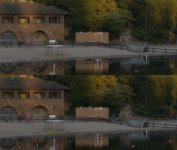
For a direct comparison of the still image quality of Flow Motion v2 1080p 24H mode and 1080p25 HBR mode, I captured unfiltered, 100% crop screen grabs of a frame at the same spot in the panning motion of each video. The upper image is in 24H mode, the lower is in HBR:

Placid Lake FM2 24H-HBR.jpg

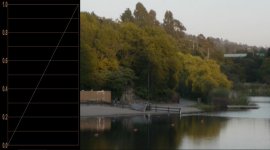
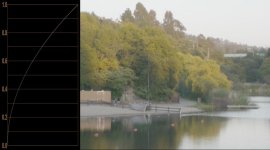
To further examine the encoding quality of the 1080p25 HBR video, I used Adobe After Effects CS5.5 to manipulate the gamma curve of the above frame grab. The middle image below shows the unaltered 100% gamma curve. In the upper image, lowering the gamma by 50% darkens the sky, but its gradients remain virtually free of banding. In the lower image, raising the gamma by 200% lightens the lake shadows, but their diffuse details remain smooth with virtually no macroblocking.


Flow Motion v2 HBR mode - 50% gamma:
Placid Lake HBR gamma 50.jpg

Flow Motion v2 HBR mode - 100% gamma:
Placid Lake HBR gamma 100.jpg

Flow Motion v2 HBR mode - 200% gamma:

Placid Lake HBR gamma 200.jpg
 
Last edited:
GH2 AVCHD Encoder Failure Patterns

Most DSLR AVCHD encoders have been implemented at least partially with dedicated encoding hardware to insure consistent image quality and performance in all video operating modes. This includes the Panasonic AF100, which uses a DSP implementation that delivers perceptibly better quality than the unhacked GH2 within the constraints of AVCHD's 24Mbps maximum bitrate specifications.

As with all Panasonic G-series cameras, the GH2's AVCHD encoder is implemented entirely in software. While this helps reduce the manufacturing cost of the camera, it makes the encoder's real-time performance vulnerable to disruption by other demands that may be placed on the camera's CPU while shooting video. In particular, automated mechanisms such as OIS, dynamic auto-exposure, and continuous auto-focus require constant attention to changing conditions which may transiently undermine the encoder's real-time performance.

With a fixed frame rate to maintain, the AVCHD encoder has but a limited amount of time in which to encode each batch of frames and write them out to the SD card. It must also work within the limits of the peak bitrate available to encode each frame. If at any time the data size or encoding time requirements of a frame exceed the encoder's limitations, it may resort to operating in a built-in low-quality Fallback Mode, which uses coarse quantization to quickly encode the frame before its time runs out.

Although the GH2's software implementation allows the AVCHD encoder's bitrate and image quality to be greatly improved, this also increases the hazards of the camera failing under demanding conditions. Unlike SD card write-speed errors that cause video recording to abruptly halt, Fallback Mode failures occur silently with no apparent disruption of the recording process. The degradation in image quality caused by Fallback Mode may not always be immediately noticeable, raising the possibility that these failures may insidiously creep into footage that otherwise appears to be recorded at the intended level of quality.

Unfortuntely, Fallback Mode can occur even when shooting ordinary scenery with the GH2's unhacked 24Mbps AVCHD firmware. Here is an example shot in 1080p 24H mode with a Panasonic 45-200mm lens:


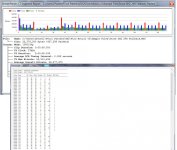
At first glance this video looks fine, and it is difficult to spot which frames have been recorded with degraded image quality. In these cases, cbrandin's invaluable Stream Parser may be used to examine the encoding quality of each frame in detail. The Elementary Stream Decoder built into Stream Parser directly identifies frames encoded in Fallback Mode, and reports a numerical rating of each frame's quantization quality. Here is an extract of the Stream Parser report on the video above:

Creek GH2 24H fallback StreamParser.jpg

In the bar chart at the top of the report, each GOP begins with a red I-frame. In GOP's 2-4, a bitrate disruption can be seen which provokes the encoder to plunge into Fallback Mode in the following GOP's. The chart at the bottom lists the quantization factors used in each recorded frame, along with a quality rating under the "DC" column. In the "QST-High" column, each frame encoded in Fallback Mode is marked with an asterisk.

The DC values of 26-39 used in Fallback Mode indicate a very coarse level of quantization, degrading the image quality of those frames. (Larger values indicate lower quality.) After the encoder recovers from Fallback Mode, it maintains significantly higher quality DC factors of 9-13, a reasonable level of quality to expect from the AVCHD encoder's 24Mbps maximum bitrate.

Using custom rate control techniques, Flow Motion v2 is able to sustain peak bitrates up to 100Mbps with complete protection from Fallback Mode. It is designed to maintain consistently superior quantization quality over a broad range of shooting conditions, including extreme underexposure by up to two stops. In real-life shooting conditions, Flow Motion v2 encodes at DC values commonly ranging from 5-9, the finest levels of quantization the AVCHD encoder can produce before hitting rapidly diminishing improvements in perceptible image quality at DC values of 4 and below. The combination of excellent motion picture quality with efficient 100Mbps peak bitrate consumption in all video modes makes Flow Motion v2 one of the highest performance AVCHD patches developed for the GH2.
 
Last edited:
Saw this over at personal-view.

I am currently running Cake 2.3 but thinking about giving FlowMotion 2.1 a go after the small bugs get worked out completely.

Thanks for all the hard work L Powell
 
Flow Motion v2.02 is finalized for release, see the attached INI file in the first post of this thread.
 
Last edited:
Thanks for all your hard work once again lpowell. Your dedication and hard work is helping make dreams come true, to put it dramatically. I can't wait to try out what I'm sure will be another amazing patch from you.
 
Awesome hack, guess 15 mins of video per 16GB of SDHC card is to be expected. Any change a Flow Motion lite could get close to, or near quality footage but with a smaller footprint? I've been playing around with the max/bit rate settings and the file size difference is marginal at best, maybe the difference of 5 min or so (36min, vs 29min). So it looks like this one is a winner, but with a trip to the store for more SDHC cards.
 
@jbcon Flow Motion's 24L, FH, and H video modes are designed to keep peak bitrates below 60Mbps. This should give you about twice as much recording time on your SD card, while maintaining motion picture quality very close to that of the 100Mbps 24H, HBR, and SH modes.
 
Thanks for the input, don't know why I didn't think of jumping down to the 24L setting....

I did do this for a few test yestarday and can say now am more confused as to what to do than before. I shot the same scene in both 24H and 24L; a 20 second pan across my bar at home during a dinner party. The 24h file was 158MB, the 24L was only 78MB, which for me over a week long shoot would be the difference I am looking for in file size... however there is a noticeable difference in quality, of which I am sure I notice a whole lot more than anyone who will ever see my footage will ever pickup on, but its the priniciple of the thing right?

Despite going ahead and ordering a few more SDHC cards last night, I am still undecided as to which to shoot at. Over a weeklong shoot my collection of cards will give me aprox, 8 hrs at the 24H setting and nearly 11 hrs at the 24L which is huge over 1000's of shots.

More to be helpful to others who might find themselves in the same boat as me, more than looking for someone's suggestion, or input to help me, here is a frame grab from the two videos, albeit compressed and shrunk-down in the photo; but I think the differences are huge, especially if you look at the wording on the bottles.

Side-by-side_HDfootage.jpg
 
Thanks for sharing your test. Even for this grandpa who mainly shoots family it is a struggle to select how much quality is enough. I imagine for professionals the answer is highest quality for sure, but the rest of us struggle the most with how much is OK... Al
 
For me there is a very fine line between quality and storage space. What I carry with me for recording media is one thing, but when I get back home and transfer everything to the computer it has to be stored someplace and that takes up room as well.

I am struggling now even with nearly 6TB of storage at home whether to keep all my footage as it comes out of the camera and the .avi's that I transcode before editing. While I generally transcode to a fairly high quality I am of the mind that I do not need both, but ever so often I find a clip that I didn't access during the editing process that I find out later didn't transcode for some reason and if I delete the orginal .mts files there is no getting that file back, so for now I am keeping both, but regardless of how cheap hard drive get, the idea of having that many HDD's that could fail scares me and even using external backup you end up with tons of multiply drives to save off sight...

...anyway I digress this was a forum post about lpowels excellent hack, sorry to have hijacked it with my ramblings.


All my test of this hack show the same thing. The 24H setting if its 100%, than the 24L is about 80% of that as far as quality. Static shots (ones without pans, or camera movement) are closer to 90%, pans and shots with a lot of movement fall off a lot. I would suggest shooting in 24L if you are doing broad static shots and kick it up to 24H for detailed and shots with motions.

This particular project I am preparing for admittedly is a person project, not a paying gig or one for work, but pretty important none the less due to the fact that I am going to a location i haven't been in 25yrs and will serve as a sample documentary for future promotion of my work. I plan on using the 24L setting inside and for closeups while at resturants and for wide static scenery shots outside along the coast of California and switching to 24H for really detailed, low-light shots as well as scenery that I need to pan and has motion.

I only recently switch from a Gh13 to the Gh2, but after trying 6 or 7 other hacks this will be the one that will be on the camera when I leave for the trip. I will cary a couple others I like on extra cards for good measure but do not plan on changing out the hack for the duration.
 
I think Flow Motion 2.01 is awesome, I agree. I understand your point about hard disk space. I do not transcode however. I use the mts files directly into my favorite editors: Corel Video Studio X5, and Premiere Pro. Both of these editors swallow mts as made. You must be using an editor that does not work with the mts files from the camera and I recommend you change to an editor that does; it will save you disk space and money in the long run... Al
 
... here is a frame grab from the two videos, albeit compressed and shrunk-down in the photo; but I think the differences are huge, especially if you look at the wording on the bottles.

Side-by-side_HDfootage.jpg


Thanks for the screenshot! It's very helpful, I love the fine detail in 24H.
 
Excited to try it out. I was on Driftwood's v9b. Got a 64GB Class 10 Sandisk 30MB/s* card that couldn't handle it. Will either upgrade to the 45MB/s card or use this hack for the time being.
 
I guess the correct answer to my question is "it's depend of the situation" but is this hack offer a better performance that the Canis Majoris or...?

Sorry to ask but it's so confusing for people like me who are not camera tuning experts...

thanks
 
Back
Top