GH1 colour space sRGB or Adobe RGB

...you can tell by [the sRGB triangle's] size (without having to read about it's specific history to find out why HP and MS designed it...) that it was intended for 8-bit devices.
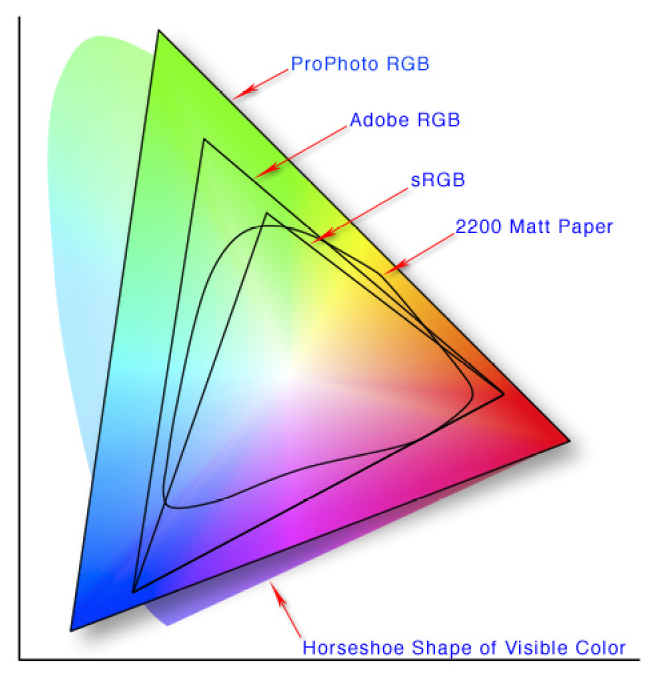
Colorspace.png
Thanks, that color space overlay reminded me of what AdobeRGB was originally designed for - encompassing the printable CMYK color gamut of paper stock in an RGB system. So if you're planning on outputting your JPEG photos to a photocolor printer, AdobeRGB is likely a better choice than sRGB. (Though of course, RAW data processing is better than either.)

As for why people have seen in-camera differences between AdobeRGB and sRGB photos, I suspect that switching the color space changes the relative amount of exposure in bright and dim areas of a photo. The dynamic range of the GH1's sensor is so limited that its ability to capture image detail is highly sensitive to exposure level. I don't think this gives either AdobeRGB or sRGB an inherent advantage - it just makes it difficult to create exposure-matched comparison photos.
 
Last edited:
The dynamic range of the GH1 sensor is limited?

The dynamic range of the GH1 sensor is limited?

Thanks, that color space overlay reminded me of what AdobeRGB was originally designed for - encompassing the printable CMYK color gamut of paper stock in an RGB system. So if you're planning on outputting your JPEG photos to a photocolor printer, AdobeRGB is likely a better choice than sRGB. (Though of course, RAW data processing is better than either.)

As for why people have seen in-camera differences between AdobeRGB and sRGB photos, I suspect that switching the color space changes the relative amount of exposure in bright and dim areas of a photo. The dynamic range of the GH1's sensor is so limited that its ability to capture image detail is highly sensitive to exposure level. I don't think this gives either AdobeRGB or sRGB an inherent advantage - it just makes it difficult to create exposure-matched comparison photos.

Explain why the GH1 sensor is dynamically limited?
 
Explain why the GH1 sensor is dynamically limited?
The GH1's ability to respond to dim lighting is limited by random noise and Fixed Pattern Noise that are present in all MOS image sensors. At the bright end of the scale, details are lost in overexposed areas of an image. Digital sensors have less dynamic range than photographic film, which in turn, has less range than the human eye.
 
The narrower the color space is, the better precision you get. sRGB always has better tonality than AdobeRGB because it represents a smaller range with the same ammount of data. There is less quantisation and better gradients. This is true on 16bit and 8 bit although 16bit has enough resolution to let AdobeRGB match sRGB precision with real cameras. That's on stills of course, there is only ITU-709 on HD video.

If the colors are correctly interpreted, sRGB and AdobeRGB should look identical in 95% of the scenes. If they are not, somebody made a mistake by outputing adobergb and srgb in the same image, or the browser/app cannot manage colors. 80% of the sRGB/AdobeRGB comparisons on the net are performed incorrectly. And most people view them on Internet explorer so they are viewed incorrectly, even when they are correctly performed.

This page can be trusted:

http://www.gballard.net/psd/go_live_page_profile/embeddedJPEGprofiles.html
 
The narrower the color space is, the better precision you get.

Technically true.


sRGB always has better tonality than AdobeRGB because it represents a smaller range with the same ammount of data.

False in practice.


There is less quantisation (SIC) and better gradients.

And can be seen realistically in one in a thousand cases (actually) whereas the better color matching from AdobeRGB shows up in about one in a hundred cases. And the better colors from ProPhoto show up in about one in 15 to 20 cases. Where "show up" means humanly detectable and also produces a noticeable/advantageous difference in side by side or flip comparisons.

So, in practice it's almost always better (better looking images, better tonality, more accurate colors, more colors) to use the widest possible color space. This isn't just my opinion either - it's an industry wide very widely accepted practice/recommendation/fact.


If the colors are correctly interpreted, sRGB and AdobeRGB should look identical in 95% of the scenes.

99% :D
 
Last edited:
Thanks, that color space overlay reminded me of what AdobeRGB was originally designed for - encompassing the printable CMYK color gamut of paper stock in an RGB system. So if you're planning on outputting your JPEG photos to a photocolor printer, AdobeRGB is likely a better choice than sRGB. (Though of course, RAW data processing is better than either.)

Yup!


As for why people have seen in-camera differences between AdobeRGB and sRGB photos, I suspect that switching the color space changes the relative amount of exposure in bright and dim areas of a photo.

Changes the exposure? Really? :Drogar-BlackEye(DBG

Seems odd.


The dynamic range of the GH1's sensor is so limited that its ability to capture image detail is highly sensitive to exposure level. I don't think this gives either AdobeRGB or sRGB an inherent advantage - it just makes it difficult to create exposure-matched comparison photos.

But but but, The camera doesn't know it's going to have to apply a color space or not when the actuation occurs. So how could the exposure values be different? Even if it was that smart then how do we account for manual exposure? So for me the question remains. Knowing Panasonic (having worked at Matsushita Denki) it's probably a bug - LOL :Drogar-Smoke(DBG):
 
The camera doesn't know it's going to have to apply a color space or not when the actuation occurs. So how could the exposure values be different?
Beats me - I don't know exactly what's going on inside the camera, just evaluating what I see. Check out the upper right corner of the two photos in the first post of this topic. To my eyes, that area of the AdobeRGB pic looks properly exposed, while the same area in the sRGB photo looks overexposed. (In addition, the entire sRGB photo appears to be a bit more exposed than the AdobeRGB version.) It looks more like a luminance dynamic range issue than a saturated color gamut difference.
 
False in practice? It's just high school math. If your image contains red1 to red2, sRGB has more steps between the two compared to AdobeRGB. It's a tradeoff you need to take to store a larger color space in a file with limited precision.

Quantisation and quantization are both valid forms. Quantisation is British English. If you don't understand the word, it refers to lower precision. Larger steps from one possible shade to the next.

Try capturing the same image in sRGB and AdobeRGB using the same camera and same settings and examine the images on a video display. Even if the images do contain something important outside sRGB, your target is an average pc monitor, which does not even cover sRGB.

The wide color space will always have inferior tonality. It will also have less accurate colors for the colors that are within sRGB. So we are wasting the precision for nothing. We only take these compromises if the scene and imaging system does produce color outside sRGB, because in this case the color must be limited to sRGB, either by reducing saturation (loss of fidelity) or by clipping at some point (map all colors to sRGB limits).
 
Hey Otis....why do I ALWAYS picture you in a lab coat with horn-rimmed glasses after reading one of your posts? :)

I all honestly....I appreciate your explanations of complex low-level imaging technology. All DVXers are lucky you're here.
 
Hey Otis....why do I ALWAYS picture you in a lab coat with horn-rimmed glasses after reading one of your posts? :)

I all honestly....I appreciate your explanations of complex low-level imaging technology. All DVXers are lucky you're here.

Hm, that sounds like Leonard Hofstadter which is an insult! I'm more like 50% Cooper and 50% Wolowitz.
 
False in practice? It's just high school math.

Yup, it sure is. And like a lot of high school math it's completely useless in this situation!

If you don't think so find an image that demonstrates your idea. You can, but you'll be searching for hours most likely. Whereas I can find and show the principles I am claiming almost immediately - and I can find and show you 10 or 20 such examples in less than an hour. Additionally the differences you will be able to show will be minuscule and hardly noticeable whereas the difference advantages between sRGB and ProPhoto will be dramatic showing ProPhoto to be highly desirable!

So, if you think so then show it. :D
 
Last edited:
An image that demonstrates what? That images in different color spaces can look the same? The opposite is what is rare (and typically the result of color management mistakes).
 
Hey Tesselator and Otis - I'm learning a lot from the discussion you're engaging in here. I'm not going to pick sides as that would be rude, though I back up Otis's correct use of the spelling of quantisation :).
 
Hi Paul,

Hey Tesselator and Otis - I'm learning a lot from the discussion you're engaging in here. I'm not going to pick sides as that would be rude,

There are no sides. Only results. :)

though I back up Otis's correct use of the spelling of quantisation :).

Oh you silly europeans... inversing the "z" and thinking it's an "s". :nads: J/K
 
The problem is that even if you could find images that exceeded sRGB, you would have a problem demonstrating it on a computer or video display. You would need a monitor that exceeds sRGB. These are quite rare. Those who only have an sRGB display (99%?), will see no difference, so they will not support your findings. Either way you lose:)
 
Last edited:
The problem is that even if you could find images that exceeded sRGB, you would have a problem demonstrating it on a computer or video display. You would need a monitor that exceeds sRGB. These are quite rare. Those who only have an sRGB display (99%?), will see no difference, so they will not support your findings. Either way you lose:)

No, I already told you that you were wrong about the monitor issue. You don't listen? That's not very smart. I thought you were smart.

So, a simple screen grab with the two displayed side by side works just fine! Also an animation will do for flips.

Here, LOL the very first image I loaded up shows it pretty well. This is essentially showing the blue end that sRGB blows totally away - but I can show the same with the yellows it obliterates, or the purples it pulverizes.


There are other ways to show it as well. For example copy the frame, do your operations, then paste the copied frame, then do a difference on the layer's blending mode. But surely you knew that? :undecided
 
Last edited:
Beats me - I don't know exactly what's going on inside the camera, just evaluating what I see. Check out the upper right corner of the two photos in the first post of this topic. To my eyes, that area of the AdobeRGB pic looks properly exposed, while the same area in the sRGB photo looks overexposed. (In addition, the entire sRGB photo appears to be a bit more exposed than the AdobeRGB version.) It looks more like a luminance dynamic range issue than a saturated color gamut difference.

Yup, I noticed that right off the bat as well. <shrug> I'm clueless. I guess we would need to know exactly how the tests were conducted. And even then it may not be conclusive without knowing more about the camera's functions : what affects what and when, etc.

I assumed if everyone contributed what they knew (not guessed, but knew) then some smart person (or the OP) would come up with the answers. I contributed what I knew but that just seemed to veer the thread against an ego or two. <shrug> Maybe it'll change from now? How many people have testified that there is indeed a difference now? Three? I still wanna know why and if it can be used to an advantage.
 
I'd have thought the best way to assess colour and detail from an HDV device would be to view it via the normal outputs - monitor, TV etc. I'm a photographer more than a 'videographer' and constantly have to be aware of how my images are correctly interpreted on web pages and when printing. I instinctively feel uncomfortable comparing still images shown here on a web page with what's actually output via video, but I can't explain it in the same technical depth as others here.

It would be great if someone could post a side by side comparison of actual footage shot with the two colour spaces. Then surely we could see it for ourselves :).
 
No, I already told you that you were wrong about the monitor issue. You don't listen? That's not very smart. I thought you were smart.

So, a simple screen grab with the two displayed side by side works just fine! Also an animation will do for flips.

Here, LOL the very first image I loaded up shows it pretty well. This is essentially showing the blue end that sRGB blows totally away - but I can show the same with the yellows it obliterates, or the purples it pulverizes.


There are other ways to show it as well. For example copy the frame, do your operations, then paste the copied frame, then do a difference on the layer's blending mode. But surely you knew that? :undecided

That video would have been better with a zombie face at the very end. :cheesy:
 
Back
Top