Otis Grapsas
Carbonite Member
The video itself never has a wide color space. It's all an interpretation of ITU709.
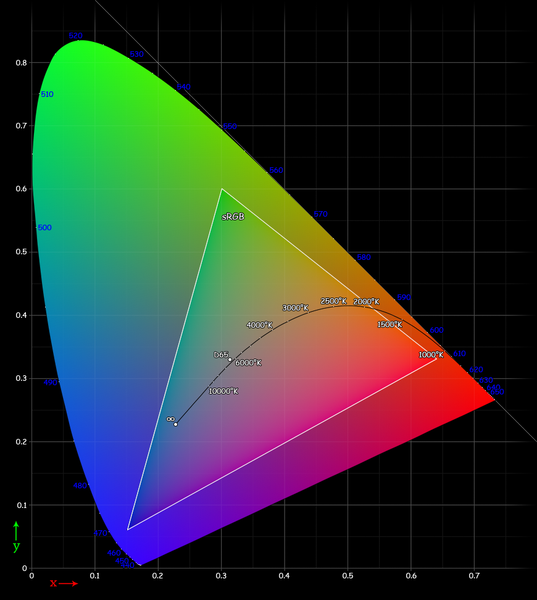
If the image looks different, it's because the color space is wrong in the AdobeRGB mode. You will see less saturation and you might like it, but find another way to reduce saturation, your colors are all over the place if the camera indeed stores adobeRGB on a video file. Using adobergb in video will make a camera store a larger color space in the same data, this will give you less precision and inferior gradients. You final video will be interpreted in ITU709/SRGB color so it makes sense to capture only what you can deliver.
The stills in video mode could be adobergb. In order to see these correctly you need Safari or Firefox. Internet explorer shows adobergb images in srgb so they appear a lot less saturated and their color is massively distorted.
Adobergb is not very useful for the web. In a best case scenario, when there is no color that exceeds srgb and when the viewing software can correctly interprete adobergb, the image will be identical to an srgb image. If one of the two is not true you are seeing something different than everyone else. Different colors. Bad reference. Bad monitoring, and it's not even your fault. Adobergb is quite rare, not even 10% of the monitors out there have good coverage, it's not safe to assume it will look right. Srgb is a lot safer. A wider color space is not a better colorspace. It's a compromise we take when we do need the color space to be wide for an application.
If the image looks different, it's because the color space is wrong in the AdobeRGB mode. You will see less saturation and you might like it, but find another way to reduce saturation, your colors are all over the place if the camera indeed stores adobeRGB on a video file. Using adobergb in video will make a camera store a larger color space in the same data, this will give you less precision and inferior gradients. You final video will be interpreted in ITU709/SRGB color so it makes sense to capture only what you can deliver.
The stills in video mode could be adobergb. In order to see these correctly you need Safari or Firefox. Internet explorer shows adobergb images in srgb so they appear a lot less saturated and their color is massively distorted.
Adobergb is not very useful for the web. In a best case scenario, when there is no color that exceeds srgb and when the viewing software can correctly interprete adobergb, the image will be identical to an srgb image. If one of the two is not true you are seeing something different than everyone else. Different colors. Bad reference. Bad monitoring, and it's not even your fault. Adobergb is quite rare, not even 10% of the monitors out there have good coverage, it's not safe to assume it will look right. Srgb is a lot safer. A wider color space is not a better colorspace. It's a compromise we take when we do need the color space to be wide for an application.

 ) right, Opera got two right, and Safari nailed all of them. I didn't try Chome. So even if you non't use Safari as an everyday browser for the web it's useful to have for checking stuff. I assume it behaves the same on Windows.