GH1 colour space sRGB or Adobe RGB

Essami

Well-known member
Hey,

I thought I'd start this thread about the colour space of GH1 that was brought up on the hack thread. Maybe this is more common knowledge though? But it seems that you can change the video colour space of GH1 from sRGB to Adobe RGB. Go to "M" mode to do so. The colour space is indeed changed in video mode as well although this option is not available when you access the menu in movie mode.

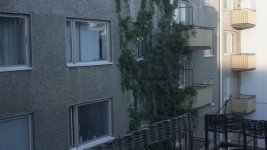
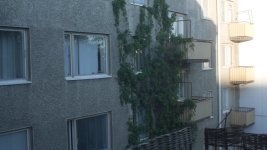
Now the question is that it seems to "flatten" the image. Does it give us mode latitude? Here's pictures I took with both settings. See the white wall on the right, with Adobe RGB the wall is properly exposed. With sRGB it's overexposed. My pics are not scientific at all. But if this is real it's a pretty amazing find!!!

It could be that the colour space change only gives us less light sensitivity... I dont know, this would have to be proven by shooting a latitude test I guess. I do find the Adobe RGB images more pleasing to the eye though. So I will be shooting with it for now to see how it looks in the long run!

Sami
 

Attachments
  • GH1-sRGB.jpg
    GH1-sRGB.jpg
    229.6 KB · Views: 0
  • GH1-AdobeRGB.jpg
    GH1-AdobeRGB.jpg
    234.3 KB · Views: 0
Last edited:
From the Manual

AdobeRGB is mainly used for business purposes such as professional printing because it has a greater range of reproducible colours than sRGB.

• Depending on the colour space setting, the file name of the recorded picture changes as shown.
• Set to sRGB if you are not very familiar with AdobeRGB.
• The setting is fixed to [sRGB] in recording motion pictures.
 
i have a thread with sRGB and AdobeRGB and for video you shouldn't edit AdobeRGB color space, it's output isn't suited for video where sRGB is a closer match. AdobeRGB should always be the preference when editing photos though. According to NAPP.
 
Essami, were those two pictures shot in stills mode or were they still frames from video? Just wanted to be clear.

Either way, thanks for sharing this information! :D
 
i have a thread with sRGB and AdobeRGB and for video you shouldn't edit AdobeRGB color space, it's output isn't suited for video where sRGB is a closer match. AdobeRGB should always be the preference when editing photos though. According to NAPP.

Have a link? I am going off what looks right to my eyes. sRGB on a 7D added quite a bit of noise and contrast that looked "baked" to my eyes. AdobeRGB had a much more natural look and didn't crush the blacks or blow out highlights. And greens looked much better then on sRGB. I don't think there's a right or wrong answer, just what your eyes prefer. I prefer less contrast.
 
Canon engineer recommended sRGB for video on the 5D....can't seem to find the thread....
 
Interesting. These images are effectively displaying in sRGB, if I understand correctly? The difference to my eye is pretty obvious. So the question is, what would be the best way to grade or post process the RGB shot material, when it will end up being converted to sRGB in the end?
 
Interesting. These images are effectively displaying in sRGB, if I understand correctly? The difference to my eye is pretty obvious. So the question is, what would be the best way to grade or post process the RGB shot material, when it will end up being converted to sRGB in the end?

Convert it to a codec like ProRes and CC in 10-bit YUV?
 
Would that have any detrimental effect though? I don't know as I haven't tested it, even though I've shot a little in Adobe RGB, I haven't really done a proper comparison and have just gone with what I like best. I've tried A-B comparing P-JPEG and ProRes with the AJA 10bit a few weeks back and to me the AJA stuff looked to be the closest to what was shot.
It seems that shooting in Adobe RGB definitely seems to preserve some of the tonal range, so it would be good to find a way to preserve it best all the way through the workflow.
 
On color space:

In the Japanese manual it specifies sRGB and AdobeRGB are available. There are 3 /common/ variants of the AdobeRGB color space but the most common by far is the "AdobeRGB (1998)" one. I would assume without guarantee that the GH1 uses this.

http://www.adobe.com/digitalimag/pdfs/AdobeRGB1998.pdf
http://www.adobe.com/products/adobemag/archive/pdfs/98auhtbf.pdf
http://www.adobe.com/digitalimag/adobergb.html

sRGB and AdobeRGB are very similar and neither is a very good color space to work in. At least compared to ProPhoto or WideRGB, etc.

These aren't ICC profiles though usually are tagged, they're color spaces - which means whatever limitations and truncations occur when selected (within it's gamut) the damage will be permanent in the encoded stream or the image file. Both are "absolute color spaces" (colorimetrically defined without external reference) based on the RBG color model. One can kind of think of the parameter definition hierarchy as being ever more limited definitions from Color Model -> Color Space -> ICC Profile. Where ICC Profiles are basically the definitions for color matching on dissimilar output devices: monitor or printer or etc.

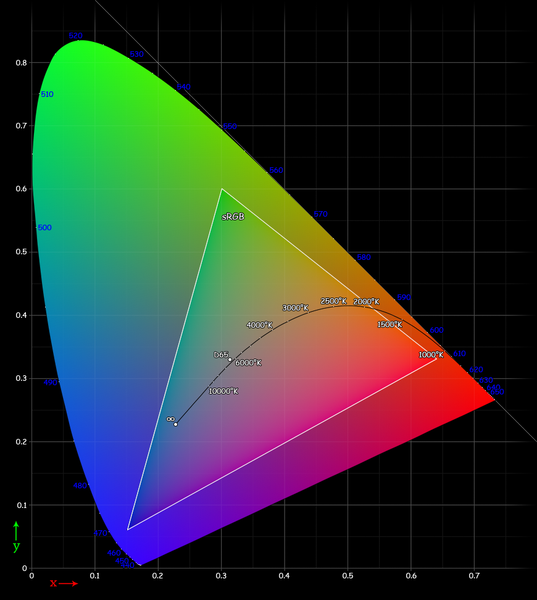
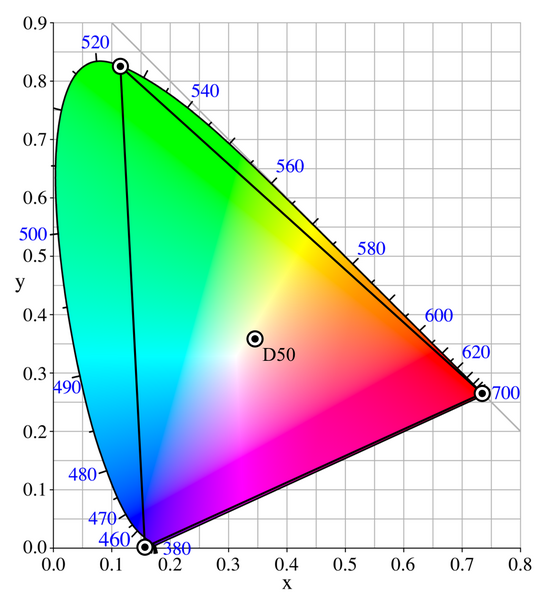
Here you can see the difference in flatspace diagrams between AdobeRBG (1998) and sRGB:

542px-CIExy1931_AdobeRGB.png
537px-Cie_Chart_with_sRGB_gamut_by_spigget.png

Where the black BG one is sRGB and the other is Abode's.

Compare this to ProPhoto or Wide to see just how limited they are (respectively):

542px-CIExy1931_ProPhoto.png
542px-CIExy1931_AdobeWGRGB.png

These are all depth independent AFAIK and so should not be confused with dynamic range and bit depth - however using severely limited implementations of either may appear to cause similar symptoms (banding, jaggies, etc.). In the end if indeed the the GH1's color space could be widened in any way and the new definitions distributed in a "GH1-HackSpace" definition file (readable by PS, CaptureOne, Premiere, AfterFX, Fusion5, etc.), that would improve some things on the GH1 - but mostly limited to recordings of color surfaces and light that fell outside the sRGB and/or AdobeRGB color spaces. In my experience about 10% ~ 20% of recorded footage and stills fall into this category.

I'll let others decide if that is worth addressing or not.

PS: Color spaces are not applied to RAW data files - which are not color managed at all. Of course if anyone ever gets the GH1 to record in RAW and/or un-color-managed formats us video guys will be creaming ourselves. As indeed we did when RED did such a thing! :)

PS: PS: The reason it is useful to convert for editing ANY footage into a wider color space has to do with what edits you will be performing and the way in which editing software works. Basically speaking, moving the footage or stills to a wider color space will give the application a little more room to work for things like color correction, non-linear tonal remapping (think Curves in PS), and even software based anti-aliasing. Of course it's by far best to retain all recorded data in the first place and never have to clip or interpolate any of it! ;)
 
BTW, the reason that engineers and reps recommend sRGB is that it's the least common denominator within editing and display applications. Your FINAL output (for distribution) should be sRGB indeed. But for editing no... not if you like your footage. :D
 
AdobeRGB looks flatter

AdobeRGB looks flatter

SRGB look a bit garish by comparison, thanks for this, the fact it carries over to movie modes is weird but is nice. Are we seeing a wide colour gamut or an adjustment of the colour profile?
 
My printer has Adobe RGB setting

My printer has Adobe RGB setting

BTW, the reason that engineers and reps recommend sRGB is that it's the least common denominator within editing and display applications. Your FINAL output (for distribution) should be sRGB indeed. But for editing no... not if you like your footage. :D

Print output can be to a specific profile?
 
Interesting. I'll have to shoot my own tests with both color spaces and see how they compare. But if I'm not mistaken, once the image is encoded to AVCHD, technically it is no longer sRGB or AdobeRGB. It's in that 4:2:0 AVCHD colorspace, which is maybe REC709?
It is intersting that there's a difference in the recorded video image, but sRGB and AdobeRGb are irrelevant when talking about editing, because AVCHD, Pro Res, etc. are not in those colorspaces. So, the only relevance is how it affects the image as it gets recorded. But that IS significant. I thought it was only for stills and had no effect on the video. I'm definitely going to do a test!
 
I just checked it out, indeed the AdobeRGb shows a much less saturated, or flatter image when compared to the video shot using sRGB.

I'm not knowledgable enough to know the ins and outs scientifically of color spaces (although some of you have done a great job of educating people like me), but it seems like using the AdobeRGB setting will give me a flatter image to work with regardless of what color space the final product becomes.

I use Log and Transfer in FCP as part of my workflow. Even though I am transcoding it to a format that doesn't use AdobeRGB as a color space(ProRes 422HQ) , I still retain the benefit that the source footage is less over exposed and saturated, right?
 
Back
Top