The effects you're describing suggest that the sRGB image may have been overexposed. Are you certain that the camera exposure was appropriately adjusted for the comparison shots taken in each color space? Since the scaling is different between AdobeRGB and sRGB, they may each require different exposure settings to produce comparably exposed results....Without question, using AdobeRGB, there is more detail in highlights/shadows... When I playback in cam- AdobeRGB shows detail in a reflection from a picture frame - which is otherwise blown out white in sRGB.

Navigation
Install the app
How to install the app on iOS
Follow along with the video below to see how to install our site as a web app on your home screen.
Note: This feature may not be available in some browsers.
More options
You are using an out of date browser. It may not display this or other websites correctly.
You should upgrade or use an alternative browser.
You should upgrade or use an alternative browser.
GH1 colour space sRGB or Adobe RGB
- Thread starter Essami
- Start date
In my experience, with cheap-o monitors it all depends on how they are adjusted. In the absence of monitor calibration, it can often be difficult to tell whether an image looks "better" (i.e. higher quality) or whether it's simply more vivid (i.e. higher color saturation). This was often the case in the early days when images rendered in Macintosh gamma looked washed-out when displayed on the raw, uncalibrated gamma of PC monitors.I have dual 24" LG cheap-o TN type monitors (model no. L246WH) and the differences between sRGB and ProPhoto can be astounding. I say "can be" because it depends on the photo and the original colors captured.
While they were originally designed for 8-bit color depth, both AdobeRGB and sRGB can nowadays be used on either 8-bit (i.e. 24-bit RGB) or 16-bit (48-bit RGB) image data. The sensor in the GH1 only produces 8-bit raw data, which significantly constrains the accuracy of the colors it can capture, even before the raw data is compressed into JPEG or AVCHD. Given that limitation, the highest quality results can probably only be obtained by disregarding the in-camera AdobeRGB or sRGB conversions, and externally converting the RAW pixel data into whichever 16-bit color space you prefer.lpowell said:When using heavy data compression techniques on captured image data, reducing the contrast range and chroma gamut often produces more detailed results. While AdobeRGB is technically superior to sRGB in processing uncompressed raw data streams recorded with greater than 24-bit RGB precision, that level of fidelity is far beyond the capabilities of the GH1.This shouldn't be the case. Both color spaces were designed around 8 bit ("24 bit") precisions. It's not until we look at much wider spaces like ProPhoto and WideRGB that we see color spaces intended for higher precision transformations.
At any rate, my impression is that most pros recommend AdobeRGB for 16-bit color and sRGB for 8-bit color. Here's a link to a more detailed comparison of the two color spaces:
http://www.cambridgeincolour.com/tutorials/sRGB-AdobeRGB1998.htm

To further throw another monkey wrench in the mix. I am getting same results in after effects whether I choose sRGB or AdobeRGB, both flatten the image in a way that I like. So AdobeRGB at least for me is a moot point.

Otis Grapsas
Carbonite Member
The difference is that in video there is no method to interprete anything other than ITU709 primaries (equal to sRGB primaries). Why would they use a different color space when there is no way to see it?
I could write my posts in Greek, it would be very precise, but what's the point of doing that on an english forum?
I could write my posts in Greek, it would be very precise, but what's the point of doing that on an english forum?
The difference is that in video there is no method to interprete anything other than ITU709 primaries (equal to sRGB primaries). Why would they use a different color space when there is no way to see it?
I could write my posts in Greek, it would be very precise, but what's the point of doing that on an english forum?
I thought this discussion had run it's course but you brought it back yesterday. Not sure anyone will go for definitive proof. What was the point of bringing this topic back up again?
Otis Grapsas
Carbonite Member
I thought this discussion had run it's course but you brought it back yesterday. Not sure anyone will go for definitive proof. What was the point of bringing this topic back up again?
Scientific interest. There should be a definitive answer to this question. An adventurous DVXuser could do a series of tests perhaps.
Agreed.

Tesselator
Active member
In my experience, with cheap-o monitors it all depends on how they are adjusted. In the absence of monitor calibration, it can often be difficult to tell whether an image looks "better" (i.e. higher quality) or whether it's simply more vivid (i.e. higher color saturation). This was often the case in the early days when images rendered in Macintosh gamma looked washed-out when displayed on the raw, uncalibrated gamma of PC monitors.
Of course they're calibrated. I use the "25 years of video experience" method. And no, this doesn't matter very much as to the differences between a very wide color space and a very narrow one. Rocking an image back and fourth between sRGB and ProPhoto you can see the colors change. Whether the changing colors are accurate (to the device/reality) or not will depend on the calibration - but the colors will still change. Bright Banana Yellows, Light Royal Blues, Soft Lavender Purples disappear right before your eyes when switching from ProPhoto to sRGB or even to Adobe RGB.
While they were originally designed for 8-bit color depth, both AdobeRGB and sRGB can nowadays be used on either 8-bit (i.e. 24-bit RGB) or 16-bit (48-bit RGB) image data.
Not just "nowadays", they always could be. But the colorspace is an 8-bit space, always has been and always will be.
Wikipedia:
"The sRGB color space is well specified and is designed to match typical home and office viewing conditions, rather than the darker environment typically used for commercial color matching.
Nearly all software was and is designed with the assumption that an 8-bit-per-channel image file placed unchanged onto an 8-bit-per-channel display will appear much as the sRGB specification dictates. LCDs, digital cameras, printers, and scanners all follow the sRGB standard. Devices which do not naturally follow sRGB (as was the case for older CRT monitors) include compensating circuitry or software so that, in the end, they also obey this standard. For this reason, one can generally assume, in the absence of embedded profiles or any other information, that any 8-bit-per-channel image file or any 8-bit-per-channel image API or device interface can be treated as being in the sRGB color space. When an RGB color space with a larger gamut is needed, color management usually must be employed to map image data to appear correctly on the display."
As the recommended color space for the Internet, sRGB should be used for editing and saving all images intended for publication to the WWW. Images intended for professional printing via a fully color-managed workflow, e.g. prepress output, sometimes use another color space such as Adobe RGB (1998), which allows for a wider gamut.
Images intended for the Internet and created in one of the other color spaces may be converted to sRGB using an image editor such as Paint Shop Pro or Adobe Photoshop.
Due to the standardization of sRGB on the Internet, on computers, and on printers, many low- to medium-end consumer digital cameras and scanners use sRGB as the default (or only available) working color space. Used in conjunction with an inkjet printer, an sRGB image produces what is often regarded as satisfactory for home use. However, consumer-level camera LCDs are typically uncalibrated, meaning that even though the image is being labelled as sRGB, one can't conclude that the image is color-accurate on the LCD.
"The sRGB color space is well specified and is designed to match typical home and office viewing conditions, rather than the darker environment typically used for commercial color matching.
Nearly all software was and is designed with the assumption that an 8-bit-per-channel image file placed unchanged onto an 8-bit-per-channel display will appear much as the sRGB specification dictates. LCDs, digital cameras, printers, and scanners all follow the sRGB standard. Devices which do not naturally follow sRGB (as was the case for older CRT monitors) include compensating circuitry or software so that, in the end, they also obey this standard. For this reason, one can generally assume, in the absence of embedded profiles or any other information, that any 8-bit-per-channel image file or any 8-bit-per-channel image API or device interface can be treated as being in the sRGB color space. When an RGB color space with a larger gamut is needed, color management usually must be employed to map image data to appear correctly on the display."
As the recommended color space for the Internet, sRGB should be used for editing and saving all images intended for publication to the WWW. Images intended for professional printing via a fully color-managed workflow, e.g. prepress output, sometimes use another color space such as Adobe RGB (1998), which allows for a wider gamut.
Images intended for the Internet and created in one of the other color spaces may be converted to sRGB using an image editor such as Paint Shop Pro or Adobe Photoshop.
Due to the standardization of sRGB on the Internet, on computers, and on printers, many low- to medium-end consumer digital cameras and scanners use sRGB as the default (or only available) working color space. Used in conjunction with an inkjet printer, an sRGB image produces what is often regarded as satisfactory for home use. However, consumer-level camera LCDs are typically uncalibrated, meaning that even though the image is being labelled as sRGB, one can't conclude that the image is color-accurate on the LCD.
It's the purpose and design of sRGB.
The sensor in the GH1 only produces 8-bit raw data, which significantly constrains the accuracy of the colors it can capture, even before the raw data is compressed into JPEG or AVCHD.
Nope. it's either 12-bit or 14-bit. I'm not sure which yet but it's probably 12-bit. It's certainly not 8-bit - of that I'm 99.99% sure! Almost all RAW processing software then pads that 12-bit data into a 16-bit file container which we edit. By the time we blur, sharpen, denoise, edit curves, remap shadows & highlights or tweak saturations we're probably utilizing the entire 16 bits of accuracy. So after processing an image it would be somewhat destructive to save it in 8 bits - or even in 12-bit if we could.
At any rate, my impression is that most pros recommend AdobeRGB for 16-bit color and sRGB for 8-bit color.
The majority of working photographers who also communicate on-line about such things testify to the use of ProPhoto in 16-bits in their standard editing environment - just like I said. I'm not here making stuff up or saying things baselessly you know.

sRGB as I stated, is used for internet viewing and posting almost exclusively. It's also used when file sharing over multiple or unknown entities/environments.
Adobe RGB is typically only used (by the majority of high-end professional folks) as an acquisition format when the only choices are between that and the lesser sRGB. As soon as possible it's bumped up to ProPhoto or WideRGB. One of the advantages of shooting in RAW is that the data isn't degraded by the Look Up Tables or Transformation Matrices of the sRGB/Adobe RGB spaces prior to editing. The data can meet up with it's very first color management transformation in a big wide gorilla suit named ProPhoto.
Tesselator
Active member
To further throw another monkey wrench in the mix. I am getting same results in after effects whether I choose sRGB or AdobeRGB, both flatten the image in a way that I like. So AdobeRGB at least for me is a moot point.
Hi Isaac,
Are you using files that contain colors outside of the sRGB space for your tests? If you're not there will of course be no difference. Use After FX to create some corner gradients where the spot and spread colors are both outside the sRGB space. Then try it. And of course let us know what you see.

This will also answer yours and Otis's question above.


alignment1
Well-known member
All mojination aside, how color spaces affect still images will also be how they affect video. It's not like it's suddenly a whole different thing just because we're talking about video - with or without flux-capacitation.
If indeed it's applied at all... (See message 19, 21 & 22)
Gotcha- I thought there maybe was a difference, seeing as when I take a still shot it is a RAW image of 12.1MP and AVCHD video is only like 2.1MP(1920X1080). So I thought since the camera is handling these files differently, that in fact the color space would effect them differently as well.
But I guess- that theory's right out the window now- especially w/ Tester's MJPEG patch:laugh:
Tesselator
Active member
Gotcha- I thought there maybe was a difference, seeing as when I take a still shot it is a RAW image of 12.1MP and AVCHD video is only like 2.1MP(1920X1080). So I thought since the camera is handling these files differently, that in fact the color space would effect them differently as well.
But I guess- that theory's right out the window now- especially w/ Tester's MJPEG patch:laugh:
Yeah, I get you. One of the problems here is a terminology clash between video and still genres. Video guys refer to carrier formats and color models as being color spaces when in fact they are not. You can read a document like this and become thoroughly confused if you're from the still image world.
http://www.zerocut.com/tech/vid_img.htm
Even the various wikipedia authors get it mixed up. It's because the definitions changed after digital color management was introduced. Then there's terminology crossover as well . For example YUV is both a basic type of carrier and storage format AND a color model. It's not a color space however and neither is it a color profile. CYM/K exists as both a color model and a color space within the RGB color model. etc. etc.
Then there''s the whole language-dynamic thing. For example in English if the word "Gay" is widely accepted as primarily meaning either "Happy" and denoting a certain element of lameness then that becomes the correct meaning of the word. If homosexuality is added as one of the primary meanings then that becomes a correct definition. If later the Happiness meaning loses all use then Happy is no longer a correct definition for the word "Gay" - after some period of time. Well, the term "Color Space" as used in the wonderful world of video is one such term. It's in transition of it's definition and the older definitions of it have been (are being) replaced with the terms gamut (or device gamut) and color-model and even container, and carrier/storage format.
So that confuses things even further. Usually sticking to the application documentation is all that will save one's preverbal butt. For the AE folks here is a good place to start:
http://help.adobe.com/en_US/AfterEffects/9.0/WS3CC95545-7246-4d80-B1AA-F9DB66C5D6EAa.html
And finally we're sitting here with a hybrid device that does both video and still processing. So questions come up like what we're dealing with in this thread. Is the sRGB or Adobe RGB color space applied somewhere or is it just the device gamut in the YUY2 or RGB color model?
Fun stuff.. Fun stuff!
I have no idea myself which is why I have been keeping my replies limited to generic facts and principles. If people are saying that they see a difference then there might be. Depending on how well or poorly controlled their tests are it could indicate several things including only that their imaginations are active.
Last edited:
Otis Grapsas
Carbonite Member
Is the sRGB or Adobe RGB color space applied somewhere or is it just the device gamut in the YUY2 or RGB color model?
It's never the device gamut, it would look very flat and lifeless interpreted as ITU709 color because ITU709 primary filters cannot be approached. Filters are used in the bayer sensor and in the beam splitting prisms. Some bayer raw video cameras can output the device gamut, but it serves no purpose really.
The sensors are always RGB, the output is YCbCr in most cameras (with or without color sampling) and RGB in rare exceptions.
Tesselator
Active member
It's never the device gamut, it would look very flat and lifeless interpreted as ITU709 color because ITU709 primary filters cannot be approached. Filters are used in the bayer sensor and in the beam splitting prisms. Some bayer raw video cameras can output the device gamut, but it serves no purpose really.
The sensors are always RGB, the output is YCbCr in most cameras (with or without color sampling) and RGB in rare exceptions.
Well I don't want to get too hung up on terminology as we're really just wanting to know if Panasonic either purposely or mistakenly is applying sRGB slash Adobe RGB somewhere in the stream from sensor to container but:
- Device Gamut: The full un-color corrected un-color managed output. (this will of course be some color model or another depending on the physical device. Yes, probably RGB in the case of the GH1 and other hybrid still cameras.
So saying "the sensors are RGB" is essentially the same thing as saying "the device gamut in the RGB color model" as I did.
Outputting full device gamut (which is of the RGB color model) is what the RED One is doing and seems very useful to me at least. This is also known as RAW video. Although indeed, before color correction and management are applied to the RED's output I would definitely say that it looked lifeless and flat.
- YCbCr: Is a carrier and storage format. It's not a colorspace in the conventional thinking. It's not what is called an "absolute color space" Although it seems to imply one as most carrier and storage formats mostly do. It's just chromatic differential way of encoding RGB information - not for defining color space. For those following along I used "YUV" instead of YCbCr which is a correct interchange of terms in this case.
- REC-709: or ITU-709 if you must, is again not a color space but rather a carrier and storage format. It describes many things including frame aspect ratio, pixel aspect ratio, filter overshoots and undershoots, and other image format and picture parameters. As well, it specifies a set of primaries whereby a gamut is implied. It's implied gamut is almost exactly the same as the sRGB color space. So here again we have a carrier (transport) and container format that can act like a color space but is not one.
Oh well, I'm cutting short cuz it's lunch-time here and I have an appointment with a beautiful girl for some nice Indian curry. Yum! BBL
Otis Grapsas
Carbonite Member
They should map to sRGB primaries and only that, it's what HD video must contain. AdobeRGB would be a bug or an undocumented "feature" that reduces your color precision because nothing is aware of it after it exits the camera.
Saying that the sensors are mostly RGB, is reality, all bayer and 3CCD cameras get parts of the spectrum which look like some shade of red, green, blue to the eye. Saying that the device gamut is output IN THE RGB color model is wrong, because there is no specific RGB color model. It's RGB data with R,G,B different for each camera.
Any raw data is full device gamut for the specific device. It look lifeless and flat not because it is small but only because it is not interpreted correctly for the monitor, the monitor incorrectly assumes it's sRGB RGB.
RGB and YCbCr is just two ways to store video. When the YCbCr is 4:4:4 (no color subsampling), they are also two ways to store single pixels. One stores R,G,B another stores something we thing will compress better for a given datarate. When we get to this point though (before color sampling), the RGB is not device RGB, it must already be mapped to ITU-709/sRGB chromaticities. It should already have a matrix applied.
Rec-709 has defined chromaticities and white point which are the same with sRGB. It is a color space. The actual color response we see though is different when custom gamma curves are used and this is part of the art of camera design.
Saying that the sensors are mostly RGB, is reality, all bayer and 3CCD cameras get parts of the spectrum which look like some shade of red, green, blue to the eye. Saying that the device gamut is output IN THE RGB color model is wrong, because there is no specific RGB color model. It's RGB data with R,G,B different for each camera.
Any raw data is full device gamut for the specific device. It look lifeless and flat not because it is small but only because it is not interpreted correctly for the monitor, the monitor incorrectly assumes it's sRGB RGB.
RGB and YCbCr is just two ways to store video. When the YCbCr is 4:4:4 (no color subsampling), they are also two ways to store single pixels. One stores R,G,B another stores something we thing will compress better for a given datarate. When we get to this point though (before color sampling), the RGB is not device RGB, it must already be mapped to ITU-709/sRGB chromaticities. It should already have a matrix applied.
Rec-709 has defined chromaticities and white point which are the same with sRGB. It is a color space. The actual color response we see though is different when custom gamma curves are used and this is part of the art of camera design.
Tesselator
Active member
They should map to sRGB primaries and only that, it's what HD video must contain. AdobeRGB would be a bug or an undocumented "feature" that reduces your color precision because nothing is aware of it after it exits the camera.
I tend to agree, unless of course AE and such apps normally attempt extraction. I'm not sure.
Saying that the sensors are mostly RGB, is reality, all bayer and 3CCD cameras get parts of the spectrum which look like some shade of red, green, blue to the eye. Saying that the device gamut is output IN THE RGB color model is wrong, because there is no specific RGB color model. It's RGB data with R,G,B different for each camera.
Again this is a terminology issue. You can not have RGB data outside of the RGB color model. That would be like saying Earth rocks are not of the Earth.
rogar-Thinking(DBGAny raw data is full device gamut for the specific device.
Exactly. Now we're on the same page.
It look lifeless and flat not because it is small but only because it is not interpreted correctly for the monitor, the monitor incorrectly assumes it's sRGB RGB.
No RAW conversion and display softwares do NOT apply any color management at all. It's flat looking because that's how flat the tone curves are for/from image sensing devices commonly used in digital cameras.
Uh, no. RGB is a color model. Nothing at all to do storage formats or etc. It's an abstraction. An idea. We need to apply various levels of formatting before vector data can be obtained, manipulated, stored, transported, whatever. The information does not come from the chip's photo-cites in any common RGB based formatting. Although the chip itself is a device designed around the "idea" or "model" of RGB color representation slash description. YCbCr is one formatting method of the RGB color model. Repeating that in other words: "YCbCr is not an absolute color space, it is a way of encoding RGB information. The actual color displayed depends on the actual RGB colorants used to display [or produce] the signal. Therefore a value expressed as YCbCr is only predictable if standard RGB colorants or an ICC profile are used." - WikiRGB and YCbCr is just two ways to store video.
The rest of the message is equally as incorrect based on several misunderstandings and misuses of terminology - but at this point I feel it's going to be too much effort and possibly become an argument in the process of explaining. And really only the first sentence (top) here is topical or important to the discussion so shall we just leave it as is? Or if you're actually interested I can continue to explain it - either way - but for now... I'd rather research which mount adaptors I should purchase. I have this GH1 sitting here with no lenses still.
rogar-KnockedOut(D
Last edited:
Otis Grapsas
Carbonite Member
I tend to agree, unless of course AE and such apps normally attempt extraction. I'm not sure.
Again this is a terminology issue. You can not have RGB data outside of the RGB color model. That would be like saying Earth rocks are not of the Earth.
Exactly. Now we're on the same page.
No RAW conversion and display softwares do NOT apply any color management at all. It's flat looking because that's how flat the tone curves are for/from image sensing devices commonly used in digital cameras.
Uh, no. RGB is a color model. Nothing at all to do storage formats or etc. It's an abstraction. An idea. We need to apply various levels of formatting before vector data can be obtained, manipulated, stored, transported, whatever. The information does not come from the chip's photo-cites in any common RGB based formatting. Although the chip itself is a device designed around the "idea" or "model" of RGB color representation slash description. YCbCr is one formatting method of the RGB color model. Repeating that in other words: "YCbCr is not an absolute color space, it is a way of encoding RGB information. The actual color displayed depends on the actual RGB colorants used to display [or produce] the signal. Therefore a value expressed as YCbCr is only predictable if standard RGB colorants or an ICC profile are used." - Wiki
The rest of the message is equally as incorrect based on several misunderstandings and misuses of terminology - but at this point I feel it's going to be too much effort and possibly become an argument in the process of explaining. And really only the first sentence (top) here is topical or important to the discussion so shall we just leave it as is? Or if you're actually interested I can continue to explain it - either way - but for now... I'd rather research which mount adaptors I should purchase. I have this GH1 sitting here with no lenses still.
1. Well, I AM sure.
2. Again, there is no RGB color model. The in camera gamut is read and stored in three colors that can be any shade or color, they look kinda red, green, blue but they are not primaries of any standard color space, their spectrum can be anything. They are unique to the sensor.
3. Great!
4. It's three colors. The manufacturer knows what they are and provides the basis for some math that can map them to sRGB primaries. An application wouldn't know what to do with them if that info did not exist. The only thing it can do it to assume they are sRGB primaries which will be wrong.
5. You are mistaken. All RAW converters apply a matrix. This is required to map the sensor to the required output color space or to an intermediate color space. The manufacturer provides the required matrix. You only see a flat look because the sensor has its own color space. That color space could be better than all existing colorspaces, it will still look wrong because it is interpreted as sRGB/ITU-709. The color management you are refering to is the output side of color mapping, it allows the intermediate color space to be mapped to your monitor, your printer etc.
5. No, the RGB of the sensor is the values of three unknown colors, different for each sensor, the colors that the sensor actually samples through its primary filters. It's not even red, green blue in any standard color space. Not even close. YCbCr is an encoding method that can be applied in any color space. It only makes sense to encode ITU-709 though if the output will be interpreted as HD video.
6. You cannot explain something you do not understand
If I understand correctly, you're using a single source image and switching the rendering mode back and forth between sRGB and ProPhoto color spaces? That would of course change the color shades since the scaling of the two color spaces is different.Rocking an image back and fourth between sRGB and ProPhoto you can see the colors change. Whether the changing colors are accurate (to the device/reality) or not will depend on the calibration - but the colors will still change.
I don't think we're in disagreement here. While sRGB and AdobeRGB were originally defined as 8-bit color spaces, they've long since been extended into 16-bit precision to improve photo processing quality, similar to how 16-bit PCM audio has been extended to 24-bits....the [sRGB] colorspace is an 8-bit space, always has been and always will be.
You're right, it's a 12-bit sensor, I was misled by B&H's GH1 specifications page here:[The bit-depth of the GH1's sensor is] either 12-bit or 14-bit. I'm not sure which yet but it's probably 12-bit.
http://www.bhphotovideo.com/c/produ...ix_DMC_GH1_Digital_Camera.html#specifications
Panasonic doesn't seem to have published sensor specs (in English at least), but I found this document from DXO Labs:
http://www.dxomark.com/index.php/eng/Image-Quality-Database/Panasonic/Lumix-DMC-GH1
I think we'd both agree that, regardless of the choice of color space, the only way to preserve the sensor's 12-bit pixel precision is to bypass the in-camera sRGB/AdobeRGB conversion and instead output RAW images for external processing.
If you stick with the camera's JPEG photo output, the pixel data has been reduced to at best 8-bit precision. Given that limitation, I think color space is really a personal choice: AdobeRGB if you want to preserve extreme ranges of color saturation; sRGB if you want more discrimination among colors typically found in nature and/or web compatibility.
And as others have pointed out, there's no AdobeRGB option for video. My understanding is that the ITU709 video color spec that Otis refers to is very close to sRGB (the gamma curve is slightly different). So if you want your still shots to resemble your video frames, sRGB will be closer than AdobeRGB.
Last edited:
Tesselator
Active member
2. Again, there is no RGB color model.
Well I guess the bridge is already aflame so why not?
All of your points are equally as absurd but #2 is the easiest to show: http://en.wikipedia.org/wiki/RGB_color_model
There is no Earth. Hehehe, OK...
The Bayer Filter built into the GH1's light sensor is the actual RGB device that we're dealing with (the bare MOS sensor itself responds to all colors in the spectrum). It's composed of a checkerboard of physical red, green and blue filters. While the raw RGB data that the Bayer Filter produces does not precisely match the RGB response of a standard human eye, it's close enough to be processed through a compensating color matching function. The CIE XYZ color space that it is converted into can be considered the standard RGB color model for camera sensors....[camera] sensors are mostly RGB, is reality, all bayer and 3CCD cameras get parts of the spectrum which look like some shade of red, green, blue to the eye. Saying that the device gamut is output IN THE RGB color model is wrong, because there is no specific RGB color model. It's RGB data with R,G,B different for each camera.
Tesselator
Active member
If I understand correctly, you're using a single source image and switching the rendering mode back and forth between sRGB and ProPhoto color spaces? That would of course change the color shades since the scaling of the two color spaces is different.
Well it might and it might not. The scaling itself isn't different enough to be humanly detectable in most cases. But the color value differences are. So typically rocking the conversion like that will show the viewer/operator which colors are being transformed by the spaces LUT or TM. I'd say "clipped" but they're not really clipped, they're transformed or even "mapped" if you will.
I don't think we're in disagreement here. While sRGB and AdobeRGB were originally defined as 8-bit color spaces, they've long since been extended into 16-bit precision to improve photo processing quality, similar to how 16-bit PCM audio has been extended to 24-bits.
Right. My only caveat is that it wasn't ever "extended" as it never needed to be. A color space is implied whereas precision (number of bits) is applied. The idea that a color space design intends specific precision only shows the intent. This will be pretty much exclusively evident by it implied gamut within (or total coverage of) the HIS visible spectrum. The HIS VS is that horse-shoe shaped color spread you see these color spaces overlaid on on top of - in the shape of a triangle. In other words you can tell by it's size (without having to read about it's specific history to find out why HP and MS designed it or discover that while refined for use in various environments it was never extended for any reason) that it was intended for 8-bit devices.
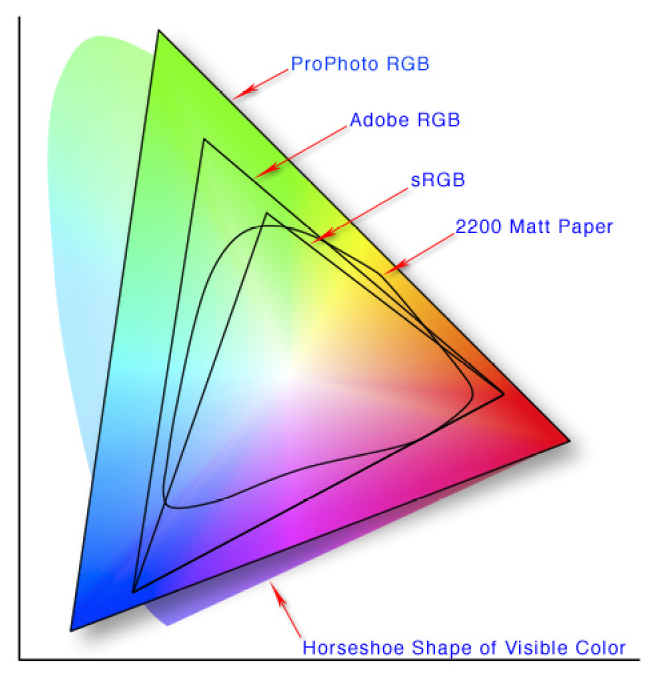
You're right, it's a 12-bit sensor, I was misled by B&H's GH1 specifications page here:
http://www.bhphotovideo.com/c/produ...ix_DMC_GH1_Digital_Camera.html#specifications
Panasonic doesn't seem to have published sensor specs (in English at least), but I found this document from DXO Labs:
http://www.dxomark.com/index.php/eng/Image-Quality-Database/Panasonic/Lumix-DMC-GH1
Oh, thank you, thank you, thank you! I've been looking for that spec - published and in writing! I took a look at the file header of the GH1's RW2 files and thought that it could be either 12 or 14 bit. I was hoping it was 14 but knowing is better than not knowing I guess - assuming that they got it right.
I think we'd both agree that, regardless of the choice of color space, the only way to preserve the sensor's 12-bit pixel precision is to bypass the in-camera sRGB/AdobeRGB conversion and instead output RAW images for external processing.
If you stick with the camera's JPEG photo output, the pixel data has been reduced to at best 8-bit precision. Given that limitation, I think color space is really a personal choice: AdobeRGB if you want to preserve extreme ranges of color saturation; sRGB if you want more discrimination among colors typically found in nature and/or web compatibility.
Yeah, you're reducing the original precision by going 8-bit AND severely constricting the devices color gamut with the use of either Adobe RGB or sRGB.
And as others have pointed out, there's no AdobeRGB option for video. My understanding is that the ITU709 video color spec that Otis refers to is very close to sRGB (the gamma curve is slightly different). So if you want your still shots to resemble your video frames, sRGB will be closer than AdobeRGB.
Yup agreed. So what were these "differences" that people were seeing? What, just pilot error?
Yes, exactly.The Bayer Filter built into the GH1's light sensor is the actual RGB device that we're dealing with (the bare MOS sensor itself responds to all colors in the spectrum). It's composed of a checkerboard of physical red, green and blue filters. While the raw RGB data that the Bayer Filter produces does not precisely match the RGB response of a standard human eye, it's close enough to be processed through a compensating color matching function. The CIE XYZ color space that it is converted into can be considered the standard RGB color model for camera sensors.
Last edited: