
Navigation
Install the app
How to install the app on iOS
Follow along with the video below to see how to install our site as a web app on your home screen.
Note: This feature may not be available in some browsers.
More options
You are using an out of date browser. It may not display this or other websites correctly.
You should upgrade or use an alternative browser.
You should upgrade or use an alternative browser.
GF1 testing and footage goes HERE
- Thread starter rawfa
- Start date

For me is not a big deal, I don't believe in this S + AE lock = semi manual mode.
sorry to be off topic but
i still cant get the s + ae lock manual shutter speed to work.
i select the shutter speed i want, say 1/60 for example, then press ae lock. i shoot, but the shutter speed is what ever the camera seems to want. i know this because if i select less than 1/30, the video should have that slow shutter speed effect, but with this procedure, i cant get that on the gf1 (not that i am trying to recreate 80's pop videos, i just want to test out the manual options, you understand lol)
what am i doing wrong (yes, apart from living in the 80's i know
 )?
)?mpgxsvcd: is it possible you could post your 422 1080 settings from the youtube vid, 422 1080 might be the answer to all my dreams!
Last edited:
sorry to be off topic but
i still cant get the s + ae lock manual shutter speed to work.
i select the shutter speed i want, say 1/60 for example, then press ae lock. i shoot, but the shutter speed is what ever the camera seems to want. i know this because if i select less than 1/30, the video should have that slow shutter speed effect, but with this procedure, i cant get that on the gf1 (not that i am trying to recreate 80's pop videos, i just want to test out the manual options, you understand lol)
what am i doing wrong (yes, apart from living in the 80's i know
mpgxsvcd: is it possible you could post your 422 1080 settings from the youtube vid, 422 1080 might be the answer to all my dreams!
I never said it was 4:2:2 1080p in a single video. The video contains some 1080p and some 4:2:2 content. However, none of it is 1080p and 4:2:2.
I don't think 1080p 4:2:2 is actually that useful. The bit rate would have to be stupid high to get decent quality.
Right now my ultimate goal is to get good 720p 4:2:2 MJPEG @ 30 FPS and High Quality 1080p @ 24 FPS AVC-HD with the GF1. If that ever happens I probably will not upgrade my camera until 4K is readily available.

adammada
Well-known member
. . .
i still cant get the s + ae lock manual shutter speed to work.
. . .
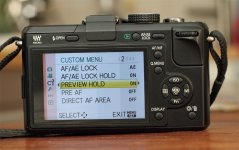
see you (set in the menu AE . . .), and you can "AE-L_hold":
AF/AE Lock set AE
AF/AE Lock Hold set on
Preview Hold set on
the AE-Hold works in the S, A, and P-Mode, not in the M-Mode!!!
Attachments
Last edited:
see you (set in the menu AE . . .), and you can "AE-L_hold":
AF/AE Lock set AE
AF/AE Lock Hold set on
Preview Hold set on
You can set what you want here, this setting has no effect on the GF1's S-Mode while filming.
I've test it - it works:evil:
Me too, but i cannot see a difference...
adammada
Well-known member
Du nervst @nemo0815 - gehörst Du nicht zur deutschen Bedenkenträgerfraktion aus dem DSLR-Forum???:violin:
Letzer Versuch:
Einfach mal im S-Modus auf eine helle Stelle belichten, dann AE-Hold drücken, die helle Stelle und dann gleich ein dunkles Motiv filmen und Du siehst den Unterschied. Wenn es nicht funktionieren würde, dann würde die Belichtung nachregeln - tut sie aber nicht!!!
Letzer Versuch:
Einfach mal im S-Modus auf eine helle Stelle belichten, dann AE-Hold drücken, die helle Stelle und dann gleich ein dunkles Motiv filmen und Du siehst den Unterschied. Wenn es nicht funktionieren würde, dann würde die Belichtung nachregeln - tut sie aber nicht!!!
Last edited:
I never said it was 4:2:2 1080p in a single video. The video contains some 1080p and some 4:2:2 content. However, none of it is 1080p and 4:2:2.
I don't think 1080p 4:2:2 is actually that useful. The bit rate would have to be stupid high to get decent quality.
Right now my ultimate goal is to get good 720p 4:2:2 MJPEG @ 30 FPS and High Quality 1080p @ 24 FPS AVC-HD with the GF1. If that ever happens I probably will not upgrade my camera until 4K is readily available.
thanks mpgxsvcd for getting back to me, i kinda thought it would be too much data. i am in the same mindset, there is no reason for me to upgrade this camera for a while now!
That doesn't make any sense. With a manual lens the aperture is always controlled on the lens and not the camera. I guess some 4/3s lenses might be manual focus and still allow aperture control from the camera. However, I am not aware of any of those lenses that operate that way.
yeah doesn't make sense, I ment shutter not aperture. In S mode I can't get the SHUTTER to increece It only decreces 60->50....
It happens only with manual lenses. Am I the only one wuth this problem?
And that S+AE lock only works in ideal conditions. So when it's sunny you have to put a ND in order to keep more or less the qay you want to.
adammada
Well-known member
AE-hold works with "S", "A" and "P" very good!!!
AE-hold works with "S", "A" and "P" very good!!!
:violin:hera a go - the proof
http://www.youtube.com/watch?v=nnH630C66Ic
AE-hold works with "S", "A" and "P" very good!!!
:violin:hera a go - the proof
http://www.youtube.com/watch?v=nnH630C66Ic
I still cannot see 1/30s there, sorry...
adammada
Well-known member
:violin:gib auf - es funktioniert, das ist Fakt!!!I still cannot see 1/30s there, sorry...
adammada
Well-known member
You can set what you want here, this setting has no effect on the GF1's S-Mode while filming.
:kali:
sorry - is nonsense
see proof
adammada, i love your use of smileys
i guess what is not being taken into account here is a number of things?
for example, say the camera is set at 1/30 and the fstop is 3.5. the video is set rolling and the picture behaves as though there is a fixed fstop, therefore there must be a fixed shutter speed...
but this doesn't have to be 1/30 it could be what ever the camera decides at that time, or what panasonic programmed it to be, more than likely 1/60 as that is the equivalent to 180 degrees.
also what about iso and gain? how do we know what iso the video is being shot at? and with gain, on camcorders gain takes a huge amount of importance in this ratio, so maybe on the gf1 too? does gain kick in and so the shutter speed varies? does the iso vary? who can tell really tell without an in camera speed read out during shooting.
until i see high shutter speed footage (faster than 1/120) and slow shutter speed (slower than 1/30) footage deliberately set, i cant be convinced that it is not shooting at 1/60 the whole time.
do a test with a camcorder and the gf1, set the camcorder to 1/60 or 1/50 for pal, film some fast pans of some lights, and try to duplicate this exactly (content,speed) with the gf1. my tests show almost the same length of light trails, meaning on my gf1, it's 1/60, but i haven't figured out how to set up manual shutter properly, maybe?
EDIT: maybe my camera is faulty, as i've just tested the more dof/less dof toggle in the video mode and that doesn't seem to make the scrap of difference either, on a 45-200mm lens where the dof difference should be hugely noticeable
i guess what is not being taken into account here is a number of things?
for example, say the camera is set at 1/30 and the fstop is 3.5. the video is set rolling and the picture behaves as though there is a fixed fstop, therefore there must be a fixed shutter speed...
but this doesn't have to be 1/30 it could be what ever the camera decides at that time, or what panasonic programmed it to be, more than likely 1/60 as that is the equivalent to 180 degrees.
also what about iso and gain? how do we know what iso the video is being shot at? and with gain, on camcorders gain takes a huge amount of importance in this ratio, so maybe on the gf1 too? does gain kick in and so the shutter speed varies? does the iso vary? who can tell really tell without an in camera speed read out during shooting.
until i see high shutter speed footage (faster than 1/120) and slow shutter speed (slower than 1/30) footage deliberately set, i cant be convinced that it is not shooting at 1/60 the whole time.
do a test with a camcorder and the gf1, set the camcorder to 1/60 or 1/50 for pal, film some fast pans of some lights, and try to duplicate this exactly (content,speed) with the gf1. my tests show almost the same length of light trails, meaning on my gf1, it's 1/60, but i haven't figured out how to set up manual shutter properly, maybe?
EDIT: maybe my camera is faulty, as i've just tested the more dof/less dof toggle in the video mode and that doesn't seem to make the scrap of difference either, on a 45-200mm lens where the dof difference should be hugely noticeable
Last edited:
Bassman2003
Veteran
Thanks for posting Mike. I am new to the GH1. Very nice images. Could you tell me what lens you are using?
this explains my dof toggle problems very simply, thank gawd, thought it was busted for a minute there
http://vimeo.com/groups/gh1/videos/8914150
http://vimeo.com/groups/gh1/videos/8914150
Adammada 1080p settings unstable
Adammada 1080p settings unstable
Hello again Adammada, I have used your 1080p settings sucessfully indoors,
but as soon as I want to shoot something outside in bright conditions I get a card write error. I am Using SanDisk Class 10 Extrem, so don't think I can get a faster card than that.
The strange thing is that as soon as it gets darker outside it records fine with around 50MBits see this video here: http://dl.dropbox.com/u/508926/HD1080pStable.MOV
But in brighter conditions it crashes at 38MBits see this video
http://dl.dropbox.com/u/508926/HD1080pUnStable.MOV
this video recorded fine for 4 seconds before the error.
In really bright conditions it crashes even after 1 second.
I am using a GF1 with 20mm or 45-200mm same on both lenses.
Have you had similar issue with your 1080p settings?
I have the same problem with the EOSHD setting from here:
http://wiki.eoshd.com/index.php/Beginners_GH1_Custom_Firmware_Guide
Adammada 1080p settings unstable
Hello again Adammada, I have used your 1080p settings sucessfully indoors,
but as soon as I want to shoot something outside in bright conditions I get a card write error. I am Using SanDisk Class 10 Extrem, so don't think I can get a faster card than that.
The strange thing is that as soon as it gets darker outside it records fine with around 50MBits see this video here: http://dl.dropbox.com/u/508926/HD1080pStable.MOV
But in brighter conditions it crashes at 38MBits see this video
http://dl.dropbox.com/u/508926/HD1080pUnStable.MOV
this video recorded fine for 4 seconds before the error.
In really bright conditions it crashes even after 1 second.
I am using a GF1 with 20mm or 45-200mm same on both lenses.
Have you had similar issue with your 1080p settings?
I have the same problem with the EOSHD setting from here:
http://wiki.eoshd.com/index.php/Beginners_GH1_Custom_Firmware_Guide