D5200 Anyone got it ???

Light response functions and DR measurements!

Thanks a lot squig for the clips that allowed me to calculate all this.

First, DR:
Neutral: 10.7 stops
LPowel 0.7: 11.3 stops
Flaat_11: 11.3 stops

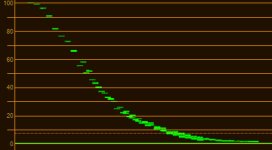
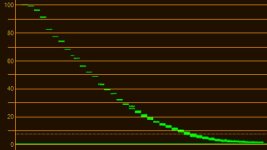
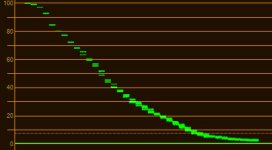
And then, the light response function:

Neutral:
View attachment 67900
Lpowell 0.7:
View attachment 67901
Flaat_11:
View attachment 67902

Final note:
This is the kind of thing that makes "Flaat for Nikon" be in beta state: I don't know if that slight hiccup at 82 is in the profile, or if it is measurement error. I would have to spend a week with the camera and shoot this test a dozen times to be sure, then play with the profile editor until all these minor-bugs-that-may-or-may-not-even-exist are ironed out. I did it with my old T2i, never got to do it with any Nikon DSLR.

In the meantime, with this and previous tests, I can declare: Flaat works just as well on the D5200 as on the D800. In fact, as far as I can tell, image processing is very similar between these two cameras (very different, for example, from that of the D7000).

A lot of this is going over my head, but do your charts indicate that the Dynamic Range is similar between Flaat_11 and Lpowell 0.7? Also for Lpowell settings is there more DR the lower you go? ie. is Lpoweel 0.4 wider DR than 1.0? Forgive the ignorance.
 
...

In the Color Finesse waveform chart, luma excursion covers the full range from 0-100 IRE, which in 8-bit mode would correspond to 0-255. ...

Lp, matching IRE (an anaolog measurement) to digital can be inconsistent. But generally, 100 IRE corresponds to video white level, i.e. 235. Black matching gets even messier with the 0 and 7.5. Are they matched to 0, 1, 16? And it gets messy still when color profiles and third-party pulgins are involved. But I really believe that what CF is calling 100 (or 700mV) IRE is actually 235, not 255.

This makes sense b/c if IRE 100 for luma were 255, there would be no room for the signal to expand to when chroma is added to luma. Look at the YC WFM in Color Finesse and I bet you'll see excursions above 100.

IMHO, what we really need to be looking at is an RGB parade, b/c that shows values per color channel for each pixel, not luma value. But there again, I believe the scope in CF will clip everything above 235. That doesn't mean there isn't data above 235, I believe there IS. But CF's Luma WFM and RGB WFM aren't showing it b/c 100 IRE for them is 235, AFAICT.

Hope that helps, and is accurate, LOL!


P.S. I've noticed that if the AE Project Settings are set to: "Working Space: HDTV (Rec. 709) 16-235" then Color Finesse's scopes DO map 100 IRE to 255. But in that case, you will not see luma clipping at 100 IRE, probably closer to 90 IRE. RGB values of 255 will also map to 100 IRE.
 
Last edited:
Samuel, can you show the RGB Parades for these different settings? And do you have calculations for the standard Nikon profile? Thanks much!
It wouldn't help you at all: the footage is processed to get this graph, and the values are remapped (it always becomes 0-100 IRE).

Pretty good dynamic range almost at BMCC Prores level :)
I would expect the BMC to be better than this, but I have no idea really. It's exactly like the D800, so if you find a D800 vs BMC dynamic range comparision, you'll have your answer.

Sorry I forgot to mention a plane flew into the frame in the middle of the flaat 11 test! :Drogar-BigGrin(DBG)
Are you testing me to see if I'm paying attention, or what? :Drogar-BigGrin(DBG)
Let's see if the Flaat_10 and Flaat_12 tests don't show this issue...

A lot of this is going over my head, but do your charts indicate that the Dynamic Range is similar between Flaat_11 and Lpowell 0.7? Also for Lpowell settings is there more DR the lower you go? ie. is Lpoweel 0.4 wider DR than 1.0? Forgive the ignorance.
Yes, they're basically the same: they both hit the camera's limit for video (no matter how you play with the profile editor, it doesn't seem to allow anything above this).
But Flaat arranges it differently: more headroom to the shadows and highlights, less to the midtones. That is: closer to log, no in-built S-curve whatsoever.
 
Last edited:
Are you testing me or what? :Drogar-BigGrin(DBG)
Let's see if the Flaat_10 and Flaat_12 tests don't show this issue...

Can't promise there won't be another plane in there somewhere. I fired a few warning shots, but they just kept coming. Gotta get me some stingers. :kali:
I gotta go now, Homeland Security are at the door. :Drogar-BlackEye(DBG
 
I really believe that what CF is calling 100 (or 700mV) IRE is actually 235, not 255...

P.S. I've noticed that if the AE Project Settings are set to: "Working Space: HDTV (Rec. 709) 16-235" then Color Finesse's scopes DO map 100 IRE to 255. But in that case, you will not see luma clipping at 100 IRE, probably closer to 90 IRE. RGB values of 255 will also map to 100 IRE.
It sounds like you're being misled by the use of the broadcast studio-swing color space: "HDTV (Rec. 709) 16-235". When you select that as your working color space, After Effects will remap the Nikon MOV files to fit into its 16-235 range. It does this because the color space used in the MOV files is the full range "HDTV (Rec. 709)" color space, which is the correct ICC profile you must use if you don't want After Effects to remap the colors in your video.

Unlike After Effects, the Color Finesse plug-in is not color managed - it is simply calculating a luma waveform chart based on the color values it finds in the data passed to it by After Effects. Color Finesse does not use 8-bit math, it uses floating point, and its 0-100 scale covers the full range of the luma component. It wouldn't make sense for Color Finesse to scale the maximum value in its 0-100 chart to correspond to the 8-bit 235 value, since that would leave no headroom to display values from 236-255.
 
Can't promise there won't be another plane in there somewhere. I fired a few warning shots, but they just kept coming. Gotta get me some stingers. :kali:
I gotta go now, Homeland Security are at the door. :Drogar-BlackEye(DBG

well, s*%t happens, right? :)

Flaat_10 and 12 tests should be up soon, we'll see if this was a plane thing or a picture style thing...


edit: here we go!

Flaat_10:
Flaat_10.jpg
Flaat_11:
Flaat_11.jpg
Flaat_12:
Flaat_12.jpg

* For some reason the 3 clips of the Flaat_10 test don't line up as nicely as the should. But it's clear that the shape is fine and the profile works similarly to how it does in the D800.
* On the chart Flaat_12 has slightly better DR than the others, but we know that area is so noisy it just doesn't matter: they're just the same, Flaat_12 will give you cleaner shadows with better colors if you're going to push them up anyway, but have your NR software at hand because it can get really ugly
* Flaat_11 is nicer than Flaat_10 or Flaat_12, I got it much closer to being really near-log and without kinks
* The 82 kink is there, it's not a plane. This is the kind of thing that makes Flaat for Nikon be "beta-3" whereas Flaat for Canon is "version 3". I'd have to correct this, but ironing out these things is very time consuming and requires that I actually have the camera with me (for a kink such as this one, a dozen iterations on each version would be par for the course)

Cheers!
 
Last edited:
... Color Finesse does not use 8-bit math, it uses floating point, and its 0-100 scale covers the full range of the luma component. It wouldn't make sense for Color Finesse to scale the maximum value in its 0-100 chart to correspond to the 8-bit 235 value, since that would leave no headroom to display values from 236-255.

But the luma component does not comprise the full signal. Luma + chroma is the full signal. That's why looking at a luma only waveform, you're usually going to see clipping at 100 IRE, which should be set to 235 BTW, not 255. (Put another way, 100 IRE is not maximum value for an analog signal; you can have active analog video up to 110 IRE.) Compare the Y WFM to the YC WFM in Color Finesse and you'll see what I'm talking about.

As for scopes clipping regular RGB values at 100 (even though 100 is 235, not 255) it happens all the time. This is why some pepople get amazed at the "highlight" recovery for some cameras. What they don't realize is that the information was there between 236 and 255 the whole time, it's just that the waveform monitor and display didn't show it b/c it was above 235.

And the only way to get 100 IRE to match to 255 in CF is to change the color management in AE to 16 to 235.

I'm not saying there isn't a chance that I'm wrong, but I really think the above is all correct.
 
Last edited:
But the luma component does not comprise the full signal. Luma + chroma is the full signal. That's why looking at a luma only wave form, you're usually going to see clipping at 100 IRE, which should be set to 235, not 255...

As for the remapping in AE, that's what would need to be done for CF's 100 IRE to correspond to 255.
Color Finesse is not displaying a combined luma + chroma signal - there is no such combined analog signal in After Effects, everything is calculated from digital data. The camera's H.264 encoder converts and encodes separate luma and chroma components directly from the RGB data captured by the image sensor. There is no clipping in After Effects' 32-bit floating point workspace, to either 235 or 255, and Color Finesse has no knowledge of which ICC color space has been selected in After Effects - it's simply displaying floating point luma data, scaled to a 0-100 range. When you select the HDTV (Rec. 709) ICC profile, that range corresponds to the 8-bit, full-range 0-255 scale used in the Nikon MOV files.

I think your confusion on this point may come from expecting After Effects to operate using analog IRE broadcast standards. After Effects will only do this when you explicitly select a broadcast studio-swing color space. When setting up After Effects to work with Nikon MOV files, it's important to make sure that the selected working color space is the same full-range Rec. 709 color space that was used to encode the video. That will insure that none of the colors in the video are remapped into a different color space.
 
* For some reason the 3 clips of the Flaat_10 test don't line up as nicely as the should.

Oh yeah forgot to mention the alien spacecraft, its cloak was refracting the light. :-Dum(DBG):

So how many stops have you measured for flaat 10 and 12?
 
Last edited:
Color Finesse is not displaying a combined luma + chroma signal - there is no such combined analog signal in After Effects, everything is calculated from digital data. ...

I realize everything is coming from digital data, LOL! ;) The issue is that IRE is an analog scale that that has been adapted for the digital world. And the way IRE is supposed to mapped in the digital world is 100 is reference white, which is 235, not 255. And that's exactly what Color Finesse is doing. (So in that sense, how you map in AE is immaterial, in CF 100 IRE will always be 235.) BTW, you can certainly display a luma + chroma waveform in CF. Just choose YC WFM. And compare that to the Y WMF. You'll get a better picture as to what I'm talking about.
 
IRE is an analog scale that that has been adapted for the digital world. And the way IRE is supposed to mapped in the digital world is 100 is reference white, which is 235, not 255.
Sorry, but you can no longer assume that the old analog standards, and their 8-bit derivatives, continue to be applied universally to digital video. They were useful in the Hollywood-centered NTSC era when video equipment was calibrated to the built-in hardware properties of CRT monitors, but that closed system has become archaic in every field except broadcast television. The transition to native digital standards has been awkward, and many video editors attempt to finesse the discrepancies by doing automatic color space conversions behind the scenes without notifying you. For most purposes it works well, but it can become quite confusing to pin down the precise data formats used in each stage of digital image processing.

The Japanese cameras we use are built to seamlessly cover a wide range of world-wide video systems and use a variety of embedded hardware and software metadata to manage compatibility issues. DSLR's still use content-delivery video encoders to record files that must work directly with consumer televisions, both NTSC and PAL. Even within the NTSC world, regional differences make it impractical to encode files using the old broadcast video IRE standards.

For example, the 7.5 IRE black level setup required by USA NTSC standards is incompatible with NTSC televisions sold in Japan, which use a 0 IRE black level. To handle this problem seamlessly, Japanese DSLR's record video files in full-range 0-255 Rec. 709 format with metadata tags to indicate that color space. Televisions built for each region recognize the tags and automatically decode the files into compatible video data. That's why there are no compatibility problems between videos recorded by Japanese versus USA versions of the same camera.

With video editors that use 32-bit floating point workspaces, there's no longer any technical need to simulate legacy 8-bit broadcast standards on a restricted 16-235 scale. Videotape material that was originally recorded in that color space can now be converted into 32-bit format and intercut compatibly with native digital formats. If a final export is needed for NTSC broadcast purposes, a render can be configured specifically in "broadcast legal" format, using a variety of color mastering tools. The simpler days of "white equals 235" are rapidly fading into history.
 
Last edited:
Sorry, but you can no longer assume that the old analog standards, and their 8-bit derivatives, continue to be applied universally to digital video. The simpler days of "white equals 235" are rapidly fading into history.

I know right?? I was telling my wife this last night as I was finishing an edit.:grin:
 
Sorry, but you can no longer assume that the old analog standards, and their 8-bit derivatives, continue to be applied universally to digital video. ...
I'm not disputing anything that you just wrote. But what I am saying is that 100 IRE is 235, not 255 in the Color Finesse screen capture that you posted. It has to be something. It could have been 255, but it isn't, AFAICT. You can do some simple testing yourself to prove this out. Just display a clipped Y WFM in Color Finesse and then display a YC WFM in Color Finesse and you will see that the YC WFM has excursions probably to 110 IRE. I simply don't is how 110 IRE is possible if 100 IRE is 255.
 
Last edited:
@Squig

Please, can you confirm if Active D-Lighting (ADL) works for video in the D5200? There are two versions, "Active D-Lighting" and just "D-Lighting". I know D-Lighting does not work because it is a post processing feature on the camera which works just for stills after the shot. But the Active D-Lighting (ADL) is applied in the capture moment so I am wondering to use it for video.

As you can see in these reviews, ADL improves the dynamic range considerably, lift shadows and avoid highlight clipping:

http://www.cameralabs.com/reviews/Nikon_D5200/index.shtml

http://www.dpreview.com/previews/nikon-d5200/11

LPowell told me in PV forum ADL works for video in the D5100, but the D5200 is a new camera so I would like to confirm.

Thanks.
 
So do you mean ADL can be enabled for video?

If yes, try the Extra High setting in a shadow/highlight situation with locked exposure in the portrait picture profile to perceive it better.
 
So, I've been reading this post slowly for days now lol. This is so exciting! I'm getting a D5200 tomorrow night (fingers crossed). I currently have a D5100. Let me know if there are any tests I could run to help this process along.
 
Аpefos, I've tried it, in different situations, have not see difference, Nikon does not advise to use it in video mode on different camera models. Would be glad if I am mistaken.
 
Last edited:
Review from Camera Labs: first video with boats on water shows no aliasing/moire. Sand texture, boat lines and cords are difficult to cameras but D5200 shows perfect image. A little bit soft but a small amount of sharpen in post solves it perfectly. A little contrasty, maybe standard profile, easy to solve with other profiles. (download original from Vimeo). Autofocus is poor, but who cares, manual focus always for serious production. Codec performance is great!

http://www.cameralabs.com/reviews/Nikon_D5200/index.shtml
 
Last edited:
Back
Top