
Navigation
Install the app
How to install the app on iOS
Follow along with the video below to see how to install our site as a web app on your home screen.
Note: This feature may not be available in some browsers.
More options
You are using an out of date browser. It may not display this or other websites correctly.
You should upgrade or use an alternative browser.
You should upgrade or use an alternative browser.
D5200 Anyone got it ???
- Thread starter ChipThome
- Start date

OlegKalyan
Well-known member
Samuel, Hi!
Thank you for the comments, please try to grade the material from both cameras, see what happens under stress.
Thank you for the comments, please try to grade the material from both cameras, see what happens under stress.

BobbyMurcerFan
Well-known member
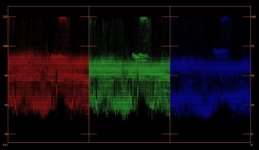
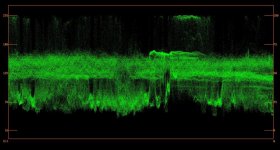
Actually, looking at the original source file more closely, it looks like it is recorded 16 to 255. I could be wrong (again) of course. But I'm looking at RGB Parades and Waveforms in both Avid Media Composer and Color Finesse in After Effects.
Actually, I'm starting to triple guess myself. R, G and B clipping seems to be happening at 235, but there are a few minor excursions above it. A higher contrast clip would help, but I can't find anything meaningful above 235.
It almost looks like Nikon will allow R, G and B to be full range, but it constrains luma to 0 (or 7.5 for NTSC) to 100 IRE (which I believe would be 16 to 235 digital). The net effect of this being that R, G and B are almost always between 16 and 235.
But again, a higher contrast clip would be helpful.
Attachments

Last edited:
BobbyMurcerFan
Well-known member

squig
Veteran
This is standard profile with everything set to 0 https://docs.google.com/file/d/0BzJ3L6nv6Fn0anhaWkJlU2EzaWs/edit?usp=sharing

Samuel H
Major Contributor
I don't think the editor will tell you what you want to know.Actually
For example, if you load a clip into the editor and it shows 0-16 values, this can mean two things:
* the clip is 0-255
* the clip is 16-235 and includes the correct metadata, and the editor is expanding that range without telling you
The only way to know which is which is to look at an original file at a deeper level.
OK, I'm basically yellow and semi-transparent myself, so I get thatThey're a bit pale in real life. Saturation was set to 90% in the grade.

In any case, an RGB curve increasing contrast also adds saturation, so that 90% number is just part of the equation.
squig
Veteran
On the rolling shutter, yeah it's as least as bad as the Nex-5n, it's really the only issue I have with this camera apart from the flimsy flip out screen and no kelvin white balance control. I might have to start praying to the film gods for Nikon to reduce the rolling shutter in the D7100. I don't want to go back to Canon after playing with this toy but the rolling shutter is a problem.
The +3 sharpness I had set on the bike clip is definitely too much. 0 or +1 with some post sharpening looks much more natural.
The +3 sharpness I had set on the bike clip is definitely too much. 0 or +1 with some post sharpening looks much more natural.
Samuel H
Major Contributor
My impression was that the 5N had less rolling shutter issues than my old T2i, so maybe the D5200 is about the same as the T2i?
I'm going to start a thread to see if people send me files to measure this more accurately on different cameras...
here: http://www.dvxuser.com/V6/showthrea...tter-put-a-number-on-this-issue!&p=1986288177
I'm going to start a thread to see if people send me files to measure this more accurately on different cameras...
here: http://www.dvxuser.com/V6/showthrea...tter-put-a-number-on-this-issue!&p=1986288177

BobbyMurcerFan
Well-known member
I don't think the editor will tell you what you want to know.
For example, if you load a clip into the editor and it shows 0-16 values, this can mean two things:
* the clip is 0-255
* the clip is 16-235 and includes the correct metadata, and the editor is expanding that range without telling you
The only way to know which is which is to look at an original file at a deeper level.
Actually Avid Media Composer has a setting that lets you determine if remapping happens or not. Now MC has many bugs, LOL!
 , but I believe it is actually doing what it is supposed to in this case.
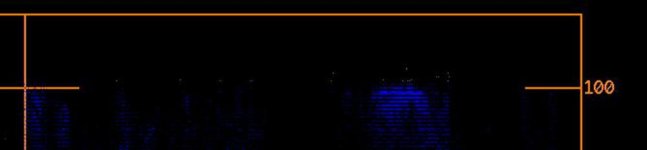
And looking at a file recorded with the standard profile, the R, G, B ranges readily move above 235. But in the clip of the kids riding the bikes, R, G, B channel clipping essentially happens at 235 with only *miniscule* excursions above.
Last edited:
BobbyMurcerFan
Well-known member
This is standard profile with everything set to 0 https://docs.google.com/file/d/0BzJ3L6nv6Fn0anhaWkJlU2EzaWs/edit?usp=sharing
THANKS! That was very helpful.
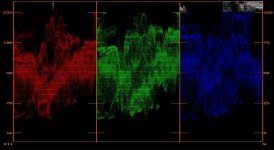
Here's what I can tell about the image: R, G and B all clip at 255 (RGB Parade). Luma by itself is constrained to 235 (Y Waveform). And the digital equivalent of a composite signal is allowed to go past of what would be 0 and 100 IRE (YC Waveform).
BTW, a clip with very dark shadows would be somewhat helpful, as I've seen in other cameras where hightlights can go above 235 but the shadows are limited to 16.
What this means, IMHO, is that if a neutral profile is essentially constraining the range to video legal levels, you are losing some of the 8-bit scale for encoding. So if there is another way to get to neutral w/o using "neutral," that might be a better option. Perhaps Flaat and/or Gamma Controls? IDK.
Attachments

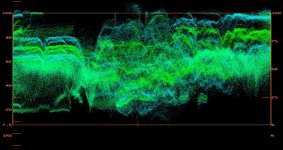
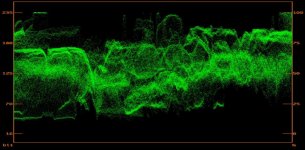
Last edited:
Samuel H
Major Contributor
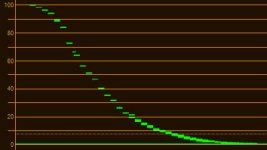
Light response functions and DR measurements!
Thanks a lot squig for the clips that allowed me to calculate all this.
First, DR:
Neutral: 10.7 stops
LPowel 0.7: 11.3 stops
Flaat_11: 11.3 stops
And then, the light response function:
Neutral:
Lpowell 0.7:
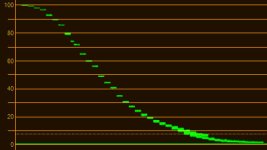
Flaat_11:
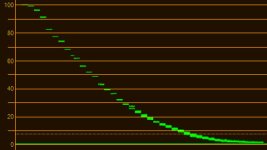
Final note:
This is the kind of thing that makes "Flaat for Nikon" be in beta state: I don't know if that slight hiccup at 82 is in the profile, or if it is measurement error. I would have to spend a week with the camera and shoot this test a dozen times to be sure, then play with the profile editor until all these minor-bugs-that-may-or-may-not-even-exist are ironed out. I did it with my old T2i, never got to do it with any Nikon DSLR.
In the meantime, with this and previous tests, I can declare: Flaat works just as well on the D5200 as on the D800. In fact, as far as I can tell, image processing is very similar between these two cameras (very different, for example, from that of the D7000).
Thanks a lot squig for the clips that allowed me to calculate all this.
First, DR:
Neutral: 10.7 stops
LPowel 0.7: 11.3 stops
Flaat_11: 11.3 stops
And then, the light response function:
Neutral:
Lpowell 0.7:
Flaat_11:
Final note:
This is the kind of thing that makes "Flaat for Nikon" be in beta state: I don't know if that slight hiccup at 82 is in the profile, or if it is measurement error. I would have to spend a week with the camera and shoot this test a dozen times to be sure, then play with the profile editor until all these minor-bugs-that-may-or-may-not-even-exist are ironed out. I did it with my old T2i, never got to do it with any Nikon DSLR.
In the meantime, with this and previous tests, I can declare: Flaat works just as well on the D5200 as on the D800. In fact, as far as I can tell, image processing is very similar between these two cameras (very different, for example, from that of the D7000).
BobbyMurcerFan
Well-known member
Samuel, can you show the RGB Parades for these different settings? And do you have calculations for the standard Nikon profile? Thanks much!
Here's a screengrab of an original MOV file recorded by a Nikon D5100, unedited or graded and displayed in Adobe After Effects CS5.5 in 32-bit Rec. 709 ICC color managed mode. AE recognizes that the MOV file's encoded color space is tagged as Rec. 709 and confirms that it does not remap its color values.BTW, a clip with very dark shadows would be somewhat helpful, as I've seen in other cameras where hightlights can go above 235 but the shadows are limited to 16.
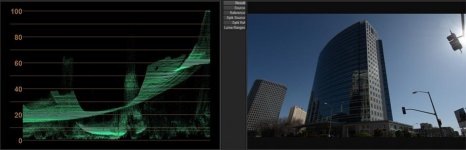
In the Color Finesse waveform chart, luma excursion covers the full range from 0-100 IRE, which in 8-bit mode would correspond to 0-255. On the chart you can see a pair of unlabeled orange horizontal grid lines between 0 and 20. The lower of these two grid lines is at 7.5 IRE, and indicates broadcast studio-swing black level setup (i.e. 16 in 8-bit scaling). The full-swing video stream in the Nikon D5100 MOV file ranges well below 7.5 IRE, all the way down to 0 IRE.
squig
Veteran
@Squig Did you have any problems autofocusing with the Sigma 20mm 1.8 on the D5200? I am just curious since I just picked one up and the autofocus is not working?
I haven't actually tried the Sigma on the D5200, I opened it up and declicked the aperture when I got it and a couple of metal rings fell out so it might not autofocus as well as it used to.
 rogar-BigGrin(DBG)
Last edited:
squig
Veteran
Final note:
This is the kind of thing that makes "Flaat for Nikon" be in beta state: I don't know if that slight hiccup at 82 is in the profile, or if it is measurement error. I would have to spend a week with the camera and shoot this test a dozen times to be sure, then play with the profile editor until all these minor-bugs-that-may-or-may-not-even-exist are ironed out. I did it with my old T2i, never got to do it with any Nikon DSLR.
(very different, for example, from that of the D7000).
Sorry I forgot to mention a plane flew into the frame in the middle of the flaat 11 test!
rogar-BigGrin(DBG)
BobbyMurcerFan
Well-known member
LOL!
squig
Veteran
LOL!
Story of my life. :nads::violin:
Samuel, can you show the RGB Parades for these different settings? And do you have calculations for the standard Nikon profile? Thanks much!
I haven't tested standard but I will.
I've looked closely at shots taken with standard and neutral, colour wise they look almost identical and the only thing that appears to differentiate them is the contrast, so standard with -3 contrast looks exactly like neutral. I'll take some dark shadow shots with each profile.