D5200 Anyone got it ???

Anyone with a D5200 can see if Active D Lighting shows up in Live View of Photo side or Video side? It would seem odd not to have some way of knowing what the effect of each ADL setting will do. Tho i'm sure it may not always be easy to see the difference even if they did allow it to be displayed on the LCD screen.
 
I'm not disputing anything that you just wrote. But what I am saying is that 100 IRE is 235, not 255 in the Color Finesse screen capture that you posted... Just display a clipped Y WFM in Color Finesse and then display a YC WFM in Color Finesse and you will see that the YC WFM has excursions probably to 110 IRE. I simply don't is how 110 IRE is possible if 100 IRE is 255.
Actually, the level marked 100 in Color Finesse's Luma Waveform is neither 235 nor 255, it's 1.0. As explained to me by the developer of Color Finesse, no 8-bit values are used in 32-bit After Effects, everything is calculated in floating point.

When you select a 32-bit full-range Rec. 709 working space in After Effects, it converts the H.264 0-255 YCC values into floating point RGB values scaled from 0-1.0. Color Finesse has no knowledge of your working color space, it simply calculates the equivalent luma levels from the floating point RGB values, labels 1.0 as 100, and clips anything larger than that. In 32-bit mode, After Effects can seamlessly handle superwhites and superblacks as values that happen to fall outside the 0-1.0 RGB range, but it doesn't destructively clip them until you export the footage into an external video format. As a result, graded footage may contain superblack values lower than 0.0 and superwhite values higher than 1.0.

Similarly, Color Finesse's YC Waveform chart isn't an actual waveform, it's a calculated simulation of what you'd get if the digital RGB data were converted into an analog video waveform. In this case, Color Finesse shows you how the simulated luma and chroma signals would combine and whether they would fit into the broadcast legal limits. Since the YC output signal is defined specifically in NTSC terms, the scaling used in this chart actually is the analog IRE scale. The 0-100 scale used in Color Finesse's Luma chart isn't necessarily an IRE scale, it's actually just a scale of floating point percentages. It will match the IRE scale only when you select a broadcast studio-swing profile as your working color space. This is an example of the kind of behind-the-scenes data juggling that modern video editors use to finesse the discrepancies between different color spaces.
 
Last edited:
I think we all need more scientific tests about Active D-Lighting.

I hope LPowell dont mind I post here a copy of his answer about ADL (from PV forum):

"I've tried Active-D lighting in video tests on the D5100. While it does bring out shadow and highlight detail in high-contrast scenes, it's only usable when you have both camera and lighting locked down, and none of your subjects cast moving shadows. With any kind of dynamic scene, Active-D will react in an unnatural manner. But as you surmised, it can work well in still shots."

"Yes, virtually any of the Nikons' still-frame features can be used in video mode (except for viewfinder focusing). I'd recommend you try Active-D at its lowest setting and underexpose the highlights. That will restrict the Active-D's effect to the shadows, where it looks more natural to my eyes."
 
way to do a more scientific test about ADL (Active D-Lighting):

put camera on tripod to fix the metering and also get same frame, point to a shadow/highlight scene (house interior with a open window or a tree against sky with clouds)

set metering mode to Matrix Metering (recommended by the pdf manual when using ADL)

set picture profile to standard, not dialed down, everything (contrast, color, noise reduction, sharpness) in middle position

set camera dial to M and use the same exposure and iso for all video shoots, try to use a middle position shutter/aperture/iso, for example: 1/500 f8 iso 800
(set the exposure with ADL off in a way to get dark shadows and bright highlights, so it will be better to perceive any improvement when turn ADL on)

shot a video with ADL off, and then turn ADL to EXTRA HIGH and shoot another video (be careful to shoot with same sunlight power, to avoid exposure changes).

upload the videos or frame grabs extracted from videos.
 
Actually, the level marked 100 in Color Finesse's Luma Waveform is neither 235 nor 255, it's 1.0. As explained to me by the developer of Color Finesse, no 8-bit values are used in 32-bit After Effects, everything is calculated in floating point.

When you select a 32-bit full-range Rec. 709 working space in After Effects, it converts the H.264 0-255 YCC values into floating point RGB values scaled from 0-1.0. Color Finesse has no knowledge of your working color space, it simply calculates the equivalent luma levels from the floating point RGB values, labels 1.0 as 100, and clips anything larger than that. In 32-bit mode, After Effects can seamlessly handle superwhites and superblacks as values that happen to fall outside the 0-1.0 RGB range, but it doesn't destructively clip them until you export the footage into an external video format. As a result, graded footage may contain superblack values lower than 0.0 and superwhite values higher than 1.0.

Similarly, Color Finesse's YC Waveform chart isn't an actual waveform, it's a calculated simulation of what you'd get if the digital RGB data were converted into an analog video waveform. In this case, Color Finesse shows you how the simulated luma and chroma signals would combine and whether they would fit into the broadcast legal limits. Since the YC output signal is defined specifically in NTSC terms, the scaling used in this chart actually is the analog IRE scale. The 0-100 scale used in Color Finesse's Luma chart isn't necessarily an IRE scale, it's actually just a scale of floating point percentages. It will match the IRE scale only when you select a broadcast studio-swing profile as your working color space. This is an example of the kind of behind-the-scenes data juggling that modern video editors use to finesse the discrepancies between different color spaces.

I really appreciate all of your discussion and research on this. And with RGB sources, I've found the above to be the case.

But, FWICT, CF's scopes are not working w/ natvie D5200 footage as expected. Essentially, if color management is set to 709 full range in AE, then CF's scopes are always showing 235 as being 100.

Here is a simple test you can do. With blown-out D5200 footage, pull down the gain or brightness while dispalying the RGB WFM. When I do this, meaningful image data appears at the top of the waveform (not the just the minor excursions I mentioned in the Avid thread). Also, if I lower gain or brightness to the point where there there is no menaingful "hidden" data above 100, i.e. the highest peak of the RGB WFM just kisses 100, and add a luma key in AE to key out everything below 235, nothing is left of the image. That shouldn't be the case. 236 to 255 should still be there.

Anyway, I don't want to highjack this thread with this, so I'll probably create a new thread after I do some more digging around.

But thanks agian for your input and help. ;)


P.S. I'm am still investigating this and have uncovered some things that are leading me to doubt MC's scopes, LOL! Here is a link to the post in the Avid forum:
http://community.avid.com/forums/p/117609/678482.aspx#678482

P.P.S. Well it looks like Avid's Media Composer might have again bit me in the butt. And for that I'm very sorry, b/c it is looking more and more likely that MC does remap even when it's not supposed to. I was thrown off b/c there is a lot of out of gamut blue channel data on the clip I used for testing. But apparently that's due to rounding errors during the conversion to RGB values. *sigh*
 
Last edited:
BTW, I'd love to post some footage I shot today, but I don't quite get permission to do so. All I can say I'm blown away by the quality of this plasticy camera. It looks so much better than any previous DSLR.
I know this is a stupid post without footage, but I had to say it.

Did MacGregor ever post anymore video?
 
I would expect the BMC to be better than this, but I have no idea really. It's exactly like the D800, so if you find a D800 vs BMC dynamic range comparision, you'll have your answer.
.

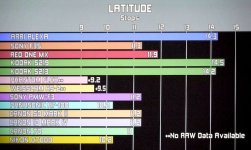
13 stops in RAW and around 11-12 in Prores I believe, but subjectively I would say the BMCC is better
 
D800e still better a bit, imho, more so withough mosaic filter, with significantly better resolution, with it just slightly better resolution.
Range slight advantage to D800e.
it's commonly known from BBC tests by Alan Roberts that latitude of D800 around 12 stops, D4 around 13, recording to card.
 
Last edited:
D800e still better a bit, imho, more so withough mosaic filter, with significantly better resolution, with it just slightly better resolution.
Range slight advantage to D800e.
it's commonly known from BBC tests by Alan Roberts that latitude of D800 around 12 stops, D4 around 13, recording to card.

For video?
 
So how many stops have you measured for flaat 10 and 12?

I'd say:
Neutral: 10.7 stops
LPowel 0.7: 11.3 stops
Flaat_10: can't really measure it, but I'd say around 10.7 stops
Flaat_11: 11.3 stops
Flaat_12: 11.7 stops
 
After reading the last pages and watching the videos again I found the obvious thing: using the Flaat or Lpowell profiles we do not need Active D-Lighting.
 
Maybe we do, still don't have 14 stops into the highlights like film yet :)

NAB11AWP1000307.jpg
attachment.php
 

Attachments

  • NAB11AWP1000307.jpg
    NAB11AWP1000307.jpg
    49.9 KB · Views: 0
Back
Top