Barry_Green
Moderator
A Review Of The Panasonic AG-AC90 Professional Video Camcorder
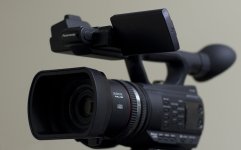
I have just returned from a trip to the Dominican Republic, which has some truly spectacular scenery, so I took the new AG-AC90 along to try it out in a tropical paradise of crystal clear water, lush green foliage, and miles of gorgeous beaches. Last year I had previously taken my AF100 along on a trip to Belize, so this year I decided to take the AG-AC90. I have been beta testing a pre-release version of the camcorder and thought I would take it along and write a review while I was there.
The AC90 is Panasonic's newest (as of 11/2012) professional camcorder, at a relative bargain-basement price of $2,295 (MSRP, street price is around $1,995). Initially I thought it was intended to be a replacement for the AG-HMC40, Panasonic Broadcast's tiny professional camcorder, but after working with it for a few weeks it became quite obvious that no, the AC90 is not intended to replace the HMC40, the HMC40's tiny size leaves it with a unique position in the lineup. Physically the AC90 is a lot bigger than the HMC40, although it is also notably smaller than the other members of the “AC” lineup, the AC-130 and AC-160. It's smaller, lighter, less expensive, and in some ways easier to use for a one-man production crew than the larger AC cameras, but at the sametime it's not a palmcorder like the HMC40, it's a (basically) full-size professional camera. It shares some things in common with the HMC40 (like a touchscreen LCD and an integrated/automatic ND filter, and the ability to take still photos) but in most other ways it's more like the bigger cameras, including dual-slot recording, pre-record, six scene files, and built-in XLR audio. And, it actually does some things the other cameras don't do – such as being able to take a still photo during recording, being able to record on both cards simultaneously and continue recording if one of the cards fails, and perhaps most interestingly, it has a new “intelligent auto” that really adds to the automatic capability in the HMC40 and far exceeds the automatic capabilities of the AC130 and AC160, and its optical image stabilization is unparalleled among its brethren.
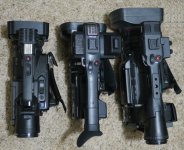
DVX100B, AC90, and AC160 side by side
So how big is it? This photo should show you the basic size comparison. It's pretty much the same size as the beloved DVX100B, a camera I used for many years and shot a lot of events and corporate work with. And that's a great size! I think the AC130 and AC160 are excellent camcorders and they do many things the AC90 doesn't do (such as variable frame rates, and recording in 720p mode) but they are also substantially larger, heavier camcorders. The AC90 is the same size as, and a lot lighter than, the DVX100B. It's not pocketable like the HMC40 but it's perfectly balanced and a real featherweight (approx. 3 pounds without battery, a full 25% lighter than the DVX100B) so you could easily hold it for all-day shooting. (Note: you can make the AC90 a little smaller by removing the lens hood, you just have to unscrew a retaining screw first, using a small Phillips-head screwdriver. Remove that screw, and the hood will bayonet off just like the prior cameras. That's been a point of concern for more than a few people, but it's really a non-issue – removing the lens hood still leaves the 49mm filter threads in place, so you can use filters or a circular polarizer or a matte box or attach other accessories to the front of the camera. You don't even have to replace the screw, as the lens hood does securely “snap on” into position. However, you'd have to come up with an alternate lens cap because the AC90's lens cap fits into the lens hood, not on the lens. It's a huge improvement, cap-wise, over the DVX100/AC130/AC160/HPX250 lens cap system. Still not as nice as an integrated switch-operated cap as found on some Sony models, but it's much better than the squeeze-in cap as used on the other AC cameras.)
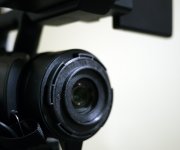
AC90 with its lens hood removed
The AC90 differs from the other Panasonic professional camcorders in a few notable ways – it's the only one to have a touchscreen (other than the HMC40, of course), and it's the only one that doesn't have a side-mounted LCD with buttons behind it. Other Panasonics have had a flip-out LCD on the side, and opening the LCD panel would reveal several operational buttons (like EVF DTL, or ZEBRAS) that would otherwise be unreachable when the LCD panel is closed. On the AC90, they've moved the LCD up onto the handle, so it never covers up buttons that you might want to reach. The LCD placement works very well, and it's a sharp and crisp LCD panel too. You activate the LCD by pulling it out of its slide-in base, and activating the LCD will disable the viewfinder (no way to have them both operational simultaneously). The LCD rotates 270 degrees, and is a touchscreen – and that really marks a difference between the AC90 and all the Panasonic broadcast cameras that have come before it (excepting, again, the HMC40). With the AC90, menus and playback are handled via the touchscreen, rather than through a joystick or pad of menu buttons. Is this a good thing or a bad thing? Well, I've got to say – it's sort of both. On the plus side, it's really usable. It's 2012 now, after all, and we've become used to iPhones and iPads and Android phones and other such electronic devices, and just pointing and touching the screen is a simple, intuitive way to work. The AC90 takes it further than the HMC40 did, in that it has six scene files that you can switch among instantly, even while recording, just by touching their icons on the screen. Menus are easy to get to and easy to navigate through. Playing back a clip is as simple as touching its thumbnail, and scrubbing through a clip is easily done by dragging the onscreen playback bar. It largely just works the way you'd want it to. So what's the downside? Fingerprints, of course – especially if your hands are greasy with suntan lotion! Now, in general, this hasn't proven to be much of a problem – with the camera's power turned off, I can see that the screen is covered in fingerprints, but when you turn the power on and the screen is illuminating itself, they're invisible. The screen display doesn't appear to suffer any for being covered in fingerprints, and you can always just wipe it with a microfiber cloth to clean it up. The AC90's LCD is not difficult to see in daylight, but it's not ideal either; in true broad daylight you'll probably be better off using the (low-resolution) viewfinder. Having the menus driven by the touchscreen does mean that the camera is harder to operate when using only the viewfinder though; with the LCD closed, the viewfinder becomes available, but there's no way to access the menus. You can bring them up by pressing the menu button, but -- the only way to select among the menu items is by the touchscreen! That's an annoying oversight on the designers' part -- it would have been nice if the buttons could have been repurposed to be up/down/left/right menu navigation buttons when the menus are up and the LCD is closed... as it is, I found myself using the LCD panel 98% of the time, and so it wasn't a real problem, but the basic issue is: you can't use the viewfinder and access the menus. Seems like some provision should have been made for that.
But, apart from that one oversight, the touchscreen does work quite well. And the touchscreen is one example of how the AC90 is a broadcast camera that's borrowing ideas from consumer camcorders – and, frankly, there are some things that consumer camcorders can do better than broadcast camcorders traditionally have done. Blasphemy? Not at all, just an acknowledgement that innovation happens very rapidly in the competitive consumer sector, where products typically have a much-shorter lifespan, and broadcast products have largely operated very similarly for years and years, so innovations like integrated ND filters, integrated gain, and face-detect autofocus are things that just aren't that commonly found on broadcast cameras, yet – maybe they should be. As an example – on the AC130 (or AC160, or HPX250, or EX1/EX3 or just about any other broadcast camera) the neutral density filter is controlled separately with a switch, and you usually have either 2 or three choices (example: the DVX100B has a 3-stop and a six-stop ND filter, where the HVX200 has a 2-stop, 4-stop, and 6-stop). Those are actual hard physical glass neutral density filters, mounted on a wheel behind the camcorder's lens and in front of its sensor, and by sliding a switch you can swap to one of the other ND filter choices. That works fine, obviously, and has been the broadcast standard for decades. But, it's not possible to swap in the ND filter while recording without seeing it in the footage, and it can't be done seamlessly – sliding in a different ND filter causes a 2-stop or 3-stop change in exposure, so you have to then manually adjust the iris to get truly proper exposure. It's – in a word, it's clunky. It works, it's always worked, but – is there another way? Perhaps. The AC90 (and the HMC40 and HMC80 before it) have an integrated, seamless, automatic ND filter. You have no control over it. It comes into play whenever the iris is stopped down beyond f/2.8, automatically sliding (invisibly) into position more and more as you stop down more and more. It's seamless. And it lets the camera keep its physical iris more open longer, which helps prevent the resolution-robbing phenomenon of diffraction from rearing its mushy head. Accordingly, you can go from wide-open to 2+ stops of ND filter, just by moving the iris ring, without having to clunk-in a separate ND filter. What's not to love? It works pretty well – with the caveat that the maximum level of filtration isn't quite strong enough, but more on that later. Another example of doing things differently: the AC90 also offers integrated gain. There is no gain switch. On a typical broadcast camera you select gain levels in usually three steps – low, mid, and high gain. There's a physical switch on the camera that you flip, so you can go from 0dB of gain (aka “no gain”) to, 6dB of gain, at the flip of a switch. It works fine, it's the way we've always done it, but – is it the best way? Maybe, maybe not. The AC90 approaches it differently – it assumes that you never want gain on any shot where you've stopped down the iris (reasonable assumption, too -- who shoots at f/4 with the gain cranked up?) So if you're at f/2.8, there'll be zero gain added. If you're at f/4, there'll be zero gain added. But if you open up the iris to all the way open, that's the time when you might want some gain, right? And accordingly, the AC90 has integrated its gain circuitry into the iris ring, so that when you open up the iris further than wide open, it starts adding gain in. And not in clunky 6dB chunks either, but in seamless 1dB increments. So if you open up the lens all the way to f/1.5, and then attempt to “open it up” a little more, it'll go to f/1.5 (its maximum opening) and add 1dB of gain. Open up a little more, and it'll go to 2dB of gain, and on and on, up to its maximum of 30dB of gain. Seamlessly. Now, I grant you, this is different from how broadcast cameras have worked in the past, where you could be at, say, f/8 and also have 12dB of gain switched in, but – does that make sense? Doesn't it sound more rational to have gain seamlessly added once the iris is at maximum open? In truth I do like to know for a fact there's no gain being added, and so I appreciate that aspect of a separate-switch system, but I can definitely see how this could be very useful for the one-person shoot (I'm thinking events, weddings, sports, fast action, those type of things, where you really don't want to be distracted by having to clunk in ND filters and flip gain switches, instead the camera can just do it all for you, seamlessly, smoothly, and – well, yeah, effortlessly). Or for the walk-and-talk where you follow a reporter from outside broad daylight into the interior of a building -- swapping the ND filter wheel on a broadcast camera doesn't usually allow for a nice seamless transition in a case like that. For a cinema shooter this integrated way of working may not be an appealing change, but for an events or reality or news shooter, especially when you're the one-man-band, something like this can come in really handy.
For further flexibility in exposure control, the camera also offers the option of using a fully automatic shutter – meaning, the camera can adjust its shutter speed automatically, if you so instruct it to. You have full manual control, of course, but it also offers the option of automatic control. Once again, this can give you exposure flexibility with no effort on your part, but this is one that I advise strict caution with – adjusting the shutter speed, in my way of working, is something that should only be done by conscious decision of the camera operator. High shutter speeds can lead to choppy/staccato movement in your footage, and are best avoided when shooting video (unless, of course, you're using that choppiness as an artistic element on purpose). Plus, just like any other rolling-shutter MOS camcorder, the AC90 can cause banding artifacts when used at high shutter speeds under fluorescent or HMI lighting or mercury-vapor or sodium-vapor streetlamps or stadium lights. So in general, I like to keep the shutter speed at a fixed speed (1/60 in the USA or NTSC territories, 1/50 in PAL territories). But, when working outdoors, in broad daylight, the fact of the matter is you're either going to need to use high shutter speeds, or you're going to require external ND filters. There's no two ways around it – the camera's built-in ND filtration is not quite strong enough to allow proper exposure on a bright sunny Caribbean beach (nor, I would dare say, at a daytime football game or any other full-sunlight event). You have to get the exposure down into the camera's acceptable range, and that means either using an external ND filter (I would recommend at least a 2-stop filter, and perhaps even a 3-stop filter) or, allowing the automatic shutter system to take over, adjusting the shutter speed to keep the scene in the proper exposure range. Obviously, as stated before, I prefer to keep the shutter at a fixed speed, so I vote strongly that prospective AC90 users invest in a high-quality 2-stop or 3-stop ND filter. Don't get a cheapo filter, or a variable ND filter, you want a good-quality high-precision filter, because cheap filters will degrade the image optically, and this is such a sharp camcorder it needs the best filters to deliver its best performance.


Did I say sharp? Well, boy howdy, yes this thing is sharp. Really, really sharp. As sharp as, and perhaps sharper than, other 1080p-native camcorders I have tested. How and why? Well, part of it is because the camera uses full-resolution 1080p sensors, but they go a step further – they use a spatial-offset technique (aka “pixel shift”) to increase the resolution the camcorder can deliver, so everything internally is processed off of a 4K source image. Then it's downconverted to 1080p. And it really fills out that 1080p frame very nicely. I have to say, this camcorder is delivering some of the best chart performance I've ever tested, especially in terms of resolution with no aliasing. Look at this section from The Wringer, where I recorded the AC90's output onto a NanoFlash to get the full 4:2:2 HDMI output.
There's nothing but pristine perfect resolution in all colors, and absolutely zero aliasing. It's really commendable. It outperforms some cameras costing much more, and anything costing less too. The AC90 is delivering heaps of solid genuine resolution. Especially when paired with an external recorder, which bypasses the 4:2:0 limitation of the onboard AVCHD codec, you can really extract a very solid 1080p 4:2:2 image out of this little camera. I haven't tested it for chroma keying but I would expect you should be able to pull extremely high quality keys from the AC90, especially when paired with an external 4:2:2 recorder.
The AC90 can also use that spatial-offset 4K image to create 3-megapixel still photos with. The AC90 downscales its 4K internally-processed images to extract the maximum detail the chips can deliver when recording still photos, which are recorded at 2304 x 1296 resolution. The quality of the still photos is not on par with a top-end DSLR, but it is superior to the quality of the stills from the HMC40... although I did notice some chromatic aberration in some spots that didn't appear to be there in the recorded video. And, as said before, the AC90 can take stills even during recording (or, if you want, you can extract a still from recorded video by playing it back and pressing the “photo” button at the appropriate moment, although stills created in this fashion won't be 3-megapixel 2304x1296, they'll be HD-compliant 1920x1080). Does that make the AC90 a replacement for your DSLR? Not hardly; I mean, obviously 3-megapixel stills aren't going to compare to a 21-megapixel full-frame DSLR. But, the stills are decent, and since the camera's already in your hands, if you need to take a still shot, it does a credible job.
The AC90 is also the first AVCCAM camcorder that doesn't support 720p – at all. There is no provision for 720p recording, and no provision for 720p playback. This is an all-1080 camcorder, supporting 1080i or 1080p at 24, 30, and 60 progressive frames per second (or, in the European/Australian/Asian version, it's 1080i or 1080p at 25 or 50 frames per second), but no support for 720p at all. I'm not sure how I feel about that... I mean, 1080/60p is obviously the big win here, in that it's the same spatial resolution as 1080i but with the progressive nature and temporal motion qualities of 720/60p. And if you need 720p, in post you can obviously downconvert the 1080/60p to 720/60p and get fantastic oversampled 720p. But, if you are using the camera as a live camera head in a multi-camera 720p event, or if you're handing off footage to the producer at the end of the shoot and the producer needs 720p footage … well, the AC90 can't do that. It's 1080p or 1080i only. On the plus side, it really simplifies the menu structure and the playback system – no more “cannot play” errors because the camera's in 720p mode and the recording was 1080p, etc. I would rather have had 720p as an option (even though, to be honest, I don't think I've ever even used it in my AF100). And, as a $1995 camcorder, you can't get everything, so if they had to leave something off in order to lower the price, I guess 720p was one of those things, and I think most people will likely never miss it. If you do need 720p, the AC130 and AC160 offer that.
One big improvement in the AC90 is the way its dual-slot simultaneous recording works. The AC130 and AC160 have simultaneous recording too, but they work differently. In the AC130 or AC160, it can record to both slots simultaneously, but if either card fails, the recording for both slots stops. I understand why they did this; I mean, if you've told the camera to record two copies, and one card fails, then you're no longer recording two copies, so it stops. It's understandable, but it's also not what I want – if I'm recording to two slots, it's for safety and to prevent missing a shot due to a glitch on a memory card! And the AC90 has changed it to work that way – now, it will record on both cards, and if one card stops, the recording will continue on the other card. This is perfect – it now provides an immediate simultaneous backup and error protection in case anything goes wrong with one of the memory cards. Bravo, Panasonic.
No review of this camcorder would be complete without a discussion of the AC90's image stabilization. In the shortest possible description, it's – far and away the best OIS Panasonic has ever included in any professional camcorder. Period. It uses what they call "Hybrid OIS" -- it tracks motion on five axes, and has a lot more capability to neutralize shake and jitterIt's not pure magic, but it's so much better than anything they've had before, there's just no comparison. The AC90 has superb image stabilization. Much of the footage in the sample video was shot handheld -- in a boat, rocking on the sea.


Having a lot of OIS power isn't all peaches and cream though -- you will most definitely need to turn this OIS off when you're using the camera on a tripod. The camera can compensate for a serious amount of camera motion now, and you can really see the effect if you're panning on a tripod because when you stop panning, you can watch the scene "glide" to a stop as the OIS system's prisms re-center themselves. Not likely a desirable effect, and so do yourself a favor and turn OIS completely off when you're using a tripod or other stabilizing device.
So what's not to like? What's the Achilles' heel, the flaw, the reason why other cameras cost more? Well, like the HMC40 before it, the AC90 isn't the most light-sensitive camcorder. Its ISO rating is about 40 ISO. It's not the king of low light. It's not as sensitive as other AVCCAM camcorders such as the AC130 (about 320 ISO) or the AF100 (about 400 ISO). But, to be fair, it does make up for a little of that by having a faster lens (f/1.5 on the AC90, vs. f/1.8 on the HMC40) and that does help. But here's the thing – the AC90's gain is super-clean. You can shoot at 20dB of gain, with very very little noise. You can't do that on a DVX100B or even on an AC130 or AC160. On most cameras, gain shows a substantial increase in noise, and the more gain, the more noise. On the AC90, I can only deduce that it is using sophisticated and aggressive noise reduction, because adding gain has really very little effect on the noise level in the picture. Even going above 18dB of gain, the amount of additional noise is quite small. When you get to 30dB of gain, yes there's noise, but even so, it's really quite tame as compared to other cameras. I don't have my HMC40 anymore, but from memory I would say that the AC90 at 30dB of gain is as clean or cleaner than the HMC40 at 12dB. That translates to about a 3-stop increase in low light performance for the AC90, as vs. the HMC40. Still not quite in the lofty realms of the DVX100B as far as pure sensitivity, but the cleanness of the image makes using healthy amounts of gain something worth considering. Now, the more noise reduction you do on an image, the softer the image can get, and the AC90 does show some image softening in the range of 24dB to 30dB, so – I don't recommend for people to crank up the gain to maximum all the time; remember, you'll do far more for your image quality by adding a light than you ever would by cranking up the gain. But, what I'm saying is, the penalty for using a lot of gain is much milder on the AC90, to the point where I consider up to about 18dB of gain really quite usable. As an example, look at what the much-more-sensitive DVX100B looks like under 18dB of gain, and then let's compare that to what the AC90 looks like – the AC90 isn't as bright, but the cleanliness and sharpness of the picture is vastly improved.
DVX100B in 480/60i at 18dB of gain on top, AC90 in 1080/60p at 30dB of gain on bottom. Lighting was identical.
So even though one camera is rated at 640 ISO (the DVX100B) and the other is at a paltry 40 ISO (the AC90), which makes the more pleasing picture in low light? The AC90 wins this comparison in a landslide. I still don't consider it a super-duper low-light camcorder, as I really prefer to shoot with minimal gain to preserve image quality as much as possible, but -- it's surprisingly good for a camera with such small imaging chips, that's for sure. If you're used to working on a large sensor camera at 2,000 ISO, then the AC90 may seem like its 40 ISO is not competitive, and -- well, yeah, it's not a full-frame giant sensor. But it's still surprisingly capable, as shown in the video against the DVX100B. You won't likely be shooting any footage of bats in coal mines at midnight, but even a 60-watt lightbulb can give off enough illumination that you can make decent quality footage.
Along with the improvement in gain, comes a big improvement in usability of the Dynamic Range Stretching (DRS) feature. DRS is a way to brighten shadows and tame highlights to increase the effective dynamic range in the camera; it's been on the Panasonic lineup since the HPX170 came out in 2008. However, it's always been of less than ideal value because the shadow stretching was accomplished by adding a lot of gain -- at the strongest DRS level 3, it meant adding up to 18dB of gain in the shadows. On the prior cameras, that meant a lot of noise was added. On the AC90, the noise penalty is quite mild, and so DRS becomes a more viable tool for more scenarios. Here's an example of how DRS helped to tame the deep shadows in a palm tree forest scene.

Exact same exposure, DRS off on the left photo, right photo is DRS on level 3.
Then there's all-automatic mode. This is new, and one area that's, frankly, vastly improved over their prior cameras. In the prior cameras there is automatic capability for focus and exposure, but on the AC90 they've extended it to focus, iris control, ND filter, gain, and automatic audio level, and, in addition, they've put in intelligent processing that analyzes the scene and tries to determine what kind of scene it's looking at – for example, it has face detection, and can tell if there's a face, and will prioritize its settings to make the face look its best, and prioritize focus so that it is focusing on the face. Additionally, it can tell if the background is bright or dark, and thus choose between “Portrait” and “Night Portrait” mode. Or, if it sees a huge swath of blue sky, the camcorder might decide that it's looking at a landscape, and it will switch to “Nature” settings. Or if the DOF is very shallow, it might decide that it's in “Macro” mode (taking shots of flowers or other tiny close objects). The camera “knows” what type of scene it's shooting, and it can adjust all its parameters to accommodate. And when I say all its parameters, I mean all of them – including all the scene file settings. You can't adjust the scene files when the auto/manual switch is in automatic, I mean, really, when this camera is in automatic it's REALLY in automatic mode! You can, of course, choose manual control and have the camera selectively control automatic focus or automatic iris or automatic shutter without entering “intelligent automatic” control; you really do have control over all that. But if you slide the switch from “manual” to “iAuto”, that's when every function goes into automatic control. I used this quite a bit during the Caribbean vacation test, and it really works quite well. It's not perfect, but it's so much better than most camera's automatic modes that I'm not afraid of using it when appropriate. I did find that the iris seemed to want to tend towards underexposure in the bright-sky landscape shots, which is basically understandable, but I found that going to manual exposure I could brighten things up nicely and the zebras and histogram were quite helpful in keeping everything within proper exposure range. And autofocus was very impressive when shooting 1080/60p – it was basically instantaneous, even when shooting a wide shot which was interrupted by someone walking through it extremely close to the lens: the camera instantly brought the person's head into focus, and when they left the frame it instantly snapped back to bringing the wide shot into focus. Right now I imagine there are more than a few folks saying "but ... pros don't use automatic!" Well, pros are people who get the shot -- if you miss out on a shot because you were screwing around with switches and buttons instead of pointing the camera at what's happening in front of you, you're going to have some explaining to do. I'm not saying the automatic functions do the job better than a trained person who has the time to dial them all in; I'm just saying -- they do work, they work quite well, and if you simply don't have the time to go through all-manual control, you can turn over some of the jobs to the camcorder and be reasonably assured that it's going to do its part. It's nice to at least have the option.
Sound is one area where the AC90 is hugely improved over the HMC40 or as compared to consumer camcorders, because the AC90 includes the proper connections and capabilities to support professional equipment. There are two XLR jacks, and you can assign them to be either mic-level or line-level, and you can supply phantom power to either, neither, or both of them. There is automatic level control or manual level control (either way with or without using an audio limiter), and you can choose to use the onboard stereo mic in tandem with the XLR ports (meaning, you have two audio tracks that get recorded, and those two tracks can come from the XLR ports, or from the stereo mic, or from one of each, or you can assign XLR port 2 to both audio tracks). Additionally the camera has an onboard surround-sound mic and records 5.1 channel surround sound, and you can adjust the mic to record a fixed ratio of surround sound, or to narrow its field of recording to synchronize with the zoom setting on the camera so the tighter you zoom in, the more emphasis is placed on the front mics and the rearward mics are de-emphasized. There's also a tiny bit of equalization you can do on the bass, in that it provides the ability to cut low frequencies, or boost them by 3dB or 6dB. One very nice design change is to the way the audio dials are restricted - instead of having a fixed plastic shield over them, the AC90 has a simple openable translucent door. What a simple change, but a welcome change! Flip the door open, adjust the dials, assign channels, and then snap the door shut and it protects the dials from being accidentally changed on you. You can still adjust them while the door is shut, but you have to do so intentionally -- you can't do it by accident. Opening the door makes it a lot easier to adjust them, of course. This is a much better design than the prior cameras.
As far as zoom range goes, the AC90 has a respectable 12x optical zoom, which starts at a nice wide angle of 29.8mm equivalent (in terms of a 35mm stills camera). The servo zoom is smooth and works well. The zoom ring is different on the AC90 than on prior Panasonics... previously, the Panasonics had fully manual zoom rings that physically moved the lens elements. True physical control. On the AC90, the zoom ring is electronic, like most other camcorder manufacturers. This means you don't have direct physical control of the lens position, but it also means that the zoom can be feathered in and out (so it starts smoothly and ends gracefully). When using the zoom rockers, it starts when you start it and it stops when you stop it. When using the zoom ring, you get a smoother start and a slower stop. Sometimes that's what you want, and sometimes you want the zoom to stop when you stop – fortunately you can have it both ways, by choosing whether to control the zoom through the ring on the lens, or by the rocker switch. Unfortunately you can't do a true snap zoom anymore (wide to tele instantly) like you can on the physical-control AVCCAM and P2 camcorders.
The AC90 also introduces a new feature to the broadcast lineup – iZoom. This is a sort of digital zoom feature. Now, it also has digital zoom, where you assign D.ZOOM to a user button and you can then toggle between 2X, 5X, or 10X magnification. The D.ZOOM involves a substantial loss in resolution, especially for 5x and 10x. 2x isn't bad, but it's definitely softer than not using any digital zoom. The iZoom works as a digital zoom that smoothly “digitally zooms” from 0% to 100% magnification (i.e., from 1x to 2x). The way it works is not that dissimilar from the way the gain works on the iris ring – with the iris ring, you open up the iris until it's fully open, and then any further you open the iris ring will bring in more and more gain. With the iZoom, you optically zoom in until you reach the limits (full 100% optical zoom at 12x magnification). Any further you attempt to zoom in will cause the iZoom feature to start digitally zooming, in smooth increments from 1% to 100% magnification. At full iZoom you basically have the same image as if you'd used 2X digital zoom. It works very smoothly, and if you need it then, hey, it's there, but – I don't like using it, because to me, the point of the AC90 is super-crisp sharp imagery, and the iZoom degrades that somewhat. But, if you're delivering standard-def footage, the iZoom works great because even at full iZoom you still have a 960x540 image, higher resolution than standard-def. (Speaking of standard-def, the AC90 does offer standard-def recording in AVC h.264 using the new “SA” recording mode, at approximately 9 megabits.)
For recording modes, the AC90 offers standard-def 720x480 recording (for NTSC cameras, or 720x576 for PAL cameras), and high-def in 1080i in the familiar HE (6 mbps) and HA (17 mbps) recording modes. For the best quality it offers 1080p (and 1080i) in the 24mbps PH recording mode, which provides for 24p/30p/60i in the NTSC camera, or 25p/50i in the PAL camera. And, finally, the AC90 has a new PS mode, which is AVCHD 2.0 compliant 28 mbps of 1080/50p (PAL) or 1080/60p (NTSC) recording. The PS recording mode seems quite robust, I expected that the additional frames might prove to be too much for the codec but frankly in the sharp Caribbean footage I shot, I didn't see much noticeable codec breakup. This codec is quite solid. I mean, this was kind of a codec torture test, having extreme amounts of leaf detail blowing in the breeze, plus massive amounts of rippling water with the sunlight glinting off it; that's the kind of shot that breaks codecs. And if I pixel-peep I can see a little bit of blockiness here and there in freeze-frames, but in motion it all just looks quite good. In a less taxing scenario (as in, just about any other kind of shot!) it should hold up really well. For PAL users, having 1080/50p gives you the option of shooting everything at 50p, and converting to 25p for film-like motion, with the option to slow down 50p for slow-mo. In other words, you can shoot everything at the high speed and determine what you want to slow-mo in post. For NTSC users, you can do the same thing with 60p in a 30p timeline, but the math to get 24p out of 60p is trickier. You can of course use the 60p for slow-mo in a 24p timeline; that's what I did in the video at the top of this article.
Also, note that the camera does output a full 1080/60p (NTSC) or 1080/50p (PAL) over its HDMI port – this is something the prior cameras couldn't do. The HDMI can output 1080p, or downconvert to 1080i, or downconvert to standard-def in 480p or 576p. If you had an external recorder that could actually handle 1080/60p, you could record it from the AC90 at full resolution with 4:2:2 color.
Since this is a low-cost camcorder, there are obviously things that the more expensive cameras do that this one doesn't. What's missing? 720P mode, variable frame rates, date/time stamp for legal videography, uncompressed audio, multiple levels of ND filter, NTSC/PAL switchability... such features like that are all things that the higher-end AC160 has, that the AC90 doesn't. If you pay more for the AC160, you do indeed get more. One vexing omission on the AC90 is that they still haven't included a proper magnified focus assist(!) This is a trend that Panasonic started with the AF100, and continued with the AC130, AC160, and now AC90 – they are leaving off the magnified focus assist. It was added back to the revised AC130A, AC160A, and new AF100A; I hope this means they're learning that magnified focus assist shouldn't be considered optional! Now, with that said, I must admit this camcorder actually works fine without it – since the DOF is so very deep, it's actually kind of hard to get a shot that's not in focus – and the focus-in-red focus assist works very well. The lack of magnified focus assist was a big mistake on the AF100, as a shallow-DOF camcorder needs to give you all the help it can to let you know what's in focus, but on the AC90 it's just not that critical, because the DOF is so much deeper. And for those who can't live without magnified focus assist, you can sort of accomplish the same task by popping on the 2x digital zoom, it digitally expands the center of the frame to about the equivalent of what the magnified focus assist would do. Just remember to never do this during recording, or your footage will be digitally zoomed too!
I really enjoyed my time with the AC90. I especially thought about the difference between shooting Belize last year on the AF100, and the Dominican Republic this year on the AC90. I love the shallow-DOF of the large sensor camera, it provides an artistic option that you don't get on a smaller-chip camera, but -- at the same time, it was substantially more convenient to have one camera with a built-in long zoom lens, versus juggling four different lenses like I did with the AF100. If I was shooting television commercials or films, no doubt I'd go for the large-sensor camcorder, but -- as an events shooter, or for news, or for weddings or sports or reality TV or other one-man-band, quick-turnaround, gotta-get-the-shot type of shooting environments, there's huge advantages to having a deep-DOF camcorder with automatic controls, light weight, excellent balance, and long recording times.
In summary – the AC90 is a low-cost, handheld, professional camcorder from Panasonic's broadcast division that provides all the most important features (such as pre-record, time lapse, film-style 1080/24p and live-action 1080/60p) with some quite advanced automatic controls, and does so in a lightweight, ergonomically friendly, and very price-friendly package. If your shooting needs are met by what it offers, I feel it presents a tremendous value in a professional camcorder.
Disclaimer: Panasonic loaned me a preproduction model of this camcorder for user feedback and beta testing, and it is being returned to them. They did not sponsor, endorse, pay for, ask for, support or expect this review, they didn't arrange or pay for the trip, or anything else; this was entirely done at my own expense. I write books about camcorders, and will be releasing one on the AC90 in December 2012.
I have just returned from a trip to the Dominican Republic, which has some truly spectacular scenery, so I took the new AG-AC90 along to try it out in a tropical paradise of crystal clear water, lush green foliage, and miles of gorgeous beaches. Last year I had previously taken my AF100 along on a trip to Belize, so this year I decided to take the AG-AC90. I have been beta testing a pre-release version of the camcorder and thought I would take it along and write a review while I was there.
DVX100B, AC90, and AC160 side by side
So how big is it? This photo should show you the basic size comparison. It's pretty much the same size as the beloved DVX100B, a camera I used for many years and shot a lot of events and corporate work with. And that's a great size! I think the AC130 and AC160 are excellent camcorders and they do many things the AC90 doesn't do (such as variable frame rates, and recording in 720p mode) but they are also substantially larger, heavier camcorders. The AC90 is the same size as, and a lot lighter than, the DVX100B. It's not pocketable like the HMC40 but it's perfectly balanced and a real featherweight (approx. 3 pounds without battery, a full 25% lighter than the DVX100B) so you could easily hold it for all-day shooting. (Note: you can make the AC90 a little smaller by removing the lens hood, you just have to unscrew a retaining screw first, using a small Phillips-head screwdriver. Remove that screw, and the hood will bayonet off just like the prior cameras. That's been a point of concern for more than a few people, but it's really a non-issue – removing the lens hood still leaves the 49mm filter threads in place, so you can use filters or a circular polarizer or a matte box or attach other accessories to the front of the camera. You don't even have to replace the screw, as the lens hood does securely “snap on” into position. However, you'd have to come up with an alternate lens cap because the AC90's lens cap fits into the lens hood, not on the lens. It's a huge improvement, cap-wise, over the DVX100/AC130/AC160/HPX250 lens cap system. Still not as nice as an integrated switch-operated cap as found on some Sony models, but it's much better than the squeeze-in cap as used on the other AC cameras.)
AC90 with its lens hood removed
The AC90 differs from the other Panasonic professional camcorders in a few notable ways – it's the only one to have a touchscreen (other than the HMC40, of course), and it's the only one that doesn't have a side-mounted LCD with buttons behind it. Other Panasonics have had a flip-out LCD on the side, and opening the LCD panel would reveal several operational buttons (like EVF DTL, or ZEBRAS) that would otherwise be unreachable when the LCD panel is closed. On the AC90, they've moved the LCD up onto the handle, so it never covers up buttons that you might want to reach. The LCD placement works very well, and it's a sharp and crisp LCD panel too. You activate the LCD by pulling it out of its slide-in base, and activating the LCD will disable the viewfinder (no way to have them both operational simultaneously). The LCD rotates 270 degrees, and is a touchscreen – and that really marks a difference between the AC90 and all the Panasonic broadcast cameras that have come before it (excepting, again, the HMC40). With the AC90, menus and playback are handled via the touchscreen, rather than through a joystick or pad of menu buttons. Is this a good thing or a bad thing? Well, I've got to say – it's sort of both. On the plus side, it's really usable. It's 2012 now, after all, and we've become used to iPhones and iPads and Android phones and other such electronic devices, and just pointing and touching the screen is a simple, intuitive way to work. The AC90 takes it further than the HMC40 did, in that it has six scene files that you can switch among instantly, even while recording, just by touching their icons on the screen. Menus are easy to get to and easy to navigate through. Playing back a clip is as simple as touching its thumbnail, and scrubbing through a clip is easily done by dragging the onscreen playback bar. It largely just works the way you'd want it to. So what's the downside? Fingerprints, of course – especially if your hands are greasy with suntan lotion! Now, in general, this hasn't proven to be much of a problem – with the camera's power turned off, I can see that the screen is covered in fingerprints, but when you turn the power on and the screen is illuminating itself, they're invisible. The screen display doesn't appear to suffer any for being covered in fingerprints, and you can always just wipe it with a microfiber cloth to clean it up. The AC90's LCD is not difficult to see in daylight, but it's not ideal either; in true broad daylight you'll probably be better off using the (low-resolution) viewfinder. Having the menus driven by the touchscreen does mean that the camera is harder to operate when using only the viewfinder though; with the LCD closed, the viewfinder becomes available, but there's no way to access the menus. You can bring them up by pressing the menu button, but -- the only way to select among the menu items is by the touchscreen! That's an annoying oversight on the designers' part -- it would have been nice if the buttons could have been repurposed to be up/down/left/right menu navigation buttons when the menus are up and the LCD is closed... as it is, I found myself using the LCD panel 98% of the time, and so it wasn't a real problem, but the basic issue is: you can't use the viewfinder and access the menus. Seems like some provision should have been made for that.
But, apart from that one oversight, the touchscreen does work quite well. And the touchscreen is one example of how the AC90 is a broadcast camera that's borrowing ideas from consumer camcorders – and, frankly, there are some things that consumer camcorders can do better than broadcast camcorders traditionally have done. Blasphemy? Not at all, just an acknowledgement that innovation happens very rapidly in the competitive consumer sector, where products typically have a much-shorter lifespan, and broadcast products have largely operated very similarly for years and years, so innovations like integrated ND filters, integrated gain, and face-detect autofocus are things that just aren't that commonly found on broadcast cameras, yet – maybe they should be. As an example – on the AC130 (or AC160, or HPX250, or EX1/EX3 or just about any other broadcast camera) the neutral density filter is controlled separately with a switch, and you usually have either 2 or three choices (example: the DVX100B has a 3-stop and a six-stop ND filter, where the HVX200 has a 2-stop, 4-stop, and 6-stop). Those are actual hard physical glass neutral density filters, mounted on a wheel behind the camcorder's lens and in front of its sensor, and by sliding a switch you can swap to one of the other ND filter choices. That works fine, obviously, and has been the broadcast standard for decades. But, it's not possible to swap in the ND filter while recording without seeing it in the footage, and it can't be done seamlessly – sliding in a different ND filter causes a 2-stop or 3-stop change in exposure, so you have to then manually adjust the iris to get truly proper exposure. It's – in a word, it's clunky. It works, it's always worked, but – is there another way? Perhaps. The AC90 (and the HMC40 and HMC80 before it) have an integrated, seamless, automatic ND filter. You have no control over it. It comes into play whenever the iris is stopped down beyond f/2.8, automatically sliding (invisibly) into position more and more as you stop down more and more. It's seamless. And it lets the camera keep its physical iris more open longer, which helps prevent the resolution-robbing phenomenon of diffraction from rearing its mushy head. Accordingly, you can go from wide-open to 2+ stops of ND filter, just by moving the iris ring, without having to clunk-in a separate ND filter. What's not to love? It works pretty well – with the caveat that the maximum level of filtration isn't quite strong enough, but more on that later. Another example of doing things differently: the AC90 also offers integrated gain. There is no gain switch. On a typical broadcast camera you select gain levels in usually three steps – low, mid, and high gain. There's a physical switch on the camera that you flip, so you can go from 0dB of gain (aka “no gain”) to, 6dB of gain, at the flip of a switch. It works fine, it's the way we've always done it, but – is it the best way? Maybe, maybe not. The AC90 approaches it differently – it assumes that you never want gain on any shot where you've stopped down the iris (reasonable assumption, too -- who shoots at f/4 with the gain cranked up?) So if you're at f/2.8, there'll be zero gain added. If you're at f/4, there'll be zero gain added. But if you open up the iris to all the way open, that's the time when you might want some gain, right? And accordingly, the AC90 has integrated its gain circuitry into the iris ring, so that when you open up the iris further than wide open, it starts adding gain in. And not in clunky 6dB chunks either, but in seamless 1dB increments. So if you open up the lens all the way to f/1.5, and then attempt to “open it up” a little more, it'll go to f/1.5 (its maximum opening) and add 1dB of gain. Open up a little more, and it'll go to 2dB of gain, and on and on, up to its maximum of 30dB of gain. Seamlessly. Now, I grant you, this is different from how broadcast cameras have worked in the past, where you could be at, say, f/8 and also have 12dB of gain switched in, but – does that make sense? Doesn't it sound more rational to have gain seamlessly added once the iris is at maximum open? In truth I do like to know for a fact there's no gain being added, and so I appreciate that aspect of a separate-switch system, but I can definitely see how this could be very useful for the one-person shoot (I'm thinking events, weddings, sports, fast action, those type of things, where you really don't want to be distracted by having to clunk in ND filters and flip gain switches, instead the camera can just do it all for you, seamlessly, smoothly, and – well, yeah, effortlessly). Or for the walk-and-talk where you follow a reporter from outside broad daylight into the interior of a building -- swapping the ND filter wheel on a broadcast camera doesn't usually allow for a nice seamless transition in a case like that. For a cinema shooter this integrated way of working may not be an appealing change, but for an events or reality or news shooter, especially when you're the one-man-band, something like this can come in really handy.
For further flexibility in exposure control, the camera also offers the option of using a fully automatic shutter – meaning, the camera can adjust its shutter speed automatically, if you so instruct it to. You have full manual control, of course, but it also offers the option of automatic control. Once again, this can give you exposure flexibility with no effort on your part, but this is one that I advise strict caution with – adjusting the shutter speed, in my way of working, is something that should only be done by conscious decision of the camera operator. High shutter speeds can lead to choppy/staccato movement in your footage, and are best avoided when shooting video (unless, of course, you're using that choppiness as an artistic element on purpose). Plus, just like any other rolling-shutter MOS camcorder, the AC90 can cause banding artifacts when used at high shutter speeds under fluorescent or HMI lighting or mercury-vapor or sodium-vapor streetlamps or stadium lights. So in general, I like to keep the shutter speed at a fixed speed (1/60 in the USA or NTSC territories, 1/50 in PAL territories). But, when working outdoors, in broad daylight, the fact of the matter is you're either going to need to use high shutter speeds, or you're going to require external ND filters. There's no two ways around it – the camera's built-in ND filtration is not quite strong enough to allow proper exposure on a bright sunny Caribbean beach (nor, I would dare say, at a daytime football game or any other full-sunlight event). You have to get the exposure down into the camera's acceptable range, and that means either using an external ND filter (I would recommend at least a 2-stop filter, and perhaps even a 3-stop filter) or, allowing the automatic shutter system to take over, adjusting the shutter speed to keep the scene in the proper exposure range. Obviously, as stated before, I prefer to keep the shutter at a fixed speed, so I vote strongly that prospective AC90 users invest in a high-quality 2-stop or 3-stop ND filter. Don't get a cheapo filter, or a variable ND filter, you want a good-quality high-precision filter, because cheap filters will degrade the image optically, and this is such a sharp camcorder it needs the best filters to deliver its best performance.
Did I say sharp? Well, boy howdy, yes this thing is sharp. Really, really sharp. As sharp as, and perhaps sharper than, other 1080p-native camcorders I have tested. How and why? Well, part of it is because the camera uses full-resolution 1080p sensors, but they go a step further – they use a spatial-offset technique (aka “pixel shift”) to increase the resolution the camcorder can deliver, so everything internally is processed off of a 4K source image. Then it's downconverted to 1080p. And it really fills out that 1080p frame very nicely. I have to say, this camcorder is delivering some of the best chart performance I've ever tested, especially in terms of resolution with no aliasing. Look at this section from The Wringer, where I recorded the AC90's output onto a NanoFlash to get the full 4:2:2 HDMI output.
The AC90 can also use that spatial-offset 4K image to create 3-megapixel still photos with. The AC90 downscales its 4K internally-processed images to extract the maximum detail the chips can deliver when recording still photos, which are recorded at 2304 x 1296 resolution. The quality of the still photos is not on par with a top-end DSLR, but it is superior to the quality of the stills from the HMC40... although I did notice some chromatic aberration in some spots that didn't appear to be there in the recorded video. And, as said before, the AC90 can take stills even during recording (or, if you want, you can extract a still from recorded video by playing it back and pressing the “photo” button at the appropriate moment, although stills created in this fashion won't be 3-megapixel 2304x1296, they'll be HD-compliant 1920x1080). Does that make the AC90 a replacement for your DSLR? Not hardly; I mean, obviously 3-megapixel stills aren't going to compare to a 21-megapixel full-frame DSLR. But, the stills are decent, and since the camera's already in your hands, if you need to take a still shot, it does a credible job.
The AC90 is also the first AVCCAM camcorder that doesn't support 720p – at all. There is no provision for 720p recording, and no provision for 720p playback. This is an all-1080 camcorder, supporting 1080i or 1080p at 24, 30, and 60 progressive frames per second (or, in the European/Australian/Asian version, it's 1080i or 1080p at 25 or 50 frames per second), but no support for 720p at all. I'm not sure how I feel about that... I mean, 1080/60p is obviously the big win here, in that it's the same spatial resolution as 1080i but with the progressive nature and temporal motion qualities of 720/60p. And if you need 720p, in post you can obviously downconvert the 1080/60p to 720/60p and get fantastic oversampled 720p. But, if you are using the camera as a live camera head in a multi-camera 720p event, or if you're handing off footage to the producer at the end of the shoot and the producer needs 720p footage … well, the AC90 can't do that. It's 1080p or 1080i only. On the plus side, it really simplifies the menu structure and the playback system – no more “cannot play” errors because the camera's in 720p mode and the recording was 1080p, etc. I would rather have had 720p as an option (even though, to be honest, I don't think I've ever even used it in my AF100). And, as a $1995 camcorder, you can't get everything, so if they had to leave something off in order to lower the price, I guess 720p was one of those things, and I think most people will likely never miss it. If you do need 720p, the AC130 and AC160 offer that.
One big improvement in the AC90 is the way its dual-slot simultaneous recording works. The AC130 and AC160 have simultaneous recording too, but they work differently. In the AC130 or AC160, it can record to both slots simultaneously, but if either card fails, the recording for both slots stops. I understand why they did this; I mean, if you've told the camera to record two copies, and one card fails, then you're no longer recording two copies, so it stops. It's understandable, but it's also not what I want – if I'm recording to two slots, it's for safety and to prevent missing a shot due to a glitch on a memory card! And the AC90 has changed it to work that way – now, it will record on both cards, and if one card stops, the recording will continue on the other card. This is perfect – it now provides an immediate simultaneous backup and error protection in case anything goes wrong with one of the memory cards. Bravo, Panasonic.
No review of this camcorder would be complete without a discussion of the AC90's image stabilization. In the shortest possible description, it's – far and away the best OIS Panasonic has ever included in any professional camcorder. Period. It uses what they call "Hybrid OIS" -- it tracks motion on five axes, and has a lot more capability to neutralize shake and jitterIt's not pure magic, but it's so much better than anything they've had before, there's just no comparison. The AC90 has superb image stabilization. Much of the footage in the sample video was shot handheld -- in a boat, rocking on the sea.
Having a lot of OIS power isn't all peaches and cream though -- you will most definitely need to turn this OIS off when you're using the camera on a tripod. The camera can compensate for a serious amount of camera motion now, and you can really see the effect if you're panning on a tripod because when you stop panning, you can watch the scene "glide" to a stop as the OIS system's prisms re-center themselves. Not likely a desirable effect, and so do yourself a favor and turn OIS completely off when you're using a tripod or other stabilizing device.
So what's not to like? What's the Achilles' heel, the flaw, the reason why other cameras cost more? Well, like the HMC40 before it, the AC90 isn't the most light-sensitive camcorder. Its ISO rating is about 40 ISO. It's not the king of low light. It's not as sensitive as other AVCCAM camcorders such as the AC130 (about 320 ISO) or the AF100 (about 400 ISO). But, to be fair, it does make up for a little of that by having a faster lens (f/1.5 on the AC90, vs. f/1.8 on the HMC40) and that does help. But here's the thing – the AC90's gain is super-clean. You can shoot at 20dB of gain, with very very little noise. You can't do that on a DVX100B or even on an AC130 or AC160. On most cameras, gain shows a substantial increase in noise, and the more gain, the more noise. On the AC90, I can only deduce that it is using sophisticated and aggressive noise reduction, because adding gain has really very little effect on the noise level in the picture. Even going above 18dB of gain, the amount of additional noise is quite small. When you get to 30dB of gain, yes there's noise, but even so, it's really quite tame as compared to other cameras. I don't have my HMC40 anymore, but from memory I would say that the AC90 at 30dB of gain is as clean or cleaner than the HMC40 at 12dB. That translates to about a 3-stop increase in low light performance for the AC90, as vs. the HMC40. Still not quite in the lofty realms of the DVX100B as far as pure sensitivity, but the cleanness of the image makes using healthy amounts of gain something worth considering. Now, the more noise reduction you do on an image, the softer the image can get, and the AC90 does show some image softening in the range of 24dB to 30dB, so – I don't recommend for people to crank up the gain to maximum all the time; remember, you'll do far more for your image quality by adding a light than you ever would by cranking up the gain. But, what I'm saying is, the penalty for using a lot of gain is much milder on the AC90, to the point where I consider up to about 18dB of gain really quite usable. As an example, look at what the much-more-sensitive DVX100B looks like under 18dB of gain, and then let's compare that to what the AC90 looks like – the AC90 isn't as bright, but the cleanliness and sharpness of the picture is vastly improved.
So even though one camera is rated at 640 ISO (the DVX100B) and the other is at a paltry 40 ISO (the AC90), which makes the more pleasing picture in low light? The AC90 wins this comparison in a landslide. I still don't consider it a super-duper low-light camcorder, as I really prefer to shoot with minimal gain to preserve image quality as much as possible, but -- it's surprisingly good for a camera with such small imaging chips, that's for sure. If you're used to working on a large sensor camera at 2,000 ISO, then the AC90 may seem like its 40 ISO is not competitive, and -- well, yeah, it's not a full-frame giant sensor. But it's still surprisingly capable, as shown in the video against the DVX100B. You won't likely be shooting any footage of bats in coal mines at midnight, but even a 60-watt lightbulb can give off enough illumination that you can make decent quality footage.
Along with the improvement in gain, comes a big improvement in usability of the Dynamic Range Stretching (DRS) feature. DRS is a way to brighten shadows and tame highlights to increase the effective dynamic range in the camera; it's been on the Panasonic lineup since the HPX170 came out in 2008. However, it's always been of less than ideal value because the shadow stretching was accomplished by adding a lot of gain -- at the strongest DRS level 3, it meant adding up to 18dB of gain in the shadows. On the prior cameras, that meant a lot of noise was added. On the AC90, the noise penalty is quite mild, and so DRS becomes a more viable tool for more scenarios. Here's an example of how DRS helped to tame the deep shadows in a palm tree forest scene.
Exact same exposure, DRS off on the left photo, right photo is DRS on level 3.
Then there's all-automatic mode. This is new, and one area that's, frankly, vastly improved over their prior cameras. In the prior cameras there is automatic capability for focus and exposure, but on the AC90 they've extended it to focus, iris control, ND filter, gain, and automatic audio level, and, in addition, they've put in intelligent processing that analyzes the scene and tries to determine what kind of scene it's looking at – for example, it has face detection, and can tell if there's a face, and will prioritize its settings to make the face look its best, and prioritize focus so that it is focusing on the face. Additionally, it can tell if the background is bright or dark, and thus choose between “Portrait” and “Night Portrait” mode. Or, if it sees a huge swath of blue sky, the camcorder might decide that it's looking at a landscape, and it will switch to “Nature” settings. Or if the DOF is very shallow, it might decide that it's in “Macro” mode (taking shots of flowers or other tiny close objects). The camera “knows” what type of scene it's shooting, and it can adjust all its parameters to accommodate. And when I say all its parameters, I mean all of them – including all the scene file settings. You can't adjust the scene files when the auto/manual switch is in automatic, I mean, really, when this camera is in automatic it's REALLY in automatic mode! You can, of course, choose manual control and have the camera selectively control automatic focus or automatic iris or automatic shutter without entering “intelligent automatic” control; you really do have control over all that. But if you slide the switch from “manual” to “iAuto”, that's when every function goes into automatic control. I used this quite a bit during the Caribbean vacation test, and it really works quite well. It's not perfect, but it's so much better than most camera's automatic modes that I'm not afraid of using it when appropriate. I did find that the iris seemed to want to tend towards underexposure in the bright-sky landscape shots, which is basically understandable, but I found that going to manual exposure I could brighten things up nicely and the zebras and histogram were quite helpful in keeping everything within proper exposure range. And autofocus was very impressive when shooting 1080/60p – it was basically instantaneous, even when shooting a wide shot which was interrupted by someone walking through it extremely close to the lens: the camera instantly brought the person's head into focus, and when they left the frame it instantly snapped back to bringing the wide shot into focus. Right now I imagine there are more than a few folks saying "but ... pros don't use automatic!" Well, pros are people who get the shot -- if you miss out on a shot because you were screwing around with switches and buttons instead of pointing the camera at what's happening in front of you, you're going to have some explaining to do. I'm not saying the automatic functions do the job better than a trained person who has the time to dial them all in; I'm just saying -- they do work, they work quite well, and if you simply don't have the time to go through all-manual control, you can turn over some of the jobs to the camcorder and be reasonably assured that it's going to do its part. It's nice to at least have the option.
Sound is one area where the AC90 is hugely improved over the HMC40 or as compared to consumer camcorders, because the AC90 includes the proper connections and capabilities to support professional equipment. There are two XLR jacks, and you can assign them to be either mic-level or line-level, and you can supply phantom power to either, neither, or both of them. There is automatic level control or manual level control (either way with or without using an audio limiter), and you can choose to use the onboard stereo mic in tandem with the XLR ports (meaning, you have two audio tracks that get recorded, and those two tracks can come from the XLR ports, or from the stereo mic, or from one of each, or you can assign XLR port 2 to both audio tracks). Additionally the camera has an onboard surround-sound mic and records 5.1 channel surround sound, and you can adjust the mic to record a fixed ratio of surround sound, or to narrow its field of recording to synchronize with the zoom setting on the camera so the tighter you zoom in, the more emphasis is placed on the front mics and the rearward mics are de-emphasized. There's also a tiny bit of equalization you can do on the bass, in that it provides the ability to cut low frequencies, or boost them by 3dB or 6dB. One very nice design change is to the way the audio dials are restricted - instead of having a fixed plastic shield over them, the AC90 has a simple openable translucent door. What a simple change, but a welcome change! Flip the door open, adjust the dials, assign channels, and then snap the door shut and it protects the dials from being accidentally changed on you. You can still adjust them while the door is shut, but you have to do so intentionally -- you can't do it by accident. Opening the door makes it a lot easier to adjust them, of course. This is a much better design than the prior cameras.
As far as zoom range goes, the AC90 has a respectable 12x optical zoom, which starts at a nice wide angle of 29.8mm equivalent (in terms of a 35mm stills camera). The servo zoom is smooth and works well. The zoom ring is different on the AC90 than on prior Panasonics... previously, the Panasonics had fully manual zoom rings that physically moved the lens elements. True physical control. On the AC90, the zoom ring is electronic, like most other camcorder manufacturers. This means you don't have direct physical control of the lens position, but it also means that the zoom can be feathered in and out (so it starts smoothly and ends gracefully). When using the zoom rockers, it starts when you start it and it stops when you stop it. When using the zoom ring, you get a smoother start and a slower stop. Sometimes that's what you want, and sometimes you want the zoom to stop when you stop – fortunately you can have it both ways, by choosing whether to control the zoom through the ring on the lens, or by the rocker switch. Unfortunately you can't do a true snap zoom anymore (wide to tele instantly) like you can on the physical-control AVCCAM and P2 camcorders.
The AC90 also introduces a new feature to the broadcast lineup – iZoom. This is a sort of digital zoom feature. Now, it also has digital zoom, where you assign D.ZOOM to a user button and you can then toggle between 2X, 5X, or 10X magnification. The D.ZOOM involves a substantial loss in resolution, especially for 5x and 10x. 2x isn't bad, but it's definitely softer than not using any digital zoom. The iZoom works as a digital zoom that smoothly “digitally zooms” from 0% to 100% magnification (i.e., from 1x to 2x). The way it works is not that dissimilar from the way the gain works on the iris ring – with the iris ring, you open up the iris until it's fully open, and then any further you open the iris ring will bring in more and more gain. With the iZoom, you optically zoom in until you reach the limits (full 100% optical zoom at 12x magnification). Any further you attempt to zoom in will cause the iZoom feature to start digitally zooming, in smooth increments from 1% to 100% magnification. At full iZoom you basically have the same image as if you'd used 2X digital zoom. It works very smoothly, and if you need it then, hey, it's there, but – I don't like using it, because to me, the point of the AC90 is super-crisp sharp imagery, and the iZoom degrades that somewhat. But, if you're delivering standard-def footage, the iZoom works great because even at full iZoom you still have a 960x540 image, higher resolution than standard-def. (Speaking of standard-def, the AC90 does offer standard-def recording in AVC h.264 using the new “SA” recording mode, at approximately 9 megabits.)
For recording modes, the AC90 offers standard-def 720x480 recording (for NTSC cameras, or 720x576 for PAL cameras), and high-def in 1080i in the familiar HE (6 mbps) and HA (17 mbps) recording modes. For the best quality it offers 1080p (and 1080i) in the 24mbps PH recording mode, which provides for 24p/30p/60i in the NTSC camera, or 25p/50i in the PAL camera. And, finally, the AC90 has a new PS mode, which is AVCHD 2.0 compliant 28 mbps of 1080/50p (PAL) or 1080/60p (NTSC) recording. The PS recording mode seems quite robust, I expected that the additional frames might prove to be too much for the codec but frankly in the sharp Caribbean footage I shot, I didn't see much noticeable codec breakup. This codec is quite solid. I mean, this was kind of a codec torture test, having extreme amounts of leaf detail blowing in the breeze, plus massive amounts of rippling water with the sunlight glinting off it; that's the kind of shot that breaks codecs. And if I pixel-peep I can see a little bit of blockiness here and there in freeze-frames, but in motion it all just looks quite good. In a less taxing scenario (as in, just about any other kind of shot!) it should hold up really well. For PAL users, having 1080/50p gives you the option of shooting everything at 50p, and converting to 25p for film-like motion, with the option to slow down 50p for slow-mo. In other words, you can shoot everything at the high speed and determine what you want to slow-mo in post. For NTSC users, you can do the same thing with 60p in a 30p timeline, but the math to get 24p out of 60p is trickier. You can of course use the 60p for slow-mo in a 24p timeline; that's what I did in the video at the top of this article.
Also, note that the camera does output a full 1080/60p (NTSC) or 1080/50p (PAL) over its HDMI port – this is something the prior cameras couldn't do. The HDMI can output 1080p, or downconvert to 1080i, or downconvert to standard-def in 480p or 576p. If you had an external recorder that could actually handle 1080/60p, you could record it from the AC90 at full resolution with 4:2:2 color.
Since this is a low-cost camcorder, there are obviously things that the more expensive cameras do that this one doesn't. What's missing? 720P mode, variable frame rates, date/time stamp for legal videography, uncompressed audio, multiple levels of ND filter, NTSC/PAL switchability... such features like that are all things that the higher-end AC160 has, that the AC90 doesn't. If you pay more for the AC160, you do indeed get more. One vexing omission on the AC90 is that they still haven't included a proper magnified focus assist(!) This is a trend that Panasonic started with the AF100, and continued with the AC130, AC160, and now AC90 – they are leaving off the magnified focus assist. It was added back to the revised AC130A, AC160A, and new AF100A; I hope this means they're learning that magnified focus assist shouldn't be considered optional! Now, with that said, I must admit this camcorder actually works fine without it – since the DOF is so very deep, it's actually kind of hard to get a shot that's not in focus – and the focus-in-red focus assist works very well. The lack of magnified focus assist was a big mistake on the AF100, as a shallow-DOF camcorder needs to give you all the help it can to let you know what's in focus, but on the AC90 it's just not that critical, because the DOF is so much deeper. And for those who can't live without magnified focus assist, you can sort of accomplish the same task by popping on the 2x digital zoom, it digitally expands the center of the frame to about the equivalent of what the magnified focus assist would do. Just remember to never do this during recording, or your footage will be digitally zoomed too!
I really enjoyed my time with the AC90. I especially thought about the difference between shooting Belize last year on the AF100, and the Dominican Republic this year on the AC90. I love the shallow-DOF of the large sensor camera, it provides an artistic option that you don't get on a smaller-chip camera, but -- at the same time, it was substantially more convenient to have one camera with a built-in long zoom lens, versus juggling four different lenses like I did with the AF100. If I was shooting television commercials or films, no doubt I'd go for the large-sensor camcorder, but -- as an events shooter, or for news, or for weddings or sports or reality TV or other one-man-band, quick-turnaround, gotta-get-the-shot type of shooting environments, there's huge advantages to having a deep-DOF camcorder with automatic controls, light weight, excellent balance, and long recording times.
In summary – the AC90 is a low-cost, handheld, professional camcorder from Panasonic's broadcast division that provides all the most important features (such as pre-record, time lapse, film-style 1080/24p and live-action 1080/60p) with some quite advanced automatic controls, and does so in a lightweight, ergonomically friendly, and very price-friendly package. If your shooting needs are met by what it offers, I feel it presents a tremendous value in a professional camcorder.
Disclaimer: Panasonic loaned me a preproduction model of this camcorder for user feedback and beta testing, and it is being returned to them. They did not sponsor, endorse, pay for, ask for, support or expect this review, they didn't arrange or pay for the trip, or anything else; this was entirely done at my own expense. I write books about camcorders, and will be releasing one on the AC90 in December 2012.
Last edited: