Here is a more vibrant version using an almost completely different recipe:
Cinema1 picture style:
http://dl.dropbox.com/u/37533131/Cinema1L.pf2
this looks nice, but there is a seriuos problem with the highlights...

Navigation
Install the app
How to install the app on iOS
Follow along with the video below to see how to install our site as a web app on your home screen.
Note: This feature may not be available in some browsers.
More options
You are using an out of date browser. It may not display this or other websites correctly.
You should upgrade or use an alternative browser.
You should upgrade or use an alternative browser.
G
Guest
Guest
Here is a more vibrant version using an almost completely different recipe:
Cinema1 picture style:
http://dl.dropbox.com/u/37533131/Cinema1L.pf2
this looks nice, but there is a seriuos problem with the highlights...
Yes, that is one of the issues with an extreme subtractive curve, the transition to blow out is ugly and the contrast in the highlights gets perverted.
I'll get rid of that highlight issue for you.
This video using the cinema/ps has some funky highlights.
http://vimeo.com/29218064
Thanks
Last edited:
G
Guest
Guest
reddino, the file in the link has been changed. The highlights have been adjusted.
Last edited:
reddino, the file in the link has been changed. The highlights have been adjusted.
thanks. i will try it and let you know ;-)
G
Guest
Guest
H.264
H.264
---------------------------------------------------------------------------------------------------------------------------------------
I am trying to make sure I cover all of the basics, but I do realize I am making some assumptions that the reader already has a firm grasp of what a RAW image is, and ideas behind other basics bite rate, digital camera basics, etc. which are perhaps too big for the scope of this, and can be better explained through others.
---------------------------------------------------------------------------------------------------------------------------------------
The PSE is tied to the end format H.264.
H.264 has a major impact on the final image produced by dslr video.
Diagram of capture to H.264 output:
1. sensor information ---> 2. RAW data file ---> 3. Picture style applied ---> 4. RAW data with picture style applied is transcoded and compressed into an H.264 motion sequence, or .MOV file.
H.264
H.264 is a clever compression method for video. It gets relatively high quality for relatively low bit rate. That is it's strength as an end medium, but also its weakness as a production tool. The bit rate used in dslr is so small that it is stripping away the most possible visual information it can.
The most obvious short cut is in the shadows. This is basic calculated assumption that the human eye is less perceiving in the shadows and therefore shortcuts can be used there. Colorimetry?
Since we are more focused on the information in the mids and highlights, the shadows are turned into chunky blocks of Brown, Gray, and Black.
(easy enough to find examples on the internet, yes, any video will do. They all have the same issue with shadow blocks, but if you aren't really sure, you can check out the Zacuto shootout 2011. - my man, Dan Kneece is in that, give him props.)
But that is not to say that shadows are junk and everything else is good. No, no, no! The highlights appear to clip earlier and less subtly than a RAW image, or even a JPEG. The Mids have less gradation and tonality than a jpeg. The 4:2:0 color spacing is also limiting from a production standpoint. (http://en.wikipedia.org/wiki/Chroma_subsampling)
H.264
---------------------------------------------------------------------------------------------------------------------------------------
I am trying to make sure I cover all of the basics, but I do realize I am making some assumptions that the reader already has a firm grasp of what a RAW image is, and ideas behind other basics bite rate, digital camera basics, etc. which are perhaps too big for the scope of this, and can be better explained through others.
---------------------------------------------------------------------------------------------------------------------------------------
The PSE is tied to the end format H.264.
H.264 has a major impact on the final image produced by dslr video.
Diagram of capture to H.264 output:
1. sensor information ---> 2. RAW data file ---> 3. Picture style applied ---> 4. RAW data with picture style applied is transcoded and compressed into an H.264 motion sequence, or .MOV file.
H.264
H.264 is a clever compression method for video. It gets relatively high quality for relatively low bit rate. That is it's strength as an end medium, but also its weakness as a production tool. The bit rate used in dslr is so small that it is stripping away the most possible visual information it can.
The most obvious short cut is in the shadows. This is basic calculated assumption that the human eye is less perceiving in the shadows and therefore shortcuts can be used there. Colorimetry?
Since we are more focused on the information in the mids and highlights, the shadows are turned into chunky blocks of Brown, Gray, and Black.
(easy enough to find examples on the internet, yes, any video will do. They all have the same issue with shadow blocks, but if you aren't really sure, you can check out the Zacuto shootout 2011. - my man, Dan Kneece is in that, give him props.)
But that is not to say that shadows are junk and everything else is good. No, no, no! The highlights appear to clip earlier and less subtly than a RAW image, or even a JPEG. The Mids have less gradation and tonality than a jpeg. The 4:2:0 color spacing is also limiting from a production standpoint. (http://en.wikipedia.org/wiki/Chroma_subsampling)
Last edited:
G
Guest
Guest
FILM vs DIGITAL
FILM vs DIGITAL
Film vs. Digital
Sticking to the basic folklore....
Film has a wonderfully graceful and magical progression from highlight to blowout: Fact!
Digital does not: Fact!
haha, okay it is not all set in stone. But for all DSLR purposes, that is true.
One of the nice things about the RAW image produced by DSLR is the near 12stop dynamic range which reaches deep into the shadows.
....but.... If the RAW is being converted into H.264, doesn't that mean.... that the shadow information is there? No. That information is lost somewhere along the way. So, in order to combat the loss of detail and highlights, the flat picture style pushes the extreme ends a bit more into the mids.
FILM vs DIGITAL
Film vs. Digital
Sticking to the basic folklore....
Film has a wonderfully graceful and magical progression from highlight to blowout: Fact!
Digital does not: Fact!
haha, okay it is not all set in stone. But for all DSLR purposes, that is true.
One of the nice things about the RAW image produced by DSLR is the near 12stop dynamic range which reaches deep into the shadows.
....but.... If the RAW is being converted into H.264, doesn't that mean.... that the shadow information is there? No. That information is lost somewhere along the way. So, in order to combat the loss of detail and highlights, the flat picture style pushes the extreme ends a bit more into the mids.
Last edited:
G
Guest
Guest
DSLR Video
DSLR Video
Disclaimer:
While all DSLR's and Mirrorless Interchangeable Lens cameras are essentially the same, and have the same short comings (2011), this thread is about the PSE, so from here on out, it will be assumed I am talking about Canon DSLR. Canon dslr, after all this time, is still the best overall video dslr solution, imho. So, anything bad I say about them, generally applies to any other camera in their class.
DSLR Video
Disclaimer:
While all DSLR's and Mirrorless Interchangeable Lens cameras are essentially the same, and have the same short comings (2011), this thread is about the PSE, so from here on out, it will be assumed I am talking about Canon DSLR. Canon dslr, after all this time, is still the best overall video dslr solution, imho. So, anything bad I say about them, generally applies to any other camera in their class.
Last edited:
G
Guest
Guest
H.264 Video
H.264 Video
H.264 Video
The digital image capture solutions in dslr technology today, still struggles with graceful highlight roll off. The limitation is offset by its ability to have a bunch of shadow information.
But once we go into H.264, we are being crunched on both ends. The highlights are brittle, and the shadows are little lego blocks, and not true detail.
As long as we create a shot within these limits, we can get pretty good quality. Should you want to be more daring, you'll get frustrated and start saving for an F3.
H.264 Video
H.264 Video
The digital image capture solutions in dslr technology today, still struggles with graceful highlight roll off. The limitation is offset by its ability to have a bunch of shadow information.
But once we go into H.264, we are being crunched on both ends. The highlights are brittle, and the shadows are little lego blocks, and not true detail.
As long as we create a shot within these limits, we can get pretty good quality. Should you want to be more daring, you'll get frustrated and start saving for an F3.
Last edited:
G
Guest
Guest
H.264 Overcoming limitations Theory
H.264 Overcoming limitations Theory
Theories to work around the H.264 limits are:
1: Flat curve (inverted "S" curve)
2: Subtractive curve
3: Expose correctly and shoot with a final look in mind. (yes, that is an option. try it sometime. it works really well. )
H.264 Overcoming limitations Theory
Theories to work around the H.264 limits are:
1: Flat curve (inverted "S" curve)
2: Subtractive curve
3: Expose correctly and shoot with a final look in mind. (yes, that is an option. try it sometime. it works really well. )
Last edited:
G
Guest
Guest
Flat Curve - PROS
Flat Curve - PROS
(Curves intro: http://www.westcoastimaging.com/wci/page/info/photoshoptip/PhotoshopBasicsCurves.html ) The "S" curve adds contrast, the "inverted-S" makes the image 'flat'
The Flat Curve
( I am calling it the flat curve based on the end result. It is actually an inverted "S" curve that reduces overall contrast, hence creating a flat image look.)
An inverted "S" curve is intending to bring all of the range and levels of the RAW data into the sweet spot of the H.264 image quality, with the intention of restoring contrast selectively in post.
On the one end, the shadows are made brighter, so that they are now lower mids.
On the other end, the highlights are brought down into upper mids.
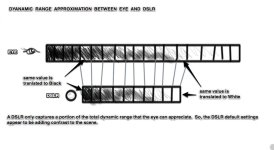
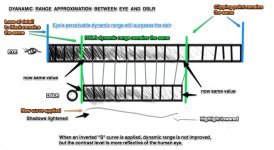
The above graphs depict what (Any flat or semi-flat picture style) Superflat, Cniestyle, Marvel Cine, Crooked Path and Neutral 0,-4,-4,0 are doing with the image. The main reason professionals use the inverted "S" curve, is because of the H.264 codec.
-----------------------------
The inverted "S" curve can be made in the PSE (similar to Marvel and Cinestyle and Superflat), or entirely in camera with the 'contrast' settings (like P Bloom/Shane Hurlburt does)
Flat Curve - PROS
(Curves intro: http://www.westcoastimaging.com/wci/page/info/photoshoptip/PhotoshopBasicsCurves.html ) The "S" curve adds contrast, the "inverted-S" makes the image 'flat'
The Flat Curve
( I am calling it the flat curve based on the end result. It is actually an inverted "S" curve that reduces overall contrast, hence creating a flat image look.)
An inverted "S" curve is intending to bring all of the range and levels of the RAW data into the sweet spot of the H.264 image quality, with the intention of restoring contrast selectively in post.
On the one end, the shadows are made brighter, so that they are now lower mids.
On the other end, the highlights are brought down into upper mids.
The above graphs depict what (Any flat or semi-flat picture style) Superflat, Cniestyle, Marvel Cine, Crooked Path and Neutral 0,-4,-4,0 are doing with the image. The main reason professionals use the inverted "S" curve, is because of the H.264 codec.
-----------------------------
The inverted "S" curve can be made in the PSE (similar to Marvel and Cinestyle and Superflat), or entirely in camera with the 'contrast' settings (like P Bloom/Shane Hurlburt does)
Last edited:
G
Guest
Guest
Flat Curve - PROS - Shadows
Flat Curve - PROS - Shadows
When lifting the shadows, it is not changing exposure.
Lifting the shadows is changing the pixel value after the sensor has scanned the image by means of digital gain.
The plus is, that the shadows are lifted BEFORE H.264 compression is applied, meaning that the shadows are going to get the much needed detail, as they are now in the H.264 friend zone: lower Mids.
This ends up looking washed out and Grey in the shadows, but can be adjusted in a computer application later, but with more control.


(200% magnification crops show differences in subtle shadow detail between Standard Default and Neutral -4 contrast. ISO1600)
The comparison above is showing subtle detail in the shadows.
Video Comparison of Cinestyle, Neutral, and Standard:
http://www.youtube.com/watch?v=ikD1_DPIgQQ&feature=related
Flat Curve - PROS - Shadows
When lifting the shadows, it is not changing exposure.
Lifting the shadows is changing the pixel value after the sensor has scanned the image by means of digital gain.
The plus is, that the shadows are lifted BEFORE H.264 compression is applied, meaning that the shadows are going to get the much needed detail, as they are now in the H.264 friend zone: lower Mids.
This ends up looking washed out and Grey in the shadows, but can be adjusted in a computer application later, but with more control.
(200% magnification crops show differences in subtle shadow detail between Standard Default and Neutral -4 contrast. ISO1600)
The comparison above is showing subtle detail in the shadows.
Video Comparison of Cinestyle, Neutral, and Standard:
http://www.youtube.com/watch?v=ikD1_DPIgQQ&feature=related
Last edited:
G
Guest
Guest
Flat Curve - PROS - Highlights
Flat Curve - PROS - Highlights
The way the default Canon curve is translated into H.264 is one of the most seamless transitions. However, the transition starts too early and a bit of visual detail is lost.
In order to recover this detail from the sensor data, an inverted curve or reduction of contrast will bring the highlight image data into the a lower range.
No curve or reduction of contrast will bring detail from a blow out. Exposure is exposure. You can darken image information that is there, but you cannot darken what is not there. For this reason, when watching uncorrected flat picture style footage, you will see a sharp transition from highlight, to all of a sudden a clean cut drop off into white. It almost looks like someone used an irregular shaped cookie cutter and cut wholes in the image.
While this looks disgusting, it is intended to bring the image information into the H.264 codec's more information rich sweet spot, and then readjusted in post with more nuanced control and purpose.

Flat Curve - PROS - Highlights
The way the default Canon curve is translated into H.264 is one of the most seamless transitions. However, the transition starts too early and a bit of visual detail is lost.
In order to recover this detail from the sensor data, an inverted curve or reduction of contrast will bring the highlight image data into the a lower range.
No curve or reduction of contrast will bring detail from a blow out. Exposure is exposure. You can darken image information that is there, but you cannot darken what is not there. For this reason, when watching uncorrected flat picture style footage, you will see a sharp transition from highlight, to all of a sudden a clean cut drop off into white. It almost looks like someone used an irregular shaped cookie cutter and cut wholes in the image.
While this looks disgusting, it is intended to bring the image information into the H.264 codec's more information rich sweet spot, and then readjusted in post with more nuanced control and purpose.
Last edited:
G
Guest
Guest
Flat Curve - CONS
Flat Curve - CONS
CONS of using FLAT PROFILES
Squeazing everything into the middle, does create some issues. The true mids lose a lot of gradation and become steppy. The trade off is totally worth it in some situations.
Other Cons may include:
-critical focus becomes more difficult in the field.
-gain noise shows up earlier than the default or subtractive curve.
-------------------------------------------------------------------------------------------------------------------------
If you want to read more in-depth about the CONS of flat and subtractive styles, got to Steve Oakley's blog, where he details what is happening when an image is flattened for H.264:
http://steveoakley.net/template_permalink.asp?id=172
(Be sure to read all 4 parts)
-------------------------------------------------------------------------------------------------------------------------
Flat Curve - CONS
CONS of using FLAT PROFILES
Squeazing everything into the middle, does create some issues. The true mids lose a lot of gradation and become steppy. The trade off is totally worth it in some situations.
Other Cons may include:
-critical focus becomes more difficult in the field.
-gain noise shows up earlier than the default or subtractive curve.
-------------------------------------------------------------------------------------------------------------------------
If you want to read more in-depth about the CONS of flat and subtractive styles, got to Steve Oakley's blog, where he details what is happening when an image is flattened for H.264:
http://steveoakley.net/template_permalink.asp?id=172
(Be sure to read all 4 parts)
-------------------------------------------------------------------------------------------------------------------------
Last edited:
G
Guest
Guest
Subtractive Curve
Subtractive Curve
Subtractive Curve
The subtractive curve is intended to reduce noise, add contrast or reign in some highlight detail. All noble causes.
There are different subtractive curves. Even an inverted "S" subtractive curve.
The subtractive curve is generally supposed to prevent the fast run from highlight to clipping that these cameras do. ...in theory. Theory is nice.
A subtractive curve can cause the cinematographer to overexpose by as much as a stop in many cases, but as we know, that will make the camera come closer to clipping and blowing out. No sense in losing a stop of dynamic range to preserve highlight detail - that is counter productive.
So, it is better to expose correctly, and not use a subtractive curve.
Subtractive Curve
Subtractive Curve
The subtractive curve is intended to reduce noise, add contrast or reign in some highlight detail. All noble causes.
There are different subtractive curves. Even an inverted "S" subtractive curve.
The subtractive curve is generally supposed to prevent the fast run from highlight to clipping that these cameras do. ...in theory. Theory is nice.
A subtractive curve can cause the cinematographer to overexpose by as much as a stop in many cases, but as we know, that will make the camera come closer to clipping and blowing out. No sense in losing a stop of dynamic range to preserve highlight detail - that is counter productive.
So, it is better to expose correctly, and not use a subtractive curve.
Last edited:
So the current generation of DSLRs will never have the range that we all desire and no picture style can change that. Is there a technical 'best middle ground'? There must be some sort of equation that will achieve that? Thanks for everything so far, you are clearing things up that I have struggled with for a while!
Amazing thread
Amazing thread
G
Guest
Guest
So the current generation of DSLRs will never have the range that we all desire and no picture style can change that. Is there a technical 'best middle ground'? There must be some sort of equation that will achieve that? Thanks for everything so far, you are clearing things up that I have struggled with for a while!
Amazing thread
Yes, there is. The best middle ground is Neutral picture style. But I hate using it, because it is neither here nor there. Just blah and unnatural. Though Salomon on Vimeo (http://vimeo.com/ligthelm), and p bloom use Neutral based styles nicely. The Neutral style has long been the gold-standard for Canon dslr video, that is well known. There are reasons. Mainly because it is the least offensive(aka dull) and most versatile. - My earliest favorite was Standard sharp1,contrast-1,saturation-2,tone+1. It is still arguably the best all round profile setting, imho.
The power of picture styles is their ability to custom fit specific needs. The very idea of fine tweaking alludes that their is no one size fits all.
I have several custom styles that I use personally. One of them looks just flat out amazing on a 60D in daylight, but when I film under those warm tinted fluorescent light bulbs made to mimic incandescent, I just can't get it to settle well in the skin tones. Of course, this green/orange mix light is very difficult to deal with regardless, so it is not as if that is a big fail. My personal aesthetic, and I will imply it throughout this thread as I continue, is to lift the shadows a touch, and find a nice way to handle the highlights. It is the best technical middle ground for dynamic range and smooth tonal gradation. I only say that because you asked me a very straight question, and I am trying my best to be direct in my answer. However, I do not believe in just one answer in this context. Otherwise, I would not be writing this whole long thread. =)
My hope is that through this entire thread, you'll be well on your way to knowing what you need, in regards to picture profiles, to meet your image challenges.
Thanks
G
Guest
Guest
BREAK:
Awareness for Aplastic Anemia
What is Aplastic Anemia:
short video
http://www.youtube.com/watch?v=w8-jx1dtg0U
or
short written explanation
http://www.mayoclinic.com/health/aplastic-anemia/DS00322
Last year my brother was diagnosed with Aplastic Anemia. We didn't know what it was, and neither do most people. I want to help create awareness for early detection and let people know how important donating blood is in saving lives!!!
I will be working with Cedar Sinai Non-Profit Hospital to find the best use of all donated funds.
http://www.cedars-sinai.edu/
So, hurry up and donate here:
https://www.paypal.com/us/cgi-bin/w...63663d3faee8dd049a0174d7b2337c94a2120c957a268
Thank you!
Awareness for Aplastic Anemia
What is Aplastic Anemia:
short video
http://www.youtube.com/watch?v=w8-jx1dtg0U
or
short written explanation
http://www.mayoclinic.com/health/aplastic-anemia/DS00322
Last year my brother was diagnosed with Aplastic Anemia. We didn't know what it was, and neither do most people. I want to help create awareness for early detection and let people know how important donating blood is in saving lives!!!
I will be working with Cedar Sinai Non-Profit Hospital to find the best use of all donated funds.
http://www.cedars-sinai.edu/
So, hurry up and donate here:
https://www.paypal.com/us/cgi-bin/w...63663d3faee8dd049a0174d7b2337c94a2120c957a268
Thank you!
Last edited:
G
Guest
Guest
PSE and in-Camera settings
PSE and in-Camera settings
What are the in-camera settings doing to a picture style?
If you are familiar with photoshop, you can think of it as layers. The bottom layer is the RAW image, the next layer is the picture style, and the top layer is the in-camera settings.
CURVES
When you adjust the contrast in camera, you are not changing the characteristics of the picture style curve, you are just reducing or adding contrast on top of the picture style output. Much in the same way having 2 CURVES adjustments layers in photoshop does.
COLOR
Similarly, if you desaturate all of the colors with the color wheel and picker in the PSE, and then try to add saturation via camera settings, you will get odd and spotty saturation, because the camera settings are not dealing directly with the RAW data, but data AFTER the picture style is applied.
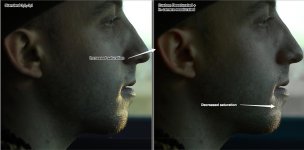
(Shows effects of in-camera settings effecting the image after the picture style is applied.)
In Camera Contrast:
In the examples below, the dark spots in the image are absolute black. The curve has been pushed to the max, and only the darkest levels remain. Then in-camera contrast is applied.
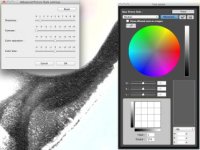
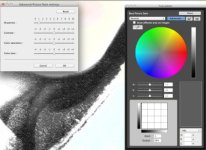
As you can see, the black levels never change. In-camera contrast ends up heavily effecting the mid tones with a generic inverted S-curve, no doubt.
PSE and in-Camera settings
What are the in-camera settings doing to a picture style?
If you are familiar with photoshop, you can think of it as layers. The bottom layer is the RAW image, the next layer is the picture style, and the top layer is the in-camera settings.
CURVES
When you adjust the contrast in camera, you are not changing the characteristics of the picture style curve, you are just reducing or adding contrast on top of the picture style output. Much in the same way having 2 CURVES adjustments layers in photoshop does.
COLOR
Similarly, if you desaturate all of the colors with the color wheel and picker in the PSE, and then try to add saturation via camera settings, you will get odd and spotty saturation, because the camera settings are not dealing directly with the RAW data, but data AFTER the picture style is applied.
(Shows effects of in-camera settings effecting the image after the picture style is applied.)
In Camera Contrast:
In the examples below, the dark spots in the image are absolute black. The curve has been pushed to the max, and only the darkest levels remain. Then in-camera contrast is applied.
As you can see, the black levels never change. In-camera contrast ends up heavily effecting the mid tones with a generic inverted S-curve, no doubt.
Last edited:
G
Guest
Guest
There is no way of removing the picture style 'layer' I assume?
Not in video. No.