
Navigation
Install the app
How to install the app on iOS
Follow along with the video below to see how to install our site as a web app on your home screen.
Note: This feature may not be available in some browsers.
More options
You are using an out of date browser. It may not display this or other websites correctly.
You should upgrade or use an alternative browser.
You should upgrade or use an alternative browser.
550D - what lense for green screen?
- Thread starter kjm
- Start date
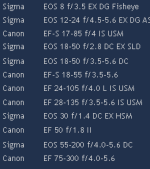
I recommend the lens that gives you the right field of view for the shot you are looking for. From your description I have no idea if you are looking for head shots, torso shots, full length head to toe, full band or any of the other million variations you could have on a music video. With that in mind it's clearly impossible to advise which 'lens' you should be using, or why.
TooTallTim
Well-known member
There have been some utterly ridiculous questions on this forum of late, this one is yet another.

manglerBMX
Veteran
not the best camera for green screen keying. just hope your lighting is really good. the shallow depth of field can make it difficult for keying around edges. so make sure you shoot at like f/8 or higher. a video camera would be a lot better tool for this.
What I don't understand is why you have three 18-55 lenses... sell two (or all three) and put the money in cash reserves. You still a 17-85 that covers this range, not to mention the 28-105 and 28-135 in the longer range.
Do you really need both 28-105L and the 28-135? Sell the 28-135Is (it's no where near as good as the 28-105L) and put the money in cash reserves.
Sell the 55-200 and 75-300 (which is junk) and add this to you cash reserves.
Now, with 6 lenses sold and money in you cash reserves, buy a Canon 70-200L instead You will have less to carry around and a higher quality lens for longer shots.
Just a thought
Do you really need both 28-105L and the 28-135? Sell the 28-135Is (it's no where near as good as the 28-105L) and put the money in cash reserves.
Sell the 55-200 and 75-300 (which is junk) and add this to you cash reserves.
Now, with 6 lenses sold and money in you cash reserves, buy a Canon 70-200L instead
You will have less to carry around and a higher quality lens for longer shots.Just a thought
yeah Ive shot a lot of stuff on green screen with my T2i and a 28mm f/2 and a 50mm f/1.8. Both of these lenses need to be stopped down to AT LEAST f/8 in order to get a key that is usable. Remember blurring out the background is a waste of time because your going to remove it anyways. A sharper more defined edge on your subject matter will make keying a lot easier in post.
Exact... my guess is the OP doesn't personally own all these lens and the overlaps they represent... but that he has access to them for the shoot in question. Selling somebody else's lens and putting the cash in your own reserves doesn't make for the best of mates.
OK - reasonable assumption I guess. I have known people with this kind of collection in the past though.....
Daniel Moore
Member
You have to think about how far away your subject will be from the green screen, how big your green screen is, and how far your camera is from the subject. These will all play a role in which lens to get.

Matt Gottshalk
Resident Preditor
Lenses matter not in this sense.
You are going to hate life keying 4:2:0 footage.
You are going to hate life keying 4:2:0 footage.
Can I pitch in and repeat something above. I have to say this because I had to key some footage in the past that was shot poorly.
Do not..... repeat..... do not use a shallow depth of field! Stop down your f-stop. As you might know light it well and make sure the green screen has enough saturation but at the same time not causing spill.
Do not..... repeat..... do not use a shallow depth of field! Stop down your f-stop. As you might know light it well and make sure the green screen has enough saturation but at the same time not causing spill.

PerroneFord
Deals in Lead
Can I pitch in and repeat something above. I have to say this because I had to key some footage in the past that was shot poorly.
Do not..... repeat..... do not use a shallow depth of field! Stop down your f-stop. As you might know light it well and make sure the green screen has enough saturation but at the same time not causing spill.
I'm curious about this. What have you found the difference is when shooting greenscreen with shallow DOF and not. Does it key differently when out of focus?

AD Tom
Active member
I'm curious about this. What have you found the difference is when shooting greenscreen with shallow DOF and not. Does it key differently when out of focus?
Yes. It's much easier to key a blury backround. I' m really not a fan of the 550's codec. But just used it as a backup camera together with my RED One for greenscreen shots. I was pretty astonished about the good results.
Cheers
Thomas.

Jordan Scott Price
Veteran
Yes. It's much easier to key a blury backround. I' m really not a fan of the 550's codec. But just used it as a backup camera together with my RED One for greenscreen shots. I was pretty astonished about the good results.
Cheers
Thomas.
Hmm, really?
I have next to no knowledge about keying and green screens, especially with DSLRs. But a previous post in this thread recommended stopping down to f8 or slower to produce less blur and make keying easier.
Any input?
Wow you don't want to key a blurry green screen shoot or background. Quite the opposite. You'll be able to pull a cleaner key when you have good focus along with being stopped down. That was my whole point of saying avoid shooting wide open. This is because it will throw the GS out of focus and along with that edges which is very very bad.
The green will mesh with the edges and create a very bad key... unless I'm missing something. If so let me know.
The green will mesh with the edges and create a very bad key... unless I'm missing something. If so let me know.
PerroneFord
Deals in Lead
This is what I was curious about.
A shallow background on the green screen would seem to smooth out the material, wrinkles and other imperfections, but might not leave a clean edge. Obviously stopping down will create a sharp edge, but you'll be more susceptible to issues from the green screen itself. I am going to set up my green screen next week and see what my results are like from both. I pulled my first keys in Avid today both with Boris Keyer and Spectramatte. Both were excellent. I am going to play some more tonight, but I don't have any greenscreen stuff with a soft background.
A shallow background on the green screen would seem to smooth out the material, wrinkles and other imperfections, but might not leave a clean edge. Obviously stopping down will create a sharp edge, but you'll be more susceptible to issues from the green screen itself. I am going to set up my green screen next week and see what my results are like from both. I pulled my first keys in Avid today both with Boris Keyer and Spectramatte. Both were excellent. I am going to play some more tonight, but I don't have any greenscreen stuff with a soft background.

J Davis
Veteran
This is what I was curious about.
A shallow background on the green screen would seem to smooth out the material, wrinkles and other imperfections, but might not leave a clean edge. Obviously stopping down will create a sharp edge, but you'll be more susceptible to issues from the green screen itself. I am going to set up my green screen next week and see what my results are like from both. I pulled my first keys in Avid today both with Boris Keyer and Spectramatte. Both were excellent. I am going to play some more tonight, but I don't have any greenscreen stuff with a soft background.
a dof that blurs the green is good but a dof that blurs the edge is bad. You want as sharp an edge as possible especially with this shitty 8 bit long gop macro blocking codec.
f8 and fast fast fast as you can shutter and tons and tons of light. If you're over cranking to 60 frames then even more light. Do motion blur in AE after keylight.
35mm (or 24mm if your screen is big enough) is my fave focal length for this

Michael Carter
Veteran
I just keyed dozens of T2i shots. It's a tough bunch of hours. The lens - any modern decent lens is fine. DOF? I shot everything at 2.8-F4. Just have your subject in focus. Enough distance between the subject & screen for a blurred screen? Very helpful.
The main things I found (keep in mind I'm very picky about bad keys):
Don't even try to key the 720-60p footage. (OK, try it once to see what I mean - the aliasing and noise is packed with green pixels.)
If you can design your shots for haze, smoke, a reason for some softness/drama - do it. It'll help hide the failings of keyed DSLR footage.
Sharpness all the way down. Contrast low.
Use daylight, not tungsten. if you only have tungsten, gel or filter and use the daylight setting (thanks Perrone Ford for that advice - I've loved tungsten lights forever, but that setting is way noisier than daylight on the Canon).
Light your screen as evenly as humanly possible. Stretch it tight, even use a steamer to kill wrinkles. Seriously, buy two or even four double-four foot worklight flos, some daylight tubes, and stick 'em on the floor and ceiling to fill in. These were a giant help to me for way under $100. And you need a pretty dang saturated screen - I've used neon green posterboard from the art store - fab. I have a 5x7 popup greenscreen that's a dull gray-green - 90% useless.
If you backlight or rim light, don't blow it out - looks ugly when keyed. Be subtle, you can always crank it after you key.
Light FLAT - as with any Canon scene, plan on beefing darks in post.
Use garbage mattes. Use holdout mattes and key specific areas to fix specific problems.
Try not to use screen gain, it seems to amplify the Canon aliasing on your edges. If you lit your screen evenly, you shouldn't have to touch screen gain.
Get an edge you're happy with - which may be several layers of your footage. Then, do a duped layer with screen gain way up, shrink the matte, soften it, check it in matte view for pure white. Dupe this layer and delete the keyer, and use the choked matte layer you just made as an inside mask on the un-keyed layer (I dunno about every package out there, but Keylight can really jack with your image, adding noise and transparency - use a non-keylight-ed layer as your inside-masked layer - just use Keylight to create the mask.
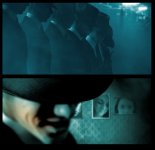
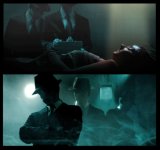
The shots below have from 3 to 6 pieces of keyed footage - often each key was 3 or 4 independent layers, including holdouts and insides.
The main things I found (keep in mind I'm very picky about bad keys):
Don't even try to key the 720-60p footage. (OK, try it once to see what I mean - the aliasing and noise is packed with green pixels.)
If you can design your shots for haze, smoke, a reason for some softness/drama - do it. It'll help hide the failings of keyed DSLR footage.
Sharpness all the way down. Contrast low.
Use daylight, not tungsten. if you only have tungsten, gel or filter and use the daylight setting (thanks Perrone Ford for that advice - I've loved tungsten lights forever, but that setting is way noisier than daylight on the Canon).
Light your screen as evenly as humanly possible. Stretch it tight, even use a steamer to kill wrinkles. Seriously, buy two or even four double-four foot worklight flos, some daylight tubes, and stick 'em on the floor and ceiling to fill in. These were a giant help to me for way under $100. And you need a pretty dang saturated screen - I've used neon green posterboard from the art store - fab. I have a 5x7 popup greenscreen that's a dull gray-green - 90% useless.
If you backlight or rim light, don't blow it out - looks ugly when keyed. Be subtle, you can always crank it after you key.
Light FLAT - as with any Canon scene, plan on beefing darks in post.
Use garbage mattes. Use holdout mattes and key specific areas to fix specific problems.
Try not to use screen gain, it seems to amplify the Canon aliasing on your edges. If you lit your screen evenly, you shouldn't have to touch screen gain.
Get an edge you're happy with - which may be several layers of your footage. Then, do a duped layer with screen gain way up, shrink the matte, soften it, check it in matte view for pure white. Dupe this layer and delete the keyer, and use the choked matte layer you just made as an inside mask on the un-keyed layer (I dunno about every package out there, but Keylight can really jack with your image, adding noise and transparency - use a non-keylight-ed layer as your inside-masked layer - just use Keylight to create the mask.
The shots below have from 3 to 6 pieces of keyed footage - often each key was 3 or 4 independent layers, including holdouts and insides.
Last edited:
Hi Guys,
I had the possibility to realize a music video using greenscreen. I used:
- 7D
- 17-55mm 2.8. I have not stop down
- ISO: 500
- Shutter: 250
For the Close Ups: The Object was 2 Meters from the Greenscreen
For the Long Shots the Arstist was 1.5 Meter from the greenscreen
I was happy with the result. What you think? http://www.youtube.com/watch?v=dwn0weKH6J0
I had the possibility to realize a music video using greenscreen. I used:
- 7D
- 17-55mm 2.8. I have not stop down
- ISO: 500
- Shutter: 250
For the Close Ups: The Object was 2 Meters from the Greenscreen
For the Long Shots the Arstist was 1.5 Meter from the greenscreen
I was happy with the result. What you think? http://www.youtube.com/watch?v=dwn0weKH6J0

Scott F
Pug Life
What you think?
I like your video and Michael Carter's stills. Some good work showing up on the boards lately.
I find the t2i footage an absolute delight to key out using Keylight, but I'm not doing anything as ambitious as the work I'm seeing here.