550D - what lense for green screen?

422inter.jpg

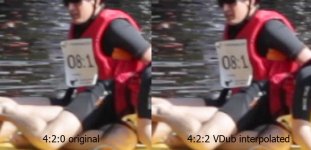
You would want to interpolate chroma to 4:2:2 before keying in order to avoid 2x2 pixel blocky edges. See the red floating vest in picture. The same happens to green screen. 550D uses 4:2:0 codec which means that the dividing edge between your subject and green screen will be 2x2 "stairway". You can ease this effect somewhat by upsampling the footage to 4:2:2 and save it in loseless format.

I use VDUB + Auto YUY2 to interpolate and save into 4:4:4 RGB Lagarith loseless format when I need something keyed.
 
Last edited:
I'll give that a shot next time, though the aliasing edges I'm getting are really prominent; they're not stair-stepped but very smooth, and I really have to erode the key to kill 'em.

I need to do some tests with camera settings - I last keyed using the same "fake film stock" settings that have been floating around, Reala & Kodachrome, etc. I can't open those in the Canon utility to see where the sharpness is at (looks like you can save presets so that they can't be opened), think it's time to make a keying preset and see how much it might help. Seems like anything to lower the aliasing would help.

It really looks to me like Canon pushes the aliasing where the saturated green meets the less saturated subject; I'm curious if a less saturated screen would help in that case - not something you find out there (an unsaturated green screen). May have to hit the fabric store or try some seamless. Keylight's pretty solid with even color, so it may work OK with a duller background.
 
View attachment 25786
I use VDUB + Auto YUY2 to interpolate and save into 4:4:4 RGB Lagarith loseless format when I need something keyed.

If you could you give me a blow by blow as to how you do that in VDUB it would be hugely appreciated.
Also, I'm converting the .mov to .avi with the Cineform codec. Anything that I need to know about that in regards to this process?
 
If you could you give me a blow by blow as to how you do that in VDUB it would be hugely appreciated.
Also, I'm converting the .mov to .avi with the Cineform codec. Anything that I need to know about that in regards to this process?

Download VDub, make sure it works.
Download Quicktime plugin for VDub (this will allow you to open native Canon .MOV files in VDub).
Now download and install Lagarith codec.
Last: download and install Auto YUY2 from here: http://www.infognition.com/cgi/getfilter?id=245

After all is done, you should be able to open your native files in VDub, apply filters and save it in lossless Lagarith codec.

I never convert anything to Cineform or any other lossy intermediate codec. I edit raw H264 or convert it into lossless 4:4:4 if I need to process it in some way that cannot be done in NLE (like DeShaker, 4:2:0 -> 4:2:2 interpolation etc.)
 
I've been playing with the 5D to RGB beta - it really does grab extra detail, and it's saved a couple shots I thought were underexposed.
 
After all is done, you should be able to open your native files in VDub, apply filters and save it in lossless Lagarith codec.
I never convert anything to Cineform or any other lossy intermediate codec. I edit raw H264 or convert it into lossless 4:4:4 if I need to process it in some way that cannot be done in NLE (like DeShaker, 4:2:0 -> 4:2:2 interpolation etc.)

Ok, total noob at VDub:
It wouldn't recognise .mov.
I converted .mov to Cineform .avi.
Opened in VDub, and applied Auto YUY2 version 1.0.0
The next dialogue box I selected Planar 4:2:2 Progressive.
Then saved as Lagarith via video/compression/Lagarith Lossles Codec. I didn't see any option for 4:4:4 so assume that it is conforming it as such?
Is that the process you're using?

Thanks for the help!
 
Ok, total noob at VDub:
It wouldn't recognise .mov.
I converted .mov to Cineform .avi.
Opened in VDub, and applied Auto YUY2 version 1.0.0
The next dialogue box I selected Planar 4:2:2 Progressive.
Then saved as Lagarith via video/compression/Lagarith Lossles Codec. I didn't see any option for 4:4:4 so assume that it is conforming it as such?
Is that the process you're using?

Thanks for the help!

Hi!

In order to open Canon H.264 .MOV-files in VirtualDub, use this plugin:
http://www.tateu.net/software/dl.php?f=qtvd_bin

It's a ZIP-file containing the plugin itself and settings file. Plugin has .vdplugin extension and should be placed into "plugin" folder of VDub. The settings file is called "Quicktime.ini" and should be placed into VDub folder itself.
"Quicktime.ini" should be edited to contains this:
---------------------
[Settings]
color=-1
Mode=2
audio=1
quality=100
vtrack=1
atrack=1
gamma=2.5
fourcc=
---------------------
If everything is OK, you should be able to open raw Canon H264 .MOV-files in VirtualDub without messing around with intermediate/lossy codecs. This will allow you to apply plethora of available VDub filters. Also, it will allow you to write your own batch scripts in order to quickly process raw camera files with any filters and output options you want.


Regarding 4:2:2 interpolation:
You should run Auto YUY2 with "Planar 4:2:2" option enabled.. That will interpolate chroma to 4:2:2. Don't forget to save it in at least 4:2:2 format or you will get "jaggy" chroma again.

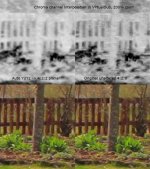
In order to check for proper interpolation, take a screendump, split the image into brightness + RB + YB components and and check the chroma part(s) in magnification. If chroma component is 2x2 "blocky" you still have 4:2:0. Here is an example of raw and interpolated picture. Frankly, you cannot see the difference unless you do the chroma-keying:


chroma.jpg Chroma part (here displayed in black and white) has been enhanced by adjusting levels in order to display the interpolation. In real life, intensity amplitude of chroma channels will be much lower...


VDub is the bees legs. It's free and it's more powerful than most of stuff that people pay money for. Only problem is that it has steep learning curve. But once you learn everything you can do with it, you won't touch anything else except the NLE itself.

For example, I scripted the whole sheebang so only thing I have to do to deshake and convert my file into 4:2:2 lossless is to drop it on a icon and VDub and filters do the rest. In goes the H264 .MOV file and out comes lossless .AVI 4:4:4 Lagarith file. And I can chain any filters I want into the process.


Just to make things clear:

No amount of interpolation will allow you to magically recover image data which was never there to begin with. H264 uses so called 4:2:0 sampling which means that brightness is "recorded" pixel-by-pixel but chroma info is recorded in 2x2 pixel blocks...in order to save the bitrate. This is OK as eyes are more forgiving on blocky colours.

When you put a green screen behind your subject, the line between "green" and your subject will be "painted" in 2x2 pixel blocks. This gives typically jaggy green screen. (That's why you want 4:4:4 or 4:2:2 gear when doing the keying.) What trick above does is linear interpolation of chroma data into 1x1 matrix. It will (in theory) give little less "jaggy" line between green screen and your subject when shooting is done in inferior 4:2:0 format.

Other than that, 4:2:0 and 4:2:2 are kinda hard to discern, unless you start pixel-peeping into bright-red pixel-wide details.


Good luck!
 
Last edited:
Back
Top