100Mbps Max Latitude Native 24/25p Patch

How important is it to restore factory defaults before switching between hacks? It would mean I lose all my custome preferences, which makes it harder to switch between the Reliability patch and the 100MBS patch...unless we only need to worry about restoring factory defaults before the FIRST time we hack the camera, and not for switching between patches? Thanks!

(Oh and thanks for explaining the benefit of GOP upgrade in the new V2 hack, Lpowell.)
 
How important is it to restore factory defaults before switching between hacks? It would mean I lose all my custome preferences, which makes it harder to switch between the Reliability patch and the 100MBS patch...unless we only need to worry about restoring factory defaults before the FIRST time we hack the camera, and not for switching between patches?

You don't have to go back to the original firmware before doing a hack. You can have a patch on the camera and then install a new patch over/in place of it. You just have to make sure that it's not the same name as any other patch.
 
No he's talking about camera settings not patches. The custom menu stores all these preferences and they take a while to set-up. I don't believe you need to reset them when patching, i never do and have had no complications. However, it is probably wise to do it, just as it is to format the SD card before using.
 
No he's talking about camera settings not patches. The custom menu stores all these preferences and they take a while to set-up. I don't believe you need to reset them when patching, i never do and have had no complications. However, it is probably wise to do it, just as it is to format the SD card before using.

ok, I see that now.

btw, I tried the Max Latitude patch and, just for clarification, it will be a variable bit rate depending on the detail?

I knew that about AVCHD being variable, but I was under the impression that the Max Latitude patch pushed the bit rate up, despite the lack of detail.
My tests stayed near 16mbps on a simple indoor scene.

Anyone know of a download that will show the bit rate as it unfolds? I'm using MediaInfo.
 
Last edited:
ok, I see that now.

btw, I tried the Max Latitude patch and, just for clarification, it will be a variable bit rate depending on the detail?

I knew that about AVCHD being variable, but I was under the impression that the Max Latitude patch pushed the bit rate up, despite the lack of detail.
My tests stayed near 16mbps on a simple indoor scene.

Anyone know of a download that will show the bit rate as it unfolds? I'm using MediaInfo.

StreamParser or Splash player. No the patch still requires proper exposure to keep the average variable bit rate high, it doesn't lock it but it does maintain higher rates than the other patches. Read what LPowell wrote about it in the V2 thread post, he explains it in full detail better than i can.
 
Thanks a lot for the patch, just one question, when I get the card write error can I salvage the footage shot before the error? In the sd card I see the corresponding file but it's empty, and the dimension of the file is 0 bytes. If I could save the footage shot that would be great (I tried to search this question, but didn't find anything).
 
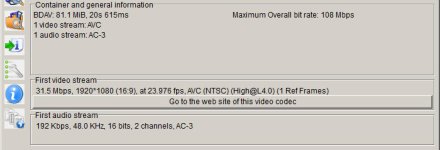
I shot some footage of flowers, leaves, a bee and the highest bitrate with this I got was 31.5 (see screenshot). Should it be much higher?bitrates.jpg
 
I shot some footage of flowers, leaves, a bee and the highest bitrate with this I got was 31.5 (see screenshot). Should it be much higher?View attachment 34857

That's a higher bitrate than the GH2 is capable of. Does it look good? It's plenty high enough. If you had deep, deep focus, it would be higher. Out of focus background is less demanding, and you tend to get that shooting bees and flowers :)
 
StreamParser or Splash player. No the patch still requires proper exposure to keep the average variable bit rate high, it doesn't lock it but it does maintain higher rates than the other patches. Read what LPowell wrote about it in the V2 thread post, he explains it in full detail better than i can.

Thanks a lot for that info.

I installed StreamParser and, in the time mode, shows the spikes higher; for example 28 and 37mbps. It wouldn't playback the mts files - do you typically convert to something else to get playback in the Stream Player within StreamParser?

I also got the free Splash Lite player with GPU acceleration - plays very smoothly/quality looks great.
 
That's a higher bitrate than the GH2 is capable of. Does it look good? It's plenty high enough. If you had deep, deep focus, it would be higher. Out of focus background is less demanding, and you tend to get that shooting bees and flowers :)

The GH2 also uses P-frames, so a comparison between the two codecs based solely on bitrate is inaccurate. If both cameras shot 24 Mbps and one had P-frames and the other didn't, one could still deliver a significantly better image.
 
The GH2 also uses P-frames, so a comparison between the two codecs based solely on bitrate is inaccurate. If both cameras shot 24 Mbps and one had P-frames and the other didn't, one could still deliver a significantly better image.

I think you're meaning to say B frames, both Gh1 and Gh2 have P frames.
 
I wasn't actually inferring that the image quality is higher than the GH2 simply because of a higher peak bit rate, as I know better, although I can see it may have read that way. I know of course that the GH2 is more efficient implementation of AVCHD, but in layman's terms, I thought it helpful to point out to the poster that we don't realistically need to achieve figures approaching 100Mbps to get stellar performance - it is normal and good to get 35Mbps out of the GH1 - that's twice it's original bit rate! Also, it looks really very amazing with this new patch.
 
I thought it helpful to point out that we don't realistically need to achieve figures approaching 100Mbps to get stellar performance - it is normal and good to get 35Mbps out of the GH1 - that's twice it's original bit rate!

Heartily agreed! Sorry for misinterpreting your earlier post :)
 
I'm getting really good quality, a lot of fine detail in the image with the 100Mbps Max Latitude Native 24/25p Patch indoors even though, so far, I'm only hovering near 24mbps.
With or without extra lighting/getting good low light performance without much or no noise with just room lighting.
I'm still trying to figure if there would be any advantage of the Blackout-Powell Native 24p Patch over the Max Latitude; Max Latitude presently being my contender as a primary hack.
 
I'm still trying to figure if there would be any advantage of the Blackout-Powell Native 24p Patch over the Max Latitude; Max Latitude presently being my contender as a primary hack.
Both the Blackout-Powell Native 24p Patch and the Max Latitude Native 24/25p Patch have drawbacks as well as advantages. Here's a summary of how they differ:

Blackout-Powell: Peak AVCHD bitrate is limited to 55Mbps. This requires Class 6 or higher SD cards.
Max Latitude: Peak AVCHD bitrate is limited to 100Mbps. This requires Class 10 or higher SD cards.

Blackout-Powell: FHD AVCHD mode is optimized for NTSC Native 24p recording at 1920x1080.
Max Latitude: FHD AVCHD mode is optimized for PAL Native 25p recording at 1920x1080.

Blackout-Powell: SH AVCHD mode records progressive NTSC 60p and PAL 50p video at 1280x720.
Max Latitude: SH AVCHD mode records progressive NTSC 30p and PAL 25p video at 1280x720.
 
Thanks.

I have seen this before in your descriptions.
What does the Max Latitude patch being "optimized" for PAL (over NTSC) translate to?

I mean is a matter of stability or just achieving a higher bit rate in PAL..or both/neither?
 
Last edited:
I'd use Max Latitude by default. Blackout-Powell for 720p60. Overcrank from 60p to 24p. Sloooow motion.

Darn... I was gonna get $299 PD deal on GH1 body so that I can have two GH1 units to install both patches, but PD cancelled and discontinued GH1. I hate PD.
 
Last edited:
What does the Max Latitude patch being "optimized" for PAL (over NTSC) translate to?

I mean is a matter of stability or just achieving a higher bit rate in PAL..or both/neither?
The Blackout-Powell Patch was optimized explicitly for Native 24p with the expectation that it would support Native 25p as well. Longer term testing showed that the Blackout-Powell PAL 25p mode was not as robust as its NTSC 24p mode. The Max Latitude Patch evolved out of my subsequent efforts to produce a patch specifically optimized for Native 25p. As it turned out, the Max Latitude NTSC 24p mode is not as robust as its PAL 25p mode. However, the relative difference in reliability between NTSC and PAL modes in these patches is only noticeable when shooting bright and extremely detailed scenery.
 
Back
Top