Zoom H4n - just ordered

You can even have it stamp the file names as time and date. This thing is way impressive for a mere $349.00

Dan

Dan,

Question for you, If I set the enternal cam clock to the same time as the Zoom would I be able to associate the correct audio files with the video files give or take 2-3 min? I'm talking about just getting them close and later sync in post?

Thanks,
Chip
 
How do you get it to roll the time, Dan? And how do you get it to stamp it?

To check the date and time of a file...
File > file name > Information > Date (Doh, wait a minute, this isn't time of day recorded, this is clip duration, my bad, it says 00:09:06 but this is duration, not time of day) At first, I thought this was time of day.

To setup H4N to stamp clips with date...
Rec Settings > File Name > Date

Oh well, at least you can get the date stamp.

Dan
 
Yeah I have no issue with that. Clip Duration helps anyway. No big deal.

Slating is perfect regardless.
 
I used the Zoom H4N yesterday under pretty lousy conditions with a cheap mic. I own quality mics but needed to record in stereo for a bunch of musicians at a music festival. $99.00 Sony MCS-907, which I have leftover from the MiniDisc days, not a great mic, definitely low end consumer. I need to buy a decent stereo mic at some point but I only record music once in a while. The end result was surprisingly good. The other thing I really dug was that the Zoom is very responsive once put into record pause mode. Hit record pause and as soon as you can unpause it, it is recording instantly. Perfect for video shooting where you are starting and stopping the recording constantly so you have the same number of clips as your video clips, makes it easier for syncing.

Unfortunately I didn't have a mount for the Zoom itself so it stayed in my camera bag with just the cheap Sony mic taped to my tripod or resting on my tripod case when we were sitting down. This Zoom continues to impress me, it make a really nice recording. Undoubtedly the built in stereo mics would have sounded better, just didn't have a way to mount it as I was run and gunning.

I feel like a kid with a new toy, I am going to be using the Zoom to record all kinds of stuff mainly because it is effortless and sounds so good for so little money.

Dan
 
Ditto. Got my REDHead today. W00t. Cheap, Fuzzy, effective.

Now it's just a matter of getting the hang of this thing and teaching someone else how to use it.

Oh, and thankss for the mono mix down tip for only one boom, Dan!
 
Hey, guys,

1.I know this question comes and goes all the time, but what are you using to rig the h4n to the camera?

2. And I don't know if someone brought this up, but wouldn't it be interesting to have a split shutter release cable (like I just got one for the D90) that had one end going to the camera and the other to the Zoom so to start and stop recording on both at the same time? (in case it's not a crew situation) I bet some of these people that make timer cords could analyze the zoom remote control to come up with something like this...

3. Tim Joy, could you share what method you used to "conform the footage" ?

Best all.
 
The H4N is probably kind of large to rig to a camera unless it is a big broadcast camera. I carried it in a Think Tank Speed Demon bag along with the extra lenses, batteries and CF cards for the 5D MKII.

The remote idea would be cool but not sure it is possible.

Dan
 
I just ordered a hot shoe mount and just got the optional remote control Zoom makes. Should be able to test on an HV30 this weekend
 
I know this question comes and goes all the time, but what are you using to rig the h4n to the camera?

I've been wondering the same thing. I just got my H4n & was reading through the manual last night. But I got to wondering ... how am I going to mount this to my tripod? Velcro?

I was just looking at the Genus Standard Adaptor Bars System. Perhaps I could buy longer support bars/rods and have them extend further out the back ... and somehow mount the H4n on top of the bars??? What do you guys think?

Here's my cut-n-paste in Photoshop ...

h4n_rods.jpg
 
Hey, guys,

3. Tim Joy, could you share what method you used to "conform the footage" ?

I used Mpeg streamclip when converting to Apple intermediate codec and changed the frame rate from 24 to 23.976

You can also use compressor, or any other export which allows you to change the frame rate.
 
Zoom H4N on 5d

Zoom H4N on 5d

Hey guys,

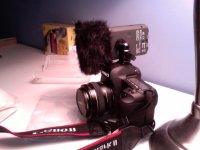
I put my H4N in a hot shoe that rotates on a circular joint so that I can rotate it onto the left side of the camera. It has worked wonders both in terms of audio and in terms of balancing the camera. This way I hand hold it with the right hand grip and focus with my left hand. The H4N is the perfect weight for a counter balance.

Not the prettiest method, but I'm damn happy with its performance.

Pardon the image quality - macbook pro webcam
 

Attachments

  • Photo 5.jpg
    Photo 5.jpg
    76.9 KB · Views: 0
Hey guys,

I put my H4N in a hot shoe that rotates on a circular joint so that I can rotate it onto the left side of the camera. It has worked wonders both in terms of audio and in terms of balancing the camera. This way I hand hold it with the right hand grip and focus with my left hand. The H4N is the perfect weight for a counter balance.

Not the prettiest method, but I'm damn happy with its performance.

Pardon the image quality - macbook pro webcam


Awesome. That's what I plan to do for run n'gun / interview work. whenever that comes up, anyway.

Otherwise a belt clip for the boom guy, run with it.

I love this thing!
 
An old still photographer's trick for steady handholding....

Hold your left hand in front of you, palm up.

Place the lens barrel of the camera in your left hand, so your fingers wrap naturally around the focus ring, f/stop ring, etc.

Tuck your left elbow in against your stomach.

Grip the right side of the camera with your right hand, but keep the bulk of the camera's weight in your left hand.

Tuck your right elbow against your chest or stomach.

You'd be surprised how much steadier this makes your handholding. At least, I was.
 
External recording is all new to me. Why this particular model for this purpose, over any other models by M-Audio, Tascam, Fostex, Marantz, or Edirol?

Also, sorry for being ignorant, but what's the point of stereo recording, when you can just pan the audio in post?
 
Last edited:
Back
Top